> ## Documentation Index
> Fetch the complete documentation index at: https://launchdarkly.com/docs/llms.txt
> Use this file to discover all available pages before exploring further.

# Using actions

export const FlagGate = ({flag, match = true, fallbackValue = false, fallback = null, tocAnchors = [], children}) => {
  const [value, setValue] = useState(fallbackValue);
  useEffect(() => {
    let cancelled = false;
    const evaluate = () => {
      window.ldClient.waitUntilReady().then(() => {
        if (!cancelled) setValue(window.ldClient.variation(flag, fallbackValue));
      });
    };
    if (window.ldClient) {
      evaluate();
    } else {
      const onReady = () => evaluate();
      window.addEventListener('ld-ready', onReady);
      return () => {
        cancelled = true;
        window.removeEventListener('ld-ready', onReady);
      };
    }
    return () => {
      cancelled = true;
    };
  }, [flag, fallbackValue]);
  const shown = value === match;
  useEffect(() => {
    if (!tocAnchors.length) return;
    const entries = tocAnchors.map(anchor => document.querySelector(`#table-of-contents-content a[href$="#${anchor}"]`)).filter(Boolean).map(link => link.closest('li') || link);
    entries.forEach(entry => {
      entry.hidden = !shown;
    });
    return () => {
      entries.forEach(entry => {
        entry.hidden = false;
      });
    };
  }, [shown, tocAnchors.join(',')]);
  return shown ? children : fallback;
};

<View title="Developer" />

<View title="Federal docs" />

<View title="EU docs" />

This topic is a complete reference of all actions that are available to use in role policies. It includes tables with all supported actions and details about them. Each action is scoped to a resource type.

Actions represent changes you can make to resources, such as `createFlag`, `deleteFlag`, `updateName`, and more.

To learn more about how actions work within role policies, read [Member role concepts](/docs/home/account/roles/role-concepts#actions). To read a list of recently added or updated actions, read [Updates to actions and resources](/docs/home/account/roles/role-updates).

## Actions reference

These are all the actions you can take, sorted by resource type.

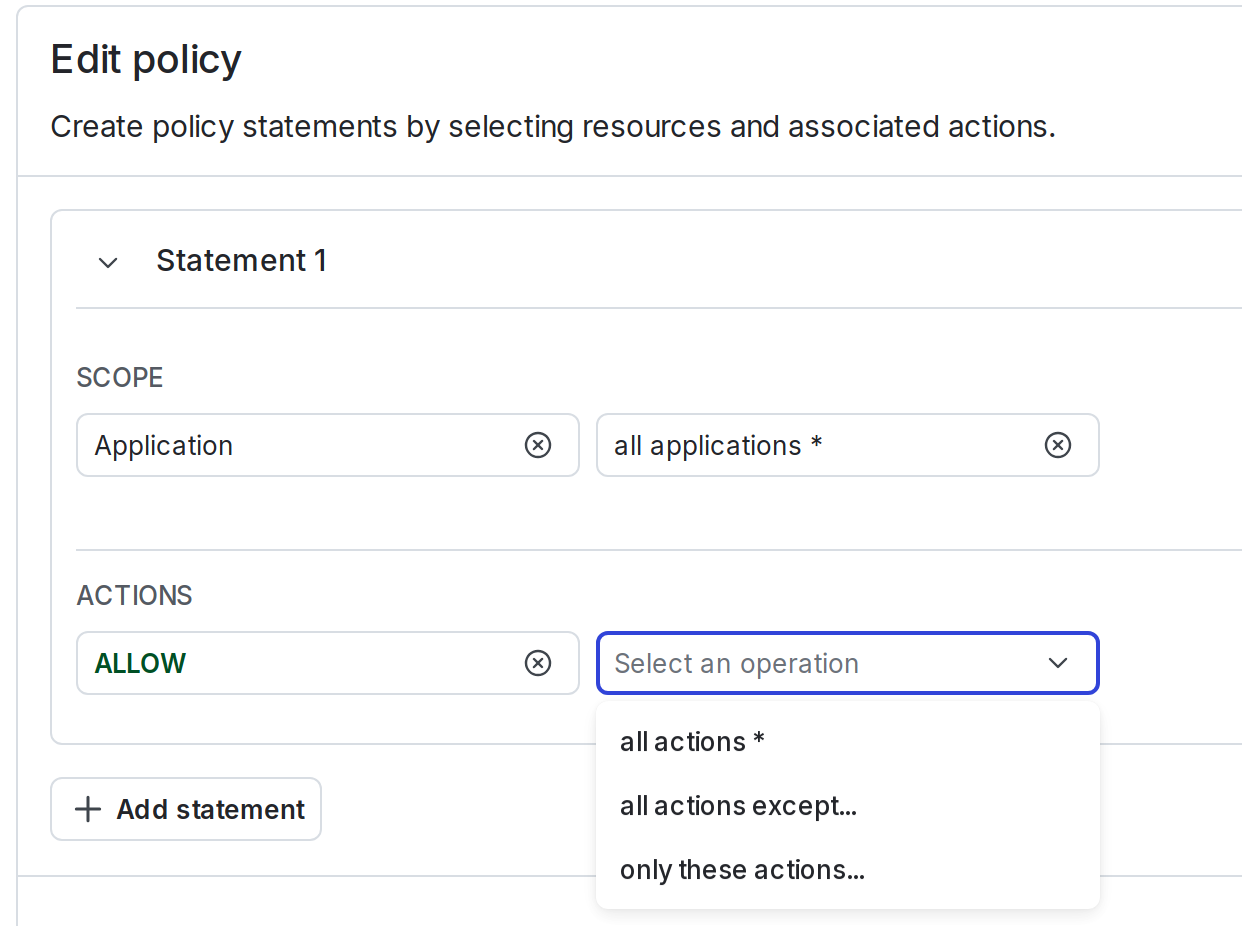
When you create a policy using the [policy builder](/docs/home/account/roles/role-create#create-policies-for-roles), actions relevant to the [resource scope](/docs/home/account/roles/role-resources) you've selected automatically appear in the policy builder:

<Frame caption="The &#x22;Actions&#x22; and &#x22;Select actions&#x22; menus when defining a policy.">
  <img src="https://mintcdn.com/launchdarkly/-b7nPh0oyigf6iW7/images/auto/custom-roles-policy-builder-actions.auto.png?fit=max&auto=format&n=-b7nPh0oyigf6iW7&q=85&s=aa49e5153017a220e7620e37ebcc6b6a" alt="The &#x22;Actions&#x22; and &#x22;Select actions&#x22; menus when defining a policy." width="1242" height="926" data-path="images/auto/custom-roles-policy-builder-actions.auto.png" />
</Frame>

When you create a policy using the [advanced editor](/docs/home/account/roles/advanced-editor), you can specify actions individually, or in bulk using glob syntax and wildcards. For example, you can describe all modifications to feature flags with the action specifier `update*`.

## Account actions

<Accordion title="Expand Account actions">
  `acct` is a top-level resource. A code sample is below:

  <CodeGroup>
    ```text title="Account resource" lines wrap theme={null}
    acct
    ```
  </CodeGroup>

  This table explains the available account actions:

  <table>
    <thead>
      <tr>
        <th>Action</th>
        <th>Description</th>
      </tr>
    </thead>

    <tbody>
      <tr>
        <td>
          <code>createAnnouncement</code>
        </td>

        <td>Create an announcement for the account.</td>
      </tr>

      <tr>
        <td>
          <code>createOAuthClient</code>
        </td>

        <td>Create a new OAuth client for the account.</td>
      </tr>

      <tr>
        <td>
          <code>createSamlConfig</code>
        </td>

        <td>Create a new SAML configuration for the account.</td>
      </tr>

      <tr>
        <td>
          <code>createSamlEncryptionCertificate</code>
        </td>

        <td>Create a new SAML encryption certificate for the account.</td>
      </tr>

      <tr>
        <td>
          <code>createScimConfig</code>
        </td>

        <td>Create a new SCIM configuration for the account.</td>
      </tr>

      <tr>
        <td>
          <code>deleteAccountToken</code>
        </td>

        <td>
          Delete account tokens for the [LaunchDarkly REST API](/docs/api#authentication). This is a legacy action and may have inconsistent performance. Instead, we recommend you use <code>deleteAccessToken</code>.
        </td>
      </tr>

      <tr>
        <td>
          <code>deleteAnnouncement</code>
        </td>

        <td>Delete an announcement for the account.</td>
      </tr>

      <tr>
        <td>
          <code>deleteOAuthClient</code>
        </td>

        <td>Delete an OAuth client for the account.</td>
      </tr>

      <tr>
        <td>
          <code>deleteSamlConfig</code>
        </td>

        <td>Delete the SAML configuration for the account.</td>
      </tr>

      <tr>
        <td>
          <code>deleteScimConfig</code>
        </td>

        <td>Delete the SCIM configuration for the account.</td>
      </tr>

      <tr>
        <td>
          <code>deleteSubscription</code>
        </td>

        <td>Cancel the account plan.</td>
      </tr>

      <tr>
        <td>
          <code>disableIdPManagingTeams</code>
        </td>

        <td>Disable team sync with SCIM.</td>
      </tr>

      <tr>
        <td>
          <code>enableIdPManagingTeams</code>
        </td>

        <td>Enable team sync with SCIM.</td>
      </tr>

      <tr>
        <td>
          <code>revokeSessions</code>
        </td>

        <td>Revoke sessions issued before a specified date.</td>
      </tr>

      <tr>
        <td>
          <code>updateAccountToken</code>
        </td>

        <td>
          Reset account tokens for the [LaunchDarkly REST API](/docs/api#authentication).
        </td>
      </tr>

      <tr>
        <td>
          <code>updateAccountTokenLimit</code>
        </td>

        <td>Change the daily AI evaluation token limit for the account.</td>
      </tr>

      <tr>
        <td>
          <code>updateAnnouncement</code>
        </td>

        <td>Update an announcement for the account.</td>
      </tr>

      <tr>
        <td>
          <code>updateBillingContact</code>
        </td>

        <td>Update the billing contact for the account.</td>
      </tr>

      <tr>
        <td>
          <code>updateEnableAccountImpersonation</code>
        </td>

        <td>Change whether LaunchDarkly support can impersonate the account as a read-only member.</td>
      </tr>

      <tr>
        <td>
          <code>updateIsGeneralGenAiEnabled</code>
        </td>

        <td>Change whether LaunchDarkly can use generative AI for general product features on the account.</td>
      </tr>

      <tr>
        <td>
          <code>updateIsSupportGenAiEnabled</code>
        </td>

        <td>Change whether support-driven automations can use generative AI for the account.</td>
      </tr>

      <tr>
        <td>
          <code>updateOAuthClient</code>
        </td>

        <td>Update an OAuth client for the account.</td>
      </tr>

      <tr>
        <td>
          <code>updateOrganization</code>
        </td>

        <td>Update the organization name.</td>
      </tr>

      <tr>
        <td>
          <code>updatePaymentCard</code>
        </td>

        <td>Change the credit card for the account.</td>
      </tr>

      <tr>
        <td>
          <code>updatePresetBundleVersion</code>
        </td>

        <td>
          Change the version of the predefined role bundle. This updates all [preset roles](/docs/home/getting-started/vocabulary#preset-roles) to the specified version.
        </td>
      </tr>

      <tr>
        <td>
          <code>updateRequireMfa</code>
        </td>

        <td>
          Change whether multi-factor authentication (MFA) is required for all members on the account.
        </td>
      </tr>

      <tr>
        <td>
          <code>updateSamlDecryptionEnabled</code>
        </td>

        <td>Enable or disable decryption for incoming SAML assertions for the account.</td>
      </tr>

      <tr>
        <td>
          <code>updateSamlDefaultRole</code>
        </td>

        <td>Update the default role given to members when SAML doesn't specify one.</td>
      </tr>

      <tr>
        <td>
          <code>updateSamlEnabled</code>
        </td>

        <td>Enable or disable SAML SSO for the account.</td>
      </tr>

      <tr>
        <td>
          <code>updateSamlLogoutUrl</code>
        </td>

        <td>Update the SAML logout URL for the account.</td>
      </tr>

      <tr>
        <td>
          <code>updateSamlRequestSigningEnabled</code>
        </td>

        <td>Enable or disable signing outgoing SAML requests.</td>
      </tr>

      <tr>
        <td>
          <code>updateSamlRequireSso</code>
        </td>

        <td>Change whether SSO must be used for authentication.</td>
      </tr>

      <tr>
        <td>
          <code>updateSamlSsoUrl</code>
        </td>

        <td>Update the SAML SSO URL for the account.</td>
      </tr>

      <tr>
        <td>
          <code>updateSamlX509Certificate</code>
        </td>

        <td>Update the SAML X509 certificate for the account.</td>
      </tr>

      <tr>
        <td>
          <code>updateSamlX509KeystoreId</code>
        </td>

        <td>Update the SAML X509 identifier for the account.</td>
      </tr>

      <tr>
        <td>
          <code>updateSessionDuration</code>
        </td>

        <td>Change the duration of sessions.</td>
      </tr>

      <tr>
        <td>
          <code>updateSessionRefresh</code>
        </td>

        <td>Change whether sessions are refreshed automatically.</td>
      </tr>

      <tr>
        <td>
          <code>updateSubscription</code>
        </td>

        <td>Change the pricing plan for the account.</td>
      </tr>
    </tbody>
  </table>
</Accordion>

## Agent graphs actions

<Accordion title="Expand agent graphs actions">
  `agent-graph` is a child resource of a project. A code sample is below:

  <CodeGroup>
    ```text title="Agent graphs resource" lines wrap theme={null}
    proj/*:agent-graph/*
    ```
  </CodeGroup>

  This table explains the available Agent graphs actions:

  <table>
    <thead>
      <tr>
        <th>Action</th>
        <th>Description</th>
      </tr>
    </thead>

    <tbody>
      <tr>
        <td>
          <code>createAgentGraph</code>
        </td>

        <td>Create a new agent graph.</td>
      </tr>

      <tr>
        <td>
          <code>updateAgentGraph</code>
        </td>

        <td>Modify an agent graph.</td>
      </tr>

      <tr>
        <td>
          <code>deleteAgentGraph</code>
        </td>

        <td>Delete an agent graph.</td>
      </tr>
    </tbody>
  </table>
</Accordion>

## Agent optimization actions

<Accordion title="Expand agent optimization actions">
  `agent-optimization` is a child resource of a project. A code sample is below:

  <CodeGroup>
    ```text title="Agent optimization resource" lines wrap theme={null}
    proj/*:agent-optimization/*
    ```
  </CodeGroup>

  This table explains the available agent optimization actions:

  <table>
    <thead>
      <tr>
        <th>Action</th>
        <th>Description</th>
      </tr>
    </thead>

    <tbody>
      <tr>
        <td>
          <code>createAgentOptimization</code>
        </td>

        <td>Create a new agent optimization.</td>
      </tr>

      <tr>
        <td>
          <code>createAgentOptimizationRun</code>
        </td>

        <td>Start a new agent optimization run.</td>
      </tr>

      <tr>
        <td>
          <code>deleteAgentOptimization</code>
        </td>

        <td>Delete an agent optimization.</td>
      </tr>

      <tr>
        <td>
          <code>updateAgentOptimization</code>
        </td>

        <td>Update an agent optimization.</td>
      </tr>

      <tr>
        <td>
          <code>updateAgentOptimizationRun</code>
        </td>

        <td>Update an agent optimization run result.</td>
      </tr>
    </tbody>
  </table>

  To learn more, read [Agent optimization](/docs/home/agentcontrol/optimization).
</Accordion>

## Agent skill actions

<Accordion title="Expand Agent skill actions">
  `agent-skill` is a child resource of a project. A code sample is below:

  <CodeGroup>
    ```text title="Agent skill resource" lines wrap theme={null}
    proj/*:agent-skill/*
    ```
  </CodeGroup>

  This table explains the available agent skill actions:

  <table>
    <thead>
      <tr>
        <th>Action</th>
        <th>Description</th>
      </tr>
    </thead>

    <tbody>
      <tr>
        <td>
          <code>createAgentSkill</code>
        </td>

        <td>Create a new agent skill.</td>
      </tr>

      <tr>
        <td>
          <code>updateAgentSkill</code>
        </td>

        <td>Modify an agent skill.</td>
      </tr>

      <tr>
        <td>
          <code>deleteAgentSkill</code>
        </td>

        <td>Delete an agent skill.</td>
      </tr>
    </tbody>
  </table>

  To learn more, read [Agent skills](/docs/home/agentcontrol/agent-skills).
</Accordion>

## AgentControl config actions

<Check>
  **AgentControl configs and custom roles**

  The product **AgentControl** and **AgentControl configs** were previously called "AI Configs" in the UI and documentation. Custom roles still use the existing <code>aiconfig</code> and similarly named actions.
</Check>

<Accordion title="Expand AgentControl config actions">
  `aiconfig` can be a child of both a project and an environment. Some feature AgentControl actions affect only the current environment. Other feature AgentControl actions affect all environments in a project.

  A code sample is below:

  <CodeGroup>
    ```text title="AgentControl resource, proj scope" lines wrap theme={null}
    proj/*:aiconfig/*
    ```

    ```text title="AgentControl resource, env scope" lines wrap theme={null}
    proj/*:env/*:aiconfig/*
    ```
  </CodeGroup>

  This table explains the available AgentControl actions related to settings and targeting changes. Unless otherwise specified, these actions affect all environments within a project:

  <table>
    <thead>
      <tr>
        <th>Action</th>
        <th>Description</th>
      </tr>
    </thead>

    <tbody>
      <tr>
        <td>
          <code>createAIConfig</code>
        </td>

        <td>Create a new AgentControl config.</td>
      </tr>

      <tr>
        <td>
          <code>deleteAIConfig</code>
        </td>

        <td>Delete an AgentControl config.</td>
      </tr>

      <tr>
        <td>
          <code>deleteAIConfigVariation</code>
        </td>

        <td>Delete an AgentControl config variation.</td>
      </tr>

      <tr>
        <td>
          <code>updateAIConfig</code>
        </td>

        <td>Update an AgentControl config.</td>
      </tr>

      <tr>
        <td>
          <code>updateAIConfigTargeting</code>
        </td>

        <td>Update an AgentControl config's targeting rules in a specific environment.</td>
      </tr>

      <tr>
        <td>
          <code>updateAIConfigVariation</code>
        </td>

        <td>Update an AgentControl config variation.</td>
      </tr>
    </tbody>
  </table>

  This table explains AgentControl actions related to collaboration. Unless otherwise specified, these actions affect only the current environment:

  <table>
    <thead>
      <tr>
        <th>Action</th>
        <th>Description</th>
      </tr>
    </thead>

    <tbody>
      <tr>
        <td>
          <code>applyApprovalRequest</code>
        </td>

        <td>Apply the requested changes after the request is approved.</td>
      </tr>

      <tr>
        <td>
          <code>createApprovalRequest</code>
        </td>

        <td>Create an approval request.</td>
      </tr>

      <tr>
        <td>
          <code>deleteApprovalRequest</code>
        </td>

        <td>Delete an approval request.</td>
      </tr>

      <tr>
        <td>
          <code>reviewApprovalRequest</code>
        </td>

        <td>Review an approval request.</td>
      </tr>

      <tr>
        <td>
          <code>updateApprovalRequest</code>
        </td>

        <td>Update an approval request.</td>
      </tr>
    </tbody>
  </table>

  This table explains AgentControl actions related to adaptive triggers. These actions affect only the current environment:

  <table>
    <thead>
      <tr>
        <th>Action</th>
        <th>Description</th>
      </tr>
    </thead>

    <tbody>
      <tr>
        <td>
          <code>createTriggers</code>
        </td>

        <td>Create a new trigger.</td>
      </tr>

      <tr>
        <td>
          <code>deleteTriggers</code>
        </td>

        <td>Delete a trigger.</td>
      </tr>

      <tr>
        <td>
          <code>updateTriggers</code>
        </td>

        <td>Update an existing trigger.</td>
      </tr>
    </tbody>
  </table>

  To learn more, read [Adaptive triggers](/docs/home/agentcontrol/triggers).
</Accordion>

## AI tool actions

<Accordion title="Expand AI tool actions">
  `ai-tool` is a child resource of a project. A code sample is below:

  <CodeGroup>
    ```text title="AI tool resource" lines wrap theme={null}
    proj/*:ai-tool/*
    ```
  </CodeGroup>

  This table explains the available AI tool actions:

  <table>
    <thead>
      <tr>
        <th>Action</th>
        <th>Description</th>
      </tr>
    </thead>

    <tbody>
      <tr>
        <td>
          <code>createAITool</code>
        </td>

        <td>Create a new AI tool.</td>
      </tr>

      <tr>
        <td>
          <code>updateAITool</code>
        </td>

        <td>Modify an existing AI tool.</td>
      </tr>

      <tr>
        <td>
          <code>deleteAITool</code>
        </td>

        <td>Delete an AI tool.</td>
      </tr>
    </tbody>
  </table>
</Accordion>

## AI model config actions

<Accordion title="Expand AI model config actions">
  `ai-model-config` is a child resource of a project. A code sample is below:

  <CodeGroup>
    ```text title="AI model config resource" lines wrap theme={null}
    proj/*:ai-model-config/*
    ```
  </CodeGroup>

  This table explains the available AI model config actions:

  <table>
    <thead>
      <tr>
        <th>Action</th>
        <th>Description</th>
      </tr>
    </thead>

    <tbody>
      <tr>
        <td>
          <code>addAIRestrictedModel</code>
        </td>

        <td>Add an AI model to the restricted list.</td>
      </tr>

      <tr>
        <td>
          <code>createAIModelConfig</code>
        </td>

        <td>Create a new AI model config.</td>
      </tr>

      <tr>
        <td>
          <code>deleteAIModelConfig</code>
        </td>

        <td>Delete an AI model config.</td>
      </tr>

      <tr>
        <td>
          <code>deleteAIRestrictedModel</code>
        </td>

        <td>Delete an AI model from the restricted list.</td>
      </tr>

      <tr>
        <td>
          <code>updateAIModelConfig</code>
        </td>

        <td>Update an AI model config.</td>
      </tr>
    </tbody>
  </table>
</Accordion>

## AI dataset actions

<Accordion title="Expand AI dataset actions">
  `ai-dataset` is a child resource of a project. A code sample is below:

  <CodeGroup>
    ```text title="AI dataset resource" lines wrap theme={null}
    proj/*:ai-dataset/*
    ```
  </CodeGroup>

  This table explains the available AI dataset actions:

  <table>
    <thead>
      <tr>
        <th>Action</th>
        <th>Description</th>
      </tr>
    </thead>

    <tbody>
      <tr>
        <td>
          <code>createAIDataset</code>
        </td>

        <td>Create a new AI evaluation dataset.</td>
      </tr>

      <tr>
        <td>
          <code>deleteAIDataset</code>
        </td>

        <td>Delete an AI evaluation dataset.</td>
      </tr>

      <tr>
        <td>
          <code>updateAIDataset</code>
        </td>

        <td>Update an AI evaluation dataset.</td>
      </tr>
    </tbody>
  </table>
</Accordion>

## AI evaluation actions

<Accordion title="Expand AI evaluation actions">
  `ai-evaluation` is a child resource of a project. A code sample is below:

  <CodeGroup>
    ```text title="AI evaluation resource" lines wrap theme={null}
    proj/*:ai-evaluation/*
    ```
  </CodeGroup>

  This table explains the available AI evaluation actions:

  <table>
    <thead>
      <tr>
        <th>Action</th>
        <th>Description</th>
      </tr>
    </thead>

    <tbody>
      <tr>
        <td>
          <code>createAIEvaluation</code>
        </td>

        <td>Create a new AI evaluation or start a new evaluation run.</td>
      </tr>

      <tr>
        <td>
          <code>deleteAIEvaluation</code>
        </td>

        <td>Delete an AI evaluation or evaluation run.</td>
      </tr>

      <tr>
        <td>
          <code>updateAIEvaluation</code>
        </td>

        <td>Update an AI evaluation.</td>
      </tr>
    </tbody>
  </table>
</Accordion>

## Alert actions

<Accordion title="Expand Alert actions">
  `alert` is a child of a project. Alerts are related to the [observability feature](/docs/home/observability).

  A code sample is below:

  <CodeGroup>
    ```text title="Alert resource" lines wrap theme={null}
    proj/*:alert/*
    ```
  </CodeGroup>

  <table>
    <thead>
      <tr>
        <th>Action</th>
        <th>Description</th>
      </tr>
    </thead>

    <tbody>
      <tr>
        <td>
          <code>createAlert</code>
        </td>

        <td>Create an alert.</td>
      </tr>

      <tr>
        <td>
          <code>createJiraIssue</code>
        </td>

        <td>Create a Jira issue from an alert.</td>
      </tr>

      <tr>
        <td>
          <code>deleteAlert</code>
        </td>

        <td>Delete an alert.</td>
      </tr>

      <tr>
        <td>
          <code>updateAlertConfiguration</code>
        </td>

        <td>Update an alert configuration.</td>
      </tr>

      <tr>
        <td>
          <code>updateAlertOn</code>
        </td>

        <td>Turn an alert on or off.</td>
      </tr>

      <tr>
        <td>
          <code>viewAlert</code>
        </td>

        <td>View an alert.</td>
      </tr>
    </tbody>
  </table>

  To learn more, read [Alerts](/docs/home/observability/alerts).
</Accordion>

## Application actions

<Accordion title="Expand Application actions">
  `application` is a top-level resource. A code sample is below:

  <CodeGroup>
    ```text title="Application resource" lines wrap theme={null}
    application/*
    ```
  </CodeGroup>

  This table explains the available application actions:

  <table>
    <thead>
      <tr>
        <th>Action</th>
        <th>Description</th>
      </tr>
    </thead>

    <tbody>
      <tr>
        <td>
          <code>createApplication</code>
        </td>

        <td>Create a new application.</td>
      </tr>

      <tr>
        <td>
          <code>deleteApplication</code>
        </td>

        <td>Delete an application.</td>
      </tr>

      <tr>
        <td>
          <code>updateApplicationDescription</code>
        </td>

        <td>Change an application's description.</td>
      </tr>

      <tr>
        <td>
          <code>updateApplicationKind</code>
        </td>

        <td>Change an application's kind.</td>
      </tr>

      <tr>
        <td>
          <code>updateApplicationMaintainer</code>
        </td>

        <td>Change an application's maintainer.</td>
      </tr>

      <tr>
        <td>
          <code>updateApplicationName</code>
        </td>

        <td>Change an application's name.</td>
      </tr>
    </tbody>
  </table>
</Accordion>

## Application version actions

<Accordion title="Expand Application version actions">
  `version` is a child resource of applications. A code sample is below:

  <CodeGroup>
    ```text title="Application version resource" lines wrap theme={null}
    application/*:version/*
    ```
  </CodeGroup>

  This table explains the available application version actions:

  <table>
    <thead>
      <tr>
        <th>Action</th>
        <th>Description</th>
      </tr>
    </thead>

    <tbody>
      <tr>
        <td>
          <code>createApplicationVersion</code>
        </td>

        <td>Create a new application version.</td>
      </tr>

      <tr>
        <td>
          <code>deleteApplicationVersion</code>
        </td>

        <td>Delete an application version.</td>
      </tr>

      <tr>
        <td>
          <code>updateApplicationVersionName</code>
        </td>

        <td>Change the application version name.</td>
      </tr>

      <tr>
        <td>
          <code>updateApplicationVersionSupport</code>
        </td>

        <td>Change whether an application version is supported or not.</td>
      </tr>
    </tbody>
  </table>
</Accordion>

## Assignment data source actions

<Accordion title="Expand Assignment data source actions">
  `assignment-data-source` is a child resource of applications. A code sample is below:

  <CodeGroup>
    ```text title="Assignment data source resource" lines wrap theme={null}
    proj/*:env/*:assignment-data-source/*;
    ```
  </CodeGroup>

  This table explains the available assignment data source actions:

  <table>
    <thead>
      <tr>
        <th>Action</th>
        <th>Description</th>
      </tr>
    </thead>

    <tbody>
      <tr>
        <td>
          <code>createAssignmentDataSource</code>
        </td>

        <td>Create a new assignment data source.</td>
      </tr>

      <tr>
        <td>
          <code>updateAssignmentDataSource</code>
        </td>

        <td>Update an existing assignment data source.</td>
      </tr>
    </tbody>
  </table>
</Accordion>

## Code reference actions

<Accordion title="Expand Code reference actions">
  `code-reference-repository` is a top-level resource. A code sample is below:

  <CodeGroup>
    ```text title="Code references resource" lines wrap theme={null}
    code-reference-repository/*
    ```
  </CodeGroup>

  To learn more, read [Code references](/docs/home/flags/code-references).

  This table explains the available code reference actions:

  <table>
    <thead>
      <tr>
        <th>Action</th>
        <th>Description</th>
      </tr>
    </thead>

    <tbody>
      <tr>
        <td>
          <code>createCodeRefsRepository</code>
        </td>

        <td>Connect a Git repository.</td>
      </tr>

      <tr>
        <td>
          <code>deleteCodeRefsRepository</code>
        </td>

        <td>Delete a Git repository connection.</td>
      </tr>

      <tr>
        <td>
          <code>updateCodeRefsRepositoryBranches</code>
        </td>

        <td>Update the stored branch data for a Git repository connection.</td>
      </tr>

      <tr>
        <td>
          <code>updateCodeRefsRepositoryConfiguration</code>
        </td>

        <td>Update a Git repository connection configuration.</td>
      </tr>

      <tr>
        <td>
          <code>updateCodeRefsRepositoryName</code>
        </td>

        <td>Update a Git repository connection name.</td>
      </tr>

      <tr>
        <td>
          <code>updateCodeRefsRepositoryOn</code>
        </td>

        <td>Flip the on/off status of a Git repository connection.</td>
      </tr>
    </tbody>
  </table>
</Accordion>

## Context kind actions

<Accordion title="Expand Context kind actions">
  `context-kind` is a child of a project. A code sample is below:

  <CodeGroup>
    ```text title="Context resource" lines wrap theme={null}
    proj/*:context-kind/*
    ```
  </CodeGroup>

  To learn more, read [Context kinds](/docs/home/flags/context-kinds).

  This table explains the available context kind actions:

  <table>
    <thead>
      <tr>
        <th>Action</th>
        <th>Description</th>
      </tr>
    </thead>

    <tbody>
      <tr>
        <td>
          <code>createContextKind</code>
        </td>

        <td>Create a context kind.</td>
      </tr>

      <tr>
        <td>
          <code>updateContextKind</code>
        </td>

        <td>Update a context kind.</td>
      </tr>

      <tr>
        <td>
          <code>updateAvailabilityForExperiments</code>
        </td>

        <td>
          Update whether a context kind is available for experiments and guarded releases, and whether that context kind is the project's default for experiments and guarded releases.
        </td>
      </tr>
    </tbody>
  </table>
</Accordion>

## Destination actions

<Accordion title="Expand Destination actions">
  `destination` is a child of both a project and an environment. A code sample is below:

  <CodeGroup>
    ```text title="Destination resource" lines wrap theme={null}
    proj/*:env/*:destination/*
    ```
  </CodeGroup>

  To learn more, read [Data Export](/docs/integrations/data-export).

  This table explains the available Data Export destination actions:

  <table>
    <thead>
      <tr>
        <th>Action</th>
        <th>Description</th>
      </tr>
    </thead>

    <tbody>
      <tr>
        <td>
          <code>createDestination</code>
        </td>

        <td>Create a new Data Export destination.</td>
      </tr>

      <tr>
        <td>
          <code>deleteDestination</code>
        </td>

        <td>Delete a Data Export destination.</td>
      </tr>

      <tr>
        <td>
          <code>updateConfiguration</code>
        </td>

        <td>Change a Data Export destination.</td>
      </tr>

      <tr>
        <td>
          <code>updateName</code>
        </td>

        <td>Change the name of a Data Export destination.</td>
      </tr>

      <tr>
        <td>
          <code>updateOn</code>
        </td>

        <td>Flip the on/off status of a Data Export destination.</td>
      </tr>
    </tbody>
  </table>
</Accordion>

## Domain verification actions

<Accordion title="Expand Domain verification actions">
  `domain-verification` is a top-level resource. A code sample is below:

  <CodeGroup>
    ```text title="Domain verification resource" lines wrap theme={null}
    domain-verification/*
    ```
  </CodeGroup>

  To learn more, read [Domain verification](/docs/home/account/domain-verification).

  This table explains the available domain verification actions:

  <table>
    <thead>
      <tr>
        <th>Action</th>
        <th>Description</th>
      </tr>
    </thead>

    <tbody>
      <tr>
        <td>
          <code>createDomainVerification</code>
        </td>

        <td>Create a new domain verification.</td>
      </tr>

      <tr>
        <td>
          <code>deleteDomainVerification</code>
        </td>

        <td>Remove a domain verification.</td>
      </tr>

      <tr>
        <td>
          <code>updateDomainVerification</code>
        </td>

        <td>
          Update a domain verification.
        </td>
      </tr>
    </tbody>
  </table>
</Accordion>

## Environment actions

<Accordion title="Expand Environment actions">
  `env` is a child of a project. A code sample is below:

  <CodeGroup>
    ```text title="Environment resource" lines wrap theme={null}
    proj/*:env/*
    ```
  </CodeGroup>

  To learn more, read [Environments](/docs/home/account/environment).

  You can also select environments by their `critical` property, for example `proj/*:env/*;{critical:true}`. To learn more, read [Property-based selectors](/docs/home/account/roles/role-concepts#property-based-selectors).

  This table explains the available environment actions:

  <table>
    <thead>
      <tr>
        <th>Action</th>
        <th>Description</th>
      </tr>
    </thead>

    <tbody>
      <tr>
        <td>
          <code>createEnvironment</code>
        </td>

        <td>Create a new environment.</td>
      </tr>

      <tr>
        <td>
          <code>deleteEnvironment</code>
        </td>

        <td>Delete an existing environment.</td>
      </tr>

      <tr>
        <td>
          <code>deleteContextInstance</code>
        </td>

        <td>Delete context instances.</td>
      </tr>

      <tr>
        <td>
          <code>importEventData</code>
        </td>

        <td>
          Import event data using the API for [Importing metric events](/docs/home/metrics/import-events).
        </td>
      </tr>

      <tr>
        <td>
          <code>updateApiKey</code>
        </td>

        <td>Deprecated. Use [SDK key actions](#sdk-key-actions) instead.</td>
      </tr>

      <tr>
        <td>
          <code>updateApprovalSettings</code>
        </td>

        <td>Configure the approval settings for an environment.</td>
      </tr>

      <tr>
        <td>
          <code>updateColor</code>
        </td>

        <td>Change the color swatch for an environment.</td>
      </tr>

      <tr>
        <td>
          <code>updateConfirmChanges</code>
        </td>

        <td>Require environment confirmation for changes to flags and segments.</td>
      </tr>

      <tr>
        <td>
          <code>updateCritical</code>
        </td>

        <td>Change whether the environment is considered critical.</td>
      </tr>

      <tr>
        <td>
          <code>updateDefaultTrackEvents</code>
        </td>

        <td>Turn on sending detailed information for new flags by default.</td>
      </tr>

      <tr>
        <td>
          <code>updateMobileKey</code>
        </td>

        <td>Deprecated. Use [SDK key actions](#sdk-key-actions) instead.</td>
      </tr>

      <tr>
        <td>
          <code>updateName</code>
        </td>

        <td>Change the name of an environment.</td>
      </tr>

      <tr>
        <td>
          <code>updateRequireComments</code>
        </td>

        <td>Require comments for changes to flags and segments.</td>
      </tr>

      <tr>
        <td>
          <code>updateSecureMode</code>
        </td>

        <td>Turn secure mode on or off for an environment.</td>
      </tr>

      <tr>
        <td>
          <code>updateTags</code>
        </td>

        <td>Update tags associated with an environment.</td>
      </tr>

      <tr>
        <td>
          <code>updateTtl</code>
        </td>

        <td>Change the TTL for an environment.</td>
      </tr>

      <tr>
        <td>
          <code>viewSdkKey</code>
        </td>

        <td>
          Deprecated. Use [SDK key actions](#sdk-key-actions) instead.
        </td>
      </tr>
    </tbody>
  </table>
</Accordion>

## Error actions

<Accordion title="Expand Error actions">
  `error` is a child of a project. Errors are related to the [observability feature](/docs/home/observability).

  A code sample is below:

  <CodeGroup>
    ```text title="Error resource" lines wrap theme={null}
    proj/*:error/*
    ```
  </CodeGroup>

  <table>
    <thead>
      <tr>
        <th>Action</th>
        <th>Description</th>
      </tr>
    </thead>

    <tbody>
      <tr>
        <td>
          <code>updateErrorStatus</code>
        </td>

        <td>Update an error's status.</td>
      </tr>

      <tr>
        <td>
          <code>viewError</code>
        </td>

        <td>View an error.</td>
      </tr>
    </tbody>
  </table>

  To learn more, read [Error monitoring](/docs/home/observability/errors).
</Accordion>

## Experiment actions

<Accordion title="Expand Experiment actions">
  `experiment` is a child of both a project and an environment. A code sample is below:

  <CodeGroup>
    ```text title="Experiment resource" lines wrap theme={null}
    proj/*:env/*:experiment/*
    ```
  </CodeGroup>

  To learn more, read [Experimentation](/docs/home/experimentation).

  This table explains the available experiment actions:

  <table>
    <thead>
      <tr>
        <th>Action</th>
        <th>Description</th>
      </tr>
    </thead>

    <tbody>
      <tr>
        <td>
          <code>createExperiment</code>
        </td>

        <td>Create an experiment or multi-armed bandit.</td>
      </tr>

      <tr>
        <td>
          <code>updateExperiment</code>
        </td>

        <td>Start, stop, or edit an existing experiment or multi-armed bandit.</td>
      </tr>

      <tr>
        <td>
          <code>updateExperimentArchived</code>
        </td>

        <td>Archive an experiment or multi-armed bandit.</td>
      </tr>
    </tbody>
  </table>
</Accordion>

## Feature flag actions

<Accordion title="Expand Feature flag actions">
  `flag` is a child of both a project and an environment. A code sample is below:

  <CodeGroup>
    ```text title="Flag resource" lines wrap theme={null}
    proj/*:env/*:flag/*
    ```
  </CodeGroup>

  To learn more, read [Creating new flags](/docs/home/flags/new).

  Some feature flag actions affect only the current environment. Other feature flag actions affect all environments in a project. Use the same resource specifier in both cases. A specifier without `:env/`, such as `proj/*:flag/*`, does not parse.

  This table explains feature flag actions related to targeting changes. Unless otherwise specified, these actions affect only the current environment:

  <table>
    <thead>
      <tr>
        <th>Action</th>
        <th>Description</th>
      </tr>
    </thead>

    <tbody>
      <tr>
        <td>
          <code>updateExpiringTargets</code>
        </td>

        <td>Change a flag's expiring individual context targeting rules.</td>
      </tr>

      <tr>
        <td>
          <code>updateFallthrough</code>
        </td>

        <td>Update the default rule, also called the "fallthrough" rule. You can start or stop guarded and progressive releases from the default rule.</td>
      </tr>

      <tr>
        <td>
          <code>updateFeatureWorkflows</code>
        </td>

        <td>Change a flag's release management workflows.</td>
      </tr>

      <tr>
        <td>
          <code>updateOffVariation</code>
        </td>

        <td>Update the variation returned when flag is toggled off.</td>
      </tr>

      <tr>
        <td>
          <code>updateOn</code>
        </td>

        <td>Toggle a flag's targeting on or off.</td>
      </tr>

      <tr>
        <td>
          <code>updatePrerequisites</code>
        </td>

        <td>Update flag prerequisites.</td>
      </tr>

      <tr>
        <td>
          <code>updateRules</code>
        </td>

        <td>Update custom targeting rules. This includes starting and stopping guarded or progressive releases on custom rules.</td>
      </tr>

      <tr>
        <td>
          <code>updateScheduledChanges</code>
        </td>

        <td>Create, edit, and delete the scheduled updates for a flag.</td>
      </tr>

      <tr>
        <td>
          <code>updateTargets</code>
        </td>

        <td>Update individual context targeting rules.</td>
      </tr>
    </tbody>
  </table>

  This table explains feature flag actions related to flag settings. These actions affect all environments in a project:

  <table>
    <thead>
      <tr>
        <th>Action</th>
        <th>Description</th>
      </tr>
    </thead>

    <tbody>
      <tr>
        <td>
          <code>addReleasePipeline</code>
        </td>

        <td>Add a flag to a release pipeline.</td>
      </tr>

      <tr>
        <td>
          <code>createFlag</code>
        </td>

        <td>Create a flag.</td>
      </tr>

      <tr>
        <td>
          <code>deleteFlag</code>
        </td>

        <td>Delete a flag.</td>
      </tr>

      <tr>
        <td>
          <code>removeReleasePipeline</code>
        </td>

        <td>Remove a flag from a release pipeline.</td>
      </tr>

      <tr>
        <td>
          <code>replaceReleasePipeline</code>
        </td>

        <td>Move a flag to a different release pipeline.</td>
      </tr>

      <tr>
        <td>
          <code>updateClientSideFlagAvailability</code>
        </td>

        <td>Change whether the flag is available to client-side SDKs.</td>
      </tr>

      <tr>
        <td>
          <code>updateDescription</code>
        </td>

        <td>Change the description of a flag.</td>
      </tr>

      <tr>
        <td>
          <code>updateDeprecated</code>
        </td>

        <td>Change whether a flag is deprecated.</td>
      </tr>

      <tr>
        <td>
          <code>updateFlagCodeReferences</code>
        </td>

        <td>Update code references associated with the flag.</td>
      </tr>

      <tr>
        <td>
          <code>updateFlagConfigMigrationSettings</code>
        </td>

        <td>Update a feature flag's consistency check ratio.</td>
      </tr>

      <tr>
        <td>
          <code>updateFlagCustomProperties</code>
        </td>

        <td>Update custom properties attached to a flag.</td>
      </tr>

      <tr>
        <td>
          <code>updateFlagDefaultVariations</code>
        </td>

        <td>Change the default flag variations used by newly-created environments for a flag.</td>
      </tr>

      <tr>
        <td>
          <code>updateFlagVariations</code>
        </td>

        <td>Change the flag's variations.</td>
      </tr>

      <tr>
        <td>
          <code>updateGlobalArchived</code>
        </td>

        <td>Change whether a flag is archived.</td>
      </tr>

      <tr>
        <td>
          <code>updateIncludeInSnippet</code>
        </td>

        <td>
          Change whether the flag is available to front-end code with the [JavaScript SDK](/docs/sdk/client-side/javascript).
        </td>
      </tr>

      <tr>
        <td>
          <code>updateName</code>
        </td>

        <td>Change the name of a flag.</td>
      </tr>

      <tr>
        <td>
          <code>updateTags</code>
        </td>

        <td>Update tags associated with a flag.</td>
      </tr>

      <tr>
        <td>
          <code>updateTemporary</code>
        </td>

        <td>Mark a flag temporary or permanent.</td>
      </tr>

      <tr>
        <td>
          <code>updateVariationJsonSchema</code>
        </td>

        <td>Change the JSON schema used to validate a flag's variations.</td>
      </tr>
    </tbody>
  </table>

  This table explains feature flag actions related to environment-specific settings:

  <table>
    <thead>
      <tr>
        <th>Action</th>
        <th>Description</th>
      </tr>
    </thead>

    <tbody>
      <tr>
        <td>
          <code>createTriggers</code>
        </td>

        <td>Create a new trigger.</td>
      </tr>

      <tr>
        <td>
          <code>deleteTriggers</code>
        </td>

        <td>Delete a trigger.</td>
      </tr>

      <tr>
        <td>
          <code>updateFlagFallthroughTrackEvents</code>
        </td>

        <td>Change whether to send detailed event information when the fallthrough variation is selected.</td>
      </tr>

      <tr>
        <td>
          <code>updateFlagSalt</code>
        </td>

        <td>Update a flag's salt.</td>
      </tr>

      <tr>
        <td>
          <code>updateTrackEvents</code>
        </td>

        <td>Change whether to send detailed event information for a flag in a given environment.</td>
      </tr>

      <tr>
        <td>
          <code>updateTriggers</code>
        </td>

        <td>Update an existing trigger.</td>
      </tr>
    </tbody>
  </table>

  This table explains feature flag actions related to collaboration. Unless otherwise specified, these actions affect only the current environment:

  <table>
    <thead>
      <tr>
        <th>Action</th>
        <th>Description</th>
      </tr>
    </thead>

    <tbody>
      <tr>
        <td>
          <code>applyApprovalRequest</code>
        </td>

        <td>Apply the requested changes after the request is approved.</td>
      </tr>

      <tr>
        <td>
          <code>bypassRequiredApproval</code>
        </td>

        <td>Bypass required approvals for flags in the environment.</td>
      </tr>

      <tr>
        <td>
          <code>createApprovalRequest</code>
        </td>

        <td>Create an approval request.</td>
      </tr>

      <tr>
        <td>
          <code>createFlagLink</code>
        </td>

        <td>Create a flag link.</td>
      </tr>

      <tr>
        <td>
          <code>deleteApprovalRequest</code>
        </td>

        <td>Delete an approval request.</td>
      </tr>

      <tr>
        <td>
          <code>deleteFlagLink</code>
        </td>

        <td>Delete a flag link. This affects all environments in a project.</td>
      </tr>

      <tr>
        <td>
          <code>manageFlagFollowers</code>
        </td>

        <td>Manage the list of members who receive flag change notifications.</td>
      </tr>

      <tr>
        <td>
          <code>reviewApprovalRequest</code>
        </td>

        <td>Review an approval request.</td>
      </tr>

      <tr>
        <td>
          <code>updateApprovalRequest</code>
        </td>

        <td>Update an approval request.</td>
      </tr>

      <tr>
        <td>
          <code>updateMaintainer</code>
        </td>

        <td>Update the flag maintainer. This affects all environments in a project.</td>
      </tr>

      <tr>
        <td>
          <code>updateFlagLink</code>
        </td>

        <td>Update a flag link. This affects all environments in a project.</td>
      </tr>
    </tbody>
  </table>

  This table explains feature flag actions related to other flag changes:

  <table>
    <thead>
      <tr>
        <th>Action</th>
        <th>Description</th>
      </tr>
    </thead>

    <tbody>
      <tr>
        <td>
          <code>cloneFlag</code>
        </td>

        <td>
          Create a new flag with settings based on an existing flag. To clone a flag, members need to have the <code>cloneFlag</code> permission on the source flag, as well as the <code>createFlag</code> permission for the new flag. This affects all environments in a project.
        </td>
      </tr>

      <tr>
        <td>
          <code>copyFlagConfigFrom</code>
        </td>

        <td>Copy settings from a flag.</td>
      </tr>

      <tr>
        <td>
          <code>copyFlagConfigTo</code>
        </td>

        <td>Copy settings to a flag.</td>
      </tr>

      <tr>
        <td>
          <code>updateExpiringTargets</code>
        </td>

        <td>Change a flag's expiring individual context targeting rules.</td>
      </tr>

      <tr>
        <td>
          <code>updateFlagRuleDescription</code>
        </td>

        <td>Change the description of a flag's custom targeting rules.</td>
      </tr>

      <tr>
        <td>
          <code>updateReleasePhaseStatus</code>
        </td>

        <td>Update a release phase status. This action is checked against every environment in the project.</td>
      </tr>
    </tbody>
  </table>
</Accordion>

## Holdout actions

<Accordion title="Expand Holdout actions">
  `holdout` is a child of both a project and an environment. A code sample is below:

  <CodeGroup>
    ```text title="Holdout resource" lines wrap theme={null}
    proj/*:env/*:holdout/*
    ```
  </CodeGroup>

  To learn more, read [Holdouts](/docs/home/holdouts).

  This table explains the available holdout actions:

  <table>
    <thead>
      <tr>
        <th>Action</th>
        <th>Description</th>
      </tr>
    </thead>

    <tbody>
      <tr>
        <td>
          <code>addExperimentToHoldout</code>
        </td>

        <td>Add an experiment to a holdout.</td>
      </tr>

      <tr>
        <td>
          <code>createHoldout</code>
        </td>

        <td>Create a holdout.</td>
      </tr>

      <tr>
        <td>
          <code>removeExperimentFromHoldout</code>
        </td>

        <td>Remove an experiment from a holdout.</td>
      </tr>

      <tr>
        <td>
          <code>updateHoldoutDescription</code>
        </td>

        <td>Update the description of a holdout.</td>
      </tr>

      <tr>
        <td>
          <code>updateHoldoutMethodology</code>
        </td>

        <td>Update the statistical method for a holdout.</td>
      </tr>

      <tr>
        <td>
          <code>updateHoldoutAmount</code>
        </td>

        <td>Update the holdout amount for a holdout.</td>
      </tr>

      <tr>
        <td>
          <code>updateHoldoutName</code>
        </td>

        <td>Update the name of a holdout.</td>
      </tr>

      <tr>
        <td>
          <code>updateHoldoutStatus</code>
        </td>

        <td>Update the status of a holdout.</td>
      </tr>

      <tr>
        <td>
          <code>updateHoldoutRandomizationUnit</code>
        </td>

        <td>Update the randomization unit of a holdout.</td>
      </tr>
    </tbody>
  </table>
</Accordion>

## Integration actions

<Accordion title="Expand Integration actions">
  Most third-party integrations use a shared set of custom role actions.

  `integration` is a top-level resource. A code sample is below:

  <CodeGroup>
    ```text title="Integration resource" lines wrap theme={null}
    integration/*
    ```
  </CodeGroup>

  To learn more, read [Integrations](/docs/integrations).

  This table explains the available integration actions:

  <table>
    <thead>
      <tr>
        <th>Action</th>
        <th>Description</th>
      </tr>
    </thead>

    <tbody>
      <tr>
        <td>
          <code>createIntegration</code>
        </td>

        <td>Create and configure new third-party integrations.</td>
      </tr>

      <tr>
        <td>
          <code>deleteIntegration</code>
        </td>

        <td>Delete existing third-party integrations.</td>
      </tr>

      <tr>
        <td>
          <code>updateConfiguration</code>
        </td>

        <td>Modify existing third-party integration configurations.</td>
      </tr>

      <tr>
        <td>
          <code>updateName</code>
        </td>

        <td>Change the name of third-party integration configurations.</td>
      </tr>

      <tr>
        <td>
          <code>updateOn</code>
        </td>

        <td>Enable and disable existing third-party integrations.</td>
      </tr>
    </tbody>
  </table>
</Accordion>

## IP allowlist actions

<Accordion title="Expand IP allowlist actions">
  `ip-allowlist` is a top-level resource. A code sample is below:

  <CodeGroup>
    ```text title="IP allowlist resource" lines wrap theme={null}
    ip-allowlist
    ```
  </CodeGroup>

  To learn more, read [IP allowlist](/docs/home/account/ip-allowlist).

  This table explains the available IP allowlist actions:

  <table>
    <thead>
      <tr>
        <th>Action</th>
        <th>Description</th>
      </tr>
    </thead>

    <tbody>
      <tr>
        <td>
          <code>createIpAllowlistEntry</code>
        </td>

        <td>Create a new IP allowlist entry.</td>
      </tr>

      <tr>
        <td>
          <code>deleteIpAllowlistEntry</code>
        </td>

        <td>Delete an IP allowlist entry.</td>
      </tr>

      <tr>
        <td>
          <code>updateIpAllowlistEnabled</code>
        </td>

        <td>Update the IP allowlist configuration fields.</td>
      </tr>

      <tr>
        <td>
          <code>updateIpAllowlistEntry</code>
        </td>

        <td>Update an IP allowlist entry.</td>
      </tr>

      <tr>
        <td>
          <code>viewIpAllowlist</code>
        </td>

        <td>View an IP allowlist.</td>
      </tr>
    </tbody>
  </table>
</Accordion>

## Layer actions

<Accordion title="Expand Layer actions">
  `layer` is a child of a project. A code sample is below:

  <CodeGroup>
    ```text title="Layer resource" lines wrap theme={null}
    proj/*:layer/*
    ```
  </CodeGroup>

  To learn more, read [Mutually exclusive experiments](/docs/home/experimentation/mutually-exclusive).

  This table explains the available layer actions:

  <table>
    <thead>
      <tr>
        <th>Action</th>
        <th>Description</th>
      </tr>
    </thead>

    <tbody>
      <tr>
        <td>
          <code>createLayer</code>
        </td>

        <td>Create a layer.</td>
      </tr>

      <tr>
        <td>
          <code>updateLayer</code>
        </td>

        <td>Update a layer's name or description.</td>
      </tr>

      <tr>
        <td>
          <code>updateLayerConfiguration</code>
        </td>

        <td>Update a layer's audience allocation.</td>
      </tr>
    </tbody>
  </table>
</Accordion>

## Log actions

<Accordion title="Expand Log actions">
  `log` is a child of a project. Logs are related to the [observability feature](/docs/home/observability).

  A code sample is below:

  <CodeGroup>
    ```text title="Log resource" lines wrap theme={null}
    proj/*:log/*
    ```
  </CodeGroup>

  <table>
    <thead>
      <tr>
        <th>Action</th>
        <th>Description</th>
      </tr>
    </thead>

    <tbody>
      <tr>
        <td>
          <code>viewLog</code>
        </td>

        <td>View a log.</td>
      </tr>
    </tbody>
  </table>

  To learn more, read [Logs](/docs/home/observability/logs).
</Accordion>

## Member actions

<Accordion title="Expand Member actions">
  `member` is a top-level resource. A code sample is below:

  <CodeGroup>
    ```text title="Member resource" lines wrap theme={null}
    member/*
    ```
  </CodeGroup>

  To learn more, read [Members](/docs/home/account/members).

  This table explains the available member actions:

  <table>
    <thead>
      <tr>
        <th>Action</th>
        <th>Description</th>
      </tr>
    </thead>

    <tbody>
      <tr>
        <td>
          <code>approveDomainMatchedMember</code>
        </td>

        <td>Approve a join request from a domain-matched member. To learn more, read [Enabling domain matching](/docs/home/account/org-settings#enable-domain-matching).</td>
      </tr>

      <tr>
        <td>
          <code>createMember</code>
        </td>

        <td>Add a new account member to an account.</td>
      </tr>

      <tr>
        <td>
          <code>deleteMember</code>
        </td>

        <td>Remove an account member from an account.</td>
      </tr>

      <tr>
        <td>
          <code>resetMemberMfa</code>
        </td>

        <td>Reset an account member's MFA configuration.</td>
      </tr>

      <tr>
        <td>
          <code>sendMfaRecoveryCode</code>
        </td>

        <td>Send an account member their MFA recovery code.</td>
      </tr>

      <tr>
        <td>
          <code>sendMfaRequest</code>
        </td>

        <td>Send an account member a request to enable MFA.</td>
      </tr>

      <tr>
        <td>
          <code>updateCustomRole</code>
        </td>

        <td>Update an account member's custom roles.</td>
      </tr>

      <tr>
        <td>
          <code>updateMemberRoleAttributes</code>
        </td>

        <td>Update a team member's role attributes. Role attributes are managed within LaunchDarkly and can be updated through the UI or REST API. They cannot be passed through SAML assertions for single sign-on. For SAML-based SSO, LaunchDarkly supports mapping only the <code>role</code>, <code>customRole</code>, and <code>teamKey</code> attributes.</td>
      </tr>

      <tr>
        <td>
          <code>updateRole</code>
        </td>

        <td>Update an account member's role.</td>
      </tr>
    </tbody>
  </table>
</Accordion>

## Metric actions

<Accordion title="Expand Metric actions">
  `metric` is a child of a project. A code sample is below:

  <CodeGroup>
    ```text title="Metric resource" lines wrap theme={null}
    proj/*:metric/*
    ```
  </CodeGroup>

  To learn more, read [Metrics](/docs/home/metrics).

  This table explains the available metric actions:

  <table>
    <thead>
      <tr>
        <th>Action</th>
        <th>Description</th>
      </tr>
    </thead>

    <tbody>
      <tr>
        <td>
          <code>createMetric</code>
        </td>

        <td>Create a new metric.</td>
      </tr>

      <tr>
        <td>
          <code>deleteMetric</code>
        </td>

        <td>Delete a metric that has been archived and is no longer in use.</td>
      </tr>

      <tr>
        <td>
          <code>updateAnalysisType</code>
        </td>

        <td>Change a metric's analysis type.</td>
      </tr>

      <tr>
        <td>
          <code>updateArchived</code>
        </td>

        <td>Archive a metric or restore an archived metric.</td>
      </tr>

      <tr>
        <td>
          <code>updateDescription</code>
        </td>

        <td>Change the description of a metric.</td>
      </tr>

      <tr>
        <td>
          <code>updateEventDefault</code>
        </td>

        <td>Change a metric's handling for units without events.</td>
      </tr>

      <tr>
        <td>
          <code>updateEventKey</code>
        </td>

        <td>Change the event key for a custom metric.</td>
      </tr>

      <tr>
        <td>
          <code>updateFilters</code>
        </td>

        <td>Update the filters for a custom metric.</td>
      </tr>

      <tr>
        <td>
          <code>updateMaintainer</code>
        </td>

        <td>Change the metric's maintainer.</td>
      </tr>

      <tr>
        <td>
          <code>updateMetricDenominator</code>
        </td>

        <td>Change the denominator configuration for a ratio metric.</td>
      </tr>

      <tr>
        <td>
          <code>updateMetricWinsorization</code>
        </td>

        <td>Change a metric's winsorization configuration.</td>
      </tr>

      <tr>
        <td>
          <code>updateName</code>
        </td>

        <td>Change the name of a metric.</td>
      </tr>

      <tr>
        <td>
          <code>updateNumeric</code>
        </td>

        <td>Mark a custom metric as numeric or non-numeric.</td>
      </tr>

      <tr>
        <td>
          <code>updateNumericSuccess</code>
        </td>

        <td>Update the success criteria for a numeric custom metric.</td>
      </tr>

      <tr>
        <td>
          <code>updateNumericUnit</code>
        </td>

        <td>Update the unit displayed in results for a numeric custom metric.</td>
      </tr>

      <tr>
        <td>
          <code>updateOn</code>
        </td>

        <td>Mark a metric as active or inactive.</td>
      </tr>

      <tr>
        <td>
          <code>updateRandomizationUnits</code>
        </td>

        <td>Change the randomization units for a metric.</td>
      </tr>

      <tr>
        <td>
          <code>updateSelector</code>
        </td>

        <td>Update the CSS selector for a click conversion metric.</td>
      </tr>

      <tr>
        <td>
          <code>updateTags</code>
        </td>

        <td>Change the tags associated with a metric.</td>
      </tr>

      <tr>
        <td>
          <code>updateTraceQuery</code>
        </td>

        <td>Update the trace query for a trace metric.</td>
      </tr>

      <tr>
        <td>
          <code>updateTraceValueLocation</code>
        </td>

        <td>Update the span attribute that provides the value for a numeric trace metric.</td>
      </tr>

      <tr>
        <td>
          <code>updateUnitAggregationType</code>
        </td>

        <td>Change a metric's aggregation method.</td>
      </tr>

      <tr>
        <td>
          <code>updateUrls</code>
        </td>

        <td>Update the URLs for a click conversion or page view conversion metric.</td>
      </tr>

      <tr>
        <td>
          <code>updateWindowOffset</code>
        </td>

        <td>Change a metric's window offsets.</td>
      </tr>
    </tbody>
  </table>
</Accordion>

## Metric data source actions

<Accordion title="Expand Metric data source actions">
  `metric-data-source` is a child of both a project and an environment. A code sample is below:

  <CodeGroup>
    ```text title="Metric data source resource" lines wrap theme={null}
    proj/*:env/*:metric-data-source/*
    ```
  </CodeGroup>

  To learn more, read [Metric data sources](/docs/home/warehouse-native/metric-data-sources).

  This table explains available metric data source actions:

  <table>
    <thead>
      <tr>
        <th>Action</th>
        <th>Description</th>
      </tr>
    </thead>

    <tbody>
      <tr>
        <td>
          <code>createMetricDataSource</code>
        </td>

        <td>Create a metric data source.</td>
      </tr>

      <tr>
        <td>
          <code>updateMetricDataSource</code>
        </td>

        <td>Update a metric data source.</td>
      </tr>
    </tbody>
  </table>
</Accordion>

## Metric group actions

<Accordion title="Expand Metric group actions">
  `metric-group` is a child of a project.

  A code sample is below:

  <CodeGroup>
    ```text title="Metric group resource" lines wrap theme={null}
    proj/*:metric-group/*
    ```
  </CodeGroup>

  To learn more, read [Metric groups](/docs/home/metrics/metric-groups).

  This table explains the available metric group actions:

  <table>
    <thead>
      <tr>
        <th>Action</th>
        <th>Description</th>
      </tr>
    </thead>

    <tbody>
      <tr>
        <td>
          <code>createMetricGroup</code>
        </td>

        <td>Create a metric group.</td>
      </tr>

      <tr>
        <td>
          <code>deleteMetricGroup</code>
        </td>

        <td>Delete a metric group.</td>
      </tr>

      <tr>
        <td>
          <code>updateMetricGroupName</code>
        </td>

        <td>Change a metric group's name.</td>
      </tr>

      <tr>
        <td>
          <code>updateMetricGroupDescription</code>
        </td>

        <td>Change a metric group's description.</td>
      </tr>

      <tr>
        <td>
          <code>updateMetricGroupTags</code>
        </td>

        <td>Change the tags associated with a metric group.</td>
      </tr>

      <tr>
        <td>
          <code>updateMetricGroupMaintainer</code>
        </td>

        <td>Change a metric group's maintainer.</td>
      </tr>

      <tr>
        <td>
          <code>updateMetricGroupMetrics</code>
        </td>

        <td>Change the metrics in a metric group.</td>
      </tr>
    </tbody>
  </table>
</Accordion>

## Notification subscription actions

<Accordion title="Expand Notification subscription actions">
  `notification-subscription` is a child of both a project and an environment. A code sample is below:

  <CodeGroup>
    ```text title="Notification subscription resource" lines wrap theme={null}
    proj/*:env/*:notification-subscription/*
    ```
  </CodeGroup>

  To learn more, read [Update your notification settings](/docs/home/account/profile#update-your-notification-settings).

  This table explains the available notification subscription actions:

  <table>
    <thead>
      <tr>
        <th>Action</th>
        <th>Description</th>
      </tr>
    </thead>

    <tbody>
      <tr>
        <td>
          <code>createNotificationSubscription</code>
        </td>

        <td>Create a feedback notification subscription.</td>
      </tr>

      <tr>
        <td>
          <code>deleteNotificationSubscription</code>
        </td>

        <td>Delete a feedback notification subscription.</td>
      </tr>
    </tbody>
  </table>
</Accordion>

## Observability settings actions

<Accordion title="Expand Observability settings actions">
  `observability-settings` is a child of a project. A code sample is below:

  <CodeGroup>
    ```text title="Observability settings resource" lines wrap theme={null}
    proj/*:observability-settings/*
    ```
  </CodeGroup>

  <table>
    <thead>
      <tr>
        <th>Action</th>
        <th>Description</th>
      </tr>
    </thead>

    <tbody>
      <tr>
        <td>
          <code>createObservabilityRule</code>
        </td>

        <td>Create a new rule in observability settings.</td>
      </tr>

      <tr>
        <td>
          <code>deleteObservabilityRule</code>
        </td>

        <td>Delete a rule from observability settings.</td>
      </tr>

      <tr>
        <td>
          <code>updateObservabilityGeneralSettings</code>
        </td>

        <td>Update general observability settings.</td>
      </tr>

      <tr>
        <td>
          <code>updateObservabilityRule</code>
        </td>

        <td>Update a rule definition in observability settings.</td>
      </tr>

      <tr>
        <td>
          <code>updateObservabilityRuleSettings</code>
        </td>

        <td>Update a rule's setting in observability settings.</td>
      </tr>
    </tbody>
  </table>

  To learn more, read [Observability](/docs/home/observability).
</Accordion>

## Observability dashboard actions

<Accordion title="Expand Observability dashboard actions">
  `observability-dashboard` is a child of a project. A code sample is below:

  <CodeGroup>
    ```text title="Observability dashboard resource" lines wrap theme={null}
    proj/*:observability-dashboard/*
    ```
  </CodeGroup>

  <table>
    <thead>
      <tr>
        <th>Action</th>
        <th>Description</th>
      </tr>
    </thead>

    <tbody>
      <tr>
        <td>
          <code>addObservabilityGraphToDashboard</code>
        </td>

        <td>Add a graph to an observability dashboard.</td>
      </tr>

      <tr>
        <td>
          <code>createObservabilityDashboard</code>
        </td>

        <td>Create an observability dashboard.</td>
      </tr>

      <tr>
        <td>
          <code>deleteObservabilityDashboard</code>
        </td>

        <td>Delete an observability dashboard.</td>
      </tr>

      <tr>
        <td>
          <code>removeObservabilityGraphFromDashboard</code>
        </td>

        <td>Remove a graph from an observability dashboard.</td>
      </tr>

      <tr>
        <td>
          <code>updateObservabilityDashboardConfiguration</code>
        </td>

        <td>Update an observability dashboard's configuration.</td>
      </tr>

      <tr>
        <td>
          <code>updateObservabilityGraphConfiguration</code>
        </td>

        <td>Update configuration for a graph on an observability dashboard.</td>
      </tr>

      <tr>
        <td>
          <code>viewObservabilityDashboard</code>
        </td>

        <td>View an observability dashboard.</td>
      </tr>
    </tbody>
  </table>

  To learn more, read [Dashboards](/docs/home/observability/dashboards).
</Accordion>

## Pending request actions

<Accordion title="Expand Pending request actions">
  `pending-request` is a top-level resource. A code sample is below:

  <CodeGroup>
    ```text title="Pending requests resource" lines wrap theme={null}
    pending-request/*
    ```
  </CodeGroup>

  To learn more, read [Accept pending requests](/docs/home/account/members#accept-pending-requests).

  This table explains the available pending request actions:

  <table>
    <thead>
      <tr>
        <th>Action</th>
        <th>Description</th>
      </tr>
    </thead>

    <tbody>
      <tr>
        <td>
          <code>updatePendingRequest</code>
        </td>

        <td>Update a pending request. Accept or decline requests for new members to join your account.</td>
      </tr>
    </tbody>
  </table>
</Accordion>

## Personal access token actions

<Accordion title="Expand Personal access token actions">
  `token` is a child of a member. A code sample is below:

  <CodeGroup>
    ```text title="Token resource" lines wrap theme={null}
    member/*:token/*
    ```
  </CodeGroup>

  To learn more, read [API access tokens](/docs/home/account/api).

  This table explains the available personal access token actions:

  <table>
    <thead>
      <tr>
        <th>Action</th>
        <th>Description</th>
      </tr>
    </thead>

    <tbody>
      <tr>
        <td>
          <code>createAccessToken</code>
        </td>

        <td>Create a personal access token. All custom roles can take this action by default.</td>
      </tr>

      <tr>
        <td>
          <code>deleteAccessToken</code>
        </td>

        <td>Delete a personal access token.</td>
      </tr>

      <tr>
        <td>
          <code>resetAccessToken</code>
        </td>

        <td>Reset a personal access token's secret key.</td>
      </tr>

      <tr>
        <td>
          <code>updateAccessTokenDescription</code>
        </td>

        <td>Change the description of a personal access token.</td>
      </tr>

      <tr>
        <td>
          <code>updateAccessTokenExpiry</code>
        </td>

        <td>Change the expiry of a personal access token.</td>
      </tr>

      <tr>
        <td>
          <code>updateAccessTokenName</code>
        </td>

        <td>Change the name of a personal access token.</td>
      </tr>

      <tr>
        <td>
          <code>updateAccessTokenPolicy</code>
        </td>

        <td>Change the policy filter of a personal access token.</td>
      </tr>
    </tbody>
  </table>
</Accordion>

## Project actions

<Accordion title="Expand Project actions">
  `proj` is a top-level resource. A code sample is below:

  <CodeGroup>
    ```text title="Project resource" lines wrap theme={null}
    proj/*
    ```
  </CodeGroup>

  To learn more, read [Projects](/docs/home/account/project).

  This table explains the available project actions:

  <table>
    <thead>
      <tr>
        <th>Action</th>
        <th>Description</th>
      </tr>
    </thead>

    <tbody>
      <tr>
        <td>
          <code>createProject</code>
        </td>

        <td>Create a new project.</td>
      </tr>

      <tr>
        <td>
          <code>deleteProject</code>
        </td>

        <td>Delete a project.</td>
      </tr>

      <FlagGate flag="enable-release-coordinator-dashboard">
        <tr>
          <td>
            <code>updateAutomatedRolloutConfig</code>
          </td>

          <td>Pause or resume an automated rollout in an environment, or archive an automated rollout configuration.</td>
        </tr>
      </FlagGate>

      <tr>
        <td>
          <code>updateDefaultClientSideAvailability</code>
        </td>

        <td>Change whether new flags are made available to client-side SDKs by default. Formerly <code>updateIncludeInSnippetByDefault</code>.</td>
      </tr>

      <tr>
        <td>
          <code>updateDefaultReleasePipeline</code>
        </td>

        <td>Change the default release pipeline for a project.</td>
      </tr>

      <tr>
        <td>
          <code>updateLifecycleSettings</code>
        </td>

        <td>Update the flag lifecycle settings for a project.</td>
      </tr>

      <tr>
        <td>
          <code>updateObservabilitySettings</code>
        </td>

        <td>Update the observability settings for a project.</td>
      </tr>

      <tr>
        <td>
          <code>updateProjectFlagDefaults</code>
        </td>

        <td>Update the default flag settings for a project.</td>
      </tr>

      <tr>
        <td>
          <code>updateProjectName</code>
        </td>

        <td>Rename a project.</td>
      </tr>

      <tr>
        <td>
          <code>updateTags</code>
        </td>

        <td>Update tags associated with a project.</td>
      </tr>

      <tr>
        <td>
          <code>updateTeamMaintainerRequirements</code>
        </td>

        <td>Change whether new flags in the project require a team as their maintainer.</td>
      </tr>

      <tr>
        <td>
          <code>updateViewAssociationRequirements</code>
        </td>

        <td>Update the view association requirements for a project.</td>
      </tr>

      <tr>
        <td>
          <code>viewProject</code>
        </td>

        <td>
          View a project and all of its environments and resources. For new roles and for roles with this action set to <code>deny</code>, anyone impacted by the policy can neither view nor modify a project.
        </td>
      </tr>
    </tbody>
  </table>

  <Note>
    **The viewProject action grants view access to all resources**

    All new roles start with no access. This means the roles cannot view nor take any actions on any resources. Make sure to add explicit permission to view projects to any roles that you create.

    Older custom roles may have read-only access to all resources by default through the `viewProject` action. This action grants view access to all environments and their resources within the project. To learn more, read [Project roles](/docs/home/account/roles/project-roles) and [Create private projects with custom roles](/docs/home/account/private-projects).
  </Note>
</Accordion>

## Prompt snippet actions

<Accordion title="Expand Prompt snippet actions">
  `prompt-snippet` is a child resource of a project. A code sample is below:

  <CodeGroup>
    ```text title="Prompt snippet resource" lines wrap theme={null}
    proj/*:prompt-snippet/*
    ```
  </CodeGroup>

  This table explains the available prompt snippet actions:

  <table>
    <thead>
      <tr>
        <th>Action</th>
        <th>Description</th>
      </tr>
    </thead>

    <tbody>
      <tr>
        <td>
          <code>createPromptSnippet</code>
        </td>

        <td>Create a new prompt snippet.</td>
      </tr>

      <tr>
        <td>
          <code>updatePromptSnippet</code>
        </td>

        <td>Modify a prompt snippet.</td>
      </tr>

      <tr>
        <td>
          <code>deletePromptSnippet</code>
        </td>

        <td>Delete a prompt snippet.</td>
      </tr>
    </tbody>
  </table>

  To learn more, read [Prompt snippets](/docs/home/agentcontrol/snippets).
</Accordion>

## Relay Proxy configuration actions

<Accordion title="Expand Relay Proxy configuration actions">
  `relay-proxy-config` is a top-level resource for which you can allow or deny certain actions.

  Here is an example:

  <CodeGroup>
    ```text title="Relay Proxy configuration resource" lines wrap theme={null}
    relay-proxy-config/*
    ```
  </CodeGroup>

  To learn more, read [Automatic configuration](/docs/sdk/relay-proxy/automatic-configuration).

  This table explains the available Relay Proxy automatic configuration actions:

  <table>
    <thead>
      <tr>
        <th>Action</th>
        <th>Description</th>
      </tr>
    </thead>

    <tbody>
      <tr>
        <td>
          <code>createRelayAutoConfiguration</code>
        </td>

        <td>Create a Relay Proxy with automatic configuration enabled.</td>
      </tr>

      <tr>
        <td>
          <code>deleteRelayAutoConfiguration</code>
        </td>

        <td>Delete the Relay Proxy with automatic configuration enabled.</td>
      </tr>

      <tr>
        <td>
          <code>resetRelayAutoConfiguration</code>
        </td>

        <td>Reset the configuration of the Relay Proxy with automatic configuration enabled.</td>
      </tr>

      <tr>
        <td>
          <code>updateRelayAutoConfigurationName</code>
        </td>

        <td>Change the Relay Proxy with automatic configuration's name.</td>
      </tr>

      <tr>
        <td>
          <code>updateRelayAutoConfigurationPolicy</code>
        </td>

        <td>Change the policies associated with the Relay Proxy with automatic configuration.</td>
      </tr>
    </tbody>
  </table>
</Accordion>

## Release pipeline actions

<Accordion title="Expand Release pipeline actions">
  `release-pipeline` is a child of a project. A code sample is below:

  <CodeGroup>
    ```text title="Release pipeline resource" lines wrap theme={null}
    proj/*:release-pipeline/*
    ```
  </CodeGroup>

  This table explains the available release pipeline actions:

  <table>
    <thead>
      <tr>
        <th>Action</th>
        <th>Description</th>
      </tr>
    </thead>

    <tbody>
      <tr>
        <td>
          <code>createReleasePipeline</code>
        </td>

        <td>Create a new release pipeline.</td>
      </tr>

      <tr>
        <td>
          <code>deleteReleasePipeline</code>
        </td>

        <td>Delete a release pipeline.</td>
      </tr>

      <tr>
        <td>
          <code>updateReleasePipelineDescription</code>
        </td>

        <td>Change the description of a release pipeline.</td>
      </tr>

      <tr>
        <td>
          <code>updateReleasePipelineName</code>
        </td>

        <td>Change the name of a release pipeline.</td>
      </tr>

      <tr>
        <td>
          <code>updateReleasePipelinePhase</code>
        </td>

        <td>Update release pipeline phase and audience values.</td>
      </tr>

      <tr>
        <td>
          <code>updateReleasePipelinePhaseName</code>
        </td>

        <td>Change the name of one phase in a release pipeline.</td>
      </tr>

      <tr>
        <td>
          <code>updateReleasePipelineTags</code>
        </td>

        <td>Change the tags on a release pipeline.</td>
      </tr>
    </tbody>
  </table>
</Accordion>

## Release policy actions

<Accordion title="Expand release policy actions">
  `release-policy` is a child of a project.

  <CodeGroup>
    ```text title="Release policy resource" lines wrap theme={null}
    proj/*:release-policy/*
    ```
  </CodeGroup>

  To learn more, read [Release policies](/docs/home/releases/release-policies).

  This table explains the available release policy actions:

  <table>
    <thead>
      <tr>
        <th>Action</th>
        <th>Description</th>
      </tr>
    </thead>

    <tbody>
      <tr>
        <td>
          <code>createReleasePolicy</code>
        </td>

        <td>Create a new release policy.</td>
      </tr>

      <tr>
        <td>
          <code>deleteReleasePolicy</code>
        </td>

        <td>Delete a release policy.</td>
      </tr>

      <tr>
        <td>
          <code>updateReleasePolicy</code>
        </td>

        <td>Update a release policy.</td>
      </tr>

      <tr>
        <td>
          <code>updateReleasePolicyRank</code>
        </td>

        <td>Update a release policy's priority.</td>
      </tr>
    </tbody>
  </table>
</Accordion>

## Role actions

<Accordion title="Expand Role actions">
  `role` is a top-level resource. A code sample is below:

  <CodeGroup>
    ```text title="Role resource" lines wrap theme={null}
    role/*
    ```
  </CodeGroup>

  To learn more, read [Roles](/docs/home/account/roles).

  This table explains the available role actions:

  <table>
    <thead>
      <tr>
        <th>Action</th>
        <th>Description</th>
      </tr>
    </thead>

    <tbody>
      <tr>
        <td>
          <code>createRole</code>
        </td>

        <td>Create new custom roles.</td>
      </tr>

      <tr>
        <td>
          <code>deleteRole</code>
        </td>

        <td>Delete a custom role.</td>
      </tr>

      <tr>
        <td>
          <code>updateBasePermissions</code>
        </td>

        <td>Update a custom role's base permissions. This only applies to roles created before October 2024.</td>
      </tr>

      <tr>
        <td>
          <code>updateDescription</code>
        </td>

        <td>Update a custom role's description.</td>
      </tr>

      <tr>
        <td>
          <code>updateMembers</code>
        </td>

        <td>
          Add or remove members from a custom role. Equivalent to <code>updateCustomRole</code> on account members.
        </td>
      </tr>

      <tr>
        <td>
          <code>updateName</code>
        </td>

        <td>Update a custom role's name.</td>
      </tr>

      <tr>
        <td>
          <code>updatePolicy</code>
        </td>

        <td>Update a custom role's policy.</td>
      </tr>
    </tbody>
  </table>
</Accordion>

## SDK key actions

<Accordion title="Expand SDK key actions">
  `sdk-key` is a child of both a project and an environment. A code sample is below:

  <CodeGroup>
    ```text title="SDK-key resource" lines wrap theme={null}
    proj/*:env/*:sdk-key/*
    ```
  </CodeGroup>

  To learn more, read [SDK credentials](/docs/home/account/environment/keys).

  This table explains the available SDK key actions:

  <table>
    <thead>
      <tr>
        <th>Action</th>
        <th>Description</th>
      </tr>
    </thead>

    <tbody>
      <tr>
        <td>
          <code>createSdkKey</code>
        </td>

        <td>Create a new SDK key or mobile key.</td>
      </tr>

      <tr>
        <td>
          <code>deleteSdkKey</code>
        </td>

        <td>Delete an SDK key or mobile key.</td>
      </tr>

      <tr>
        <td>
          <code>updateSdkKey</code>
        </td>

        <td>Update an SDK key or mobile key.</td>
      </tr>

      <tr>
        <td>
          <code>updateSdkKeyPayload</code>
        </td>

        <td>Updates the set of views associated with an SDK key.</td>
      </tr>

      <tr>
        <td>
          <code>viewSdkKey</code>
        </td>

        <td>View an environment's SDK credentials.</td>
      </tr>
    </tbody>
  </table>
</Accordion>

## Segment actions

<Accordion title="Expand Segment actions">
  `segment` is a child of both a project and an environment. A code sample is below:

  <CodeGroup>
    ```text title="Segment resource" lines wrap theme={null}
    proj/*:env/*:segment/*
    ```
  </CodeGroup>

  To learn more, read [Segments](/docs/home/flags/segments).

  This table explains the available segments actions:

  <table>
    <thead>
      <tr>
        <th>Action</th>
        <th>Description</th>
      </tr>
    </thead>

    <tbody>
      <tr>
        <td>
          <code>applyApprovalRequest</code>
        </td>

        <td>Apply an approved approval request for a segment.</td>
      </tr>

      <tr>
        <td>
          <code>bypassRequiredSegmentApproval</code>
        </td>

        <td>Bypass required approval for segment changes in the environment.</td>
      </tr>

      <tr>
        <td>
          <code>createApprovalRequest</code>
        </td>

        <td>Request approval on changes for a segment.</td>
      </tr>

      <tr>
        <td>
          <code>createSegment</code>
        </td>

        <td>Create new segments.</td>
      </tr>

      <tr>
        <td>
          <code>createSegmentExport</code>
        </td>

        <td>Export a list-based segment.</td>
      </tr>

      <tr>
        <td>
          <code>deleteApprovalRequest</code>
        </td>

        <td>Delete an approval request for a segment.</td>
      </tr>

      <tr>
        <td>
          <code>deleteSegment</code>
        </td>

        <td>Delete segments.</td>
      </tr>

      <tr>
        <td>
          <code>reviewApprovalRequest</code>
        </td>

        <td>Review changes on an approval request for a segment.</td>
      </tr>

      <tr>
        <td>
          <code>updateApprovalRequest</code>
        </td>

        <td>Update an approval request for a segment.</td>
      </tr>

      <tr>
        <td>
          <code>updateDescription</code>
        </td>

        <td>Update a segment's description.</td>
      </tr>

      <tr>
        <td>
          <code>updateExcluded</code>
        </td>

        <td>Change a segment's excluded contexts.</td>
      </tr>

      <tr>
        <td>
          <code>updateExpiringTargets</code>
        </td>

        <td>Change a segment's expiring individual context targeting rules.</td>
      </tr>

      <tr>
        <td>
          <code>updateIncluded</code>
        </td>

        <td>Change a segment's included contexts.</td>
      </tr>

      <tr>
        <td>
          <code>updateName</code>
        </td>

        <td>Change the name of a segment.</td>
      </tr>

      <tr>
        <td>
          <code>updateRules</code>
        </td>

        <td>Change a segment's custom targeting rules.</td>
      </tr>

      <tr>
        <td>
          <code>updateScheduledChanges</code>
        </td>

        <td>Change the scheduled updates on a segment.</td>
      </tr>

      <tr>
        <td>
          <code>updateTags</code>
        </td>

        <td>Change the tags associated with a segment.</td>
      </tr>
    </tbody>
  </table>
</Accordion>

## Service access token actions

<Accordion title="Expand Service access token actions">
  `service-token` is a top-level resource. A code sample is below:

  <CodeGroup>
    ```text title="Service token resource" lines wrap theme={null}
    service-token/*
    ```
  </CodeGroup>

  To learn more, read [API access tokens](/docs/home/account/api).

  This table explains the available service access token actions:

  <table>
    <thead>
      <tr>
        <th>Action</th>
        <th>Description</th>
      </tr>
    </thead>

    <tbody>
      <tr>
        <td>
          <code>createAccessToken</code>
        </td>

        <td>Create a service access token. All custom roles can take this action by default.</td>
      </tr>

      <tr>
        <td>
          <code>deleteAccessToken</code>
        </td>

        <td>Delete a service access token.</td>
      </tr>

      <tr>
        <td>
          <code>resetAccessToken</code>
        </td>

        <td>Reset a service access token's secret key.</td>
      </tr>

      <tr>
        <td>
          <code>updateAccessTokenDescription</code>
        </td>

        <td>Change the description of a service access token.</td>
      </tr>

      <tr>
        <td>
          <code>updateAccessTokenExpiry</code>
        </td>

        <td>Change the expiry of a service access token.</td>
      </tr>

      <tr>
        <td>
          <code>updateAccessTokenName</code>
        </td>

        <td>Change the name of a service access token.</td>
      </tr>
    </tbody>
  </table>
</Accordion>

## Session actions

<Accordion title="Expand Session actions">
  `session` is a child of a project. Sessions are related to the [observability feature](/docs/home/observability).

  A code sample is below:

  <CodeGroup>
    ```text title="Session resource" lines wrap theme={null}
    proj/*:session/*
    ```
  </CodeGroup>

  <table>
    <thead>
      <tr>
        <th>Action</th>
        <th>Description</th>
      </tr>
    </thead>

    <tbody>
      <tr>
        <td>
          <code>viewSession</code>
        </td>

        <td>View a session.</td>
      </tr>
    </tbody>
  </table>

  To learn more, read [Session replay](/docs/home/observability/session-replay).
</Accordion>

## Team actions

<Accordion title="Expand Team actions">
  `team` is a top-level resource. A code sample is below:

  <CodeGroup>
    ```text title="Team resource" lines wrap theme={null}
    team/*
    ```
  </CodeGroup>

  To learn more, read [Teams](/docs/home/account/teams).

  This table explains the available team actions:

  <table>
    <thead>
      <tr>
        <th>Action</th>
        <th>Description</th>
      </tr>
    </thead>

    <tbody>
      <tr>
        <td>
          <code>createTeam</code>
        </td>

        <td>Create a new team.</td>
      </tr>

      <tr>
        <td>
          <code>deleteTeam</code>
        </td>

        <td>Delete a team.</td>
      </tr>

      <tr>
        <td>
          <code>updateTeamCustomRoles</code>
        </td>

        <td>Add or remove custom roles from a team.</td>
      </tr>

      <tr>
        <td>
          <code>updateTeamDescription</code>
        </td>

        <td>Update the description of a team.</td>
      </tr>

      <tr>
        <td>
          <code>updateTeamMembers</code>
        </td>

        <td>Add or remove members to or from a team.</td>
      </tr>

      <tr>
        <td>
          <code>updateTeamName</code>
        </td>

        <td>Change the name of a team.</td>
      </tr>

      <tr>
        <td>
          <code>updateTeamPermissionGrants</code>
        </td>

        <td>Update a team's permission grants. Permission grants can be added or removed using the [REST API](/docs/api/teams/update-team).</td>
      </tr>

      <tr>
        <td>
          <code>updateTeamRoleAttributes</code>
        </td>

        <td>Update a team's role attributes.</td>
      </tr>

      <tr>
        <td>
          <code>viewTeam</code>
        </td>

        <td>If set to deny, anyone impacted by this policy can neither view nor modify a team.</td>
      </tr>
    </tbody>
  </table>

  <Note>
    **More information about the viewTeam action**

    The `deny` effect for your `resource` in the `viewTeam` action hides the teams you specify from the member. The `allow` effect for the same resource and action pairing doesn't do anything because your account member can already view the team.

    To learn more, read [Create private teams](/docs/guides/teams-roles/teams#create-private-teams).
  </Note>
</Accordion>

## Template actions

<Accordion title="Expand Template actions">
  `template` is a top-level resource. A code sample is below:

  <CodeGroup>
    ```text title="Template resource" lines wrap theme={null}
    template/*
    ```
  </CodeGroup>

  To learn more, read [Workflow templates](/docs/home/releases/workflow-templates).

  This table explains the available workflow template actions:

  <table>
    <thead>
      <tr>
        <th>Action</th>
        <th>Description</th>
      </tr>
    </thead>

    <tbody>
      <tr>
        <td>
          <code>createTemplate</code>
        </td>

        <td>Create a new template.</td>
      </tr>

      <tr>
        <td>
          <code>deleteTemplate</code>
        </td>

        <td>Delete a template.</td>
      </tr>

      <tr>
        <td>
          <code>viewTemplate</code>
        </td>

        <td>If set to deny, anyone impacted by this policy can neither view nor modify a template.</td>
      </tr>
    </tbody>
  </table>
</Accordion>

## Trace actions

<Accordion title="Expand Trace actions">
  `trace` is a child of a project. Traces are related to the [observability feature](/docs/home/observability).

  A code sample is below:

  <CodeGroup>
    ```text title="Trace resource" lines wrap theme={null}
    proj/*:trace/*
    ```
  </CodeGroup>

  This table explains the available trace actions:

  <table>
    <thead>
      <tr>
        <th>Action</th>
        <th>Description</th>
      </tr>
    </thead>

    <tbody>
      <FlagGate flag="enable-ai-annotations">
        <tr>
          <td>
            <code>updateTraceAnnotation</code>
          </td>

          <td>Create or update an annotation on a distributed trace.</td>
        </tr>
      </FlagGate>

      <tr>
        <td>
          <code>viewTrace</code>
        </td>

        <td>View a trace.</td>
      </tr>
    </tbody>
  </table>

  To learn more, read [Traces](/docs/home/observability/traces).
</Accordion>

## Vega actions

<Accordion title="Expand Vega actions">
  `vega` is a child of a project. Vega is the [observability feature](/docs/home/observability) AI agent.

  A code sample is below:

  <CodeGroup>
    ```text title="Vega resource" lines wrap theme={null}
    proj/*:vega/*
    ```
  </CodeGroup>

  <table>
    <thead>
      <tr>
        <th>Action</th>
        <th>Description</th>
      </tr>
    </thead>

    <tbody>
      <tr>
        <td>
          <code>talkToVega</code>
        </td>

        <td>Access the Vega AI agent.</td>
      </tr>
    </tbody>
  </table>

  To learn more, read [Vega](/docs/home/getting-started/vega).
</Accordion>

## View actions

<Accordion title="Expand View actions">
  `view` is a child of a project. A code sample is below:

  <CodeGroup>
    ```text title="View resource" lines wrap theme={null}
    proj/*:view/*
    ```
  </CodeGroup>

  To learn more, read [Views](/docs/home/account/views).

  You can also select views by their `affectsSdkPayload` property, for example `proj/*:view/*;{affectsSdkPayload:true}`. To learn more, read [Property-based selectors](/docs/home/account/roles/role-concepts#property-based-selectors).

  This table explains the available view actions:

  <table>
    <thead>
      <tr>
        <th>Action</th>
        <th>Description</th>
      </tr>
    </thead>

    <tbody>
      <tr>
        <td>
          <code>createView</code>
        </td>

        <td>Create a new view.</td>
      </tr>

      <tr>
        <td>
          <code>deleteView</code>
        </td>

        <td>Delete a view.</td>
      </tr>

      <tr>
        <td>
          <code>linkAIConfigToView</code>
        </td>

        <td>Link an AgentControl config to a view.</td>
      </tr>

      <tr>
        <td>
          <code>linkFlagToView</code>
        </td>

        <td>Link a flag to a view.</td>
      </tr>

      <tr>
        <td>
          <code>linkSegmentToView</code>
        </td>

        <td>Link a segment to a view.</td>
      </tr>

      <tr>
        <td>
          <code>linkMetricToView</code>
        </td>

        <td>Link a metric to a view.</td>
      </tr>

      <tr>
        <td>
          <code>unlinkAIConfigFromView</code>
        </td>

        <td>Unlink an AgentControl config from a view.</td>
      </tr>

      <tr>
        <td>
          <code>unlinkFlagFromView</code>
        </td>

        <td>Unlink a flag from a view.</td>
      </tr>

      <tr>
        <td>
          <code>unlinkSegmentFromView</code>
        </td>

        <td>Unlink a segment from a view.</td>
      </tr>

      <tr>
        <td>
          <code>unlinkMetricFromView</code>
        </td>

        <td>Unlink a metric from a view.</td>
      </tr>

      <tr>
        <td>
          <code>updateView</code>
        </td>

        <td>Update a view.</td>
      </tr>

      <tr>
        <td>
          <code>viewView</code>
        </td>

        <td>View a view.</td>
      </tr>
    </tbody>
  </table>
</Accordion>

## Webhook actions

<Accordion title="Expand Webhook actions">
  `webhook` is a top-level resource. A code sample is below:

  <CodeGroup>
    ```text title="Webhook resource" lines wrap theme={null}
    webhook/*
    ```
  </CodeGroup>

  To learn more, read [Webhooks](/docs/home/infrastructure/webhooks).

  This table explains the available webhooks actions:

  <table>
    <thead>
      <tr>
        <th>Action</th>
        <th>Description</th>
      </tr>
    </thead>

    <tbody>
      <tr>
        <td>
          <code>createWebhook</code>
        </td>

        <td>Create new webhooks.</td>
      </tr>

      <tr>
        <td>
          <code>deleteWebhook</code>
        </td>

        <td>Delete existing webhooks.</td>
      </tr>

      <tr>
        <td>
          <code>updateName</code>
        </td>

        <td>Change the name of webhook configurations.</td>
      </tr>

      <tr>
        <td>
          <code>updateOn</code>
        </td>

        <td>Enable and disable existing webhooks.</td>
      </tr>

      <tr>
        <td>
          <code>updateSecret</code>
        </td>

        <td>Update an existing webhook's signing secret.</td>
      </tr>

      <tr>
        <td>
          <code>updateStatements</code>
        </td>

        <td>Update webhook policy statements.</td>
      </tr>

      <tr>
        <td>
          <code>updateTags</code>
        </td>

        <td>Update webhook tags.</td>
      </tr>

      <tr>
        <td>
          <code>updateUrl</code>
        </td>

        <td>Change the URL for a webhook.</td>
      </tr>
    </tbody>
  </table>
</Accordion>
