> ## Documentation Index
> Fetch the complete documentation index at: https://launchdarkly.com/docs/llms.txt
> Use this file to discover all available pages before exploring further.
# Bitbucket code references
**Code references are available to customers on select plans**
Code references are only available to customers on select plans. To learn more, [read about our pricing](https://launchdarkly.com/pricing/). To upgrade your plan, [contact Sales](https://launchdarkly.com/contact-sales/).
This topic explains how to use the `ld-find-code-refs` utility with Bitbucket code references to create code references in LaunchDarkly.
You can use the [`ld-find-code-refs`](https://github.com/launchdarkly/ld-find-code-refs/) utility with [Bitbucket Pipelines](https://bitbucket.org/product/features/pipelines) to automatically populate code references in LaunchDarkly. To do this, you must create a Pipes configuration using LaunchDarkly's [code reference pipe](https://bitbucket.org/launchdarkly/ld-find-code-refs-pipe).
## Prerequisites
To set up Bitbucket Pipes, you must have the following prerequisite:
* A Bitbucket Pipelines configuration file. To create one, navigate to the Pipelines section of your Bitbucket repository.
* An API access token with write permissions for the `code-reference-repository` resource, either through a base role, a LaunchDarkly-provided project role, or another role that you have created. To learn more, read [API access tokens](/docs/home/account/api) and [Code reference actions](/docs/home/account/roles/role-actions#code-reference-actions).
**API tokens can also use custom roles**
Alternatively, you can give the access token access to a role with the `code-reference-repository` resource specifier. To learn more, read [Roles](/docs/home/account/roles).
## Set up the Pipes configuration
To set up the Bitbucket Pipes configuration:
1. Create a new Pipeline configuration in your Bitbucket repository.
2. Configure the Pipeline to run on `push` using the `default` configuration. Include the following variables:
* `LD_ACCESS_TOKEN`: This secured variable should be your API access token.
* `LD_PROJ_KEY`: This should be your LaunchDarkly project key. To learn how to find your project key, read [Project keys](/docs/home/account/project#project-keys).
Here's an example of a minimal Pipeline configuration:
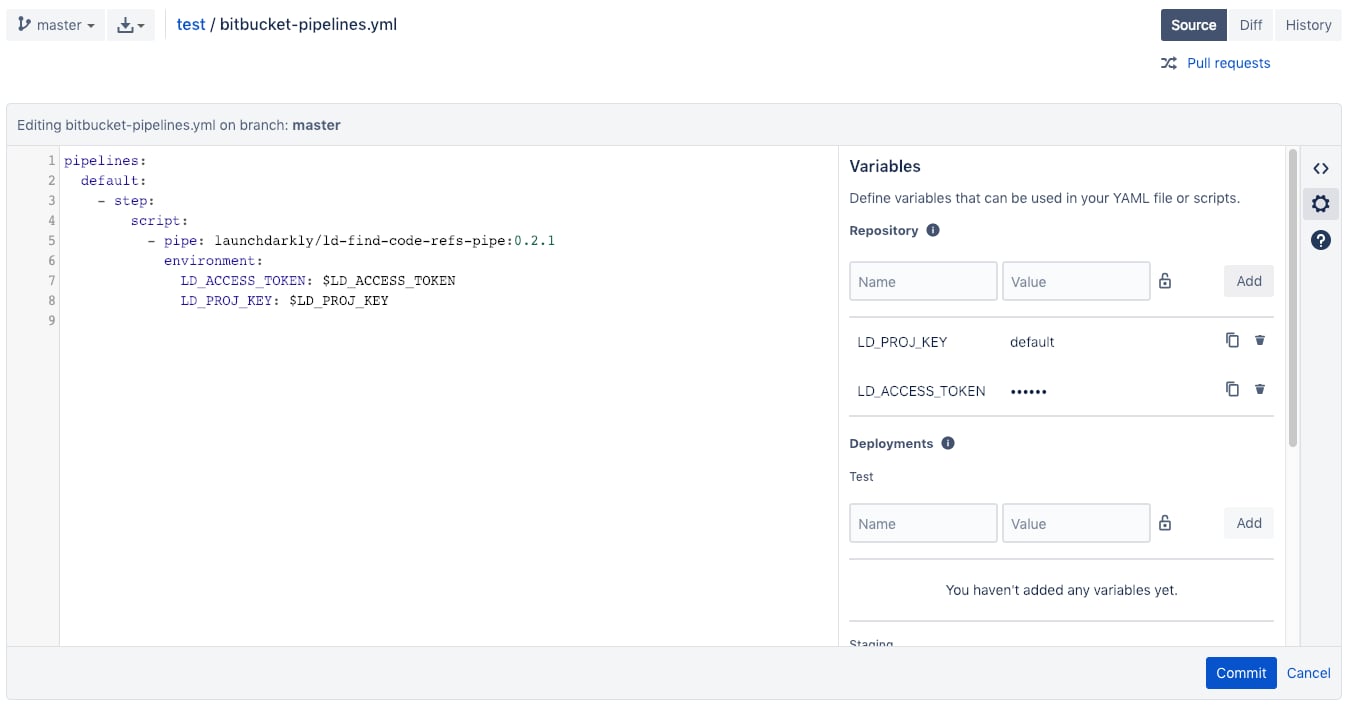 You can copy and paste the following code into a blank Pipelines configuration if you have set the `LD_PROJ_KEY` and `LD_ACCESS_TOKEN` environment variables as repository variables:
```yaml title="YAML" lines wrap theme={null}
pipelines:
default:
- step:
script:
- pipe: launchdarkly/ld-find-code-refs-pipe:2.12.0
environment:
LD_ACCESS_TOKEN: $LD_ACCESS_TOKEN
LD_PROJ_KEY: $LD_PROJ_KEY
```
To learn more about repository variables, read [Atlassian's documentation](https://support.atlassian.com/bitbucket-cloud/docs/variables-and-secrets/).
3. Confirm that the pipeline is working by creating a new pull request with the workflow file and visiting the Pipelines page on your repository's webpage. If your pipeline fails, there may be a problem with your configuration. To investigate, check the pipeline's logs to view any error messages.
## Pipeline configuration
You may configure the [code reference pipe](https://bitbucket.org/launchdarkly/ld-find-code-refs-pipe) with additional environment variables to enable more functionality. For additional configuration options, read the [ld-find-code-refs-pipe repository](https://bitbucket.org/launchdarkly/ld-find-code-refs-pipe/src/master).
You can copy and paste the following code into a blank Pipelines configuration if you have set the `LD_PROJ_KEY` and `LD_ACCESS_TOKEN` environment variables as repository variables:
```yaml title="YAML" lines wrap theme={null}
pipelines:
default:
- step:
script:
- pipe: launchdarkly/ld-find-code-refs-pipe:2.12.0
environment:
LD_ACCESS_TOKEN: $LD_ACCESS_TOKEN
LD_PROJ_KEY: $LD_PROJ_KEY
```
To learn more about repository variables, read [Atlassian's documentation](https://support.atlassian.com/bitbucket-cloud/docs/variables-and-secrets/).
3. Confirm that the pipeline is working by creating a new pull request with the workflow file and visiting the Pipelines page on your repository's webpage. If your pipeline fails, there may be a problem with your configuration. To investigate, check the pipeline's logs to view any error messages.
## Pipeline configuration
You may configure the [code reference pipe](https://bitbucket.org/launchdarkly/ld-find-code-refs-pipe) with additional environment variables to enable more functionality. For additional configuration options, read the [ld-find-code-refs-pipe repository](https://bitbucket.org/launchdarkly/ld-find-code-refs-pipe/src/master).