> ## Documentation Index
> Fetch the complete documentation index at: https://launchdarkly.com/docs/llms.txt
> Use this file to discover all available pages before exploring further.
# GitLab code references
**Code references are available to customers on select plans**
Code references are only available to customers on select plans. To learn more, [read about our pricing](https://launchdarkly.com/pricing/). To upgrade your plan, [contact Sales](https://launchdarkly.com/contact-sales/).
This topic explains how to set up and configure the GitLab code references to use with LaunchDarkly.
You can use the [`ld-find-code-refs`](https://github.com/launchdarkly/ld-find-code-refs/) utility with [GitLab CI](https://about.gitlab.com/solutions/continuous-integration/) to automatically populate code references in LaunchDarkly.
Follow the procedure below to create a GitLab code references configuration using LaunchDarkly's code references executable.
## Prerequisites
To complete this procedure, you must have the following prerequisites:
* An API access token with write permissions for the `code-reference-repository` resource, either through a base role, a LaunchDarkly-provided project role, or another role that you have created. To learn more, read [API access tokens](/docs/home/account/api) and [Code reference actions](/docs/home/account/roles/role-actions#code-reference-actions).
## Set up GitLab code references
Here's how to set up the GitLab code references:
1. Navigate to your GitLab project's CI / CD settings by clicking through **Your project**, then **Settings**, then **CI/CD**.
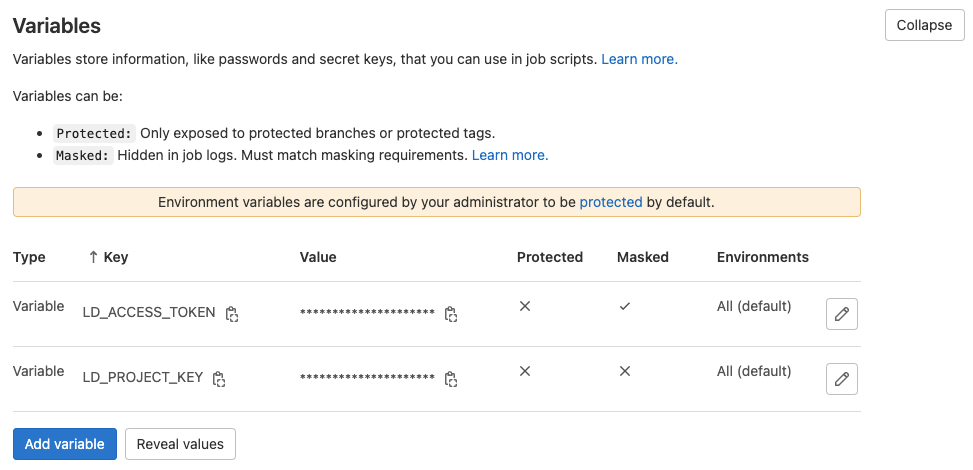
2. Expand **Variables**.
3. Create a variable called `LD_ACCESS_TOKEN`. Use the same value as your LaunchDarkly access token. Click the toggle to set the variable to **Masked**
4. Create a variable called `LD_PROJECT_KEY`. Use your LaunchDarkly project's key as the value. To learn how to find your project key, read [Project keys](/docs/home/account/project#project-keys). To learn more about setting variables, read [GitLab's documentation](https://docs.gitlab.com/ee/ci/variables/#creating-a-custom-environment-variable).
 5. Open your `.gitlab-ci.yml` file. This file defines your project's CI/CD pipeline. To learn more about getting started with GitLab code references, read [GitLab's documentation](https://docs.gitlab.com/ee/ci/#getting-started).
6. Copy and paste the following into `.gitlab-ci.yml`. No changes to the script are needed if your pipeline runs on Alpine Linux. If `apk` is unavailable in your environment then you'll need to modify the first three steps to use a different package manager:
```yaml title="YAML" expandable lines wrap theme={null}
find-launchdarkly-code-refs:
stage: deploy
image:
name: launchdarkly/ld-find-code-refs:latest
entrypoint: [""]
script:
- ld-find-code-refs
--accessToken $LD_ACCESS_TOKEN
--projKey $LD_PROJECT_KEY
--dir $CI_PROJECT_DIR
--repoName $CI_PROJECT_NAME
--repoUrl $CI_PROJECT_URL
--repoType gitlab
--branch $CI_COMMIT_REF_NAME
--updateSequenceId $CI_PIPELINE_IID
--userAgent gitlab-pipeline
```
## How the script works
When executed, this script downloads and runs the `ld-find-code-refs` docker image.
This script runs the docker image with previously-set variables, as well as GitLab-specific configurations.
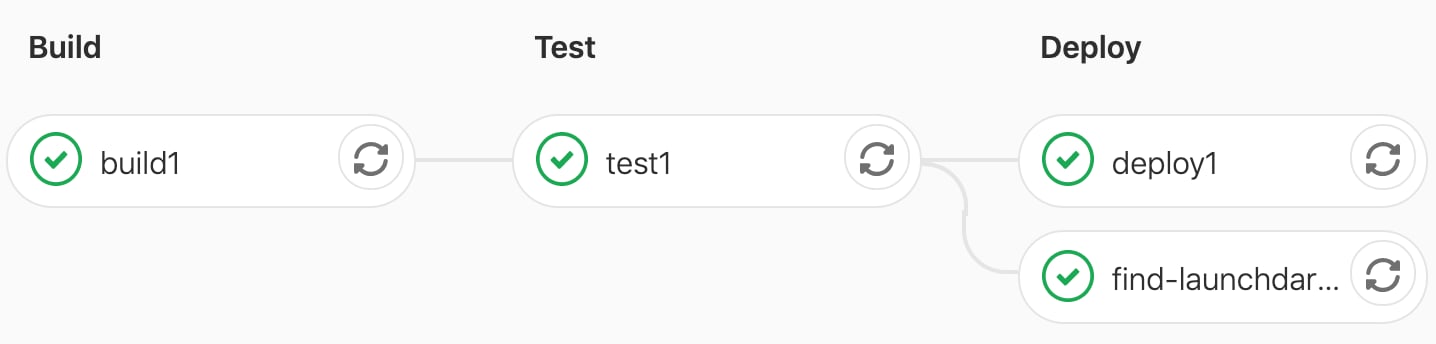
The `find-launchdarkly-code-refs` script runs in GitLab's `deploy` phase. As written, `find-launchdarkly-code-refs` runs concurrent to other scripts in the `deploy` stage. We positioned the script this way so problems running `ld-find-code-refs` won't block the deployment pipeline.
In the example `.gitlab-ci.yml` below, the `find-launchdarkly-code-refs` script runs as a part of a project's pipeline:
```yaml title="YAML" maxLines=0 expandable lines wrap theme={null}
image: alpine:latest
build1:
stage: build
script:
- echo "Build something"
test1:
stage: test
script:
- echo "Test something"
deploy1:
stage: deploy
script:
- echo "Deploy something"
find-launchdarkly-code-refs:
stage: deploy
image:
name: launchdarkly/ld-find-code-refs:latest
entrypoint: [""]
script:
- ld-find-code-refs
--accessToken $LD_ACCESS_TOKEN
--projKey $LD_PROJECT_KEY
--dir $CI_PROJECT_DIR
--repoName $CI_PROJECT_NAME
--repoUrl $CI_PROJECT_URL
--repoType gitlab
--branch $CI_COMMIT_REF_NAME
--updateSequenceId $CI_PIPELINE_IID
--userAgent gitlab-pipeline
```
When the jobs run in the pipeline, they display like this:
5. Open your `.gitlab-ci.yml` file. This file defines your project's CI/CD pipeline. To learn more about getting started with GitLab code references, read [GitLab's documentation](https://docs.gitlab.com/ee/ci/#getting-started).
6. Copy and paste the following into `.gitlab-ci.yml`. No changes to the script are needed if your pipeline runs on Alpine Linux. If `apk` is unavailable in your environment then you'll need to modify the first three steps to use a different package manager:
```yaml title="YAML" expandable lines wrap theme={null}
find-launchdarkly-code-refs:
stage: deploy
image:
name: launchdarkly/ld-find-code-refs:latest
entrypoint: [""]
script:
- ld-find-code-refs
--accessToken $LD_ACCESS_TOKEN
--projKey $LD_PROJECT_KEY
--dir $CI_PROJECT_DIR
--repoName $CI_PROJECT_NAME
--repoUrl $CI_PROJECT_URL
--repoType gitlab
--branch $CI_COMMIT_REF_NAME
--updateSequenceId $CI_PIPELINE_IID
--userAgent gitlab-pipeline
```
## How the script works
When executed, this script downloads and runs the `ld-find-code-refs` docker image.
This script runs the docker image with previously-set variables, as well as GitLab-specific configurations.
The `find-launchdarkly-code-refs` script runs in GitLab's `deploy` phase. As written, `find-launchdarkly-code-refs` runs concurrent to other scripts in the `deploy` stage. We positioned the script this way so problems running `ld-find-code-refs` won't block the deployment pipeline.
In the example `.gitlab-ci.yml` below, the `find-launchdarkly-code-refs` script runs as a part of a project's pipeline:
```yaml title="YAML" maxLines=0 expandable lines wrap theme={null}
image: alpine:latest
build1:
stage: build
script:
- echo "Build something"
test1:
stage: test
script:
- echo "Test something"
deploy1:
stage: deploy
script:
- echo "Deploy something"
find-launchdarkly-code-refs:
stage: deploy
image:
name: launchdarkly/ld-find-code-refs:latest
entrypoint: [""]
script:
- ld-find-code-refs
--accessToken $LD_ACCESS_TOKEN
--projKey $LD_PROJECT_KEY
--dir $CI_PROJECT_DIR
--repoName $CI_PROJECT_NAME
--repoUrl $CI_PROJECT_URL
--repoType gitlab
--branch $CI_COMMIT_REF_NAME
--updateSequenceId $CI_PIPELINE_IID
--userAgent gitlab-pipeline
```
When the jobs run in the pipeline, they display like this:
 ## Additional configuration options
There are more configuration options for `ld-find-code-refs`.
You can exclude files and directories from searches with an [`.ldignore`](https://github.com/launchdarkly/ld-find-code-refs/blob/main/docs/CONFIGURATION.md#ignoring-files-and-directories) file.
You can use the [`.launchdarkly/coderefs.yaml`](https://github.com/launchdarkly/ld-find-code-refs/blob/main/docs/CONFIGURATION.md#advanced-yaml-configuration) file for advanced configuration, such as configuring custom delimiters and aliases for your flag keys.
To learn more, read the [configuration documentation](https://github.com/launchdarkly/ld-find-code-refs/blob/main/docs/CONFIGURATION.md).
## Additional configuration options
There are more configuration options for `ld-find-code-refs`.
You can exclude files and directories from searches with an [`.ldignore`](https://github.com/launchdarkly/ld-find-code-refs/blob/main/docs/CONFIGURATION.md#ignoring-files-and-directories) file.
You can use the [`.launchdarkly/coderefs.yaml`](https://github.com/launchdarkly/ld-find-code-refs/blob/main/docs/CONFIGURATION.md#advanced-yaml-configuration) file for advanced configuration, such as configuring custom delimiters and aliases for your flag keys.
To learn more, read the [configuration documentation](https://github.com/launchdarkly/ld-find-code-refs/blob/main/docs/CONFIGURATION.md).