> ## Documentation Index
> Fetch the complete documentation index at: https://launchdarkly.com/docs/llms.txt
> Use this file to discover all available pages before exploring further.
# Search specification
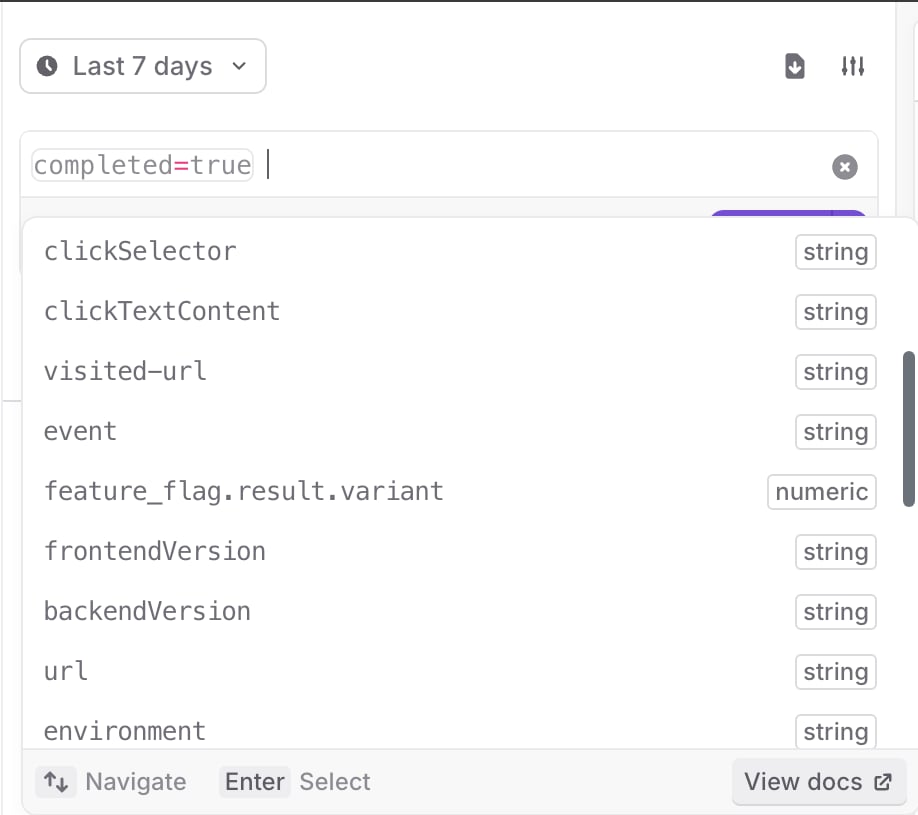
This topic explains how to use LaunchDarkly's observability search feature to query and filter data across your application. The search functionality allows you to find specific sessions, errors, logs, and traces by composing queries with different properties and attributes.
 ## Compose search queries
Compose your search query with one or more expressions. Each expression can be a comparison between a key and a value, or a logical combination of other expressions.
Here are some examples of search queries:
```txt title="Example query" lines wrap theme={null}
span_name=gorm.Query
```
Find sessions associated with a specific feature flag.
```txt title="Example query" lines wrap theme={null}
events.attributes.feature_flag.key=EXAMPLE_FLAG_KEY
```
Enter a search value without a key to search on a default key. For logs, the default key is the message, and for traces it is the `span_name`.
```txt title="Example query" lines wrap theme={null}
gorm.Query
```
You can also filter for custom attributes you send in sessions, logs, and traces.
```txt title="Example filter" lines wrap theme={null}
user_id=42
```
### Keys and values
Keys are identifiers, which can include any combination of alphanumeric characters, underscores (`_`), periods (`.`), dashes (`-`), and wildcards, which are indicated by asterisks (`*`).
Values are strings with any character. To use spaces or special characters, you must enclose the string in quotes (`"`, `'`).
You can use wildcards (`*`) in values to match on part of a pattern. For example:
* `span_name=gorm.*` matches all `span_name` values that start with `gorm`.
* `span_name=*.Query` matches all `span_name` values that end with `.Query`
* `span_name=*orm*` matches all values that contain `orm`
If you want to use a value with a space or special character, you must wrap the value in quotations.
```txt title="Example query" lines wrap theme={null}
tag="*query error*"
visited-url="https://app.launchdarkly.com/*"
```
### Regex expressions
You can search with regex expressions by using the matches query operator: `=/[your regex here]/`. For example:
* `clickTextContent=/\w.+\w/` matches all `clickTextContent` that start and end with any word
* `browser_version=/\d\.\d\.\d/` matches all `browser_version` values in the form \[0-9].\[0-9].\[0-9]
If you want to use a regex expression with a space or special character, you must wrap the value in quotations. For example:
* `tag="/\w \w/"`
* `visited-url="/https://app.launchdarkly.com/\d/.+/"`
### Comparisons
Use operators to compare two different elements in your search query. The following operators are supported:
* `=`: Equals
* `!=`: Does not equal
* `<`: Less than
* `<=`: Less than or equal to
* `>`: Greater than
* `>=`: Greater than or equal to
### Exist and does not exist
You can search if a key exists or does not exist with the `exists` operator. For example, to return all the traces with a connected session, use the following query:
```txt title="Example query" lines wrap theme={null}
secure_session_id exists
```
`exists` also works with the `not` keyword. For example, when you only want the root level spans when searching traces, use this query:
```txt title="Example query" lines wrap theme={null}
parent_span_id not exists
```
You can combine expressions with the logical operators `AND`, `OR`, and `NOT`:
* `AND`: Both expressions must be true
* `OR`: At least one of the expressions must be true
* `NOT`: The following expression must be false
Filters are combined with an implicit `AND` unless you specify `OR`. For example:
```txt title="Example query" lines wrap theme={null}
service_name=private-graph span_name=gorm.Query
```
This is equivalent to:
```txt title="Example query" lines wrap theme={null}
service_name=private-graph AND span_name=gorm.Query
```
You can also use parentheses `( AND )` to group values in an expression. For example:
```txt title="Example query" lines wrap theme={null}
(key1=value1 AND key2=value2) OR key3=value3
```
You can also use parentheses to group values in an expression:
```txt title="Example query" lines wrap theme={null}
service_name=(private-graph OR public-graph)
```
### Span functions for trace search
The search functionality on the **Traces** page returns individual spans that make up traces.
Span functions help you filter results to show only those spans for traces that contain or don't contain spans that match one or more conditions.
The following span functions are available when you search on the **Traces** page:
* `any_span( expression )` limits results to spans where the trace contains at least one span that matches the expression.
* `any_span2()` and `any_span3()` operate in the same way as `any_span()`. The unique function names let you require different spans in the trace to satisfy different conditions in the same query. To learn more, read [Using multiple span aliases](#using-multiple-span-aliases).
* `no_span( expression )` limits results to spans where the trace contains no spans that match the inner expression.
* `child_span( expression )` limits results to spans that have at least one direct child span matching the expression.
* `parent_span( expression )` limits results to spans where the direct parent span matches the expression.
* `root_span( expression )` limits results to spans where the trace's root span matches the expression.
Span functions wrap a normal search expression in parentheses. Inside the parentheses, you can use any of the existing operators, including comparisons, `EXISTS`, `AND`, `OR`, and `NOT`.
Here is an example that returns spans whose trace contains at least one span from the `auth-service`:
```txt title="Example query" lines wrap theme={null}
any_span(service_name=auth-service)
```
Here is an example that returns spans whose trace contains at least one error in an `auth-service` span:
```txt title="Example query" lines wrap theme={null}
any_span(service_name=auth-service AND has_errors=true)
```
Here is an example that returns spans whose trace contains no spans with errors:
```txt title="Example query" lines wrap theme={null}
no_span(has_errors=true)
```
Here is an example that returns spans that have a direct child span that lasts longer than one second:
```txt title="Example query" lines wrap theme={null}
child_span(duration>1000)
```
Here is an example that returns spans where the direct parent span belongs to the `auth-service`:
```txt title="Example query" lines wrap theme={null}
parent_span(service_name=auth-service)
```
Here is an example that returns spans where the trace's root span is named `checkout`:
```txt title="Example query" lines wrap theme={null}
root_span(span_name=checkout)
```
#### Using multiple span aliases
If you call `any_span()` more than once in a query, the conditions accumulate against the same span. For example, this query requires a single span in the trace to match both conditions:
```txt title="Example query" lines wrap theme={null}
any_span(service_name=checkout) any_span(has_errors=true)
```
To require that different spans in the trace satisfy each condition, use `any_span2()` or `any_span3()` for the second condition. Here is an example that returns spans whose trace contains at least one `checkout` span and another, different span that contains errors:
```txt title="Example query" lines wrap theme={null}
any_span(service_name=checkout) any_span2(has_errors=true)
```
#### Combining span functions with regular search expressions
You can combine span functions with regular search expressions in the same query. Regular expressions filter the displayed spans by their own properties, while span functions filter the displayed spans by conditions that apply to the same trace. Here is an example:
```txt title="Example query" lines wrap theme={null}
environment=production any_span(service_name=auth-service AND duration>1s)
```
This query returns spans in the `production` environment whose trace also contains at least one `auth-service` span that lasts longer than one second.
#### Limitations
You can only use span functions as top-level filters in a query.
Span functions have the following restrictions:
* You cannot wrap span functions in parentheses.
* All span functions at the top level of a query are joined with an implicit `AND` operator. You cannot combine span functions using `AND`, `OR`, or `NOT` outside of the function call.
These restrictions apply to the span function itself. Inside the parentheses, the inner expression supports the full set of search operators, including `AND`, `OR`, `NOT`, `EXISTS`, and grouping.
## Saved searches
Saved searches are a set of search filters that apply to sessions or errors. Saved searches are useful if you want to quickly view sessions or errors that relate to a certain population of your end users.
To save a search, click the **Save** button below the search bar.
The searches you build are reflected in the URL parameters when you're accessing sessions through the LaunchDarkly UI. You can share these URLs with others to deep link to search results, or create them programmatically.
## Session-specific searching
To learn more about search terms and defaults specific to session replays, read [Search](/docs/home/observability/session-replay#search) in the [Session replay](/docs/home/observability/session-replay) topic.
LaunchDarkly flattens the nested properties of the track events your application records. This lets you query each individual property. To learn more, read [Search by track event properties](/docs/home/observability/session-replay#search-by-track-event-properties).
## Configure error views
You can configure the **Errors** page to display different subsets of errors. Use the date dropdown to select a time range, and search in the search bar to filter the errors.
## Compose search queries
Compose your search query with one or more expressions. Each expression can be a comparison between a key and a value, or a logical combination of other expressions.
Here are some examples of search queries:
```txt title="Example query" lines wrap theme={null}
span_name=gorm.Query
```
Find sessions associated with a specific feature flag.
```txt title="Example query" lines wrap theme={null}
events.attributes.feature_flag.key=EXAMPLE_FLAG_KEY
```
Enter a search value without a key to search on a default key. For logs, the default key is the message, and for traces it is the `span_name`.
```txt title="Example query" lines wrap theme={null}
gorm.Query
```
You can also filter for custom attributes you send in sessions, logs, and traces.
```txt title="Example filter" lines wrap theme={null}
user_id=42
```
### Keys and values
Keys are identifiers, which can include any combination of alphanumeric characters, underscores (`_`), periods (`.`), dashes (`-`), and wildcards, which are indicated by asterisks (`*`).
Values are strings with any character. To use spaces or special characters, you must enclose the string in quotes (`"`, `'`).
You can use wildcards (`*`) in values to match on part of a pattern. For example:
* `span_name=gorm.*` matches all `span_name` values that start with `gorm`.
* `span_name=*.Query` matches all `span_name` values that end with `.Query`
* `span_name=*orm*` matches all values that contain `orm`
If you want to use a value with a space or special character, you must wrap the value in quotations.
```txt title="Example query" lines wrap theme={null}
tag="*query error*"
visited-url="https://app.launchdarkly.com/*"
```
### Regex expressions
You can search with regex expressions by using the matches query operator: `=/[your regex here]/`. For example:
* `clickTextContent=/\w.+\w/` matches all `clickTextContent` that start and end with any word
* `browser_version=/\d\.\d\.\d/` matches all `browser_version` values in the form \[0-9].\[0-9].\[0-9]
If you want to use a regex expression with a space or special character, you must wrap the value in quotations. For example:
* `tag="/\w \w/"`
* `visited-url="/https://app.launchdarkly.com/\d/.+/"`
### Comparisons
Use operators to compare two different elements in your search query. The following operators are supported:
* `=`: Equals
* `!=`: Does not equal
* `<`: Less than
* `<=`: Less than or equal to
* `>`: Greater than
* `>=`: Greater than or equal to
### Exist and does not exist
You can search if a key exists or does not exist with the `exists` operator. For example, to return all the traces with a connected session, use the following query:
```txt title="Example query" lines wrap theme={null}
secure_session_id exists
```
`exists` also works with the `not` keyword. For example, when you only want the root level spans when searching traces, use this query:
```txt title="Example query" lines wrap theme={null}
parent_span_id not exists
```
You can combine expressions with the logical operators `AND`, `OR`, and `NOT`:
* `AND`: Both expressions must be true
* `OR`: At least one of the expressions must be true
* `NOT`: The following expression must be false
Filters are combined with an implicit `AND` unless you specify `OR`. For example:
```txt title="Example query" lines wrap theme={null}
service_name=private-graph span_name=gorm.Query
```
This is equivalent to:
```txt title="Example query" lines wrap theme={null}
service_name=private-graph AND span_name=gorm.Query
```
You can also use parentheses `( AND )` to group values in an expression. For example:
```txt title="Example query" lines wrap theme={null}
(key1=value1 AND key2=value2) OR key3=value3
```
You can also use parentheses to group values in an expression:
```txt title="Example query" lines wrap theme={null}
service_name=(private-graph OR public-graph)
```
### Span functions for trace search
The search functionality on the **Traces** page returns individual spans that make up traces.
Span functions help you filter results to show only those spans for traces that contain or don't contain spans that match one or more conditions.
The following span functions are available when you search on the **Traces** page:
* `any_span( expression )` limits results to spans where the trace contains at least one span that matches the expression.
* `any_span2()` and `any_span3()` operate in the same way as `any_span()`. The unique function names let you require different spans in the trace to satisfy different conditions in the same query. To learn more, read [Using multiple span aliases](#using-multiple-span-aliases).
* `no_span( expression )` limits results to spans where the trace contains no spans that match the inner expression.
* `child_span( expression )` limits results to spans that have at least one direct child span matching the expression.
* `parent_span( expression )` limits results to spans where the direct parent span matches the expression.
* `root_span( expression )` limits results to spans where the trace's root span matches the expression.
Span functions wrap a normal search expression in parentheses. Inside the parentheses, you can use any of the existing operators, including comparisons, `EXISTS`, `AND`, `OR`, and `NOT`.
Here is an example that returns spans whose trace contains at least one span from the `auth-service`:
```txt title="Example query" lines wrap theme={null}
any_span(service_name=auth-service)
```
Here is an example that returns spans whose trace contains at least one error in an `auth-service` span:
```txt title="Example query" lines wrap theme={null}
any_span(service_name=auth-service AND has_errors=true)
```
Here is an example that returns spans whose trace contains no spans with errors:
```txt title="Example query" lines wrap theme={null}
no_span(has_errors=true)
```
Here is an example that returns spans that have a direct child span that lasts longer than one second:
```txt title="Example query" lines wrap theme={null}
child_span(duration>1000)
```
Here is an example that returns spans where the direct parent span belongs to the `auth-service`:
```txt title="Example query" lines wrap theme={null}
parent_span(service_name=auth-service)
```
Here is an example that returns spans where the trace's root span is named `checkout`:
```txt title="Example query" lines wrap theme={null}
root_span(span_name=checkout)
```
#### Using multiple span aliases
If you call `any_span()` more than once in a query, the conditions accumulate against the same span. For example, this query requires a single span in the trace to match both conditions:
```txt title="Example query" lines wrap theme={null}
any_span(service_name=checkout) any_span(has_errors=true)
```
To require that different spans in the trace satisfy each condition, use `any_span2()` or `any_span3()` for the second condition. Here is an example that returns spans whose trace contains at least one `checkout` span and another, different span that contains errors:
```txt title="Example query" lines wrap theme={null}
any_span(service_name=checkout) any_span2(has_errors=true)
```
#### Combining span functions with regular search expressions
You can combine span functions with regular search expressions in the same query. Regular expressions filter the displayed spans by their own properties, while span functions filter the displayed spans by conditions that apply to the same trace. Here is an example:
```txt title="Example query" lines wrap theme={null}
environment=production any_span(service_name=auth-service AND duration>1s)
```
This query returns spans in the `production` environment whose trace also contains at least one `auth-service` span that lasts longer than one second.
#### Limitations
You can only use span functions as top-level filters in a query.
Span functions have the following restrictions:
* You cannot wrap span functions in parentheses.
* All span functions at the top level of a query are joined with an implicit `AND` operator. You cannot combine span functions using `AND`, `OR`, or `NOT` outside of the function call.
These restrictions apply to the span function itself. Inside the parentheses, the inner expression supports the full set of search operators, including `AND`, `OR`, `NOT`, `EXISTS`, and grouping.
## Saved searches
Saved searches are a set of search filters that apply to sessions or errors. Saved searches are useful if you want to quickly view sessions or errors that relate to a certain population of your end users.
To save a search, click the **Save** button below the search bar.
The searches you build are reflected in the URL parameters when you're accessing sessions through the LaunchDarkly UI. You can share these URLs with others to deep link to search results, or create them programmatically.
## Session-specific searching
To learn more about search terms and defaults specific to session replays, read [Search](/docs/home/observability/session-replay#search) in the [Session replay](/docs/home/observability/session-replay) topic.
LaunchDarkly flattens the nested properties of the track events your application records. This lets you query each individual property. To learn more, read [Search by track event properties](/docs/home/observability/session-replay#search-by-track-event-properties).
## Configure error views
You can configure the **Errors** page to display different subsets of errors. Use the date dropdown to select a time range, and search in the search bar to filter the errors.