> ## Documentation Index
> Fetch the complete documentation index at: https://launchdarkly.com/docs/llms.txt
> Use this file to discover all available pages before exploring further.
# Creating flag triggers
This topic explains how to create flag triggers.
## Create flag triggers
To create a trigger:
1. Navigate to the feature flag for which you wish to create a trigger.
2. Click on the **three-dot** overflow menu for the environment you want to create a trigger in.
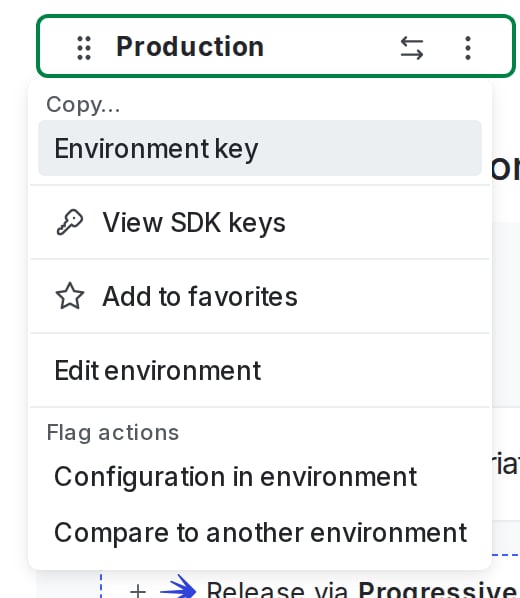 3. Select **Configuration in environment**. The "Environment configuration" screen appears.
4. Find the "Triggers" section and click **+ Add trigger**. The "Create trigger" dialog appears.
5. Choose the tool you wish to use from the **Trigger type** menu. You can also choose **Generic trigger** to create a trigger that is not associated with any specific tool.
6. Choose an action you wish to perform with the trigger from the **Action** menu.
7. Click **Save trigger**. A confirmation appears and the trigger appears in the flag's configuration.
8. Copy and save the unique trigger URL. You must do this now. After you leave this page, the trigger URL will be obscured and you will not be able to view it again:
3. Select **Configuration in environment**. The "Environment configuration" screen appears.
4. Find the "Triggers" section and click **+ Add trigger**. The "Create trigger" dialog appears.
5. Choose the tool you wish to use from the **Trigger type** menu. You can also choose **Generic trigger** to create a trigger that is not associated with any specific tool.
6. Choose an action you wish to perform with the trigger from the **Action** menu.
7. Click **Save trigger**. A confirmation appears and the trigger appears in the flag's configuration.
8. Copy and save the unique trigger URL. You must do this now. After you leave this page, the trigger URL will be obscured and you will not be able to view it again:
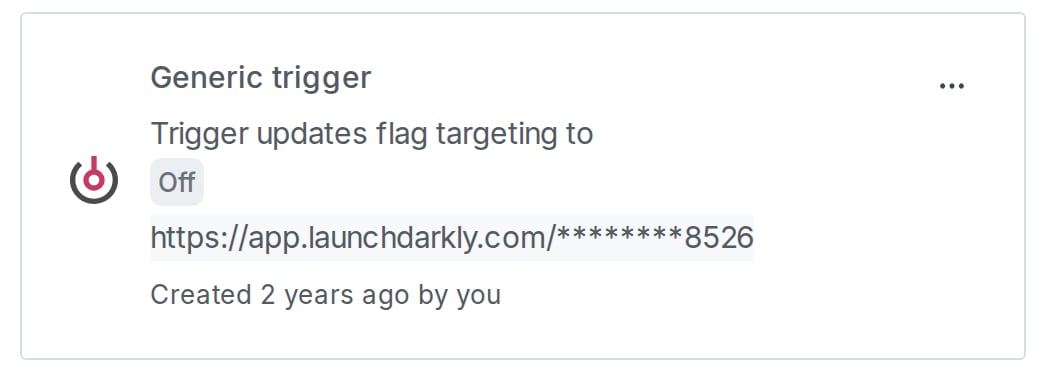 You have created a new trigger for your flag. You can create more triggers if necessary by clicking **Add trigger**.
You can also use the REST API: [Create flag trigger](/docs/api/flag-triggers/create-flag-trigger)
You have created a new trigger for your flag. You can create more triggers if necessary by clicking **Add trigger**.
You can also use the REST API: [Create flag trigger](/docs/api/flag-triggers/create-flag-trigger)