> ## Documentation Index
> Fetch the complete documentation index at: https://launchdarkly.com/docs/llms.txt
> Use this file to discover all available pages before exploring further.
# Sentry
**This integration is not available in federal environments**
To learn more, read LaunchDarkly in federal environments.
**This integration is not available in LaunchDarkly's European Union (EU) instance**
To learn more, read LaunchDarkly in the European Union (EU).
**The Sentry integration is available to customers on select plans**
The Sentry integration is only available to customers on select plans. To learn more, [read about our pricing](https://launchdarkly.com/pricing/). To upgrade your plan, [contact Sales](https://launchdarkly.com/contact-sales/).
This topic explains how to use the LaunchDarkly Sentry integration. Sentry is an application performance monitoring and error tracking tool. You can connect Sentry error events to LaunchDarkly to use with LaunchDarkly metrics.
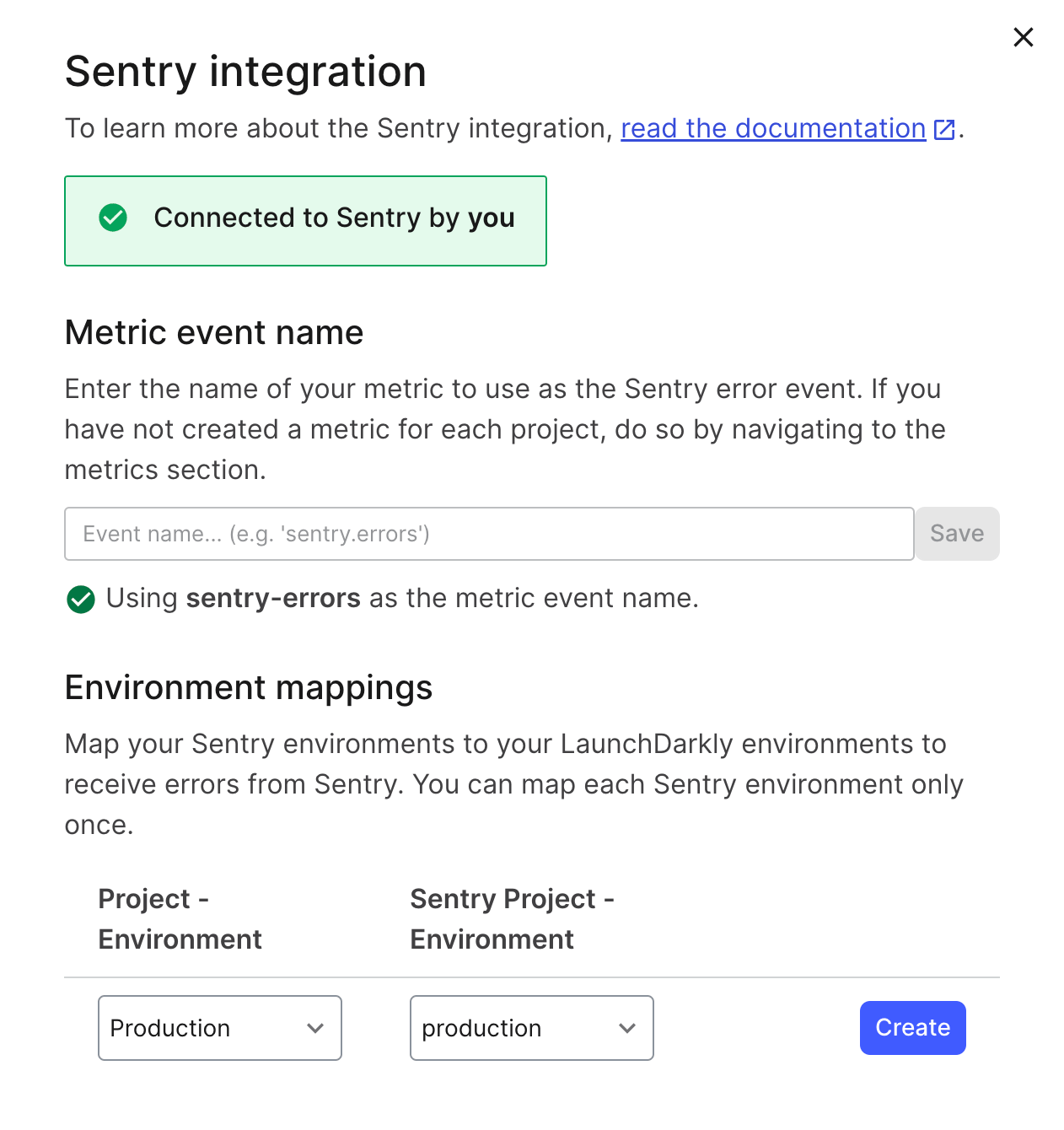 The Sentry integration works with custom conversion binary and custom conversion count metrics. To learn more, read [Metrics](/docs/home/metrics).
**You can also forward Sentry errors from your own code**
If this integration is not available on your plan or in your LaunchDarkly instance, or if you want control over the data attached to each error event, you can forward errors to LaunchDarkly yourself from Sentry's `beforeSend` hook. To learn how, read [Sending error events from observability tools](/docs/integrations/monitoring/error-events).
To use the Sentry integration, you must complete the following steps:
1. [Install Sentry](#install-sentry)
2. [Configure the integration](#configure-the-integration)
3. [Create a LaunchDarkly metric](#create-a-launchdarkly-metric)
4. [Attach LaunchDarkly contexts to Sentry error events](#attach-launchdarkly-contexts-to-sentry-error-events)
## Install Sentry
To install the Sentry integration:
1. Log in to LaunchDarkly.
2. Navigate to the public integrations directory in Sentry's application.
3. Click **Install**.
You are redirected to the Sentry integration panel in LaunchDarkly.
## Configure the integration
There are two pieces of configuration required for the Sentry integration to work:
* setting the event key, and
* mapping the environments.
### Set the event key
Sentry uses the event key to aggregate events. We recommend using a **Metric event key** of `sentry-errors` or similar, but you can use any event key you like.
The Sentry integration works with custom conversion binary and custom conversion count metrics. To learn more, read [Metrics](/docs/home/metrics).
**You can also forward Sentry errors from your own code**
If this integration is not available on your plan or in your LaunchDarkly instance, or if you want control over the data attached to each error event, you can forward errors to LaunchDarkly yourself from Sentry's `beforeSend` hook. To learn how, read [Sending error events from observability tools](/docs/integrations/monitoring/error-events).
To use the Sentry integration, you must complete the following steps:
1. [Install Sentry](#install-sentry)
2. [Configure the integration](#configure-the-integration)
3. [Create a LaunchDarkly metric](#create-a-launchdarkly-metric)
4. [Attach LaunchDarkly contexts to Sentry error events](#attach-launchdarkly-contexts-to-sentry-error-events)
## Install Sentry
To install the Sentry integration:
1. Log in to LaunchDarkly.
2. Navigate to the public integrations directory in Sentry's application.
3. Click **Install**.
You are redirected to the Sentry integration panel in LaunchDarkly.
## Configure the integration
There are two pieces of configuration required for the Sentry integration to work:
* setting the event key, and
* mapping the environments.
### Set the event key
Sentry uses the event key to aggregate events. We recommend using a **Metric event key** of `sentry-errors` or similar, but you can use any event key you like.
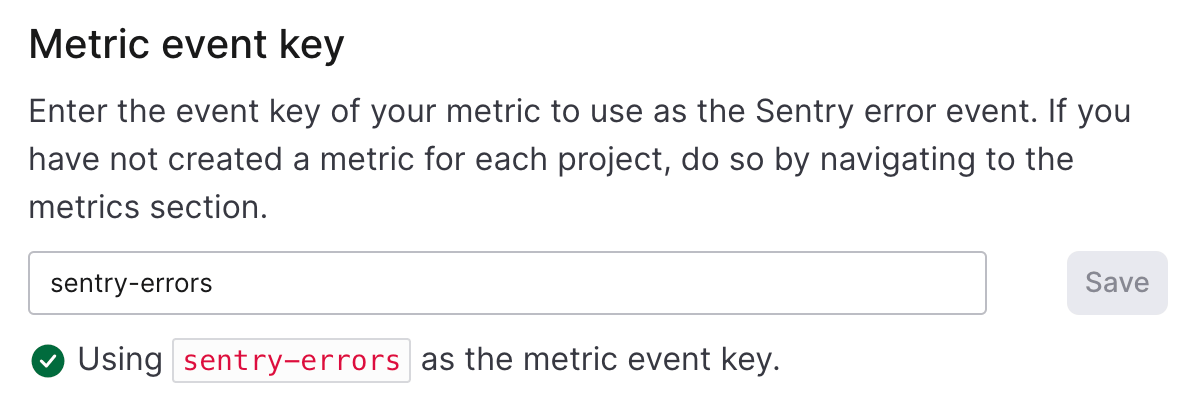 A LaunchDarkly metric must exist with the designated event key for the integration to work in a given project. If there is not an existing custom metric with the chosen event key, create a custom metric with that event key. To learn how, read [Create a LaunchDarkly metric](#create-a-launchdarkly-metric).
When you set a metric event key, a green check mark appears in the integration panel.
**Event keys and metric keys are different**
Sending custom events to LaunchDarkly requires a unique **event key**. Set the event key to anything you want. Adding this event key to your codebase lets your SDK track actions customers take in your app as events. To learn more, read [Tracking custom events](/docs/sdk/features/events).
LaunchDarkly also automatically generates a **metric key** when you create a metric. You only use the metric key to identify the metric in API calls. To learn more, read [Creating and managing metrics](/docs/home/metrics/create-metrics).
### Map environments
Events are specific to one LaunchDarkly environment. The Sentry integration requires you to map Sentry environments to LaunchDarkly environments. This lets you send Sentry errors to different LaunchDarkly environments. For example, you can send errors from your production Sentry environment to your production LaunchDarkly environment, and errors from your staging Sentry environment to your staging LaunchDarkly environment.
To map Sentry environments to LaunchDarkly environments:
1. Navigate to the Integrations page in LaunchDarkly.
2. Open the Sentry integration panel.
3. In the "Environment mappings" section, choose a LaunchDarkly project and environment from the **Project - Environment** menu.
4. Choose a Sentry project and environment from the **Sentry Project - Environment** menu.
5. Click **Create**.
The sets of projects and environments are now mapped to each other.
A LaunchDarkly metric must exist with the designated event key for the integration to work in a given project. If there is not an existing custom metric with the chosen event key, create a custom metric with that event key. To learn how, read [Create a LaunchDarkly metric](#create-a-launchdarkly-metric).
When you set a metric event key, a green check mark appears in the integration panel.
**Event keys and metric keys are different**
Sending custom events to LaunchDarkly requires a unique **event key**. Set the event key to anything you want. Adding this event key to your codebase lets your SDK track actions customers take in your app as events. To learn more, read [Tracking custom events](/docs/sdk/features/events).
LaunchDarkly also automatically generates a **metric key** when you create a metric. You only use the metric key to identify the metric in API calls. To learn more, read [Creating and managing metrics](/docs/home/metrics/create-metrics).
### Map environments
Events are specific to one LaunchDarkly environment. The Sentry integration requires you to map Sentry environments to LaunchDarkly environments. This lets you send Sentry errors to different LaunchDarkly environments. For example, you can send errors from your production Sentry environment to your production LaunchDarkly environment, and errors from your staging Sentry environment to your staging LaunchDarkly environment.
To map Sentry environments to LaunchDarkly environments:
1. Navigate to the Integrations page in LaunchDarkly.
2. Open the Sentry integration panel.
3. In the "Environment mappings" section, choose a LaunchDarkly project and environment from the **Project - Environment** menu.
4. Choose a Sentry project and environment from the **Sentry Project - Environment** menu.
5. Click **Create**.
The sets of projects and environments are now mapped to each other.
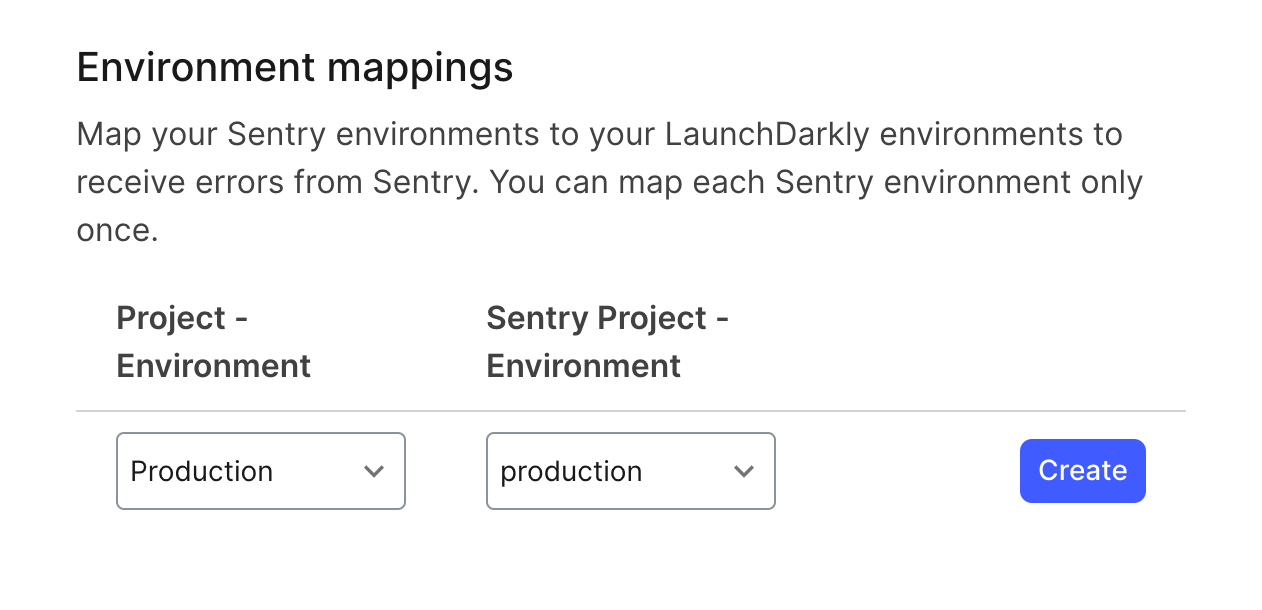 If an environment mapping is highlighted in red, it means that there is no metric for the event key in that LaunchDarkly project.
You can map any number of Sentry project environments to a LaunchDarkly environment. However, you cannot map multiple LaunchDarkly environments to a single Sentry environment.
## Create a LaunchDarkly metric
To create a LaunchDarkly metric, follow the procedure at [Custom conversion binary metrics](/docs/home/metrics/custom) or [Custom conversion count metrics](/docs/home/metrics/custom-count), depending on your needs.
Here are two example metrics we recommend.
### Percentage of end users that experienced an error
To track the percentage of end users that experienced an error, create a custom conversion binary metric by selecting the following options:
* Event kind: **Custom**
* Event key: `sentry-errors`
* Metric definition: **Occurrence (Percent)** of **User** units that sent the event where **lower is better**
Here is what the metric setup looks like:
If an environment mapping is highlighted in red, it means that there is no metric for the event key in that LaunchDarkly project.
You can map any number of Sentry project environments to a LaunchDarkly environment. However, you cannot map multiple LaunchDarkly environments to a single Sentry environment.
## Create a LaunchDarkly metric
To create a LaunchDarkly metric, follow the procedure at [Custom conversion binary metrics](/docs/home/metrics/custom) or [Custom conversion count metrics](/docs/home/metrics/custom-count), depending on your needs.
Here are two example metrics we recommend.
### Percentage of end users that experienced an error
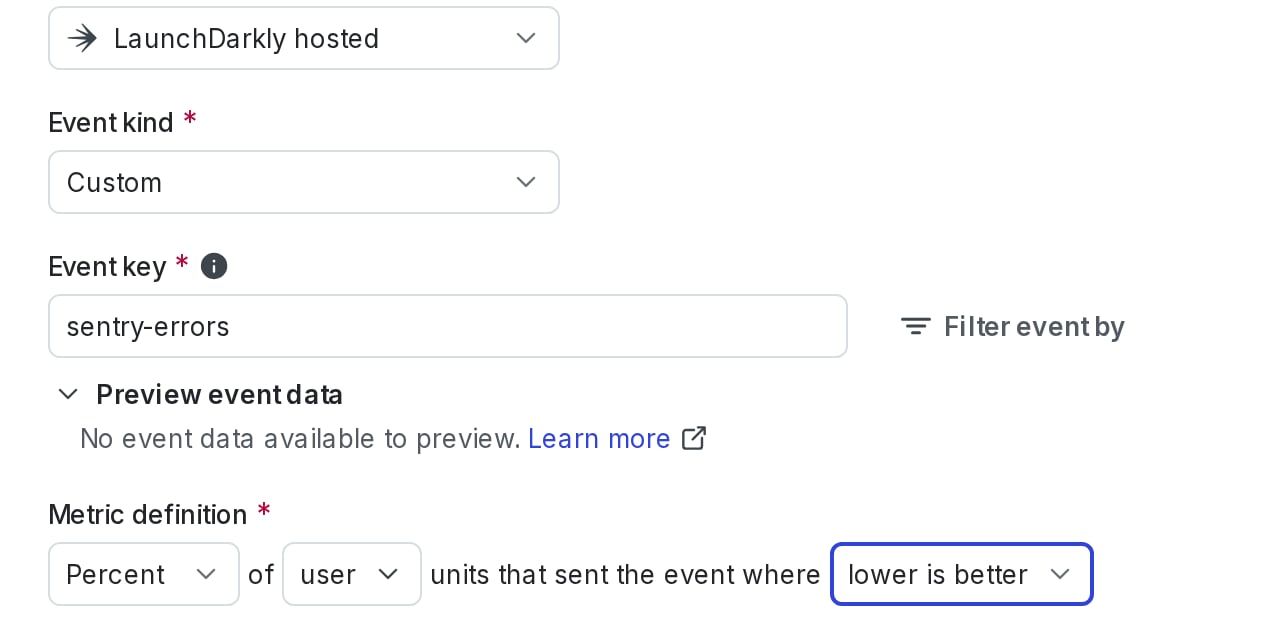
To track the percentage of end users that experienced an error, create a custom conversion binary metric by selecting the following options:
* Event kind: **Custom**
* Event key: `sentry-errors`
* Metric definition: **Occurrence (Percent)** of **User** units that sent the event where **lower is better**
Here is what the metric setup looks like:
 ### Average number of errors per request
To track the average number of errors per request, create a custom conversion count metric by selecting the following options:
* Event kind: **Custom**
* **Event key:** `sentry-errors`
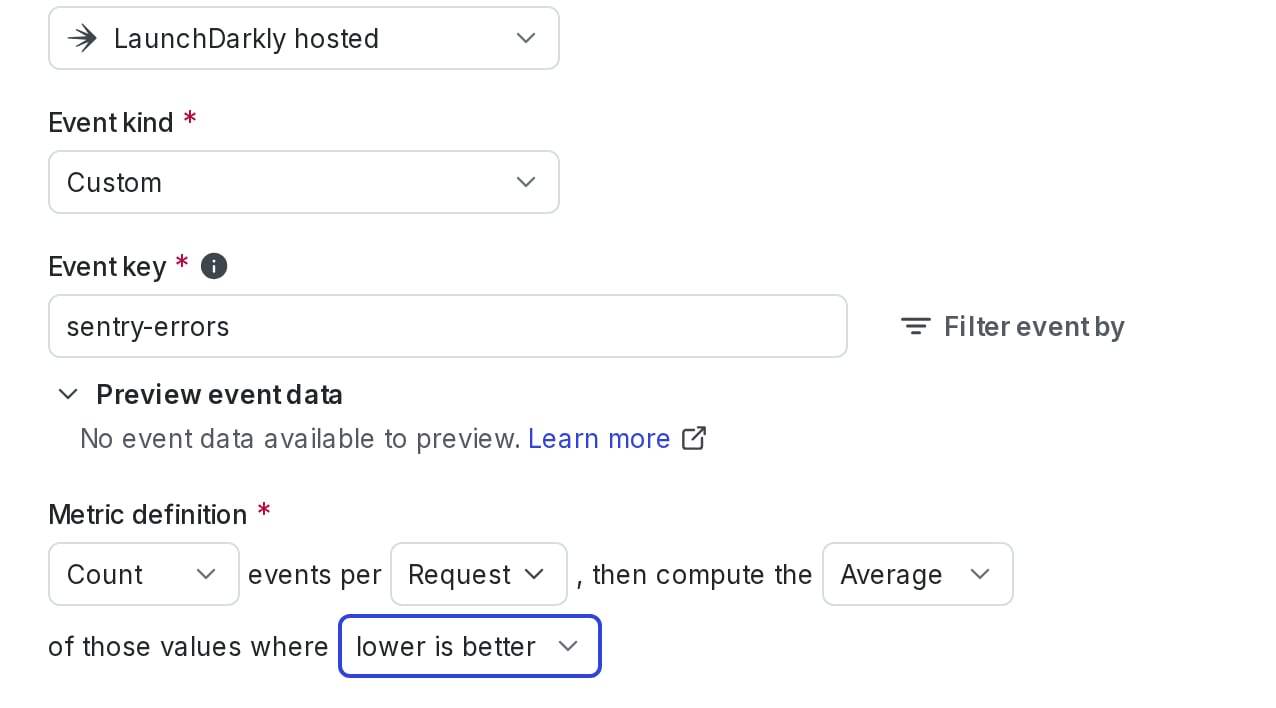
* Metric definition: **Count** events per **Request**, then compute the **Average** of those values where **lower is better**
Here is what the metric setup looks like:
### Average number of errors per request
To track the average number of errors per request, create a custom conversion count metric by selecting the following options:
* Event kind: **Custom**
* **Event key:** `sentry-errors`
* Metric definition: **Count** events per **Request**, then compute the **Average** of those values where **lower is better**
Here is what the metric setup looks like:
 After you create your metrics, return to the Sentry integration configuration panel and set the Sentry integration event key if you have not already done so.
## Attach LaunchDarkly contexts to Sentry error events
**Sentry custom contexts are not the same as LaunchDarkly custom contexts**
Sentry provides functionality called "custom contexts." These are distinct from LaunchDarkly's custom contexts. In this section, "custom contexts" refers to the Sentry functionality.
Sentry provides custom contexts which let you attach arbitrary data to a Sentry event. To use the Sentry integration, you must name the Sentry custom context `launchdarklyContext` and then attach LaunchDarkly contexts to error events. To learn how, read Sentry's [Context docs](https://docs.sentry.io/platforms/go/guides/gin/enriching-events/context/).
**You must name the Sentry custom context
After you create your metrics, return to the Sentry integration configuration panel and set the Sentry integration event key if you have not already done so.
## Attach LaunchDarkly contexts to Sentry error events
**Sentry custom contexts are not the same as LaunchDarkly custom contexts**
Sentry provides functionality called "custom contexts." These are distinct from LaunchDarkly's custom contexts. In this section, "custom contexts" refers to the Sentry functionality.
Sentry provides custom contexts which let you attach arbitrary data to a Sentry event. To use the Sentry integration, you must name the Sentry custom context `launchdarklyContext` and then attach LaunchDarkly contexts to error events. To learn how, read Sentry's [Context docs](https://docs.sentry.io/platforms/go/guides/gin/enriching-events/context/).
**You must name the Sentry custom context launchdarklyContext**
In Sentry, you must name the Sentry custom context launchdarklyContext. If the Sentry custom context is not present or you have named it something else, LaunchDarkly rejects the error event and does not create a metric event.
### Supported JSON structures for the custom context
LaunchDarkly reads the `launchdarklyContext` custom context to find the context kinds and keys that the error belongs to. It accepts the custom context in structures such as the following. In every structure, the value for a context kind is either the context key as a string, or an object with a `key` property. The `kind` property is optional. If you omit `kind` and include a top-level `key`, LaunchDarkly reads the object as a `user` context.
```json title="Multi-context" lines wrap theme={null}
{
"kind": "multi",
"user": { "key": "user-key-123" },
"device": { "key": "device-key-456" }
}
```
```json title="Multi-context, keys only" lines wrap theme={null}
{
"kind": "multi",
"user": "user-key-123",
"device": "device-key-456"
}
```
```json title="Single context" lines wrap theme={null}
{
"kind": "user",
"key": "user-key-123"
}
```
```json title="Single context, nested" lines wrap theme={null}
{
"kind": "device",
"device": { "key": "device-key-456" }
}
```
```json title="Kind-to-key map" lines wrap theme={null}
{
"user": "user-key-123",
"device": "device-key-456"
}
```
The first and third examples match the JSON that LaunchDarkly SDKs use for a context. You can attach the same context object that you pass to the LaunchDarkly SDK. The "keys only" and "kind-to-key map" structures match the output of SDK helper methods that return context keys.
LaunchDarkly uses only the context kinds and keys. It ignores other properties inside a context object, such as `name` or `anonymous`. In the single-context structures it also ignores other top-level properties.
In multi-context and kind-to-key map structures, LaunchDarkly reads every top-level property other than `kind` as a context kind. Put attributes inside each context object.
LaunchDarkly rejects an event if:
* It finds user attributes such as `name` or `anonymous` at the top level of a multi-context or kind-to-key map structure.
* A context kind contains characters other than letters, numbers, `.`, `_`, and `-`.
* A context key is empty.
Here is an example that attaches a multi-context in a JavaScript application:
```js title="JavaScript" lines wrap theme={null}
Sentry.setContext('launchdarklyContext', {
kind: 'multi',
user: { key: 'user-key-123' },
device: { key: 'device-key-456' },
});
```
Each context key in the custom context is attached to the metric event that LaunchDarkly creates for the error. If the custom context is missing or does not match one of these structures, LaunchDarkly rejects the error event and does not create a metric event. The rejection response to Sentry states the reason and lists the accepted structures. If your Sentry errors do not appear in your metric, confirm that the custom context matches one of these structures.
## Using the integration
After you create the environment mappings, set the metric event key, create metrics for your desired projects, and add LaunchDarkly contexts to the Sentry SDK, you can use the metric in LaunchDarkly the same way as any other metric. When you configure a metric to use Sentry errors, error events will flow from Sentry into that metric.