> ## Documentation Index
> Fetch the complete documentation index at: https://launchdarkly.com/docs/llms.txt
> Use this file to discover all available pages before exploring further.

# Flutter SDK reference

<View title="Developer" />

<View title="Federal docs" />

<View title="EU docs" />

<Note>
  **Recent major versions**

  **Version 4 of the Flutter SDK is implemented in Flutter and supports development on all Flutter platforms**. To learn more about upgrading, read [Flutter SDK 3.x to 4.0 migration guide](/docs/sdk/client-side/flutter/migration-3-to-4).
  **Version 3 of the Flutter SDK introduces optional automatic collection of environment attributes**. To learn more about upgrading, read [Flutter SDK 2.x to 3.0 migration guide](/docs/sdk/client-side/flutter/migration-2-to-3).
</Note>

This topic documents how to get started with the Flutter SDK, and links to reference information on all of the supported features.

<Note>
  **SDK quick links**

  LaunchDarkly's SDKs are open source. In addition to this reference guide, we provide source, API reference documentation, and a sample application:

  <table>
    <thead>
      <tr>
        <th>Resource</th>
        <th>Location</th>
      </tr>
    </thead>

    <tbody>
      <tr>
        <td>SDK API documentation</td>
        <td>[SDK API docs](https://pub.dev/documentation/launchdarkly_flutter_client_sdk/latest/)</td>
      </tr>

      <tr>
        <td>Supported SDK Versions</td>
        <td>[Flutter client SDK](/docs/sdk/concepts/supported-versions#flutter-client-sdk)</td>
      </tr>

      <tr>
        <td>GitHub repository</td>
        <td>[flutter-client-sdk](https://github.com/launchdarkly/flutter-client-sdk)</td>
      </tr>

      <tr>
        <td>Sample application</td>
        <td>[Flutter](https://github.com/launchdarkly/flutter-client-sdk/tree/main/packages/flutter_client_sdk/example)</td>
      </tr>

      <tr>
        <td>Published module</td>
        <td>[pub.dev](https://pub.dev/packages/launchdarkly_flutter_client_sdk)</td>
      </tr>
    </tbody>
  </table>
</Note>

<Note>
  **SDK version compatibility**

  The LaunchDarkly Flutter SDK version 4 is compatible with Android SDK versions 19 and higher and with iOS version 12 and higher. It also supports all other Flutter platforms.

  The LaunchDarkly Flutter SDK version 3 is compatible with Android SDK versions 21 and higher and with iOS version 11 and higher. Version 3 does not support other Flutter platforms.
</Note>

## Get started

After you complete the [Get started](/docs/home/getting-started) process, follow these instructions to start using the LaunchDarkly SDK in your Flutter application.

### Install the SDK

First, declare a dependency on the LaunchDarkly Flutter SDK:

<CodeGroup>
  ```yaml title="pubspec.yaml" lines wrap theme={null}
    launchdarkly_flutter_client_sdk: ^4.0.0
  ```
</CodeGroup>

Then, import the package in your application code:

<CodeGroup>
  ```dart title="Dart" lines wrap theme={null}
  import 'package:launchdarkly_flutter_client_sdk/launchdarkly_flutter_client_sdk.dart';
  ```
</CodeGroup>

<Note>
  **Flutter SDK credentials**

  The Flutter SDK version 4 uses either a mobile key or a client-side ID, depending on the platform that you build for.

  If you are building for Windows, Mac, Linux, Android, or iOS, you must use a mobile key. If you are building for a web browser, you must use a client-side ID.

  Your environment's mobile key and client-side ID are specific to each project and environment. They are both available from the Environments list for each project. To learn more about key types, read [Keys](/docs/sdk/concepts/client-side-server-side#keys-and-credentials).

  The Flutter SDK version 3 and earlier requires a mobile key, as it only works on mobile platforms.
</Note>

The Flutter SDK version 4 uses either a mobile key or a client-side ID, depending on the platform that you build for. If you are building for Windows, Mac, Linux, Android, or iOS, you must use a mobile key. If you are building for a web browser, you must use a client-side ID.

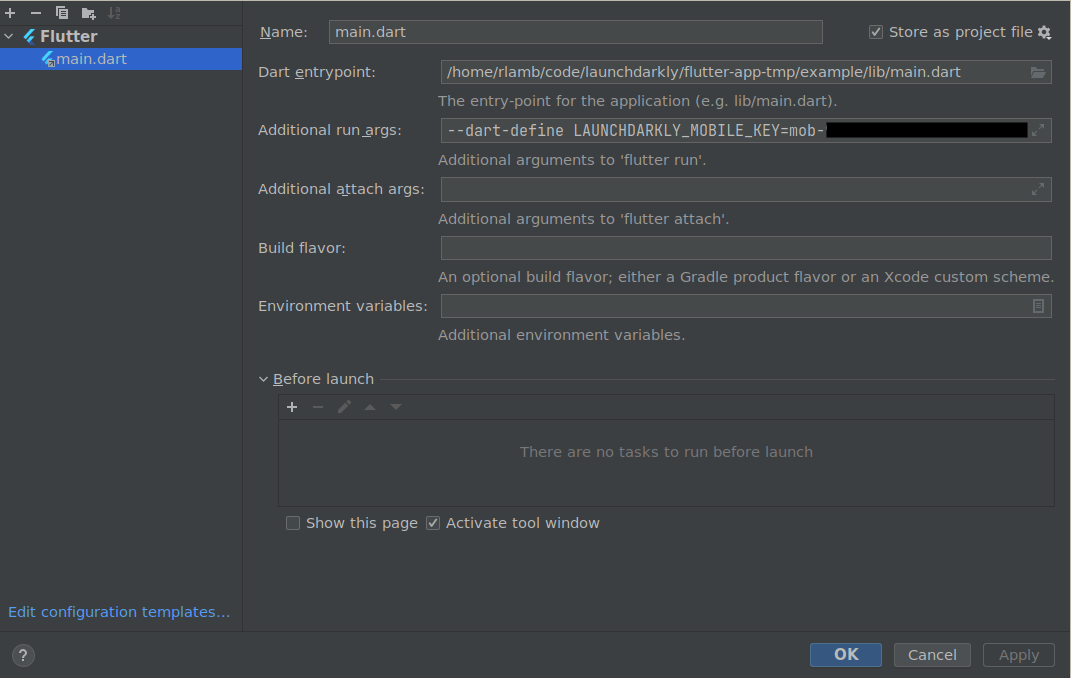
You can set these credentials in the `LAUNCHDARKLY_MOBILE_KEY` and `LAUNCHDARKLY_CLIENT_SIDE_ID` environment variables, and then use the `CredentialSource` helper to select your credential and provide it to your configuration. `CredentialSource` expects one of the two environment variables to be set, but not both. You can set them in your IDE, like this:

<Frame caption="Setting the &#x22;LAUNCHDARKLY_MOBILE_KEY&#x22; credential in your IDE.">
  <img src="https://mintcdn.com/launchdarkly/7dOLLfhGme_BglBp/images/__not_from_LD_app_UI/flutter-credentials-in-ide.png?fit=max&auto=format&n=7dOLLfhGme_BglBp&q=85&s=0365307d5b5fd594b7f30b7233f7f4ce" alt="Setting the &#x22;LAUNCHDARKLY_MOBILE_KEY&#x22; credential in your IDE." width="1071" height="678" data-path="images/__not_from_LD_app_UI/flutter-credentials-in-ide.png" />
</Frame>

Then, you can use the `CredentialSource` helper when creating your configuration object:

<CodeGroup>
  ```dart title="Flutter SDK v4, providing credentials in config" lines wrap theme={null}
  final config = LDConfig(CredentialSource.fromEnvironment(), AutoEnvAttributes.enabled);
  ```
</CodeGroup>

Alternatively, you can provide the correct credential on the command line when you build or run your application.

Here's how:

<CodeGroup>
  ```bash title="Flutter SDK v4, credentials at command line, running a browser app" lines wrap theme={null}
  flutter run --dart-define LAUNCHDARKLY_CLIENT_SIDE_ID=YourClientSideId -d Chrome
  ```

  ```bash title="Flutter SDK v4, credentials at command line, running a Windows app" lines wrap theme={null}
  flutter run --dart-define LAUNCHDARKLY_MOBILE_KEY=YourMobileKey -d windows
  ```
</CodeGroup>

### Initialize the client

After you install the SDK, create a client instance. You need your environment's credential, either a mobile key or client-side ID, and the context for which you want to evaluate flags. This authorizes your application to connect to a particular environment within LaunchDarkly.

<Warning>
  **Never embed a server-side SDK key into a client-side application**

  Mobile keys and client-side IDs are not secret and you can expose them in your client-side code without risk. However, never embed a server-side SDK key into a client-side application.
</Warning>

The following example shows the simplest way to create a client:

<CodeGroup>
  ```dart title="Flutter SDK v4" lines wrap theme={null}
  final config = LDConfig(
    CredentialSource.fromEnvironment(),
    AutoEnvAttributes.enabled,
    // all other configuration options are optional
  );

  // You'll need this context later, but you can ignore it for now.
  final context = LDContextBuilder()
    .kind("user", "example-user-key")
    .build();

  final client = LDClient(config, context);
  await client.start();
  ```
</CodeGroup>

This method of initializing the client lets you use the SDK as soon as it is ready to return evaluated flags.

However, the `start` function can take an indeterminate amount of time to complete. For example, if the SDK is started while a device is in airplane mode, then `start` may not complete until the device leaves airplane mode. However, if the SDK has been started before, with the same context, then it may have cached values and `start` will return once those cached values are loaded. Because of these possibilities, we recommend that you use a timeout when waiting for initialization.

Here's how:

<CodeGroup>
  ```dart title="Flutter SDK v4" lines wrap theme={null}
  await client.start().timeout(const Duration(seconds: 5));
  ```
</CodeGroup>

To learn more about the specific configuration options available in this SDK, read [`LDConfig`](https://pub.dev/documentation/launchdarkly_flutter_client_sdk/latest/launchdarkly_flutter_client_sdk/LDConfig-class.html).

<Warning>
  **Making feature flags available to this SDK**

  If you are building for Windows, Mac, Linux, Android, or iOS, you must use a mobile key. You must make feature flags available to mobile SDKs before the SDK can evaluate those flags.

  If you are building for a web browser, you must use a client-side ID. You must make feature flags available to client-side SDKs before the SDK can evaluate those flags.

  In both cases, if the SDK tries to evaluate a feature flag that is not available, the context will receive the fallback value for that flag.

  To make a flag available to this SDK, check the **SDKs using Mobile key** or **SDKs using Client-side ID** checkboxes during flag creation, or toggle on the option in the flag's right sidebar. To make all of a project's flags available to this SDK by default, check the **SDKs using Mobile key** or **SDKs using Client-side ID** checkboxes on your project's [Flag settings page](/docs/home/account/edit-project).
</Warning>

### Evaluate a flag

You can use the client to check which variation a particular context will receive for a feature flag.

Here's how:

<CodeGroup>
  ```dart title="Flutter SDK" lines wrap theme={null}
  bool showFeature = await client.boolVariation(flagKey, false);
  if (showFeature) {
      // Application code to show the feature
  }
  else {
      // The code to run if the feature is off
  }
  ```
</CodeGroup>

You can also create multiple clients, each tied to separate credentials and separate environments, if you need to.

## Background fetch

If you are using the Flutter SDK version 4 on desktop or on the web, by default your application will continue to get updates. For example, if the end user minimizes your Windows app or moves to a different tab in their web browser, the SDK will continue to fetch flags in the background. You can change this behavior in your client configuration.

If you are using the Flutter SDK version 4 in a power-constrained situation, such as in a mobile application on iOS or Android, the SDK will not receive real-time events when backgrounded.

<Note>
  **Earlier versions of the Flutter SDK performed background fetch on Android**

  In the Flutter SDK version 3, the SDK did receive real-time events through background fetch on Android platforms, but not on iOS platforms. In version 4 of the SDK, this behavior has been standardized. Mobile applications do not receive real-time events when backgrounded.
</Note>

## Shut down the client

Shut down the client when your application terminates. To learn more, read [Shutting down](/docs/sdk/features/shutdown#flutter).

## Data collection

To learn more about data collection within this SDK and implications on submissions to the Apple App Store, read the [Apple App Store data collection policy](/docs/sdk/concepts/apple-app-store).

## Supported features

This SDK supports the following features:

* [SDK configuration](/docs/sdk/features/config#flutter), including
  * [Application metadata configuration](/docs/sdk/features/app-config#flutter)
  * [Service endpoint configuration](/docs/sdk/features/service-endpoint-configuration#flutter)
* [Anonymous contexts and users](/docs/sdk/features/anonymous#flutter)
* [Automatic environment attributes](/docs/sdk/features/environment-attributes#flutter)
* [Caching contexts to local storage](/docs/sdk/features/local-storage#flutter)
* [Context configuration](/docs/sdk/features/context-config#flutter)
* [Flag variation evaluation](/docs/sdk/features/evaluating#flutter)
* [Flag variation evaluation details](/docs/sdk/features/evaluation-reasons#flutter)
* [Flushing events](/docs/sdk/features/flush#flutter)
* [Getting all flags](/docs/sdk/features/all-flags#flutter)
* [Identifying and changing contexts](/docs/sdk/features/identify#flutter)
* [Logging configuration](/docs/sdk/features/logging#flutter)
* [Monitoring SDK status](/docs/sdk/features/monitoring#flutter)
* [Offline mode](/docs/sdk/features/offline-mode#flutter)
* [Private attributes](/docs/sdk/features/private-attributes#flutter)
* [Relay Proxy configuration, using proxy mode](/docs/sdk/features/relay-proxy-configuration/proxy-mode#flutter)
* [Tracking custom events](/docs/sdk/features/events#flutter)
* [Shutting down](/docs/sdk/features/shutdown#flutter)
* [Subscribing to flag changes](/docs/sdk/features/flag-changes#flutter)