> ## Documentation Index
> Fetch the complete documentation index at: https://launchdarkly.com/docs/llms.txt
> Use this file to discover all available pages before exploring further.
# Tracking custom events
This topic explains how to send `custom` events using the track feature in each SDK. The track feature is available in server-side, client-side, and most edge SDKs.
## Tracking events
The track feature lets you record actions your customers take in your application as events. Events are specific to one LaunchDarkly environment and use an event key. You can use custom events to create LaunchDarkly metrics for use in experiments and guarded rollouts. To learn more, read [Metrics](/docs/home/metrics).
**Event keys and metric keys are different**
Sending custom events to LaunchDarkly requires a unique **event key**. You can set the event key to anything you want. Adding this event key to your codebase lets your SDK track actions customers take in your app as events.
LaunchDarkly also automatically generates a **metric key** when you create a metric. You only use the metric key to identify the metric in API calls. To learn more, read [Creating and managing metrics](/docs/home/metrics/create-metrics).
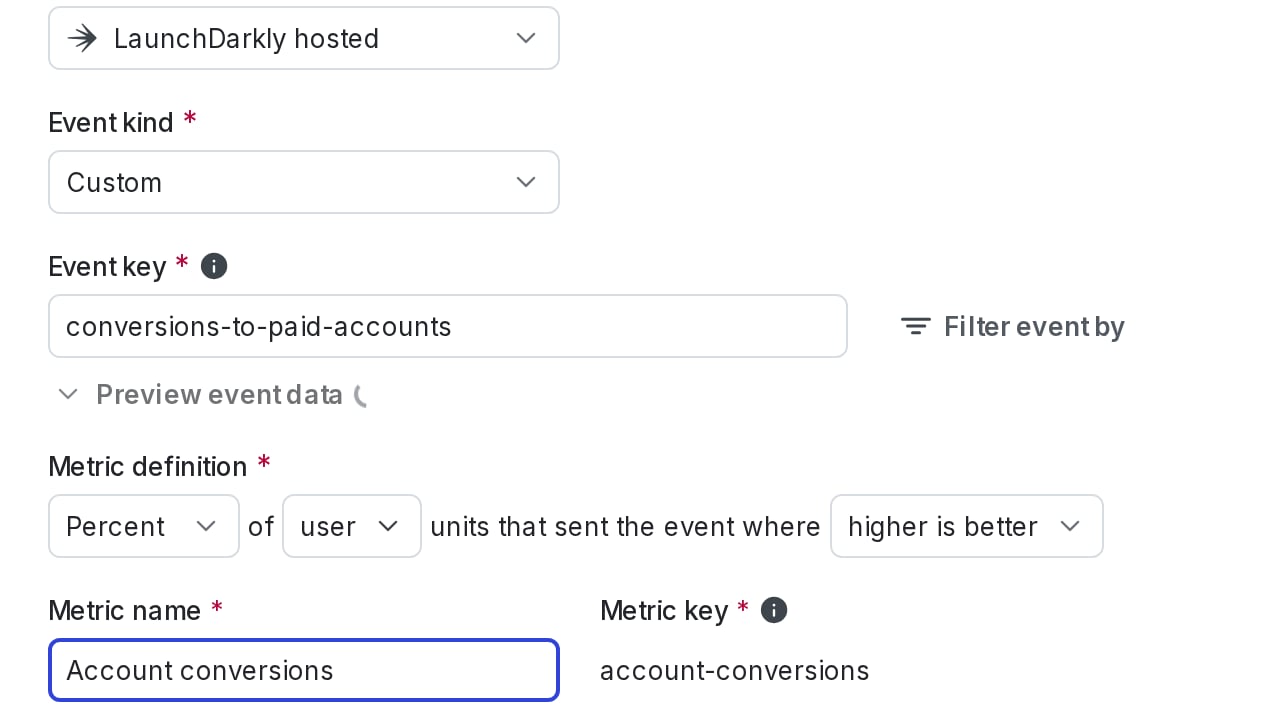
This is an example of a custom conversion binary metric with an event key of `conversions-to-paid-accounts`:
 Evaluating flags with `variation()` produces analytics events which you can observe on your LaunchDarkly **Live events** page. The initial context you specify in the client constructor, as well as any context you specify with `identify()`, produces an analytics event which is how LaunchDarkly receives your context data. To learn more, read [Live events](/docs/home/releases/live-events). In a few client-side SDKs, evaluating flags with `allFlags()` also produces analytics events. To learn more, read [About the all flags feature](/docs/sdk/features/all-flags#about-the-all-flags-feature).
To learn more about the different kinds of events SDKs send to LaunchDarkly, read [Analytics events](/docs/sdk/concepts/events). To learn how to view a list of all of the metric events your SDKs are sending to LaunchDarkly, read [Viewing incoming events](/docs/home/metrics/view-incoming-events).
Details about each SDK's configuration are available in the SDK-specific sections below.
* [Client-side SDKs](#client-side-sdks)
* [Server-side SDKs](#server-side-sdks)
* [Edge SDKs](#edge-sdks)
## Client-side SDKs
This feature is available in the following client-side SDKs:
* [.NET (client-side)](#net-client-side)
* [Android](#android)
* [C++ (client-side)](#c++-client-side)
* [Electron](#electron)
* [Flutter](#flutter)
* [iOS](#ios)
* [JavaScript](#javascript)
* [Node.js (client-side)](#node-js-client-side)
* [React Native](#react-native)
* [Roku](#roku)
* [Vue](#vue): The Vue SDK relies on the JavaScript SDK for this functionality.
### .NET (client-side)
The `Track` method lets you record `custom` events end users take in your application using an event key.
Here's how:
```csharp title="C#" lines wrap theme={null}
client.Track("example-event-key");
```
You can also attach custom data to your event by passing an extra parameter to `Track`, using the `LdValue` class to represent any value that can be encoded in JSON. To learn how, read [`LdClient.Track`](https://launchdarkly.github.io/dotnet-core/pkgs/sdk/client/api/LaunchDarkly.Sdk.Client.LdClient.html#LaunchDarkly_Sdk_Client_LdClient_Track_System_String_LaunchDarkly_Sdk_LdValue_).
### Android
The `track` method lets you record `custom` events end users take in your application using an event key. You can also attach custom JSON data to your event by passing an extra `JsonElement` parameter to `track`.
Here's how:
```java title="Java" lines wrap theme={null}
client.track("example-event-key");
```
```kotlin title="Kotlin" lines wrap theme={null}
client.track("example-event-key")
```
To learn more, read [`track`](https://launchdarkly.github.io/android-client-sdk/com/launchdarkly/sdk/android/LDClientInterface.html#track\(java.lang.String\)).
You can also attach custom data to your event by calling [`trackData`](https://launchdarkly.github.io/android-client-sdk/com/launchdarkly/sdk/android/LDClientInterface.html#trackData\(java.lang.String,com.launchdarkly.sdk.LDValue\)) or [`trackMetric`](https://launchdarkly.github.io/android-client-sdk/com/launchdarkly/sdk/android/LDClientInterface.html#trackMetric\(java.lang.String,com.launchdarkly.sdk.LDValue,double\)).
### C++ (client-side)
The `Track` method lets you record `custom` events end users take in your application using an event key.
Here's how:
```cpp title="C++ SDK v3.0 (native)" lines wrap theme={null}
client.Track("example-event-key");
```
To learn more, read [`Track`](https://launchdarkly.github.io/cpp-sdks/libs/client-sdk/docs/html/classlaunchdarkly_1_1client__side_1_1Client.html#a7c4ec4ae3cb04cb4fac27335834f3257).
### Electron
The `track` function lets you record `custom` events in your application with LaunchDarkly using an event key.
Here's how:
```js title="JavaScript" lines wrap theme={null}
client.track('example-event-key', { customProperty: someValue });
```
### Flutter
The `track` method lets you record `custom` events end users take in your application using an event key. You can also attach custom data to your event by passing an extra `LDValue` parameter or `num` parameter to `track`.
Here's how:
```dart title="Flutter SDK v4" lines wrap theme={null}
client.track('example-event-key', data: LDValue.buildObject().addBool("clicked-button", true).build());
```
To learn more, read [`track`](https://pub.dev/documentation/launchdarkly_flutter_client_sdk/latest/launchdarkly_flutter_client_sdk/LDClient/track.html).
### iOS
The `track` method lets you record `custom` events end users take in your application using an event key.
In the iOS SDK, `track` is a `custom` event added to the LDClient event store. A client app can set a tracking event to allow client customized data analysis. After an app has called `track`, the app cannot remove the event from the event store. LDClient periodically transmits events to LaunchDarkly based on the frequency set in `LDConfig.eventFlushInterval`. The LDClient must be started and online.
After the SDK's event store is full, the SDK discards new events until the event store is cleared when it reports events to LaunchDarkly. Configure the size of the event store using `LDConfig.eventCapacity`. The first parameter, `key`, is the key for the event. The SDK does nothing with the key, which can be any string the client app sends. The second parameter, `data`, is the data for the event. The `data` parameter is optional. The SDK does nothing with the data, which can be any valid JSON item as an `LDValue` instance.
Optionally, you can add a `metricValue` parameter of type `Double` to `track` in Swift or as a required parameter to the overloaded `track` method in Objective-C.
```swift title="Swift" lines wrap theme={null}
let data: LDValue = ["some-custom-key": "some-custom-value", "another-custom-key": 7]
try LDClient.get()!.track(key: "example-event-key", data: data)
```
```objectivec title="Objective-C" lines wrap theme={null}
LDValue *data = [LDValue ofArray:@[[LDValue ofBool:YES], [LDValue ofNumber:@5.5]]];
[[LDClient get] trackWithKey:@"example-event-key" data:data];
```
To learn more, read the generated API documentation for [Swift](https://launchdarkly.github.io/ios-client-sdk/Classes/LDClient.html#/Events) or [Objective-C](https://launchdarkly.github.io/ios-client-sdk/Classes/ObjcLDClient.html#/Events).
### JavaScript
The `track` method lets you record `custom` events end users take in your application using an event key.
To call `track`:
```js title="JavaScript" lines wrap theme={null}
client.track('example-event-key');
```
The second and third arguments are optional. They assist with observational analytics for Data Export destinations or for metrics:
* With Data Export, the second argument gives additional information without saving the data to the LaunchDarkly context. To learn more about Data export, read [Data Export](/docs/integrations/data-export).
* If you define clicked or tapped conversion or page viewed conversion metrics in LaunchDarkly, the SDK sends them automatically after you have initialized the client. You do not have to do anything else with the client to send click or page view events. The SDK will generate `page view` events correctly regardless of how the URL is changed, such as by the HTML5 history API or by changing the URL hash fragment. To learn more about metrics, read [Metrics](/docs/home/metrics).
To learn how to attach custom data to your event with optional parameters, read [`track`](https://launchdarkly.github.io/js-client-sdk/interfaces/LDClient.html#track).
If you are using the [LaunchDarkly observability SDKs](/docs/sdk/observability), calling `track()` also automatically indexes your sessions so that you can [search for sessions](/docs/home/observability/session-replay) where the end user has completed an action.
**Single-page apps**
The SDK automatically handles URL changes made by the HTML5 history API or by changing the URL hash fragment, and will trigger
Evaluating flags with `variation()` produces analytics events which you can observe on your LaunchDarkly **Live events** page. The initial context you specify in the client constructor, as well as any context you specify with `identify()`, produces an analytics event which is how LaunchDarkly receives your context data. To learn more, read [Live events](/docs/home/releases/live-events). In a few client-side SDKs, evaluating flags with `allFlags()` also produces analytics events. To learn more, read [About the all flags feature](/docs/sdk/features/all-flags#about-the-all-flags-feature).
To learn more about the different kinds of events SDKs send to LaunchDarkly, read [Analytics events](/docs/sdk/concepts/events). To learn how to view a list of all of the metric events your SDKs are sending to LaunchDarkly, read [Viewing incoming events](/docs/home/metrics/view-incoming-events).
Details about each SDK's configuration are available in the SDK-specific sections below.
* [Client-side SDKs](#client-side-sdks)
* [Server-side SDKs](#server-side-sdks)
* [Edge SDKs](#edge-sdks)
## Client-side SDKs
This feature is available in the following client-side SDKs:
* [.NET (client-side)](#net-client-side)
* [Android](#android)
* [C++ (client-side)](#c++-client-side)
* [Electron](#electron)
* [Flutter](#flutter)
* [iOS](#ios)
* [JavaScript](#javascript)
* [Node.js (client-side)](#node-js-client-side)
* [React Native](#react-native)
* [Roku](#roku)
* [Vue](#vue): The Vue SDK relies on the JavaScript SDK for this functionality.
### .NET (client-side)
The `Track` method lets you record `custom` events end users take in your application using an event key.
Here's how:
```csharp title="C#" lines wrap theme={null}
client.Track("example-event-key");
```
You can also attach custom data to your event by passing an extra parameter to `Track`, using the `LdValue` class to represent any value that can be encoded in JSON. To learn how, read [`LdClient.Track`](https://launchdarkly.github.io/dotnet-core/pkgs/sdk/client/api/LaunchDarkly.Sdk.Client.LdClient.html#LaunchDarkly_Sdk_Client_LdClient_Track_System_String_LaunchDarkly_Sdk_LdValue_).
### Android
The `track` method lets you record `custom` events end users take in your application using an event key. You can also attach custom JSON data to your event by passing an extra `JsonElement` parameter to `track`.
Here's how:
```java title="Java" lines wrap theme={null}
client.track("example-event-key");
```
```kotlin title="Kotlin" lines wrap theme={null}
client.track("example-event-key")
```
To learn more, read [`track`](https://launchdarkly.github.io/android-client-sdk/com/launchdarkly/sdk/android/LDClientInterface.html#track\(java.lang.String\)).
You can also attach custom data to your event by calling [`trackData`](https://launchdarkly.github.io/android-client-sdk/com/launchdarkly/sdk/android/LDClientInterface.html#trackData\(java.lang.String,com.launchdarkly.sdk.LDValue\)) or [`trackMetric`](https://launchdarkly.github.io/android-client-sdk/com/launchdarkly/sdk/android/LDClientInterface.html#trackMetric\(java.lang.String,com.launchdarkly.sdk.LDValue,double\)).
### C++ (client-side)
The `Track` method lets you record `custom` events end users take in your application using an event key.
Here's how:
```cpp title="C++ SDK v3.0 (native)" lines wrap theme={null}
client.Track("example-event-key");
```
To learn more, read [`Track`](https://launchdarkly.github.io/cpp-sdks/libs/client-sdk/docs/html/classlaunchdarkly_1_1client__side_1_1Client.html#a7c4ec4ae3cb04cb4fac27335834f3257).
### Electron
The `track` function lets you record `custom` events in your application with LaunchDarkly using an event key.
Here's how:
```js title="JavaScript" lines wrap theme={null}
client.track('example-event-key', { customProperty: someValue });
```
### Flutter
The `track` method lets you record `custom` events end users take in your application using an event key. You can also attach custom data to your event by passing an extra `LDValue` parameter or `num` parameter to `track`.
Here's how:
```dart title="Flutter SDK v4" lines wrap theme={null}
client.track('example-event-key', data: LDValue.buildObject().addBool("clicked-button", true).build());
```
To learn more, read [`track`](https://pub.dev/documentation/launchdarkly_flutter_client_sdk/latest/launchdarkly_flutter_client_sdk/LDClient/track.html).
### iOS
The `track` method lets you record `custom` events end users take in your application using an event key.
In the iOS SDK, `track` is a `custom` event added to the LDClient event store. A client app can set a tracking event to allow client customized data analysis. After an app has called `track`, the app cannot remove the event from the event store. LDClient periodically transmits events to LaunchDarkly based on the frequency set in `LDConfig.eventFlushInterval`. The LDClient must be started and online.
After the SDK's event store is full, the SDK discards new events until the event store is cleared when it reports events to LaunchDarkly. Configure the size of the event store using `LDConfig.eventCapacity`. The first parameter, `key`, is the key for the event. The SDK does nothing with the key, which can be any string the client app sends. The second parameter, `data`, is the data for the event. The `data` parameter is optional. The SDK does nothing with the data, which can be any valid JSON item as an `LDValue` instance.
Optionally, you can add a `metricValue` parameter of type `Double` to `track` in Swift or as a required parameter to the overloaded `track` method in Objective-C.
```swift title="Swift" lines wrap theme={null}
let data: LDValue = ["some-custom-key": "some-custom-value", "another-custom-key": 7]
try LDClient.get()!.track(key: "example-event-key", data: data)
```
```objectivec title="Objective-C" lines wrap theme={null}
LDValue *data = [LDValue ofArray:@[[LDValue ofBool:YES], [LDValue ofNumber:@5.5]]];
[[LDClient get] trackWithKey:@"example-event-key" data:data];
```
To learn more, read the generated API documentation for [Swift](https://launchdarkly.github.io/ios-client-sdk/Classes/LDClient.html#/Events) or [Objective-C](https://launchdarkly.github.io/ios-client-sdk/Classes/ObjcLDClient.html#/Events).
### JavaScript
The `track` method lets you record `custom` events end users take in your application using an event key.
To call `track`:
```js title="JavaScript" lines wrap theme={null}
client.track('example-event-key');
```
The second and third arguments are optional. They assist with observational analytics for Data Export destinations or for metrics:
* With Data Export, the second argument gives additional information without saving the data to the LaunchDarkly context. To learn more about Data export, read [Data Export](/docs/integrations/data-export).
* If you define clicked or tapped conversion or page viewed conversion metrics in LaunchDarkly, the SDK sends them automatically after you have initialized the client. You do not have to do anything else with the client to send click or page view events. The SDK will generate `page view` events correctly regardless of how the URL is changed, such as by the HTML5 history API or by changing the URL hash fragment. To learn more about metrics, read [Metrics](/docs/home/metrics).
To learn how to attach custom data to your event with optional parameters, read [`track`](https://launchdarkly.github.io/js-client-sdk/interfaces/LDClient.html#track).
If you are using the [LaunchDarkly observability SDKs](/docs/sdk/observability), calling `track()` also automatically indexes your sessions so that you can [search for sessions](/docs/home/observability/session-replay) where the end user has completed an action.
**Single-page apps**
The SDK automatically handles URL changes made by the HTML5 history API or by changing the URL hash fragment, and will trigger click and page view events correctly.
**Do Not Track and ad blocking software**
In v4.x of the JavaScript SDK, you can disable sending events by [setting the `sendEvents` configuration](https://launchdarkly.github.io/js-core/packages/sdk/browser/docs/interfaces/LDOptions.html#sendEvents) to `false`.
Version 3.x of the JavaScript SDK respects the [Do Not Track events](https://www.eff.org/issues/do-not-track) header. If an end user has Do Not Track enabled in their browser, v3.x of the SDK does not send analytics events for flag evaluations or metrics to `events.launchdarkly.com`.
Version 3.x of the JavaScript SDK respects the [Do Not Track events](https://www.eff.org/issues/do-not-track) header. If an end user has Do Not Track enabled in their browser, v3.x of the SDK does not send analytics events for flag evaluations or metrics to `events.launchdarkly.us`.
Version 3.x of the JavaScript SDK respects the [Do Not Track events](https://www.eff.org/issues/do-not-track) header. If an end user has Do Not Track enabled in their browser, v3.x of the SDK does not send analytics events for flag evaluations or metrics to `events.eu.launchdarkly.com`.
In addition, ad blocking software may block analytics events from being sent. This does not impact feature flag evaluations. To learn more about the events SDKs send to LaunchDarkly, read [Analytics events](/docs/sdk/concepts/events).
### Node.js (client-side)
The `track` method lets you record `custom` events end users take in your application using an event key.
Here's an example:
```js title="JavaScript" lines wrap theme={null}
client.track('example-event-key1');
client.track('example-event-key2', { someData: 2 });
```
To learn how to attach custom data to your event with optional parameters, read [`track`](https://launchdarkly.github.io/node-client-sdk/interfaces/LDClient.html#track).
### React Native
The `track` method lets you record `custom` events end users take in your application using an event key. You can also attach custom JSON data to your event by passing an extra parameter to `track`.
**Availability**
This parameter is available in v2.1.0 and later.
Optionally, you can add a `metricValue` parameter to the `track` method if you are using the latest version of Experimentation.
Here's how:
```js title="JavaScript" lines wrap theme={null}
client.track('example-event-key1', false);
client.track('example-event-key2', { someData: 'value' });
```
To learn how to attach custom data to your event with optional parameters, read [`track`](https://launchdarkly.github.io/js-core/packages/sdk/react-native/docs/classes/LDClientImpl.html#track).
### Roku
The `track` method lets you record `custom` events end users take in your application using an event key.
Here's how:
```brightscript title="BrightScript" lines wrap theme={null}
' without optional data
launchDarkly.track("example-event-key")
' with optional data
launchDarkly.track("example-event-key", {"customField": 123})
' with optional numeric metric
launchDarkly.track("example-event-key", invalid, 52.3)
```
### Vue
The Vue SDK relies on the [JavaScript SDK](#javascript) for tracking custom events. Retrieve the client with `useLDClient()` and call the `track()` method.
Here's how:
```html title="Vue SDK v3.0" lines wrap theme={null}
```
## Server-side SDKs
This feature is available in the following server-side SDKs:
* [.NET (server-side)](#net-server-side)
* [Apex](#apex)
* [C++ (server-side)](#c++-server-side)
* [Erlang](#erlang)
* [Go](#go)
* [Haskell](#haskell)
* [Java](#java)
* [Lua](#lua)
* [Node.js (server-side)](#node-js-server-side)
* [PHP](#php)
* [Python](#python)
* [Ruby](#ruby)
* [Rust](#rust)
### .NET (server-side)
The [`Track`](https://launchdarkly.github.io/dotnet-core/pkgs/sdk/server/api/LaunchDarkly.Sdk.Server.LdClient.html#LaunchDarkly_Sdk_Server_LdClient_Track_) method lets you record `custom` events end users take in your application using an event key.
Here's an example:
```csharp title=".NET SDK v7.0+ (C#)" lines wrap theme={null}
client.Track("example-event-key", context);
```
You can also attach custom data to your event by passing an extra parameter to `Track`. To do this, use the [`LdValue`](https://launchdarkly.github.io/dotnet-core/pkgs/sdk/server/api/LaunchDarkly.Sdk.LdValue.html) type, which can contain any kind of data supported by JSON. You can also pass another parameter for a custom metric value.
### Apex
The `track` method lets you record actions your users take in your you do application. You can also attach custom JSON data to your event by passing an `LDValue` parameter to `track`, or a custom metric value by passing a `Double` parameter.
Here's how:
```java title="Apex" lines wrap theme={null}
client.track(user, 'example-event-key', 52.3, LDValue.of('my value'));
```
To learn how to attach custom data to your event with extra parameters, read [Other methods](https://github.com/launchdarkly/apex-server-sdk/blob/master/doc.md#other-methods-1).
### C++ (server-side)
The `Track` method lets you record `custom` events end users take in your application using an event key. Optionally, you can include additional data associated with the event.
Here's how:
```cpp title="C++ SDK v3.0 (native)" lines wrap theme={null}
/* track the event */
client.Track(context, "example-event-key");
/* track the event and associate data with it */
client.Track(context, "example-event-key", 42);
```
```c title="C++ SDK v3.0 (C binding)" lines wrap theme={null}
/* track the event */
LDServerSDK_TrackEvent(client, context, "example-event-key");
/* track the event and associate data with it */
LDServerSDK_TrackData(client, context, "example-event-key", LDValue_NewNumber(42));
```
To learn more, read `Track()` in [`Client`](https://launchdarkly.github.io/cpp-sdks/libs/server-sdk/docs/html/classlaunchdarkly_1_1server__side_1_1Client.html).
### Erlang
The `track` method lets you record `custom` events end users take in your application using an event key.
Here's how:
```text title="Erlang SDK v2.0+" lines wrap theme={null}
ldclient:track(<<"example-event-key">>, #{key => <<"example-context-key">>}, #{data => <<"example">>})
```
To learn more, read [`track`](https://hexdocs.pm/launchdarkly_server_sdk/ldclient.html#track-3).
You can also attach a JSON object containing arbitrary data to your event, or a custom metric value. To learn how, read [`track_metric`](https://hexdocs.pm/launchdarkly_server_sdk/ldclient.html#track_metric-4).
### Go
The `Track` method lets you record `custom` events end users take in your application using an event key.
In this example, we use [`TrackEvent`](https://pkg.go.dev/github.com/launchdarkly/go-server-sdk/v7#LDScopedClient.TrackEvent) to send an event with the key `example-event-key`.
Here's how:
```go title="Go SDK v7.13.4+, using LDScopedClient" lines wrap theme={null}
scopedClient.TrackEvent("example-event-key")
// LDScopedClient is in beta and may change without notice.
```
```go title="Go SDK v6+, using LDClient" lines wrap theme={null}
client.TrackEvent("example-event-key", context)
```
You can also attach custom data to your event by calling [`TrackData`](https://pkg.go.dev/github.com/launchdarkly/go-server-sdk/v7#LDScopedClient.TrackData), which takes an extra parameter. Or, if you are using experimentation, you can specify a numeric metric with [`TrackMetric`](https://pkg.go.dev/github.com/launchdarkly/go-server-sdk/v7#LDScopedClient.TrackMetric).
### Haskell
The `track` method lets you record `custom` events end users take in your application using an event key.
Here's how:
```haskell title="Haskell SDK v4.0" lines wrap theme={null}
track client context "example-event-key" Nothing Nothing
```
You can also attach a JSON object containing arbitrary data to your event, or a custom metric value. To learn how, read [`track`](https://launchdarkly.github.io/haskell-server-sdk/src/LaunchDarkly.Server.Client.html#track).
### Java
The [`track`](https://launchdarkly.github.io/java-core/lib/sdk/server/com/launchdarkly/sdk/server/LDClient.html#track-java.lang.String-com.launchdarkly.sdk.LDContext-) method lets you record `custom` events end users take in your application using an event key.
Here's how:
```java title="Java SDK v6.0+" lines wrap theme={null}
client.track("example-event-key", context);
```
You can also attach custom JSON data to your event with an alternate version of `track`, [`trackData`](https://launchdarkly.github.io/java-core/lib/sdk/server/com/launchdarkly/sdk/server/LDClient.html#trackData-java.lang.String-com.launchdarkly.sdk.LDContext-com.launchdarkly.sdk.LDValue-). You can set the data to any value that can be represented in JSON. To learn more, read [`LDValue`](https://launchdarkly.github.io/java-core/lib/sdk/server/com/launchdarkly/sdk/LDValue.html).
If you are using [Experimentation](/docs/home/experimentation), you can specify a numeric metric with [`trackMetric`](https://launchdarkly.github.io/java-core/lib/sdk/server/com/launchdarkly/sdk/server/LDClient.html#trackMetric-java.lang.String-com.launchdarkly.sdk.LDContext-com.launchdarkly.sdk.LDValue-double-).
### Lua
The `track` method lets you record `custom` events end users take in your application using an event key. Optionally, you can include additional data associated with the event.
Here's how:
```lua title="Lua SDK v2" lines wrap theme={null}
client:track("example-event-key", context);
```
You can also attach an object containing arbitrary data to your event. To learn how, read [`track`](https://launchdarkly.github.io/lua-server-sdk/modules/launchdarkly-server-sdk.html#track).
### Node.js (server-side)
The `track` method lets you record `custom` events end users take in your application using an event key.
Here's how:
```js title="Node.js SDK v7.x and later" lines wrap theme={null}
client.track('example-event-key', context);
```
You can also attach custom data to your event with optional parameters. To learn how, read [track](https://launchdarkly.github.io/js-core/packages/sdk/server-node/docs/interfaces/LDClient.html#track).
### PHP
The `track` method lets you record `custom` events end users take in your application using an event key.
Here's how:
```php title="PHP SDK v5.0+" lines wrap theme={null}
$client->track("example-event-key", $context);
```
You can also attach custom data, including anything that can be marshaled to JSON, to your event by passing an extra parameter to `track`. To learn how, read [`track()`](https://launchdarkly.github.io/php-server-sdk/classes/LaunchDarkly-LDClient.html#method_track).
### Python
The `track` method lets you record actions end users take on your site. This lets you record events that take place on your server.
Here's how:
```python title="Python SDK v8.0+" lines wrap theme={null}
ldclient.get().track("example-event-key", context)
```
You can also attach custom data to your event with optional parameters. To learn how, read [`track`](https://launchdarkly-python-sdk.readthedocs.io/en/latest/api-main.html#ldclient.client.LDClient.track).
### Ruby
The `track` method lets you record `custom` events end users take in your application using an event key.
Here's how:
```ruby title="Ruby SDK v7.0+" lines wrap theme={null}
client.track("example-event-key", context)
```
You can also attach an extra hash containing arbitrary data to your event. To learn how, read [`track`](https://launchdarkly.github.io/ruby-server-sdk/LaunchDarkly/LDClient.html#track-instance_method).
### Rust
The `track` method lets you record `custom` events end users take in your application using an event key.
In this example, we use [`track_event`](https://docs.rs/launchdarkly-server-sdk/latest/launchdarkly_server_sdk/struct.Client.html#method.track_event) to send an event with the key `example-event-key`.
Here's how:
```rust title="Rust SDK v1+" lines wrap theme={null}
client.track_event(context, "example-event-key");
```
You can also attach custom data to your event by calling [`track_data`](https://docs.rs/launchdarkly-server-sdk/latest/launchdarkly_server_sdk/struct.Client.html#method.track_data), which takes an extra parameter. Or, if you are using experimentation, you can specify a numeric metric with [`track_metric`](https://docs.rs/launchdarkly-server-sdk/latest/launchdarkly_server_sdk/struct.Client.html#method.track_metric).
## Edge SDKs
All edge SDKs can be used with one of the LaunchDarkly client-side SDKs as follows:
* The edge SDK gets all flags at the edge for a given context, and bootstraps them onto a cached payload
* The client-side SDK initializes the bootstrapped payload
* The client-side SDK evaluates the flags and sends events back to LaunchDarkly
Most edge SDKs support sending events directly. The [Akamai SDK](/docs/sdk/edge/akamai) does not. If you configure the edge SDK to send events, then using a client-side SDK is not necessary. This enables [Experimentation](/docs/home/experimentation) and [metrics](/docs/home/metrics) use cases if you are using the edge SDK in conjunction with a server-side SDK. To learn more, read [Experimentation and metric events](/docs/home/experimentation/events).
You need to configure the edge SDK to enable sending events. To learn more, read [SDK configuration](/docs/sdk/features/config#edge-sdks).
This feature is available in the following edge SDKs:
* [Cloudflare](#cloudflare)
* [Fastly](#fastly)
* [Vercel](#vercel)
### Cloudflare
Sending events is available in Cloudflare SDK version 2.3.0 and later. You must explicitly enable sending events in your [SDK configuration](/docs/sdk/features/config#cloudflare).
The `track` method lets you record `custom` events end users take in your application using an event key.
Here's how:
```ts title="Cloudflare SDK v2.3.0+ (TypeScript)" lines wrap theme={null}
client.track('example-event-key', context);
```
You can also attach custom data to your event with optional parameters.
Here's how:
```ts title="Cloudflare SDK v2.3.0+ (TypeScript)" lines wrap theme={null}
const exampleData = { customProperty: 'someValue' };
const metricValue = 10;
client.track('example-event-key', context, exampleData, metricValue);
```
When you are working with an edge SDK, you must also call `flush` after sending any events:
```ts title="Cloudflare SDK v2.3.0+ (TypeScript)" lines wrap theme={null}
executionContext.waitUntil(
client.flush((err, res) => {
console.log(`flushed events result: ${res}, error: ${err}`);
}),
);
```
To learn more, read [Flushing events](/docs/sdk/features/flush#cloudflare).
### Fastly
Sending events from the Fastly SDK is enabled by default. You can change this in the SDK [SDK configuration](/docs/sdk/features/config#fastly).
The `track` method lets you record `custom` events end users take in your application using an event key.
Here's how:
```ts title="TypeScript" lines wrap theme={null}
client.track('example-event-key', context);
```
You can also attach custom data to your event with optional parameters.
Here's how:
```ts title="TypeScript" lines wrap theme={null}
const exampleData = { customProperty: 'someValue' };
const metricValue = 10;
client.track('example-event-key', context, exampleData, metricValue);
```
To learn more, read [`track`](https://launchdarkly.github.io/js-core/packages/sdk/fastly/docs/classes/LDClient.html#track).
When you are working with an edge SDK, you must also flush the events before your worker exits to ensure that they are sent back to LaunchDarkly. If you call `flush` inside the `waitUntil` method, then flushing events will not impact the handler's response time. To learn more, read the [Fastly Compute documentation on `waitUntil`](https://js-compute-reference-docs.edgecompute.app/docs/globals/FetchEvent/prototype/waitUntil).
Here's how:
```ts title="TypeScript" lines wrap theme={null}
async function handleRequest(event: FetchEvent) {
// ...
event.waitUntil(
client.flush((err, res) => {
console.log(`flushed events result: ${res}, error: ${err}`);
}),
);
// ...
}
```
To learn more, read [Flushing events](/docs/sdk/features/flush#fastly).
### Vercel
Sending events is available in Vercel SDK version 1.2.0 and later. You must explicitly enable sending events in your [SDK configuration](/docs/sdk/features/config#vercel).
The `track` method lets you record `custom` events end users take in your application using an event key.
Here's how:
```ts title="Vercel SDK v1.2.0+ (TypeScript)" lines wrap theme={null}
client.track('example-event-key', context);
```
You can also attach custom data to your event with optional parameters.
Here's how:
```ts title="Vercel SDK v1.2.0+ (TypeScript)" lines wrap theme={null}
const exampleData = { customProperty: 'someValue' };
const metricValue = 10;
client.track('example-event-key', context, exampleData, metricValue);
```
When you are working with an edge SDK, you must also flush the events before your worker exits to ensure that they are sent back to LaunchDarkly. If you call `flush` inside the `waitUntil` method, then flushing events will not impact the handler's response time. To learn more, read the [Vercel documentation on `waitUntil`](https://vercel.com/docs/functions/edge-functions/edge-functions-api#waituntil).
Here's how:
```ts title="Vercel SDK v1.2.0+ (TypeScript)" lines wrap theme={null}
import { waitUntil } from '@vercel/functions';
waitUntil(
client.flush((err, res) => {
console.log(`flushed events result: ${res}, error: ${err}`);
}),
);
```
To learn more, read [Flushing events](/docs/sdk/features/flush#vercel).