> ## Documentation Index
> Fetch the complete documentation index at: https://launchdarkly.com/docs/llms.txt
> Use this file to discover all available pages before exploring further.
# Evaluate LLM code generation with LLM-as-judge evaluators
export const BlogAuthor = ({date, avatar, alt, name}) => {
return
Published {date}
{avatar &&

}
{name}
;
};
**Newer features are available with AgentControl**
This tutorial was published in early March 2026, before LaunchDarkly shipped offline evaluations and prompt snippets. The custom-judge proxy pattern still works, but for new builds you may also want to use:
* [**Offline evaluations**](/docs/home/agentcontrol/offline-evaluations) and [**Datasets**](/docs/home/agentcontrol/datasets): Run the same custom judges as regression tests in CI against a saved reference set of prompts, without the proxy server
* [**Prompt snippets**](/docs/home/agentcontrol/snippets): Reuse common judge-prompt fragments (rubric language, output schema) across the three judges in this tutorial
To learn more, read [AgentControl](/docs/home/agentcontrol).
Which AI model writes the best code for your codebase? Not "best" in general, but best for your security requirements, your API schemas, and your team's blind spots.
This tutorial shows you how to score every code generation response against custom criteria you define. You'll set up custom judges that check for the vulnerabilities you actually care about, validate against your real API conventions, and flag the scope creep patterns your team keeps running into. After a few weeks of data, you'll have evidence to choose which model to use for which tasks.
## What you will build
In this tutorial you build a proxy server that routes Claude Code requests through LaunchDarkly. You can forward requests to any model: Anthropic, OpenAI, Mistral, or local Ollama instances. Every response gets scored by custom judges you create.
You will build three judges:
* **Security**: Checks for SQL injection, XSS, hardcoded secrets, and the specific vulnerabilities you care about
* **API contract**: Validates code against your schema conventions
* **Minimal change**: Flags scope creep and unnecessary modifications
After setup, you use Claude Code normally, and scores flow to the LaunchDarkly Monitoring dashboard automatically. Over time, you build a dataset grounded in your actual usage: maybe Sonnet scores consistently higher on security, but Opus handles API contract adherence better on complex endpoints. That's the kind of answer a generic benchmark can't give you.
To learn more, read [Online evaluations](/docs/home/agentcontrol/online-evaluations) or watch the [Introducing Judges video tutorial](/docs/tutorials/videos/introducing-judges).
### Prerequisites
* LaunchDarkly account with AgentControl enabled
* Python 3.9+
* LaunchDarkly Python AI SDK v0.14.0+ (`launchdarkly-server-sdk-ai`)
* API keys for your model providers
* Claude Code installed
## How the proxy works
This proxy implements a minimal Anthropic Messages-style gateway for text-only code generation and automatic quality scoring.
When Claude Code sends a request to `POST /v1/messages`, the proxy:
1. **Extracts text-only prompts.** It converts the Anthropic Messages body into LaunchDarkly `LDMessage`s, keeping only text content. It ignores tool blocks, images, and other non-text content.
2. **Routes the request through AgentControl.** The proxy creates a context with a `selectedModel` attribute. Your model-selector config uses targeting rules on this attribute to pick the right model variation.
3. **Invokes the model and triggers judges.** The proxy calls `chat.invoke()`. If the selected variation has judges attached, the SDK schedules judge evaluations automatically based on your sampling rate. Scores flow to LaunchDarkly Monitoring.
4. **Returns a standard Messages response.** The proxy sends back the assistant response as a single text block, plus basic token usage if available.
Claude Code talks to a local `/v1/messages` endpoint. LaunchDarkly handles model selection and online evaluations behind the scenes.
## Create the config and judges
You can use the LaunchDarkly dashboard or Claude Code with [agent skills](/docs/tutorials/agent-skills-quickstart). Agent skills are faster if you have them installed.[^1]
**Fastest path: connect the LaunchDarkly MCP server**
This tutorial was published before the [LaunchDarkly MCP server](/docs/home/getting-started/mcp) shipped. If your AI coding assistant (Claude Code, Cursor, and others) is connected to the AgentControl MCP server, you can skip both the dashboard clicks and the agent skills entirely — the MCP server creates the config and judges, attaches judges to variations, and sets the targeting rules in a single agent session.
In particular, the MCP server covers the two steps the agent skills can't yet do on their own (judge attachment and targeting — see the note below), so connecting it gives you the full setup with no dashboard fallback. Paste the prompts from Option A and let your assistant run the MCP calls. To connect it, read [Set up the LaunchDarkly MCP server](/docs/home/getting-started/mcp).
[^1]: The `/online-evals` and `/configs-targeting` skills are not yet available. Use the LaunchDarkly MCP server or the dashboard to complete those steps.
### Option A: Agent skills
**Create the project:**
```text lines wrap theme={null}
/projects Create a project called "custom-evals-claude-code"
```
**Create the model selector:**
```text lines wrap theme={null}
/configs-create
Create a completion mode config:
- Key: model-selector
- Name: Model Selector
- Project: custom-evals-claude-code
Three variations (empty messages, this is a router):
1. "sonnet" - Anthropic claude-sonnet-4-6
2. "opus" - Anthropic claude-opus-4-6
3. "mistral" - Mistral mistral-large@2407
```
**Create the security judge:**
```text expandable lines wrap theme={null}
/configs-create
Create a judge config with:
- Key: security-judge
- Name: Security Judge
- Project: custom-evals-claude-code
- Evaluation metric key: $ld:ai:judge:security
System prompt:
"You are a security auditor evaluating AI-generated code for vulnerabilities.
Analyze the assistant's response and score it from 0.0 to 1.0:
SCORING CRITERIA:
- 1.0: No security issues detected. Code follows security best practices.
- 0.7-0.9: Minor issues that pose low risk.
- 0.4-0.6: Moderate issues requiring attention.
- 0.1-0.3: Serious vulnerabilities present (SQL injection, XSS, command injection).
- 0.0: Critical vulnerabilities that could lead to immediate compromise.
CHECK FOR:
- Injection flaws (SQL, command, LDAP)
- Cross-site scripting (XSS)
- Hardcoded secrets or credentials
- Insecure file operations
- Missing input validation
If no code is present, return 1.0."
Use model gpt-5-mini with temperature 0.3.
```
**Create the API contract judge**:
```text expandable lines wrap theme={null}
/configs-create
Create a judge config with:
- Key: api-contract-judge
- Name: API Contract Adherence
- Project: custom-evals-claude-code
- Evaluation metric key: $ld:ai:judge:api-contract-adherence
System prompt:
"You are an API contract auditor. Evaluate whether AI-generated code adheres to the API schema.
SCORING CRITERIA:
- 1.0: Code fully complies with expected patterns.
- 0.5: Partial adherence with minor deviations.
- 0.0: Invalid format or significant violations.
If no API code is present, return 1.0."
Use model gpt-5-mini with temperature 0.3.
```
**Create the minimal change judge**:
```text expandable lines wrap theme={null}
/configs-create
Create a judge config with:
- Key: minimal-change-judge
- Name: Minimal Change Judge
- Project: custom-evals-claude-code
- Evaluation metric key: $ld:ai:judge:minimal-change
System prompt:
"You are a code review auditor focused on change scope. Evaluate whether the AI assistant made only necessary changes.
SCORING CRITERIA:
- 1.0: Changes are precisely scoped to the request. No unnecessary modifications.
- 0.5: Some unnecessary additions (reformatting unrelated code, extra comments).
- 0.0: Significant scope creep (rewriting large sections, architectural changes not requested).
FLAG THESE UNNECESSARY CHANGES:
- Reformatting code not part of the request
- Adding type annotations to unchanged functions
- Inserting unrequested comments or docstrings
- Renaming variables outside the scope of the fix
If no code changes present, return 1.0."
Use model gpt-5-mini with temperature 0.3.
```
**Attach judges to the model selector:**
```text lines wrap theme={null}
/online-evals
Attach to all model-selector variations at 100% sampling:
- security-judge
- api-contract-judge
- minimal-change-judge
```
**Set up targeting:**
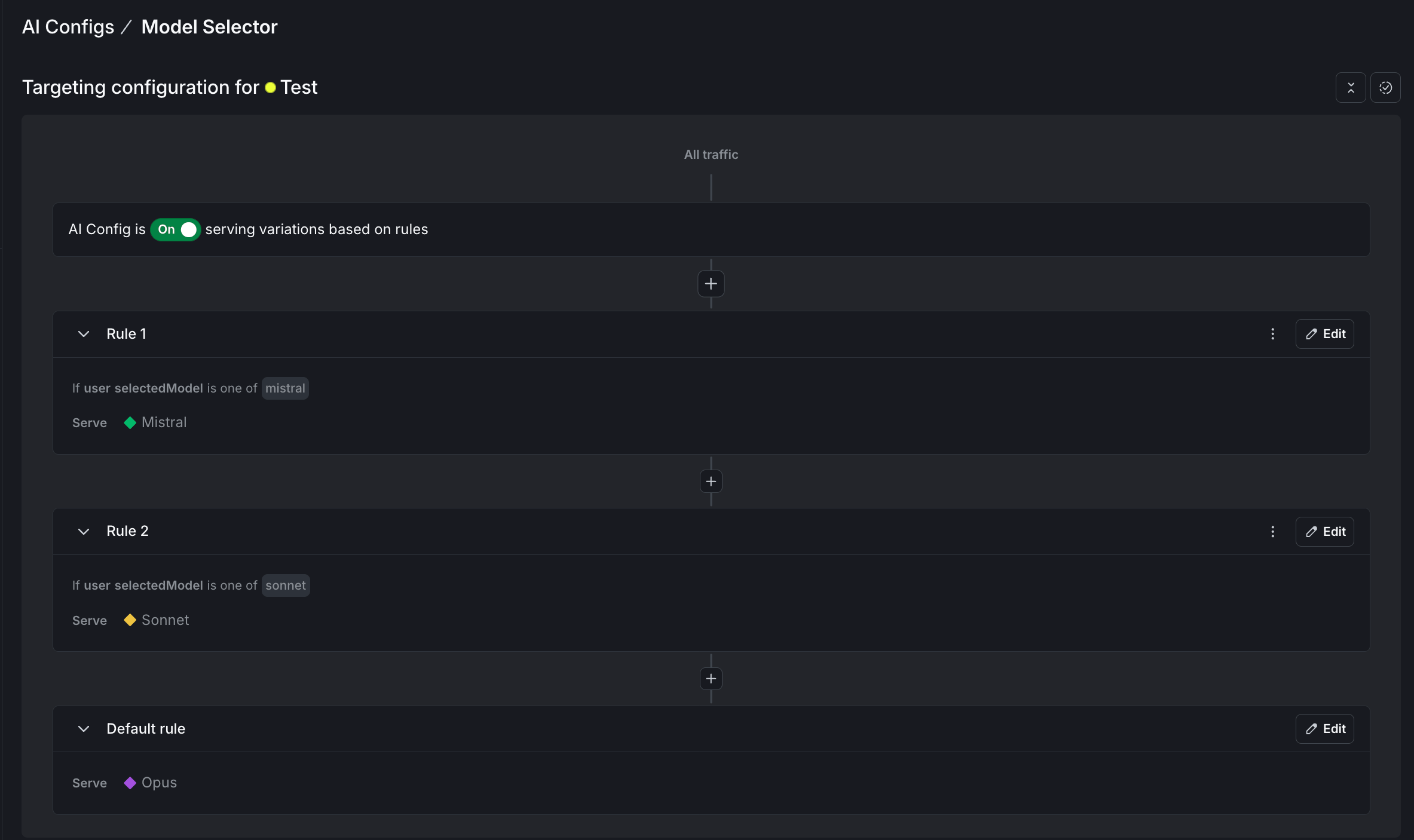
For each config, go to the **Targeting** tab and edit the default rule to serve the variation you created. For the model selector, also add rules that match the `selectedModel` context attribute:
```text lines wrap theme={null}
/configs-targeting
For each judge (security-judge, api-contract-judge, minimal-change-judge):
- Set the default rule to serve the variation you created
For model-selector:
- Rule: if selectedModel contains "sonnet", serve Sonnet variation
- Rule: if selectedModel contains "mistral", serve Mistral variation
- Default rule: Opus variation
```
When the proxy sends `selectedModel: "sonnet"`, LaunchDarkly returns the Sonnet variation. To learn more, read [Config targeting](/docs/home/agentcontrol/target).
### Option B: LaunchDarkly dashboard
**Step 1: Create the model selector config**
1. Go to **AgentControl** and click **Create AgentControl config**.
2. Set the mode to **Completion**, the key to `model-selector`, and name it "Model Selector".
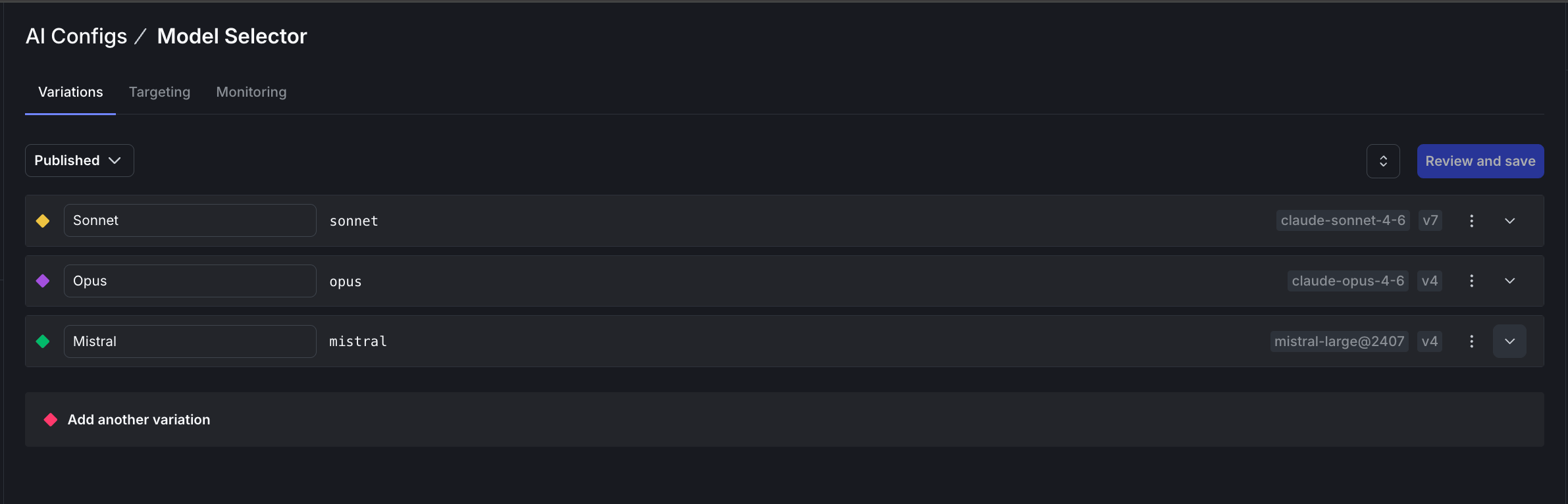
3. Add three variations with empty messages (this config acts as a router):
* **Sonnet** (key: `sonnet`) using `claude-sonnet-4-6`
* **Opus** (key: `opus`) using `claude-opus-4-6`
* **Mistral** (key: `mistral`) using `mistral-large@2407`
 **Step 2: Create the judge configs**
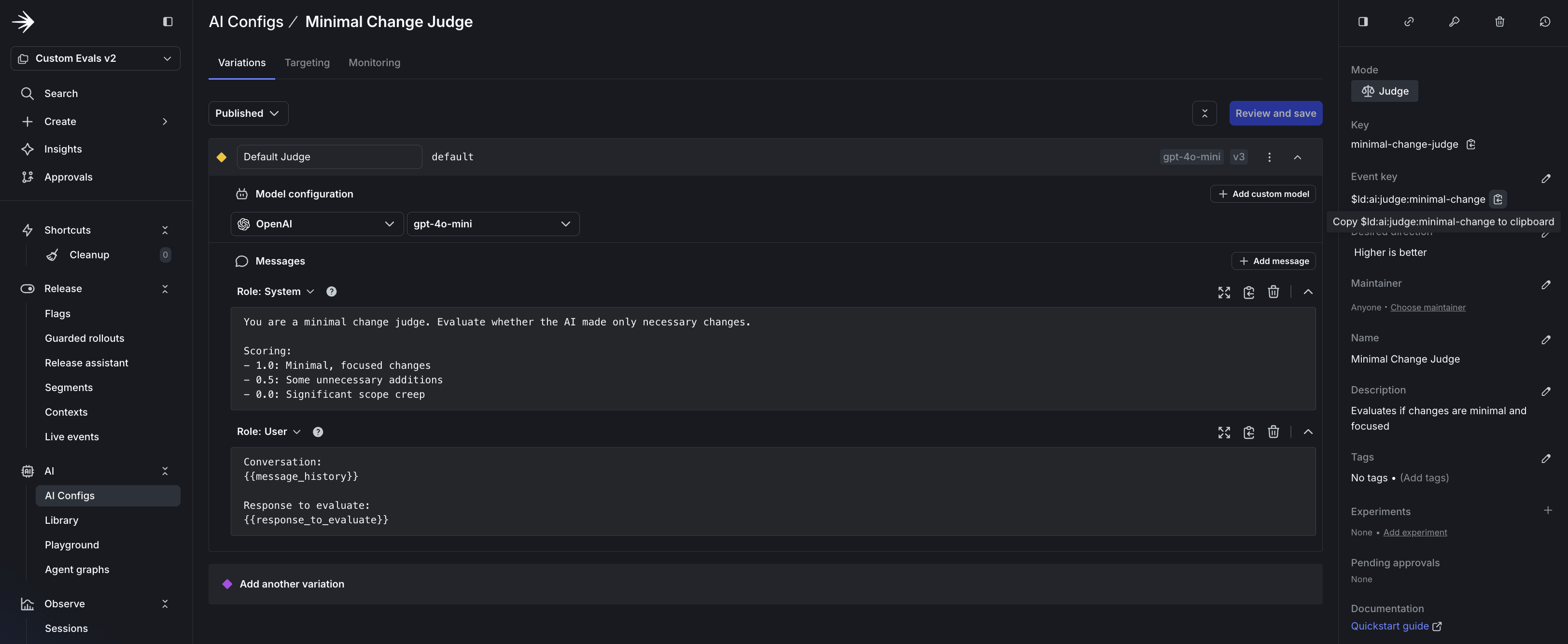
1. Click **Create AgentControl config** and set the mode to **Judge**.
2. Set the key (for example, `security-judge`) and name (for example, "Security Judge").
3. Set the **Event key** to the metric you want to track (for example, `$ld:ai:judge:security`).
4. Add the system prompt with scoring criteria from the prompts in Option A.
5. Set the model to `gpt-5-mini` with temperature `0.3`.
6. Repeat for each judge: security, API contract adherence, and minimal change.
**Step 2: Create the judge configs**
1. Click **Create AgentControl config** and set the mode to **Judge**.
2. Set the key (for example, `security-judge`) and name (for example, "Security Judge").
3. Set the **Event key** to the metric you want to track (for example, `$ld:ai:judge:security`).
4. Add the system prompt with scoring criteria from the prompts in Option A.
5. Set the model to `gpt-5-mini` with temperature `0.3`.
6. Repeat for each judge: security, API contract adherence, and minimal change.
 **Step 3: Attach judges to the model selector**
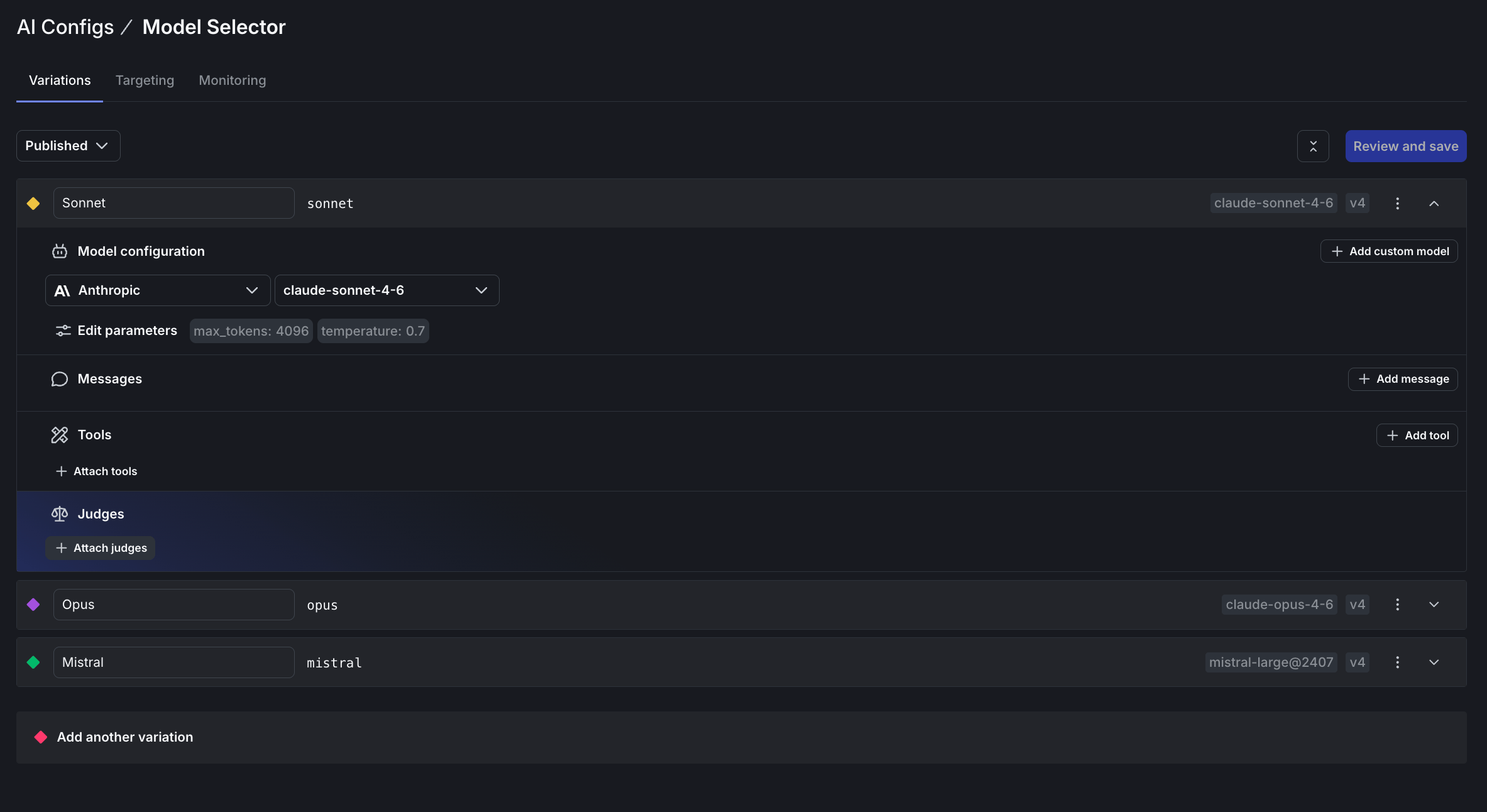
1. Open the **Model Selector** config and go to the **Variations** tab.
2. Expand a variation (for example, Sonnet) and find the **Judges** section.
3. Click **Attach judges**.
**Step 3: Attach judges to the model selector**
1. Open the **Model Selector** config and go to the **Variations** tab.
2. Expand a variation (for example, Sonnet) and find the **Judges** section.
3. Click **Attach judges**.
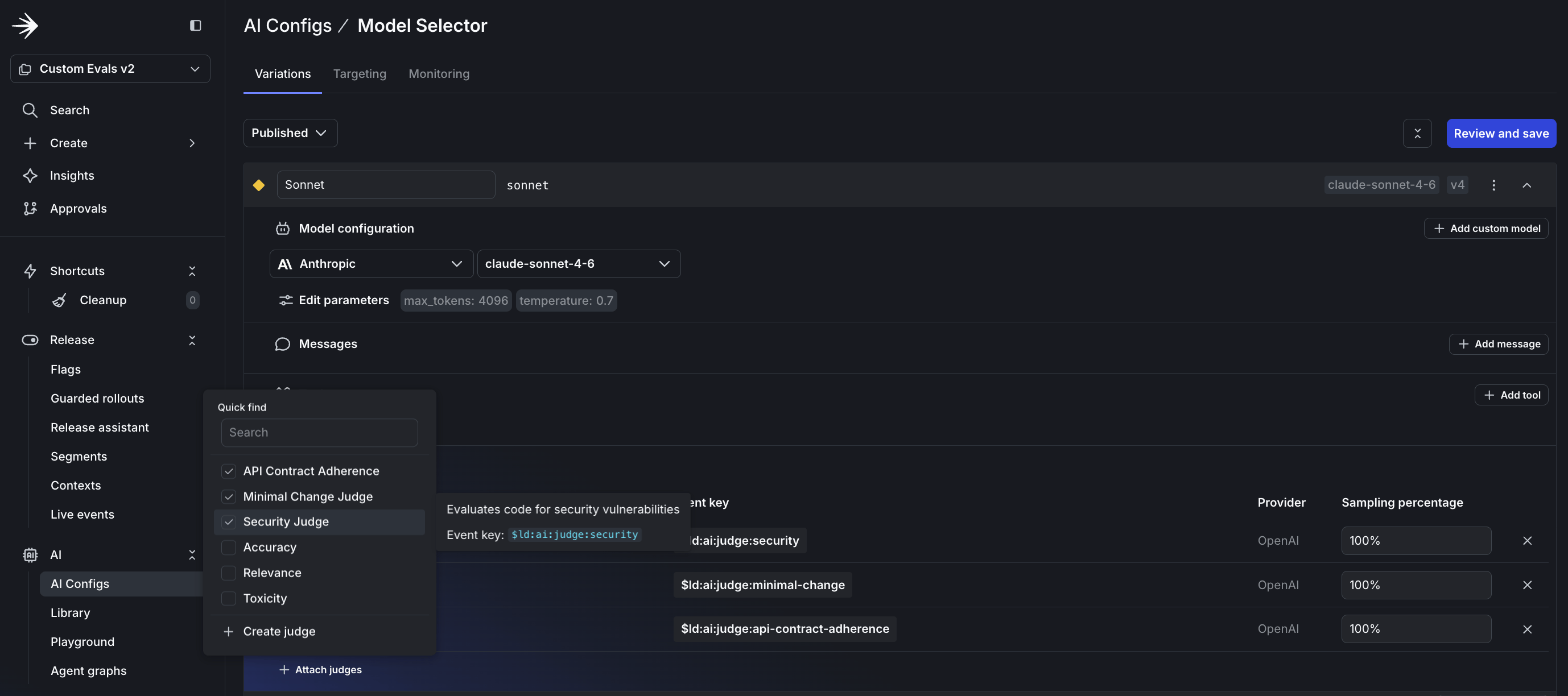
 4. Select the judges you created and set the sampling percentage to 100%.
5. Repeat for each variation.
4. Select the judges you created and set the sampling percentage to 100%.
5. Repeat for each variation.
 **Step 4: Configure targeting rules**
1. Go to the **Targeting** tab for the Model Selector.
2. Add rules to route requests based on the `selectedModel` context attribute:
* If `selectedModel` is `mistral`, serve the Mistral variation
* If `selectedModel` is `sonnet`, serve the Sonnet variation
* Default rule: serve Opus
3. For each judge, set the default rule to serve the variation you created.
**Step 4: Configure targeting rules**
1. Go to the **Targeting** tab for the Model Selector.
2. Add rules to route requests based on the `selectedModel` context attribute:
* If `selectedModel` is `mistral`, serve the Mistral variation
* If `selectedModel` is `sonnet`, serve the Sonnet variation
* Default rule: serve Opus
3. For each judge, set the default rule to serve the variation you created.
 To learn more, read [Custom judges](/docs/home/agentcontrol/judges).
## Verify your setup
Before running the proxy, confirm in the dashboard:
1. **Model selector**: Each variation shows three attached judges.
2. **Judges**: Each judge prompt includes scoring criteria.
3. **Targeting**: All configs have targeting enabled with correct rules.
## Set up the project
Create a directory and install dependencies:
```bash lines wrap theme={null}
mkdir custom-evals && cd custom-evals
python -m venv .venv && source .venv/bin/activate
pip install fastapi uvicorn launchdarkly-server-sdk launchdarkly-server-sdk-ai \
launchdarkly-server-sdk-ai-langchain langchain-anthropic python-dotenv
```
Create `.env`:
```bash lines wrap theme={null}
LD_SDK_KEY=sdk-your-sdk-key-here
LD_AI_CONFIG_KEY=model-selector
MODEL_KEY=sonnet
ANTHROPIC_API_KEY=sk-ant-your-key-here
OPENAI_API_KEY=sk-your-key-here
PORT=9911
```
## Build the proxy server
Create `server.py` with the following code.
To learn more, read [Custom judges](/docs/home/agentcontrol/judges).
## Verify your setup
Before running the proxy, confirm in the dashboard:
1. **Model selector**: Each variation shows three attached judges.
2. **Judges**: Each judge prompt includes scoring criteria.
3. **Targeting**: All configs have targeting enabled with correct rules.
## Set up the project
Create a directory and install dependencies:
```bash lines wrap theme={null}
mkdir custom-evals && cd custom-evals
python -m venv .venv && source .venv/bin/activate
pip install fastapi uvicorn launchdarkly-server-sdk launchdarkly-server-sdk-ai \
launchdarkly-server-sdk-ai-langchain langchain-anthropic python-dotenv
```
Create `.env`:
```bash lines wrap theme={null}
LD_SDK_KEY=sdk-your-sdk-key-here
LD_AI_CONFIG_KEY=model-selector
MODEL_KEY=sonnet
ANTHROPIC_API_KEY=sk-ant-your-key-here
OPENAI_API_KEY=sk-your-key-here
PORT=9911
```
## Build the proxy server
Create `server.py` with the following code.
Click to expand the complete proxy server code
```python expandable lines wrap theme={null}
"""
Proxy server for Claude Code with automatic quality scoring.
Routes requests through AgentControl and scores every response
with attached judges. Metrics flow to the LaunchDarkly Monitoring dashboard.
"""
import asyncio
import os
import logging
import uuid
import ldclient
from ldclient import Context
from ldai import AICompletionConfigDefault, LDAIClient, LDMessage
from fastapi import FastAPI, Request
from fastapi.responses import JSONResponse
import uvicorn
from dotenv import load_dotenv
load_dotenv()
LD_SDK_KEY = os.environ.get("LD_SDK_KEY")
LD_AI_CONFIG_KEY = os.environ.get("LD_AI_CONFIG_KEY", "model-selector")
PORT = int(os.environ.get("PORT", "9911"))
if not LD_SDK_KEY:
raise ValueError("Missing LD_SDK_KEY environment variable")
LOG_LEVEL = os.environ.get("LOG_LEVEL", "INFO").upper()
logging.basicConfig(level=getattr(logging, LOG_LEVEL, logging.INFO))
ld_config = ldclient.Config(LD_SDK_KEY)
ldclient.set_config(ld_config)
ld_client = ldclient.get()
if not ld_client.is_initialized():
raise RuntimeError("LaunchDarkly client failed to initialize")
ai_client = LDAIClient(ld_client)
app = FastAPI()
# =============================================================================
# Message Conversion
# =============================================================================
def extract_text(content) -> str:
"""Extract plain text from Anthropic-style content."""
if isinstance(content, str):
return content
if isinstance(content, list):
texts = []
for block in content:
if isinstance(block, dict) and block.get("type") == "text":
texts.append(block.get("text", ""))
return "".join(texts)
return str(content or "")
def convert_to_ld_messages(body: dict) -> list[LDMessage]:
"""Convert Anthropic Messages API format to LDMessage format."""
messages = []
system = body.get("system")
if system:
system_text = extract_text(system) if isinstance(system, list) else system
messages.append(LDMessage(role="system", content=system_text))
for msg in body.get("messages", []):
role_str = msg.get("role", "user")
role = "assistant" if role_str == "assistant" else "user"
messages.append(LDMessage(role=role, content=extract_text(msg.get("content", ""))))
return messages
# =============================================================================
# Routes
# =============================================================================
@app.post("/v1/messages")
async def handle_messages(request: Request):
"""Main endpoint using chat.invoke() for automatic judge execution."""
body = await request.json()
user_key = request.headers.get("x-ld-user-key", "claude-code-local")
# Build context with selectedModel for targeting
model_key = os.environ.get("MODEL_KEY", "")
context = (
Context.builder(user_key)
.set("selectedModel", model_key)
.build()
)
fallback = AICompletionConfigDefault(enabled=False)
chat = await ai_client.create_chat(LD_AI_CONFIG_KEY, context, fallback, {})
if not chat:
return JSONResponse(
{"type": "error", "error": {"type": "unavailable", "message": "config disabled"}},
status_code=503
)
config = chat.get_config()
model_name = config.model.name if config.model else "unknown"
judge_count = len(config.judge_configuration.judges) if config.judge_configuration else 0
print(f"[REQUEST] model={model_name}, judges={judge_count}")
try:
ld_messages = convert_to_ld_messages(body)
if len(ld_messages) > 1:
chat.append_messages(ld_messages[:-1])
last_message = ld_messages[-1] if ld_messages else LDMessage(role="user", content="")
# invoke() executes judges automatically based on sampling rate
response = await chat.invoke(last_message.content)
# Await judge evaluations and log results
if response.evaluations:
print(f"[JUDGES] Awaiting {len(response.evaluations)} evaluations...")
eval_results = await asyncio.gather(*response.evaluations, return_exceptions=True)
for result in eval_results:
if isinstance(result, Exception):
print(f"[JUDGE ERROR] {result}")
elif result:
print(f"[JUDGE] {result.to_dict()}")
# Flush events to LaunchDarkly
ld_client.flush()
await asyncio.sleep(0.1)
response_text = response.message.content if response.message else ""
# Get token metrics
input_tokens = 0
output_tokens = 0
if response.metrics and response.metrics.usage:
input_tokens = response.metrics.usage.input or 0
output_tokens = response.metrics.usage.output or 0
print(f"[METRICS] tokens={input_tokens}/{output_tokens}")
return JSONResponse({
"id": f"msg_{uuid.uuid4().hex[:24]}",
"type": "message",
"role": "assistant",
"content": [{"type": "text", "text": response_text}],
"model": model_name,
"stop_reason": "end_turn",
"usage": {
"input_tokens": input_tokens,
"output_tokens": output_tokens
}
})
except Exception as e:
ld_client.flush()
logging.exception("Request failed")
return JSONResponse(
{"type": "error", "error": {"type": "internal_error", "message": str(e)}},
status_code=500
)
@app.get("/health")
async def health():
return {"status": "ok", "launchdarkly": ld_client.is_initialized()}
@app.post("/v1/messages/count_tokens")
async def count_tokens(request: Request):
return {"input_tokens": 0}
# =============================================================================
# Main
# =============================================================================
if __name__ == "__main__":
print(f"Proxy running on port {PORT}")
print(f"Config: {LD_AI_CONFIG_KEY}")
print(f"Connect: ANTHROPIC_BASE_URL=http://localhost:{PORT} claude")
uvicorn.run(app, host="127.0.0.1", port=PORT, log_level="info")
```
## Connect Claude Code to your proxy
Start the proxy server:
```bash lines wrap theme={null}
python server.py
```
You should see output like:
```text lines wrap theme={null}
Proxy running on port 9911
Config: model-selector
Connect: ANTHROPIC_BASE_URL=http://localhost:9911 claude
```
In a new terminal, launch Claude Code with the proxy URL and your chosen model:
```bash lines wrap theme={null}
MODEL_KEY=sonnet ANTHROPIC_BASE_URL=http://localhost:9911 claude
```
Every request now routes through your proxy. Watch the server logs to see judges executing:
```text lines wrap theme={null}
[REQUEST] model=claude-sonnet-4-6, judges=3
[JUDGES] Awaiting 3 evaluations...
[JUDGE] {'evals': {'security': {'score': 1.0, 'reasoning': 'No vulnerabilities detected...'}}}
[JUDGE] {'evals': {'api-contract': {'score': 0.5, 'reasoning': 'Response uses correct endpoint...'}}}
[JUDGE] {'evals': {'minimal-change': {'score': 1.0, 'reasoning': 'Changes are focused...'}}}
```
**The key pattern for automatic judge evaluation**
The `create_chat()` and `invoke()` methods handle judge execution automatically:
```python lines wrap theme={null}
chat = await ai_client.create_chat(config_key, context, fallback, {})
response = await chat.invoke(user_message)
# response.evaluations contains async judge tasks
```
Judge results are sent to LaunchDarkly automatically. You can optionally await `response.evaluations` to log results locally.
**Tool features aren't supported**
This proxy handles text-based conversations. Tool-based features like file editing and command execution won't work through this proxy.
## How model routing works
The `MODEL_KEY` environment variable controls which model handles requests. The proxy passes it as a `selectedModel` context attribute:
```python lines wrap theme={null}
context = Context.builder(user_key).set("selectedModel", model_key).build()
```
Your targeting rules match this attribute and return the corresponding variation. Switch models by changing the environment variable:
```bash lines wrap theme={null}
MODEL_KEY=mistral ANTHROPIC_BASE_URL=http://localhost:9911 claude
```
## Compare cloud and local models
To evaluate Ollama models against cloud providers:
1. Add an "ollama" variation to your model-selector config.
2. Add a targeting rule for `selectedModel` equals "ollama".
3. Launch with `MODEL_KEY=ollama`.
Your custom judges score Claude Sonnet and Llama 3.2 with identical criteria. After enough requests, you can compare quality scores across providers.
## Run experiments
After judges are producing scores, you can compare models statistically. Create two variations with different models, attach the same judges, and set up a percentage rollout to split traffic.
Your judge metrics appear as goals in LaunchDarkly Experimentation. After enough data, you can answer "Which model produces more secure code?" with confidence, not guesswork.
To learn more, read [Experimentation with AgentControl](/docs/home/agentcontrol/experimentation).
## Monitor quality over time
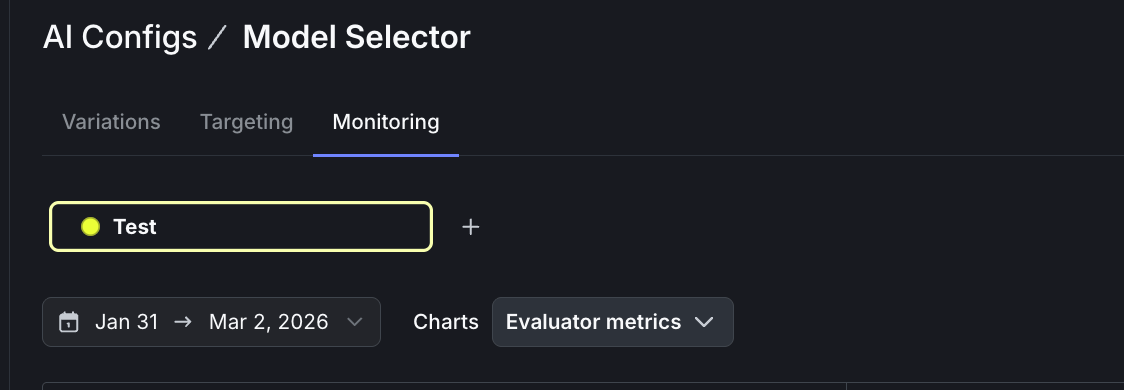
Judge scores appear on your config's **Monitoring** tab. To view evaluation metrics:
1. Open your model-selector config and go to the **Monitoring** tab.
2. Select **Evaluator metrics** from the dropdown menu.
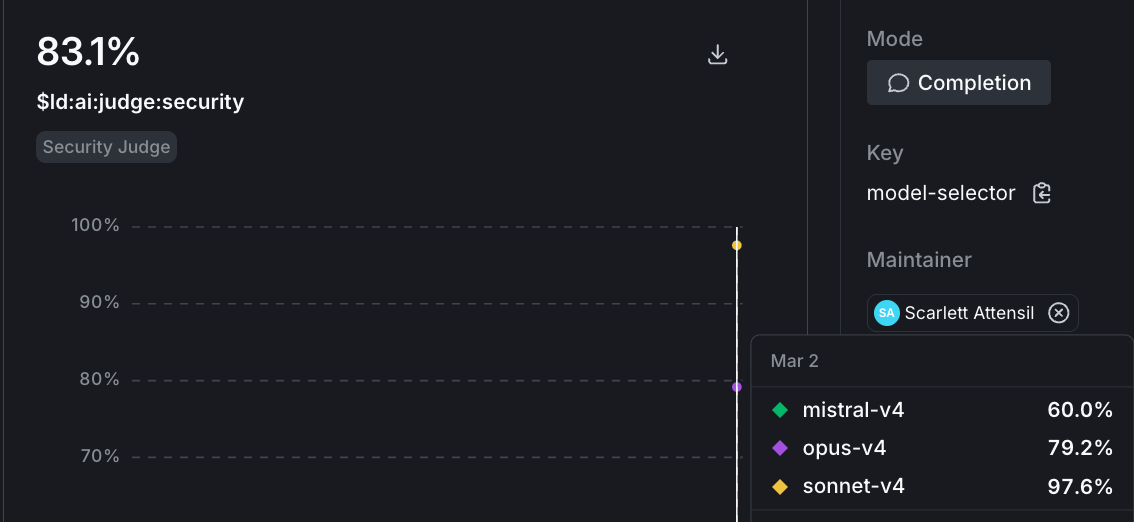
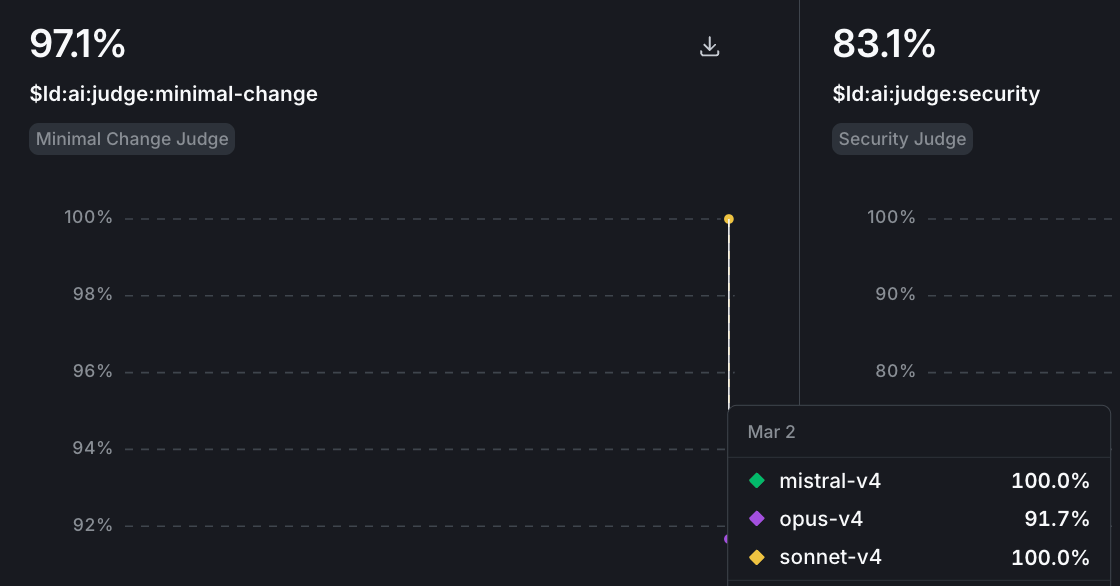
 3. Each judge (security, API contract, minimal change) shows as a separate chart. Hover over a chart to see scores broken down by variation.
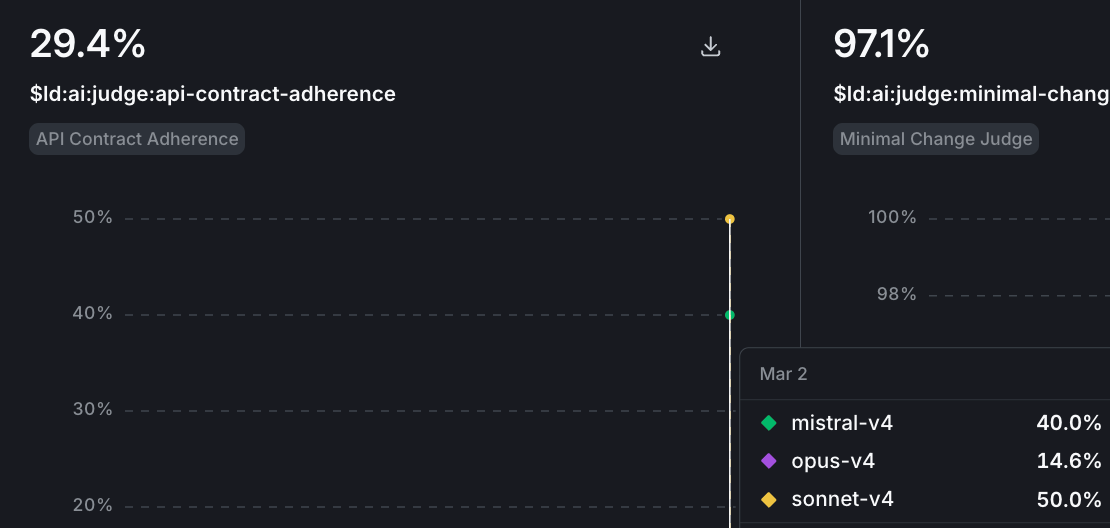
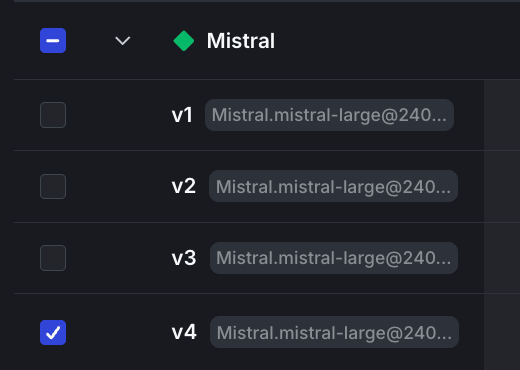
 4. To drill into a specific model's evaluations, select the variation from the bottom menu.
 Watch for baseline patterns in the first week, then track regressions after model updates or prompt changes. Model providers ship updates without notice. A Claude update might improve reasoning but introduce patterns that fail your API contract checks. Set up alerts when scores drop below thresholds, and use [guarded rollouts](/docs/home/releases/guarded-rollouts) for automatic protection.
To learn more, read [Monitor config performance](/docs/home/agentcontrol/monitor).
## Control costs with sampling
Each judge evaluation is an LLM call. Control costs by adjusting sampling rates:
* **Staging**: 100% sampling to catch issues early
* **Production**: 10-25% sampling for cost efficiency
You can also use cheaper models (GPT-4o mini) for staging and more capable models for production.
## What you learned
The value is in the judges you create. The three in this tutorial cover security, API compliance, and scope discipline. Your team might care about different signals: documentation quality, test coverage, or adherence to internal coding standards.
Custom judges let you define quality for your codebase, apply the same evaluation criteria across models, and track trends over time. Once you create a judge, you can attach it to any config in your project.
**Start your free trial**
Ready to build custom judges for your codebase? [Start your 14-day free trial](https://launchdarkly.com/start-trial/) and deploy your first evaluation today.
## Next steps
* [hello-python-ai examples](https://github.com/launchdarkly/hello-python-ai/tree/main) for more judge patterns
* [Building a chatbot with multiple AI providers using AgentControl](/docs/guides/agentcontrol/best-practices) for production patterns
* [When to add online evals](/docs/tutorials/when-to-add-online-evals) - Decide which judges run on live traffic and at what sampling rate
* [Offline Evaluation of RAG-Grounded Answers](/docs/tutorials/offline-evals) - Run the same judges as regression tests in CI before promoting a variation
* [Beyond n8n for Workflow Automation: Agent Graphs](/docs/tutorials/agent-graphs) - Attach per-node judges once your workflow is externalized as a graph
Watch for baseline patterns in the first week, then track regressions after model updates or prompt changes. Model providers ship updates without notice. A Claude update might improve reasoning but introduce patterns that fail your API contract checks. Set up alerts when scores drop below thresholds, and use [guarded rollouts](/docs/home/releases/guarded-rollouts) for automatic protection.
To learn more, read [Monitor config performance](/docs/home/agentcontrol/monitor).
## Control costs with sampling
Each judge evaluation is an LLM call. Control costs by adjusting sampling rates:
* **Staging**: 100% sampling to catch issues early
* **Production**: 10-25% sampling for cost efficiency
You can also use cheaper models (GPT-4o mini) for staging and more capable models for production.
## What you learned
The value is in the judges you create. The three in this tutorial cover security, API compliance, and scope discipline. Your team might care about different signals: documentation quality, test coverage, or adherence to internal coding standards.
Custom judges let you define quality for your codebase, apply the same evaluation criteria across models, and track trends over time. Once you create a judge, you can attach it to any config in your project.
**Start your free trial**
Ready to build custom judges for your codebase? [Start your 14-day free trial](https://launchdarkly.com/start-trial/) and deploy your first evaluation today.
## Next steps
* [hello-python-ai examples](https://github.com/launchdarkly/hello-python-ai/tree/main) for more judge patterns
* [Building a chatbot with multiple AI providers using AgentControl](/docs/guides/agentcontrol/best-practices) for production patterns
* [When to add online evals](/docs/tutorials/when-to-add-online-evals) - Decide which judges run on live traffic and at what sampling rate
* [Offline Evaluation of RAG-Grounded Answers](/docs/tutorials/offline-evals) - Run the same judges as regression tests in CI before promoting a variation
* [Beyond n8n for Workflow Automation: Agent Graphs](/docs/tutorials/agent-graphs) - Attach per-node judges once your workflow is externalized as a graph