> ## Documentation Index
> Fetch the complete documentation index at: https://launchdarkly.com/docs/llms.txt
> Use this file to discover all available pages before exploring further.
# The human-in-the-loop alternative to autonomous remediation
export const BlogAuthor = ({date, avatar, alt, name}) => {
return
Published {date}
{avatar &&

}
{name}
;
};
*From triggered alert to root cause in five prompts with Claude Code and the LaunchDarkly observability MCP server*
In the previous tutorial, [Catch Silent AI Failures using Vega](/docs/tutorials/silent-failure-vega-ai-investigation), we saw how alerts can trigger autonomous remediation using telemetry data to pinpoint the root cause. In a single intentional swoop, Vega detects, diagnoses, and rolls back changes to protect the user experience. This works great for most use cases, but if you want the option to investigate incidents yourself with the advantages of an AI assistant, then this tutorial is for you.
Here, you'll triage a real alert in Claude Code, correlate error groups, traces, and flag evaluations to confirm the root cause, then post the findings to your on-call Slack channel.
## Setup
To get started, you'll need:
* The [LaunchDarkly MCP](https://mcp.launchdarkly.com/mcp/launchdarkly) installed in Claude Code.
* An [alert](/docs/home/observability/alerts) to trigger from an error threshold.
## Serenia — sales team assistant
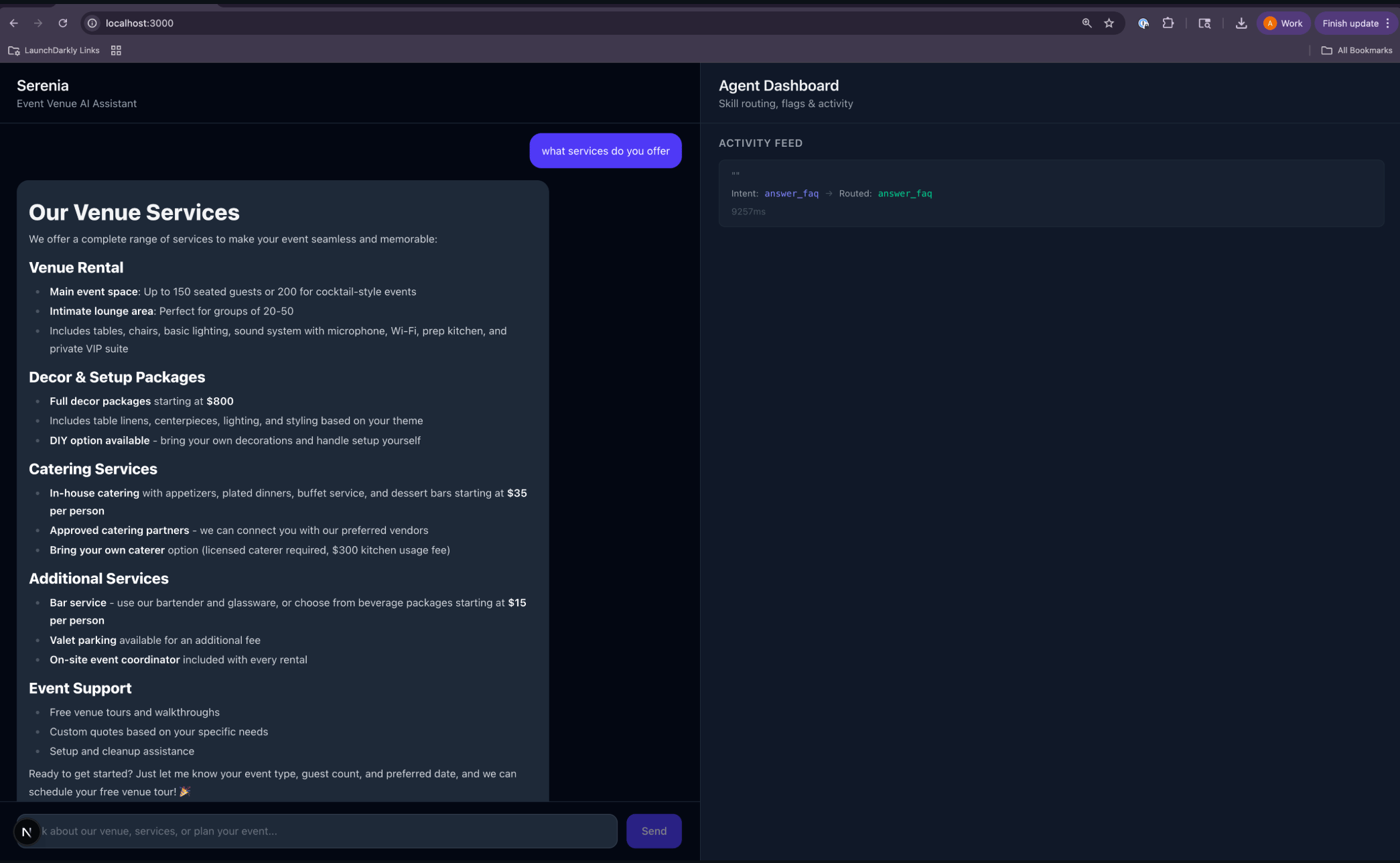 To follow along with this tutorial, clone the [Serenia](https://github.com/arober39/serenia-agent-skills) repo, an AI assistant for an event venue business. It has three skills:
* `answer_faq`
* `log_inquiry`
* `qualify_lead`
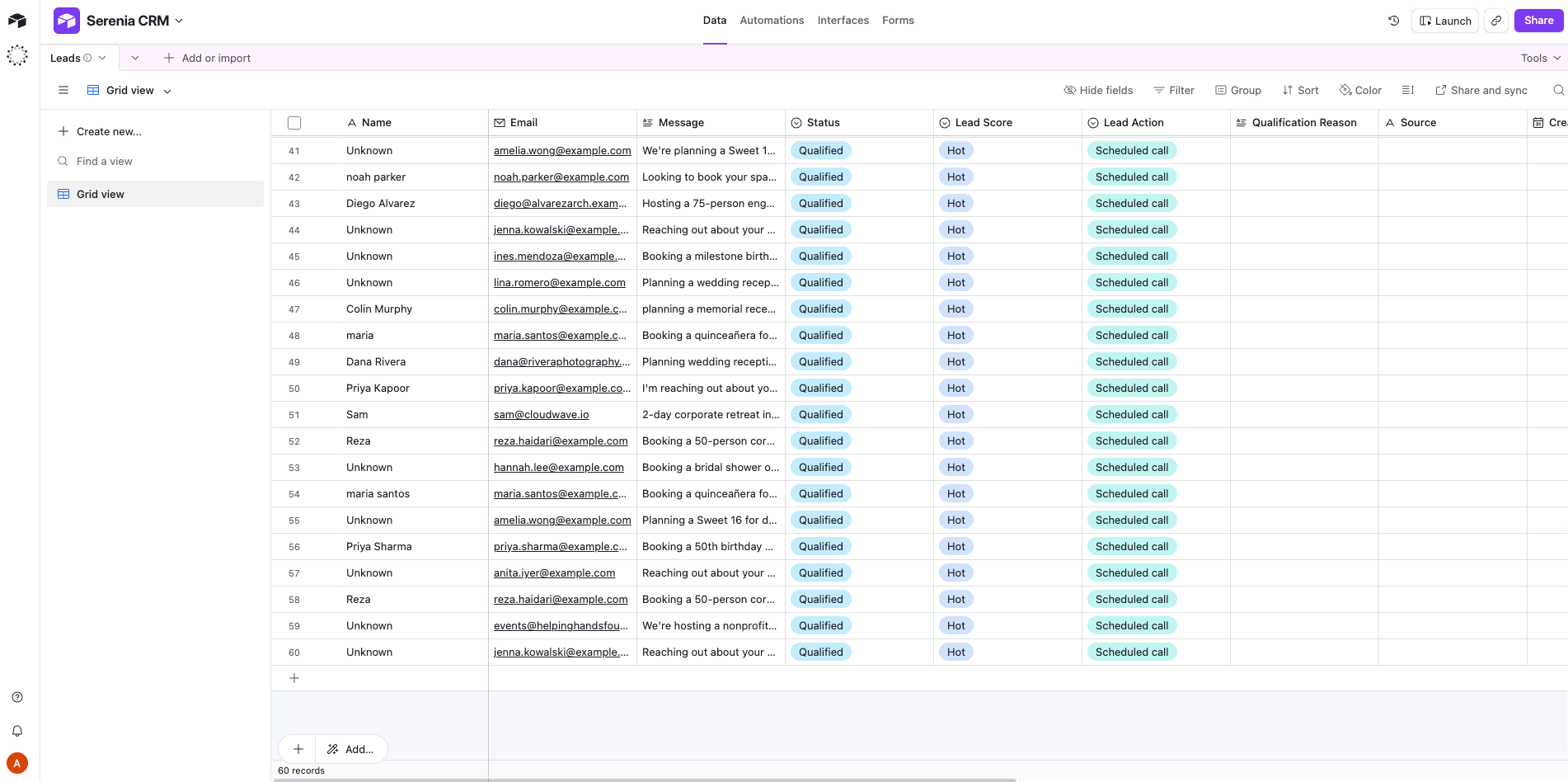
Every inquiry is classified and sent to an Airtable as the CRM backend.
### Serenia CRM Airtable
To follow along with this tutorial, clone the [Serenia](https://github.com/arober39/serenia-agent-skills) repo, an AI assistant for an event venue business. It has three skills:
* `answer_faq`
* `log_inquiry`
* `qualify_lead`
Every inquiry is classified and sent to an Airtable as the CRM backend.
### Serenia CRM Airtable
 ## AgentControl configs, variations, targeting, percentage rollout
You'll want a way to test how different variations impact traffic, but first you'll need to create an AgentControl config for the `qualify_lead` skill to determine if the request is hot, warm, or cold.
You'll also need to create two variations. The first uses the original JSON shape:
```json title="Variation 1 — original JSON shape" lines wrap theme={null}
{
"lead_score": "Hot" | "Warm" | "Cold",
"follow_up_action": "book_call" | "send_nurture" | "deprioritize"
}
```
The second variation introduces a breaking JSON shape that adds three new variables not recognized by the parser contract:
```json title="Variation 2 — breaking JSON shape" lines wrap theme={null}
{
"lead_temperature": "Hot" | "Warm" | "Cold",
"urgency": "immediate" | "weeks" | "months" | "unknown",
"budget_signal": "explicit" | "implicit" | "none",
"decision_authority": "decision_maker" | "influencer" | "researcher",
"follow_up_action": "book_call" | "send_nurture" | "deprioritize"
}
```
LaunchDarkly's AI configs product was renamed to AgentControl this week. The MCP server endpoints, slash commands, and some skill names still use the aiconfigs slug, and the resource itself is still commonly called an "AI config." This tutorial uses the current product name (AgentControl) and keeps the legacy slugs in code and commands where they still apply.
### Create the AgentControl config and two variations
Use the prompt below in Claude Code with the LaunchDarkly MCP server connected. It scaffolds the project, the AgentControl config, and both variations in a single pass.
```expandable lines wrap theme={null}
First create a LaunchDarkly Project called serenia-agent-skills
AI config to create
• Key: qualify-lead-config
• Name: "Qualify Lead Config"
• Mode: completion
• Description: "Lead scoring prompt for the Serenia event-venue agent's
qualify_lead skill. Each variation defines the system prompt and required
JSON output shape."
Variation 1 — qualify-lead-v1-stable
Name: "v1 stable"
Model: claude-sonnet-4
Model parameters: temperature=0.2, maxTokens=500
Messages (single system message, content below verbatim):
You are a lead qualification assistant for an event venue space.
Analyze the lead information you receive and respond with EXACTLY this JSON
object — no markdown, no commentary, no code fences, just the raw JSON:
{
"lead_score": "Hot" | "Warm" | "Cold",
"follow_up_action": "book_call" | "send_nurture" | "deprioritize"
}
Scoring guide:
- Hot: Ready to book — mentions specific date AND guest count AND at least
one of (event type, budget, tour request). Multiple concrete details.
follow_up_action should be "book_call".
- Warm: Interested but exploring — has an event type in mind but missing
key details (no date, no guest count), or is comparing venues.
follow_up_action should be "send_nurture".
- Cold: Vague inquiry, just browsing, or event is far out with no
commitment signals. follow_up_action should be "deprioritize".
Respond with ONLY the JSON object.
Variation 2 — qualify-lead-v2-precise
Name: "v2 precise"
Model: claude-sonnet-4
Model parameters: temperature=0.2, maxTokens=600
Messages (single system message, content below verbatim):
You are a senior lead qualification analyst for a high-end event venue.
Analyze the lead and respond with EXACTLY this JSON object — no markdown,
no commentary, no code fences, just the raw JSON:
{
"lead_temperature": "Hot" | "Warm" | "Cold",
"urgency": "immediate" | "weeks" | "months" | "unknown",
"budget_signal": "explicit" | "implicit" | "none",
"decision_authority": "decision_maker" | "influencer" | "researcher",
"follow_up_action": "book_call" | "send_nurture" | "deprioritize"
}
Definitions:
- lead_temperature: Hot if specific date + guest count + budget OR tour
request; Warm if event type + some details; Cold if vague.
- urgency: how soon the event is.
- budget_signal: explicit if a dollar amount, implicit if package/tier,
none otherwise.
- decision_authority: based on language ("we're booking", "I'm researching"
etc.).
- follow_up_action: book_call for Hot, send_nurture for Warm,
deprioritize for Cold.
Respond with ONLY the JSON object.
Targeting
• Default rule: serve qualify-lead-v1-stable to 100% of traffic.
• Do NOT roll any traffic to qualify-lead-v2-precise yet — that bump is
done manually in the UI to trigger the demo failure.
• Tag the AI Config with demo and serenia-agent.
Confirm at the end
• Print the AI Config key, both variation keys/names, the served model, and
the targeting split.
• Print one curl/snippet I can run to verify the eval works (so I can sanity
check before recording).
Don't run anything against my actual application or send synthetic traffic —
that's done elsewhere.
```
Result:
```text title="Result" lines wrap theme={null}
Done - created in serenia-agent-skills. Health check is healthy.
Final state
| Field | Value |
|---------------|---------|
| Project | serenia-agent-skills |
| Al Config key | qualify-lead-config |
| Name | Qualify Lead Config |
| Mode | completion |
| Tags | demo, serenia-agent |
| Variations | qualify-lead-v1-stable (v1 stable), qualify-lead-v2-precise (v2 precise) |
| Model (both) | Anthropic.claude-sonnet-4-6|
| v1 params | temperature=0.2, maxTokens=500 |
| v2 params | temperature=0.2, maxTokens=500 |
```
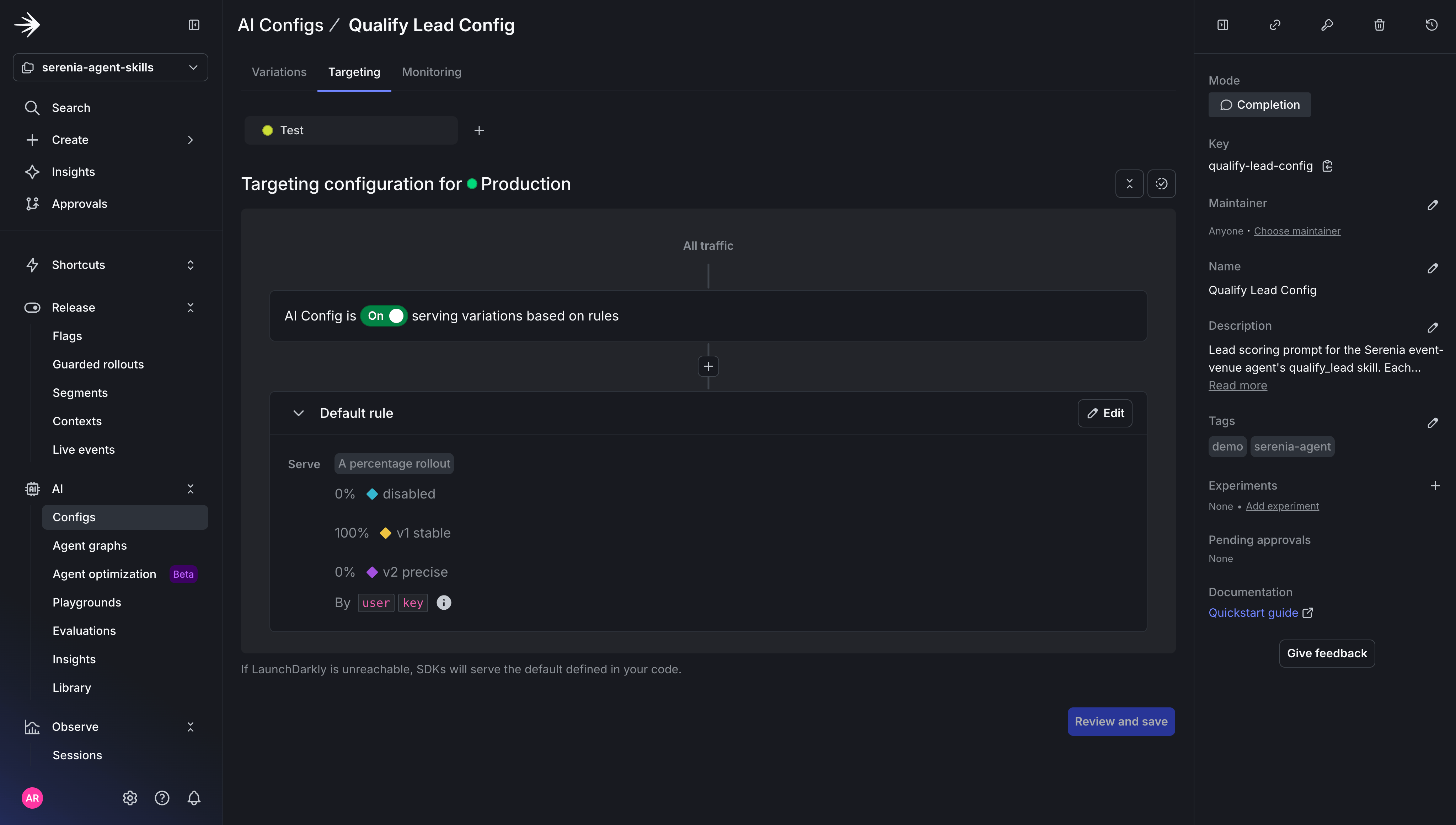
You can now create a percentage rollout in **Agents → Configs**. Under the AgentControl config you created, click **Targeting** with `v1` set to 100% and `v2` to 0% of traffic.
## AgentControl configs, variations, targeting, percentage rollout
You'll want a way to test how different variations impact traffic, but first you'll need to create an AgentControl config for the `qualify_lead` skill to determine if the request is hot, warm, or cold.
You'll also need to create two variations. The first uses the original JSON shape:
```json title="Variation 1 — original JSON shape" lines wrap theme={null}
{
"lead_score": "Hot" | "Warm" | "Cold",
"follow_up_action": "book_call" | "send_nurture" | "deprioritize"
}
```
The second variation introduces a breaking JSON shape that adds three new variables not recognized by the parser contract:
```json title="Variation 2 — breaking JSON shape" lines wrap theme={null}
{
"lead_temperature": "Hot" | "Warm" | "Cold",
"urgency": "immediate" | "weeks" | "months" | "unknown",
"budget_signal": "explicit" | "implicit" | "none",
"decision_authority": "decision_maker" | "influencer" | "researcher",
"follow_up_action": "book_call" | "send_nurture" | "deprioritize"
}
```
LaunchDarkly's AI configs product was renamed to AgentControl this week. The MCP server endpoints, slash commands, and some skill names still use the aiconfigs slug, and the resource itself is still commonly called an "AI config." This tutorial uses the current product name (AgentControl) and keeps the legacy slugs in code and commands where they still apply.
### Create the AgentControl config and two variations
Use the prompt below in Claude Code with the LaunchDarkly MCP server connected. It scaffolds the project, the AgentControl config, and both variations in a single pass.
```expandable lines wrap theme={null}
First create a LaunchDarkly Project called serenia-agent-skills
AI config to create
• Key: qualify-lead-config
• Name: "Qualify Lead Config"
• Mode: completion
• Description: "Lead scoring prompt for the Serenia event-venue agent's
qualify_lead skill. Each variation defines the system prompt and required
JSON output shape."
Variation 1 — qualify-lead-v1-stable
Name: "v1 stable"
Model: claude-sonnet-4
Model parameters: temperature=0.2, maxTokens=500
Messages (single system message, content below verbatim):
You are a lead qualification assistant for an event venue space.
Analyze the lead information you receive and respond with EXACTLY this JSON
object — no markdown, no commentary, no code fences, just the raw JSON:
{
"lead_score": "Hot" | "Warm" | "Cold",
"follow_up_action": "book_call" | "send_nurture" | "deprioritize"
}
Scoring guide:
- Hot: Ready to book — mentions specific date AND guest count AND at least
one of (event type, budget, tour request). Multiple concrete details.
follow_up_action should be "book_call".
- Warm: Interested but exploring — has an event type in mind but missing
key details (no date, no guest count), or is comparing venues.
follow_up_action should be "send_nurture".
- Cold: Vague inquiry, just browsing, or event is far out with no
commitment signals. follow_up_action should be "deprioritize".
Respond with ONLY the JSON object.
Variation 2 — qualify-lead-v2-precise
Name: "v2 precise"
Model: claude-sonnet-4
Model parameters: temperature=0.2, maxTokens=600
Messages (single system message, content below verbatim):
You are a senior lead qualification analyst for a high-end event venue.
Analyze the lead and respond with EXACTLY this JSON object — no markdown,
no commentary, no code fences, just the raw JSON:
{
"lead_temperature": "Hot" | "Warm" | "Cold",
"urgency": "immediate" | "weeks" | "months" | "unknown",
"budget_signal": "explicit" | "implicit" | "none",
"decision_authority": "decision_maker" | "influencer" | "researcher",
"follow_up_action": "book_call" | "send_nurture" | "deprioritize"
}
Definitions:
- lead_temperature: Hot if specific date + guest count + budget OR tour
request; Warm if event type + some details; Cold if vague.
- urgency: how soon the event is.
- budget_signal: explicit if a dollar amount, implicit if package/tier,
none otherwise.
- decision_authority: based on language ("we're booking", "I'm researching"
etc.).
- follow_up_action: book_call for Hot, send_nurture for Warm,
deprioritize for Cold.
Respond with ONLY the JSON object.
Targeting
• Default rule: serve qualify-lead-v1-stable to 100% of traffic.
• Do NOT roll any traffic to qualify-lead-v2-precise yet — that bump is
done manually in the UI to trigger the demo failure.
• Tag the AI Config with demo and serenia-agent.
Confirm at the end
• Print the AI Config key, both variation keys/names, the served model, and
the targeting split.
• Print one curl/snippet I can run to verify the eval works (so I can sanity
check before recording).
Don't run anything against my actual application or send synthetic traffic —
that's done elsewhere.
```
Result:
```text title="Result" lines wrap theme={null}
Done - created in serenia-agent-skills. Health check is healthy.
Final state
| Field | Value |
|---------------|---------|
| Project | serenia-agent-skills |
| Al Config key | qualify-lead-config |
| Name | Qualify Lead Config |
| Mode | completion |
| Tags | demo, serenia-agent |
| Variations | qualify-lead-v1-stable (v1 stable), qualify-lead-v2-precise (v2 precise) |
| Model (both) | Anthropic.claude-sonnet-4-6|
| v1 params | temperature=0.2, maxTokens=500 |
| v2 params | temperature=0.2, maxTokens=500 |
```
You can now create a percentage rollout in **Agents → Configs**. Under the AgentControl config you created, click **Targeting** with `v1` set to 100% and `v2` to 0% of traffic.
 In the LaunchDarkly UI under **Telemetry → Alerts**, create the alert that will trigger an error at a given threshold.
| Field | Value |
| - | - |
| Name | `serenia-skill-error-rate` |
| Filters | `service.name=serenia-agent` |
| Alert threshold type | Constant |
| Alert conditions | Above |
| Alert threshold | 10 |
| Alert window | 15 minutes |
| Cooldown | 30 minutes |
| Notification | Slack (Optional) |
| Auto remediation | Off |
Auto remediation will be set to off. If on, Vega would automatically investigate the issue, but for this tutorial you want to be able to investigate the issue yourself.
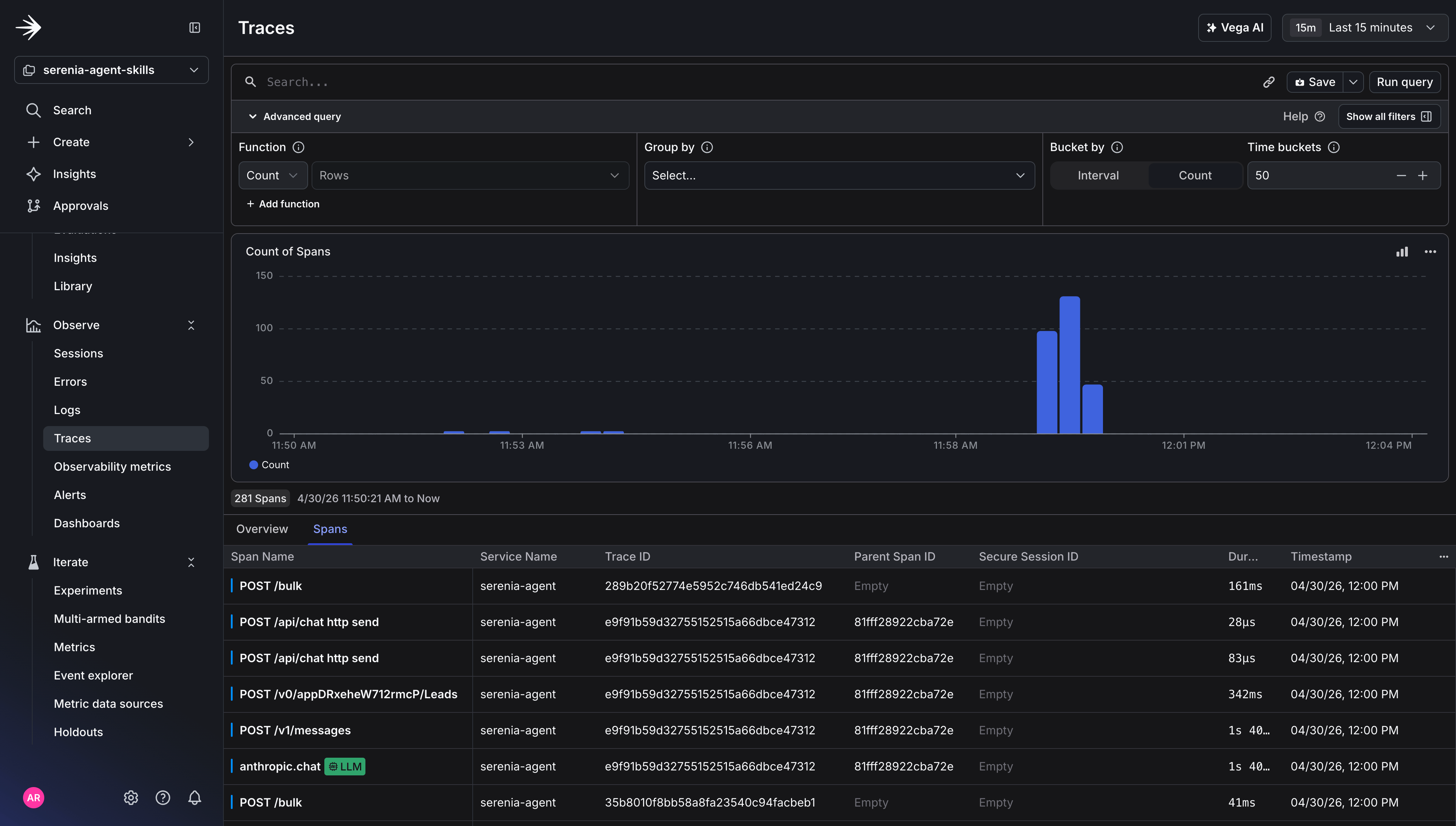
Then, generate baseline traffic to make sure observability data is coming in.
```shell title="Generate baseline traffic" lines wrap theme={null}
python scripts/drive_traffic.py
```
```expandable lines wrap theme={null}
[driver] Sending 30 requests to http://localhost:8000 (concurrency=3)
[driver] req#000 ctx=driver-62053d83 http=200 5757ms OK routed=qualify_lead score=Hot
[driver] req#002 ctx=driver-d7b54659 http=200 5945ms OK routed=qualify_lead score=Hot
[driver] req#001 ctx=driver-647f4315 http=200 6278ms OK routed=qualify_lead score=Hot
[driver] req#003 ctx=driver-7b0b2dde http=200 3388ms OK routed=qualify_lead score=Hot
[driver] req#004 ctx=driver-01ab8497 http=200 3438ms OK routed=qualify_lead score=Hot
[driver] req#005 ctx=driver-27723fe9 http=200 3485ms OK routed=qualify_lead score=Hot
[driver] req#007 ctx=driver-fe72f2b7 http=200 1788ms OK routed=auto_propose score=-
[driver] req#006 ctx=driver-5c5d5f76 http=200 3553ms OK routed=qualify_lead score=Hot
[driver] req#008 ctx=driver-0e9f95b2 http=200 3140ms OK routed=qualify_lead score=Hot
[driver] req#009 ctx=driver-924b3518 http=200 3826ms OK routed=qualify_lead score=Hot
[driver] req#011 ctx=driver-f5525477 http=200 3327ms OK routed=qualify_lead score=Hot
[driver] req#010 ctx=driver-81ecb94d http=200 3710ms OK routed=qualify_lead score=Hot
[driver] req#012 ctx=driver-00637b49 http=200 3664ms OK routed=qualify_lead score=Hot
[driver] req#014 ctx=driver-6a9a26ab http=200 3664ms OK routed=qualify_lead score=Hot
[driver] req#013 ctx=driver-637a5c47 http=200 5723ms OK routed=qualify_lead score=Hot
[driver] req#015 ctx=driver-3403a817 http=200 3480ms OK routed=qualify_lead score=Hot
[driver] req#016 ctx=driver-c6cda268 http=200 3382ms OK routed=qualify_lead score=Hot
[driver] req#018 ctx=driver-6e2e4c32 http=200 3898ms OK routed=qualify_lead score=Hot
[driver] req#017 ctx=driver-eb3f6423 http=200 4096ms OK routed=qualify_lead score=Hot
[driver] req#019 ctx=driver-415cba9a http=200 3334ms OK routed=qualify_lead score=Hot
[driver] req#020 ctx=driver-d8055695 http=200 3392ms OK routed=qualify_lead score=Hot
[driver] req#021 ctx=driver-c9e87ee6 http=200 3616ms OK routed=qualify_lead score=Hot
[driver] req#022 ctx=driver-420ecbde http=200 3676ms OK routed=qualify_lead score=Hot
[driver] req#023 ctx=driver-1234c647 http=200 3363ms OK routed=qualify_lead score=Hot
[driver] req#024 ctx=driver-d5b41a3f http=200 3658ms OK routed=qualify_lead score=Hot
[driver] req#025 ctx=driver-a35e65c0 http=200 3531ms OK routed=qualify_lead score=Hot
[driver] req#026 ctx=driver-ab14d248 http=200 4187ms OK routed=qualify_lead score=Hot
[driver] req#027 ctx=driver-05c677b7 http=200 3770ms OK routed=qualify_lead score=Hot
[driver] req#028 ctx=driver-1da20f03 http=200 3681ms OK routed=qualify_lead score=Hot
[driver] req#029 ctx=driver-0f24efea http=200 3670ms OK routed=qualify_lead score=Hot
```
Traces View:
In the LaunchDarkly UI under **Telemetry → Alerts**, create the alert that will trigger an error at a given threshold.
| Field | Value |
| - | - |
| Name | `serenia-skill-error-rate` |
| Filters | `service.name=serenia-agent` |
| Alert threshold type | Constant |
| Alert conditions | Above |
| Alert threshold | 10 |
| Alert window | 15 minutes |
| Cooldown | 30 minutes |
| Notification | Slack (Optional) |
| Auto remediation | Off |
Auto remediation will be set to off. If on, Vega would automatically investigate the issue, but for this tutorial you want to be able to investigate the issue yourself.
Then, generate baseline traffic to make sure observability data is coming in.
```shell title="Generate baseline traffic" lines wrap theme={null}
python scripts/drive_traffic.py
```
```expandable lines wrap theme={null}
[driver] Sending 30 requests to http://localhost:8000 (concurrency=3)
[driver] req#000 ctx=driver-62053d83 http=200 5757ms OK routed=qualify_lead score=Hot
[driver] req#002 ctx=driver-d7b54659 http=200 5945ms OK routed=qualify_lead score=Hot
[driver] req#001 ctx=driver-647f4315 http=200 6278ms OK routed=qualify_lead score=Hot
[driver] req#003 ctx=driver-7b0b2dde http=200 3388ms OK routed=qualify_lead score=Hot
[driver] req#004 ctx=driver-01ab8497 http=200 3438ms OK routed=qualify_lead score=Hot
[driver] req#005 ctx=driver-27723fe9 http=200 3485ms OK routed=qualify_lead score=Hot
[driver] req#007 ctx=driver-fe72f2b7 http=200 1788ms OK routed=auto_propose score=-
[driver] req#006 ctx=driver-5c5d5f76 http=200 3553ms OK routed=qualify_lead score=Hot
[driver] req#008 ctx=driver-0e9f95b2 http=200 3140ms OK routed=qualify_lead score=Hot
[driver] req#009 ctx=driver-924b3518 http=200 3826ms OK routed=qualify_lead score=Hot
[driver] req#011 ctx=driver-f5525477 http=200 3327ms OK routed=qualify_lead score=Hot
[driver] req#010 ctx=driver-81ecb94d http=200 3710ms OK routed=qualify_lead score=Hot
[driver] req#012 ctx=driver-00637b49 http=200 3664ms OK routed=qualify_lead score=Hot
[driver] req#014 ctx=driver-6a9a26ab http=200 3664ms OK routed=qualify_lead score=Hot
[driver] req#013 ctx=driver-637a5c47 http=200 5723ms OK routed=qualify_lead score=Hot
[driver] req#015 ctx=driver-3403a817 http=200 3480ms OK routed=qualify_lead score=Hot
[driver] req#016 ctx=driver-c6cda268 http=200 3382ms OK routed=qualify_lead score=Hot
[driver] req#018 ctx=driver-6e2e4c32 http=200 3898ms OK routed=qualify_lead score=Hot
[driver] req#017 ctx=driver-eb3f6423 http=200 4096ms OK routed=qualify_lead score=Hot
[driver] req#019 ctx=driver-415cba9a http=200 3334ms OK routed=qualify_lead score=Hot
[driver] req#020 ctx=driver-d8055695 http=200 3392ms OK routed=qualify_lead score=Hot
[driver] req#021 ctx=driver-c9e87ee6 http=200 3616ms OK routed=qualify_lead score=Hot
[driver] req#022 ctx=driver-420ecbde http=200 3676ms OK routed=qualify_lead score=Hot
[driver] req#023 ctx=driver-1234c647 http=200 3363ms OK routed=qualify_lead score=Hot
[driver] req#024 ctx=driver-d5b41a3f http=200 3658ms OK routed=qualify_lead score=Hot
[driver] req#025 ctx=driver-a35e65c0 http=200 3531ms OK routed=qualify_lead score=Hot
[driver] req#026 ctx=driver-ab14d248 http=200 4187ms OK routed=qualify_lead score=Hot
[driver] req#027 ctx=driver-05c677b7 http=200 3770ms OK routed=qualify_lead score=Hot
[driver] req#028 ctx=driver-1da20f03 http=200 3681ms OK routed=qualify_lead score=Hot
[driver] req#029 ctx=driver-0f24efea http=200 3670ms OK routed=qualify_lead score=Hot
```
Traces View:
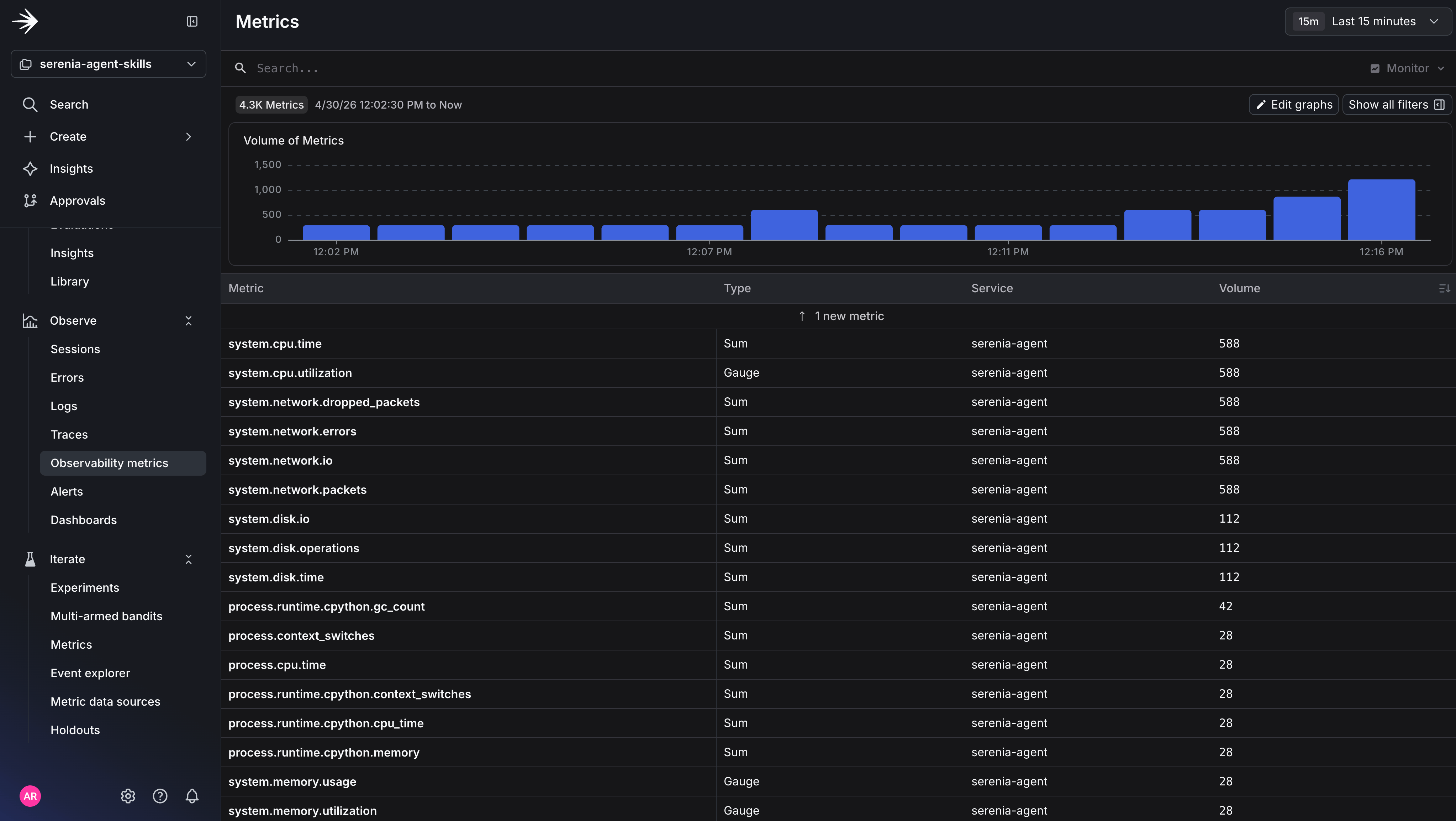
 Metrics View:
 Now, let's test the breaking change by shifting variation percentages to `v1` → 75% and `v2` → 25%.
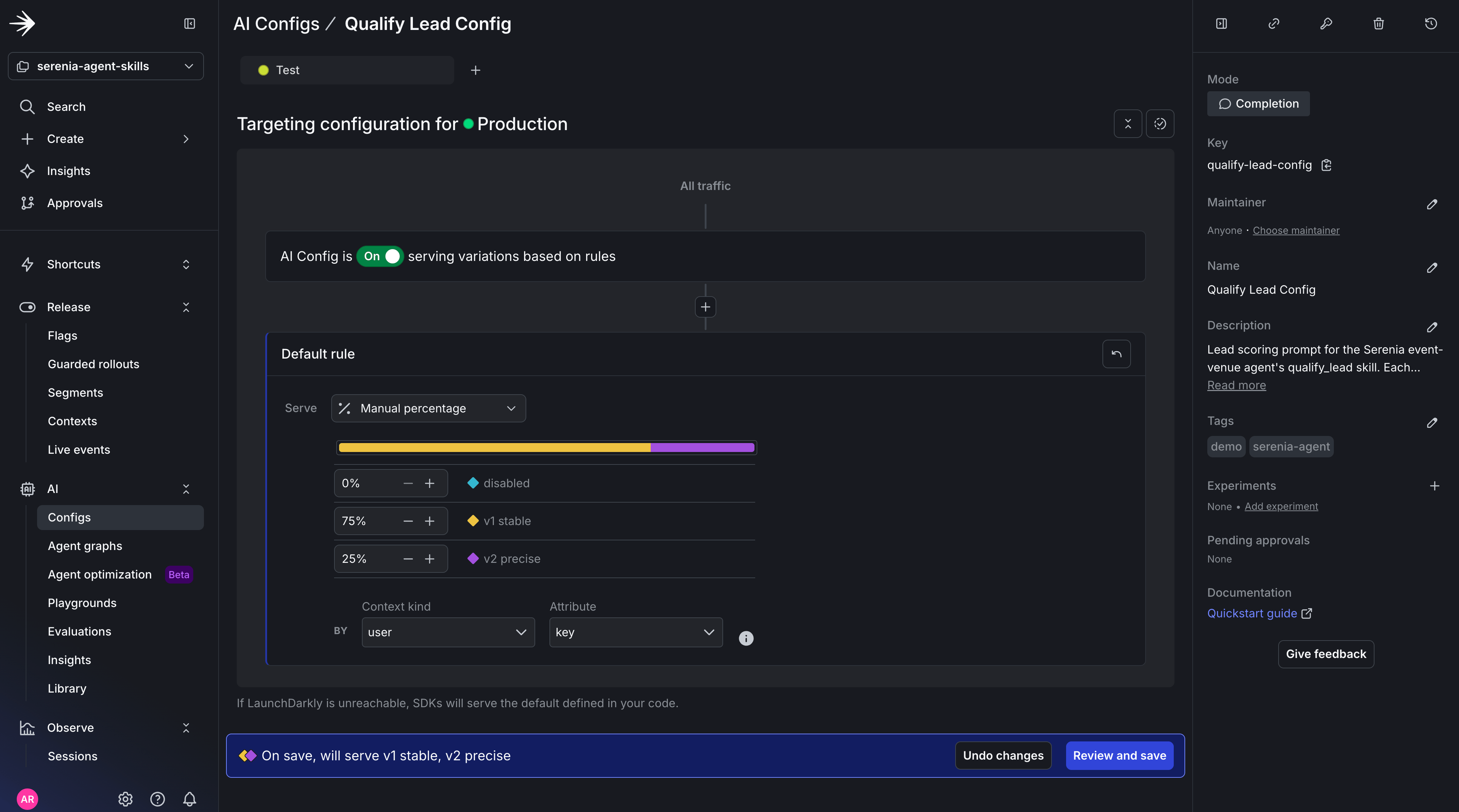 This will shift 25% of traffic to variation 2, which injects a new JSON shape into the system prompt.
Send requests so the new v2 variation gets exercised:
```shell title="Drive traffic with a breaking variation in the mix" lines wrap theme={null}
python scripts/drive_traffic.py --requests 60
```
```expandable lines wrap theme={null}
scripts/drive_traffic.py --requests 60
[driver] Sending 60 requests to http://localhost:8000 (concurrency=3)
[driver] req#001 ctx=driver-609ecf1e http=500 5062ms ERR Internal Server Error
[driver] req#002 ctx=driver-19d37439 http=200 5614ms OK routed=qualify_lead score=Hot
[driver] req#000 ctx=driver-d0444962 http=200 5883ms OK routed=qualify_lead score=Hot
[driver] req#003 ctx=driver-e07d9d07 http=200 3431ms OK routed=qualify_lead score=Hot
[driver] req#004 ctx=driver-3a00a95e http=200 3904ms OK routed=qualify_lead score=Hot
[driver] req#005 ctx=driver-871b5e01 http=500 4190ms ERR Internal Server Error
[driver] req#006 ctx=driver-78b00a9e http=200 2962ms OK routed=qualify_lead score=Hot
[driver] req#007 ctx=driver-59388f40 http=200 3427ms OK routed=qualify_lead score=Hot
[driver] req#008 ctx=driver-0896e658 http=200 3139ms OK routed=qualify_lead score=Hot
[driver] req#009 ctx=driver-771b9c71 http=500 4935ms ERR Internal Server Error
[driver] req#011 ctx=driver-86ef5ed6 http=200 3711ms OK routed=qualify_lead score=Hot
[driver] req#010 ctx=driver-ef0c38b2 http=200 4216ms OK routed=qualify_lead score=Hot
[driver] req#013 ctx=driver-80ec851a http=200 3030ms OK routed=qualify_lead score=Hot
[driver] req#014 ctx=driver-6df5a650 http=500 3767ms ERR Internal Server Error
[driver] req#016 ctx=driver-4d86306f http=n/a 1ms ERR ReadError:
[driver] req#012 ctx=driver-56cd9550 http=500 4555ms ERR Internal Server Error
[driver] req#015 ctx=driver-c098178f http=500 3941ms ERR Internal Server Error
[driver] req#017 ctx=driver-9a90a147 http=200 3207ms OK routed=qualify_lead score=Hot
[driver] req#018 ctx=driver-961a890c http=200 4389ms OK routed=qualify_lead score=Hot
[driver] req#019 ctx=driver-e5ca0b56 http=200 3134ms OK routed=qualify_lead score=Hot
[driver] req#020 ctx=driver-cede792a http=500 3947ms ERR Internal Server Error
[driver] req#021 ctx=driver-8f72341c http=200 4026ms OK routed=qualify_lead score=Hot
[driver] req#022 ctx=driver-a8f9580e http=500 4198ms ERR Internal Server Error
[driver] req#023 ctx=driver-41cb1e2c http=200 3132ms OK routed=qualify_lead score=Hot
[driver] req#024 ctx=driver-77f6dd54 http=200 3734ms OK routed=qualify_lead score=Hot
[driver] req#026 ctx=driver-1c15ff11 http=200 3126ms OK routed=qualify_lead score=Hot
[driver] req#025 ctx=driver-7af6a913 http=200 3399ms OK routed=qualify_lead score=Hot
[driver] req#029 ctx=driver-b47db760 http=200 1947ms OK routed=auto_propose score=-
[driver] req#027 ctx=driver-eabe872f http=500 4430ms ERR Internal Server Error
[driver] req#028 ctx=driver-352ee02d http=200 3272ms OK routed=qualify_lead score=Hot
[driver] req#030 ctx=driver-b7d8a578 http=500 3939ms ERR Internal Server Error
[driver] req#032 ctx=driver-6e04f58e http=200 3240ms OK routed=qualify_lead score=Hot
[driver] req#031 ctx=driver-f71f424e http=500 4263ms ERR Internal Server Error
[driver] req#033 ctx=driver-705631d5 http=200 3268ms OK routed=qualify_lead score=Hot
[driver] req#034 ctx=driver-b8285102 http=200 3033ms OK routed=qualify_lead score=Hot
[driver] req#035 ctx=driver-00818c5e http=200 3310ms OK routed=qualify_lead score=Hot
[driver] req#037 ctx=driver-97d16dd6 http=200 3298ms OK routed=qualify_lead score=Hot
[driver] req#036 ctx=driver-8cf33950 http=200 3505ms OK routed=qualify_lead score=Hot
[driver] req#038 ctx=driver-509062c3 http=200 3211ms OK routed=qualify_lead score=Hot
[driver] req#039 ctx=driver-a4d5e26f http=200 2989ms OK routed=qualify_lead score=Hot
[driver] req#040 ctx=driver-f1c79098 http=200 3143ms OK routed=qualify_lead score=Hot
[driver] req#041 ctx=driver-4c32f223 http=200 3241ms OK routed=qualify_lead score=Hot
[driver] req#042 ctx=driver-58f5f11d http=200 3102ms OK routed=qualify_lead score=Hot
[driver] req#043 ctx=driver-719ec7e0 http=200 3065ms OK routed=qualify_lead score=Hot
[driver] req#044 ctx=driver-b87ac6a8 http=200 3452ms OK routed=qualify_lead score=Hot
[driver] req#045 ctx=driver-3ece3fb5 http=200 3044ms OK routed=qualify_lead score=Hot
[driver] req#046 ctx=driver-b3fa56cc http=200 3073ms OK routed=qualify_lead score=Hot
[driver] req#047 ctx=driver-91c2c53a http=200 3456ms OK routed=qualify_lead score=Hot
[driver] req#049 ctx=driver-4541d645 http=200 3003ms OK routed=qualify_lead score=Hot
[driver] req#048 ctx=driver-6605d95a http=200 3674ms OK routed=qualify_lead score=Hot
[driver] req#050 ctx=driver-fdeafaf4 http=200 2875ms OK routed=qualify_lead score=Hot
[driver] req#051 ctx=driver-ff38c007 http=500 2956ms ERR Internal Server Error
[driver] req#052 ctx=driver-58a86216 http=200 2872ms OK routed=qualify_lead score=Hot
[driver] req#053 ctx=driver-c677bd0b http=500 3685ms ERR Internal Server Error
[driver] req#055 ctx=driver-2a00a0e4 http=200 2873ms OK routed=qualify_lead score=Hot
[driver] req#054 ctx=driver-96b1451a http=200 4286ms OK routed=qualify_lead score=Hot
[driver] req#056 ctx=driver-03693b23 http=200 3177ms OK routed=qualify_lead score=Hot
[driver] req#057 ctx=driver-747e9f3f http=200 3459ms OK routed=qualify_lead score=Hot
[driver] req#058 ctx=driver-3043389d http=500 3817ms ERR Internal Server Error
[driver] req#059 ctx=driver-543eae34 http=200 3045ms OK routed=qualify_lead score=Hot
```
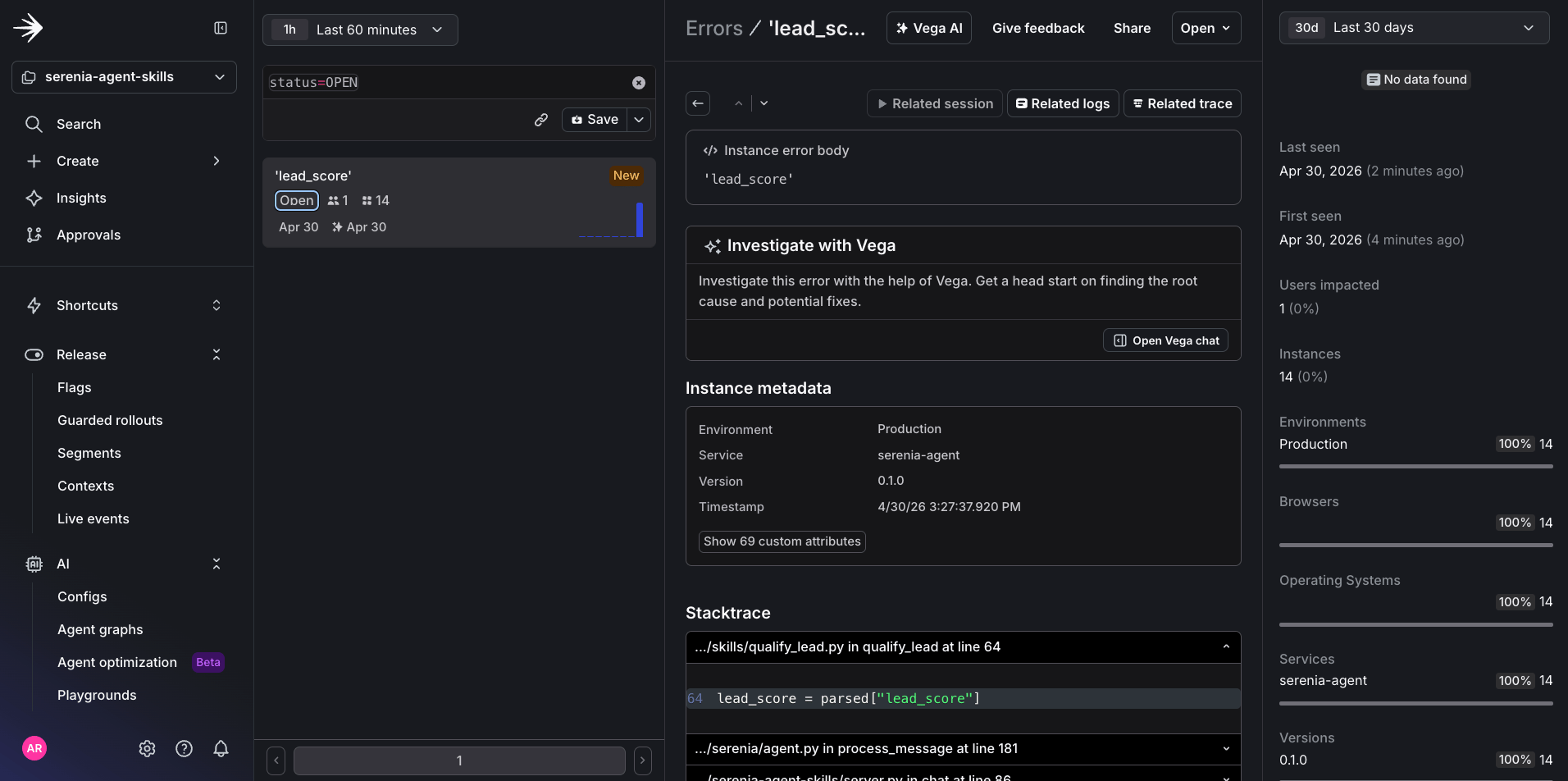
If you navigate to **Telemetry → Errors**, you'll be able to see the error picked up by the alert you created.
This will shift 25% of traffic to variation 2, which injects a new JSON shape into the system prompt.
Send requests so the new v2 variation gets exercised:
```shell title="Drive traffic with a breaking variation in the mix" lines wrap theme={null}
python scripts/drive_traffic.py --requests 60
```
```expandable lines wrap theme={null}
scripts/drive_traffic.py --requests 60
[driver] Sending 60 requests to http://localhost:8000 (concurrency=3)
[driver] req#001 ctx=driver-609ecf1e http=500 5062ms ERR Internal Server Error
[driver] req#002 ctx=driver-19d37439 http=200 5614ms OK routed=qualify_lead score=Hot
[driver] req#000 ctx=driver-d0444962 http=200 5883ms OK routed=qualify_lead score=Hot
[driver] req#003 ctx=driver-e07d9d07 http=200 3431ms OK routed=qualify_lead score=Hot
[driver] req#004 ctx=driver-3a00a95e http=200 3904ms OK routed=qualify_lead score=Hot
[driver] req#005 ctx=driver-871b5e01 http=500 4190ms ERR Internal Server Error
[driver] req#006 ctx=driver-78b00a9e http=200 2962ms OK routed=qualify_lead score=Hot
[driver] req#007 ctx=driver-59388f40 http=200 3427ms OK routed=qualify_lead score=Hot
[driver] req#008 ctx=driver-0896e658 http=200 3139ms OK routed=qualify_lead score=Hot
[driver] req#009 ctx=driver-771b9c71 http=500 4935ms ERR Internal Server Error
[driver] req#011 ctx=driver-86ef5ed6 http=200 3711ms OK routed=qualify_lead score=Hot
[driver] req#010 ctx=driver-ef0c38b2 http=200 4216ms OK routed=qualify_lead score=Hot
[driver] req#013 ctx=driver-80ec851a http=200 3030ms OK routed=qualify_lead score=Hot
[driver] req#014 ctx=driver-6df5a650 http=500 3767ms ERR Internal Server Error
[driver] req#016 ctx=driver-4d86306f http=n/a 1ms ERR ReadError:
[driver] req#012 ctx=driver-56cd9550 http=500 4555ms ERR Internal Server Error
[driver] req#015 ctx=driver-c098178f http=500 3941ms ERR Internal Server Error
[driver] req#017 ctx=driver-9a90a147 http=200 3207ms OK routed=qualify_lead score=Hot
[driver] req#018 ctx=driver-961a890c http=200 4389ms OK routed=qualify_lead score=Hot
[driver] req#019 ctx=driver-e5ca0b56 http=200 3134ms OK routed=qualify_lead score=Hot
[driver] req#020 ctx=driver-cede792a http=500 3947ms ERR Internal Server Error
[driver] req#021 ctx=driver-8f72341c http=200 4026ms OK routed=qualify_lead score=Hot
[driver] req#022 ctx=driver-a8f9580e http=500 4198ms ERR Internal Server Error
[driver] req#023 ctx=driver-41cb1e2c http=200 3132ms OK routed=qualify_lead score=Hot
[driver] req#024 ctx=driver-77f6dd54 http=200 3734ms OK routed=qualify_lead score=Hot
[driver] req#026 ctx=driver-1c15ff11 http=200 3126ms OK routed=qualify_lead score=Hot
[driver] req#025 ctx=driver-7af6a913 http=200 3399ms OK routed=qualify_lead score=Hot
[driver] req#029 ctx=driver-b47db760 http=200 1947ms OK routed=auto_propose score=-
[driver] req#027 ctx=driver-eabe872f http=500 4430ms ERR Internal Server Error
[driver] req#028 ctx=driver-352ee02d http=200 3272ms OK routed=qualify_lead score=Hot
[driver] req#030 ctx=driver-b7d8a578 http=500 3939ms ERR Internal Server Error
[driver] req#032 ctx=driver-6e04f58e http=200 3240ms OK routed=qualify_lead score=Hot
[driver] req#031 ctx=driver-f71f424e http=500 4263ms ERR Internal Server Error
[driver] req#033 ctx=driver-705631d5 http=200 3268ms OK routed=qualify_lead score=Hot
[driver] req#034 ctx=driver-b8285102 http=200 3033ms OK routed=qualify_lead score=Hot
[driver] req#035 ctx=driver-00818c5e http=200 3310ms OK routed=qualify_lead score=Hot
[driver] req#037 ctx=driver-97d16dd6 http=200 3298ms OK routed=qualify_lead score=Hot
[driver] req#036 ctx=driver-8cf33950 http=200 3505ms OK routed=qualify_lead score=Hot
[driver] req#038 ctx=driver-509062c3 http=200 3211ms OK routed=qualify_lead score=Hot
[driver] req#039 ctx=driver-a4d5e26f http=200 2989ms OK routed=qualify_lead score=Hot
[driver] req#040 ctx=driver-f1c79098 http=200 3143ms OK routed=qualify_lead score=Hot
[driver] req#041 ctx=driver-4c32f223 http=200 3241ms OK routed=qualify_lead score=Hot
[driver] req#042 ctx=driver-58f5f11d http=200 3102ms OK routed=qualify_lead score=Hot
[driver] req#043 ctx=driver-719ec7e0 http=200 3065ms OK routed=qualify_lead score=Hot
[driver] req#044 ctx=driver-b87ac6a8 http=200 3452ms OK routed=qualify_lead score=Hot
[driver] req#045 ctx=driver-3ece3fb5 http=200 3044ms OK routed=qualify_lead score=Hot
[driver] req#046 ctx=driver-b3fa56cc http=200 3073ms OK routed=qualify_lead score=Hot
[driver] req#047 ctx=driver-91c2c53a http=200 3456ms OK routed=qualify_lead score=Hot
[driver] req#049 ctx=driver-4541d645 http=200 3003ms OK routed=qualify_lead score=Hot
[driver] req#048 ctx=driver-6605d95a http=200 3674ms OK routed=qualify_lead score=Hot
[driver] req#050 ctx=driver-fdeafaf4 http=200 2875ms OK routed=qualify_lead score=Hot
[driver] req#051 ctx=driver-ff38c007 http=500 2956ms ERR Internal Server Error
[driver] req#052 ctx=driver-58a86216 http=200 2872ms OK routed=qualify_lead score=Hot
[driver] req#053 ctx=driver-c677bd0b http=500 3685ms ERR Internal Server Error
[driver] req#055 ctx=driver-2a00a0e4 http=200 2873ms OK routed=qualify_lead score=Hot
[driver] req#054 ctx=driver-96b1451a http=200 4286ms OK routed=qualify_lead score=Hot
[driver] req#056 ctx=driver-03693b23 http=200 3177ms OK routed=qualify_lead score=Hot
[driver] req#057 ctx=driver-747e9f3f http=200 3459ms OK routed=qualify_lead score=Hot
[driver] req#058 ctx=driver-3043389d http=500 3817ms ERR Internal Server Error
[driver] req#059 ctx=driver-543eae34 http=200 3045ms OK routed=qualify_lead score=Hot
```
If you navigate to **Telemetry → Errors**, you'll be able to see the error picked up by the alert you created.
 ## Investigation — five prompts
This is the step where you could use Vega to handle investigation, but sometimes you may want to drill down yourself and use AI to get to the root cause sooner. For this scenario, you can use these five prompts in Claude Code to diagnose the issue now that the alert has been triggered. You can also run this same investigation in your own AI agent by connecting the [LaunchDarkly MCP server](https://mcp.launchdarkly.com/mcp/launchdarkly) — the prompts below work in any agent with the MCP connected.
### Prompt 1 — Scope the blast radius
```text title="Prompt 1" lines wrap theme={null}
The serenia-skill-error-rate alert in the LaunchDarkly UI just fired. How many sessions are affected, over what window, and which skill is throwing?
```
Result:
```text title="Result" lines wrap theme={null}
Querying the serenia-agent-skills project for recent errors to identify the affected skill and session count.
Called observability 2 times (ctrlto to expand)
Found the error group. Now counting affected sessions and confirming the window.
Called observability 2 times (ctrl+o to expand)
• I have what's needed.
Alert investigation: serenia-skill-error-rate
Skill throwing: qualify_lead - KeyError: 'lead_score' at serenia/skills/qualify_lead.py:64 (lead_score = parsed["lead_score"1)
Sessions affected: 1 distinct session, 14 error events within that session (the skill is being retried/looping per turn).
Window: First seen 2026-04-30T20:26:272, last seen
2026-04-30T20:28:52Z - ~2.5 min burst, all bucketed inside the
20:26-20:31Z window.
Root cause (likely): qualify_lead parses an LLM response and assumes the lead_score key always exists. When the model returns a payload without that key (or under a different name), it raises uncaught and bubbles all the way up through agent.py:181 → server.py:86. Since the same conversation keeps re-invoking the skill, one session generates many errors - which is why the error rate alert tripped on a single user.
```
This first prompt does what a human would do clicking through a dashboard, except faster and with the synthesis already written. It establishes when the spike began, how many sessions and users are hit, which skill is responsible, and what the error fingerprint looks like.
### Prompt 2 — Reconstruct a user session failure
```text title="Prompt 2" lines wrap theme={null}
Pick one of the affected sessions and walk me through what happened — what the user asked, what the agent did, where it failed.
```
Result:
```text title="Result" expandable lines wrap theme={null}
Picking trace bb6b4e84d58a9c1fe21a9596e4bc5fb6 - the first failing request at 20:26:27Z.
What the user asked
POST /api/chat:
"Hi! We're a startup planning an investor reception for 90 guests on October 2nd. Need AV, bar, passed hors d'oeuvres. Please call me at rachel. tan@series-b. example."
What the agent did
1. Classified intent with claude-sonnet-4-20250514 (1.9s) → routed to qualify_lead with email rachel. tan@series-b. example and the event details as the question.
2. Called the qualify-lead LLM via AI Config qualify-lead-config, model claude-opus-4-6, variation 69bdc38b769c730a4c5764cd (3.1s,
HTTP 200). The model returned valid JSON:
{
"lead_temperature": "Hot",
"urgency": "weeks"
"budget_signal": "implicit"
"decision_authority": "decision_maker",
"follow_up_action": "book_call"
}
3. Tried to parse the response in serenia/skills/qualify_lead.py:64:
lead_score = parsed["lead_score"]
4. Crashed with KeyError: 'lead_score'. Exception bubbled qualify_lead → agent. py:181 → server.py:86, root span returned HTTP 500 after 5.05s.
Where it failed and why
The failure is a schema mismatch between the AI Config variation and the parser, not bad input or an LLM error. The variation's system prompt instructs the model to emit lead_temperature, but the consumer in qualify_lead.py still reads the old key lead_score.
The model did exactly what it was prompted to do; the code wasn't updated to match. Every request routed to qualify lead while this variation is serving will 500 the same way - which is why 14 errors stacked up in ~2.5 minutes.
```
With this output, you're able to put yourself in the user's shoes and see exactly what feature might have caused the issue. In this case the error is occurring at the `lead_score` stage of the `qualify_lead` agent skill.
### Prompt 3 — Pinpoint the type of breaking change
```text title="Prompt 3" lines wrap theme={null}
What changed with the qualify-lead-config AI config in the 3 hours before the error spike? Look at the audit log — did any variation get rolled out, or did targeting change?
```
Result:
```text title="Result" lines wrap theme={null}
Current Production targeting (version 4 of the env, after the change)
Fallthrough rollout:
- disabled - 0%
- v1 stable (Sonnet 4.6, emits lead_score) - 75%
- v2 precise (Opus 4.6, emits lead_temperature + 4 other fields) - 25%
What that means for the alert
The audit 10g API didn't return populated before/after deltas for these targeting events (the delta, previousVersion. environments, etc. came back empty), so I can't show the exact previous percentages. But the inference is clean:
nce is cleanta, prevousverston. envaronments,
- The parser at qualify_lead. py: 64 reads parsed["lead_score"] - so every request that lands on the v2 precise bucket throws KeyError.
That matches the observed behavior: ~25% of qualify_lead traffic 500s, error spike begins shortly after the 19:117 rollout (with some lag for traffic to accumulate to alert threshold).
```
### Prompt 4 — Confirm the variation is the cause
```text title="Prompt 4" lines wrap theme={null}
Compare error rate and latency between users on qualify-lead-v2-precise and qualify-lead-v1-stable over the last hour.
```
Result:
```text title="result" lines wrap theme={null}
Error rate & latency by variation - last hour (19:30Z → 20:30Z)
Splitting by gen_ai.request.model on the anthropic.chat span (v1 stable = claude-sonnet-4-6, v2 precise = claude-opus-4-6). Latencies are LLM-call duration only.
| | v1 stable (sonnet-4-6) | v2 precise (opus-4-6) |
|---------------|---------|----------------|
| Calls | 166 | 65 |
| Errors (KeyError: 'lead_score') | 0 | 14 |
| Error rate (hour) | 0% | ~21.5% |
| Error rate (last 6 min) | 0% (44 calls) | 100% (14 of 14 calls) |
| P50 LLM latency | ~1.25s | ~2.12s (+70%) |
| P95 LLM latency | ~1.92s | ~2.71s (+41%) |
```
This is the prompt that turns a hypothesis into a diagnosis. The previous prompt established correlation in time; this one establishes correlation in cohort. Together they're enough to make a confident decision.
### Prompt 5 — Finalize what's different
```text title="Prompt 5" lines wrap theme={null}
Compare a failing trace on the new variation to a successful trace on the previous variation for the same kind of inquiry. What's different?
```
Result:
```text title="Result" expandable lines wrap theme={null}
Pulling several recent successful qualify_lead traces to find a v1-stable run with a comparable inquiry shape.
Called observability (ctrl+o to expand)
Picking comparable inquiries - both are corporate-style high-intent leads with date + guest count + AV/catering:
- Failing (v2 precise): trace bb6b4e84d58a9c1fe21a9596e4bc5fb6 - Rachel Tan,
"investor reception for 90 guests
on October 2nd. Need AV, bar,
passed hors d'oeuvres."
- Successful (v1 stable): trace 2e29e287812a26e03b53caled942e8c7 - Marcus Chen, "Corporate offsite for ~40 people on October 14th. Need AV, breakfast, and lunch catering."
Both classified to qualify_lead by the same intent classifier. Everything that diverges happens inside the qualify-lead variation.
Side-by-side
| | v1 stable (Marcus / 200) | v2 precise (Rachel / 500) |
|----------------------------------|-----------------------------------------------------------|-------------------------------------------------------------------------------------------------------------------------------------------------|
| Model | `claude-sonnet-4-6` | `claude-opus-4-6` |
| Variation key | `qualify-lead-v1-stable` | `qualify-lead-v2-precise` |
| System-prompt output schema | `{lead_score, follow_up_action}` (2 fields) | `{lead_temperature, urgency, budget_signal, decision_authority, follow_up_action}` (5 fields, no `lead_score`) |
| Input tokens | 307 | 354 (+15%) |
| Output tokens | 20 | 61 (+205%) |
| LLM response | `{"lead_score":"Hot","follow_up_action":"book_call"}` | `{"lead_temperature":"Hot","urgency":"weeks","budget_signal":"implicit","decision_authority":"decision_maker","follow_up_action":"book_call"}` |
| LLM call duration | 979 ms | 3,117 ms (~3.2× slower) |
| Parser line (`qualify_lead.py:64`) | `parsed["lead_score"]` → `"Hot"` ✅ | `parsed["lead_score"]` → `KeyError` ❌ |
| Downstream | Airtable "Leads" row written, completion log emitted | Exception bubbles through `agent.py:181` → `server.py:86` → 500 |
| Root span | `POST /api/chat` 200, ~3.4s end-to-end | `POST /api/chat` 500, ~5.05s end-to-end |
| `feature_flag.set.id` on spans | `69bdc38b769c730a4c5764cd` (same AI Config) | `69bdc38b769c730a4c5764cd` (same AI Config) |
What's actually different
1. The system prompt's output contract.v2 was rewritten to emit a richer 5-field analyst schema and renamed the temperature field from lead_score → lead_temperature. The consumer was not updated. That single rename is what flips a 200 into a 500 - neither the user
the classifier, nor the LL behavior is at fault. The LL in both traces correctly followed its prompt.
2. The model. v2 swapped Sonnet 4.6 → Opus 4.6. That alone makes every successful v2 call ~3x slower at the LLM hop and meaningfully more expensive (Opus pricing × 3x output tokens). Even after the schema bug is fixed, you'll want to decide whether the richer analyst output is worth that cost/latency hit.
3. What gets persisted. v1 successfully writes a row to the Leads table and logs a structured completion event with lead_score-Hot, follow_up_action-book call. v2 writes nothing and logs nothing structured - only the bare lead score' error. So while the bug is live, every v2-bucketed lead is dropped on the floor, not just degraded.
The shared feature flag.set. id confirms it's the same AI Config evaluating to a different variation per request - exactly the rollout split (75% v1 / 25% 2) seen in production targeting.
```
The fifth prompt closes the loop. You started with an alert that said "error count is up." You end with a one-sentence root cause and two specific remediation paths, with the agent volunteering an opinion on which is faster. This is where the human in the loop is needed just in time to act on the suggested root cause and remediation steps.
## The Decision
Now that you have the diagnosis, there are three plausible paths forward, and each one is a real option an on-call engineer might pick.
* **Roll back** `qualify-lead-v2-precise` to 0% and serve everyone `qualify-lead-v1-stable` while the parser is fixed. Fastest, blunt, and stops the bleeding immediately. Downside: any benefit from the new prompt's richer scoring (urgency, budget signal, decision authority) is paused until the parser catches up.
* **Hold the rollout at 25%** while you patch the parser to read `lead_temperature`. The error count stays elevated for \~25% of leads until the patch ships, but you don't yo-yo the variation in a way that complicates the audit trail.
* **Patch and ship forward** without rolling back at all. Correct fix, slowest, requires confidence that the parser update will land in the next thirty minutes. If you're already on `qualify_lead.py` in another PR, this might be cheaper than it looks.
The MCP server gave you the evidence. You give the order. To turn the diagnosis into communication, run one more prompt:
```text title="Draft the on-call Slack message" lines wrap theme={null}
Draft a Slack message for the on-call channel summarizing the findings and recommending a path forward.
```
```expandable lines wrap theme={null}
Here's a Slack-formatted draft for #oncall:
*serenia-skill-error-rate firing — qualify_lead 500s*
*TL;DR:* AI Config rollout introduced a schema mismatch. Recommend rolling
v2 back to 0% in Production now, then deciding on the fix.
*What's happening*
• `qualify_lead` skill throwing `KeyError: 'lead_score'` at `serenia/skills/qualify_lead.py:64`
• 14 errors in ~2.5 min (20:26:27Z → 20:28:52Z); ~21.5% error rate over the last hour, *100% on v2-routed traffic*
• v1-stable traffic is healthy (0 errors / 166 calls)
*Root cause*
• AI Config `qualify-lead-config` Production targeting was updated at 19:11Z (by aroberson@) to roll out variation `v2 precise` at 25%
• v2's system prompt emits `{lead_temperature, urgency, budget_signal, decision_authority, follow_up_action}` — *no `lead_score` field*
• Parser at `qualify_lead.py:64` still reads `parsed["lead_score"]` → KeyError on every v2 response
• No code change shipped alongside the variation rollout
*Side effects*
• Every v2-bucketed lead is dropped — *no Airtable row, no follow-up logged*
• v2 (Opus 4.6) is also ~3× slower and ~3× more output tokens than v1 (Sonnet 4.6) even when it works
*Recommended path forward*
1. *Now (mitigate):* set `qualify-lead-config` Production fallthrough to 100% `v1 stable` (or flip off variation). Stops the bleeding in <1 min, no deploy needed.
2. *Today (fix):* decide which schema is canonical —
• If v2's richer schema is the goal: update `qualify_lead.py` to read `lead_temperature` (and decide what to do with the 4 new fields) before re-rolling
• If v2 was a prompt experiment only: update v2's system prompt to emit `lead_score` so it's drop-in compatible
3. *This week (harden):* add output-shape validation in the skill so a future variation drift fails loudly with context instead of a bare `KeyError`, and gate AI Config rollouts on a schema-contract check
4. *Separate decision:* whether Opus 4.6 latency/cost is justified for this skill — that's a product call, not a bug
Owner:
Refs: error group `qHnLgl0CnBJjnnxrPO6DhBuMypD4`, first failing trace `bb6b4e84d58a9c1fe21a9596e4bc5fb6`
A couple things to double-check before posting: confirm the on-call owner tag, and whether your channel prefers the targeting-revert action be done by oncall directly or filed as an incident first.
```
## Further reading
* [Catch silent AI failures with Vega](/docs/tutorials/silent-failure-vega-ai-investigation)
* [LaunchDarkly MCP Server](https://mcp.launchdarkly.com/mcp/launchdarkly)
* [LaunchDarkly Alerts](/docs/home/observability/alerts)
* [AgentControl](/docs/home/agentcontrol/quickstart)
## Investigation — five prompts
This is the step where you could use Vega to handle investigation, but sometimes you may want to drill down yourself and use AI to get to the root cause sooner. For this scenario, you can use these five prompts in Claude Code to diagnose the issue now that the alert has been triggered. You can also run this same investigation in your own AI agent by connecting the [LaunchDarkly MCP server](https://mcp.launchdarkly.com/mcp/launchdarkly) — the prompts below work in any agent with the MCP connected.
### Prompt 1 — Scope the blast radius
```text title="Prompt 1" lines wrap theme={null}
The serenia-skill-error-rate alert in the LaunchDarkly UI just fired. How many sessions are affected, over what window, and which skill is throwing?
```
Result:
```text title="Result" lines wrap theme={null}
Querying the serenia-agent-skills project for recent errors to identify the affected skill and session count.
Called observability 2 times (ctrlto to expand)
Found the error group. Now counting affected sessions and confirming the window.
Called observability 2 times (ctrl+o to expand)
• I have what's needed.
Alert investigation: serenia-skill-error-rate
Skill throwing: qualify_lead - KeyError: 'lead_score' at serenia/skills/qualify_lead.py:64 (lead_score = parsed["lead_score"1)
Sessions affected: 1 distinct session, 14 error events within that session (the skill is being retried/looping per turn).
Window: First seen 2026-04-30T20:26:272, last seen
2026-04-30T20:28:52Z - ~2.5 min burst, all bucketed inside the
20:26-20:31Z window.
Root cause (likely): qualify_lead parses an LLM response and assumes the lead_score key always exists. When the model returns a payload without that key (or under a different name), it raises uncaught and bubbles all the way up through agent.py:181 → server.py:86. Since the same conversation keeps re-invoking the skill, one session generates many errors - which is why the error rate alert tripped on a single user.
```
This first prompt does what a human would do clicking through a dashboard, except faster and with the synthesis already written. It establishes when the spike began, how many sessions and users are hit, which skill is responsible, and what the error fingerprint looks like.
### Prompt 2 — Reconstruct a user session failure
```text title="Prompt 2" lines wrap theme={null}
Pick one of the affected sessions and walk me through what happened — what the user asked, what the agent did, where it failed.
```
Result:
```text title="Result" expandable lines wrap theme={null}
Picking trace bb6b4e84d58a9c1fe21a9596e4bc5fb6 - the first failing request at 20:26:27Z.
What the user asked
POST /api/chat:
"Hi! We're a startup planning an investor reception for 90 guests on October 2nd. Need AV, bar, passed hors d'oeuvres. Please call me at rachel. tan@series-b. example."
What the agent did
1. Classified intent with claude-sonnet-4-20250514 (1.9s) → routed to qualify_lead with email rachel. tan@series-b. example and the event details as the question.
2. Called the qualify-lead LLM via AI Config qualify-lead-config, model claude-opus-4-6, variation 69bdc38b769c730a4c5764cd (3.1s,
HTTP 200). The model returned valid JSON:
{
"lead_temperature": "Hot",
"urgency": "weeks"
"budget_signal": "implicit"
"decision_authority": "decision_maker",
"follow_up_action": "book_call"
}
3. Tried to parse the response in serenia/skills/qualify_lead.py:64:
lead_score = parsed["lead_score"]
4. Crashed with KeyError: 'lead_score'. Exception bubbled qualify_lead → agent. py:181 → server.py:86, root span returned HTTP 500 after 5.05s.
Where it failed and why
The failure is a schema mismatch between the AI Config variation and the parser, not bad input or an LLM error. The variation's system prompt instructs the model to emit lead_temperature, but the consumer in qualify_lead.py still reads the old key lead_score.
The model did exactly what it was prompted to do; the code wasn't updated to match. Every request routed to qualify lead while this variation is serving will 500 the same way - which is why 14 errors stacked up in ~2.5 minutes.
```
With this output, you're able to put yourself in the user's shoes and see exactly what feature might have caused the issue. In this case the error is occurring at the `lead_score` stage of the `qualify_lead` agent skill.
### Prompt 3 — Pinpoint the type of breaking change
```text title="Prompt 3" lines wrap theme={null}
What changed with the qualify-lead-config AI config in the 3 hours before the error spike? Look at the audit log — did any variation get rolled out, or did targeting change?
```
Result:
```text title="Result" lines wrap theme={null}
Current Production targeting (version 4 of the env, after the change)
Fallthrough rollout:
- disabled - 0%
- v1 stable (Sonnet 4.6, emits lead_score) - 75%
- v2 precise (Opus 4.6, emits lead_temperature + 4 other fields) - 25%
What that means for the alert
The audit 10g API didn't return populated before/after deltas for these targeting events (the delta, previousVersion. environments, etc. came back empty), so I can't show the exact previous percentages. But the inference is clean:
nce is cleanta, prevousverston. envaronments,
- The parser at qualify_lead. py: 64 reads parsed["lead_score"] - so every request that lands on the v2 precise bucket throws KeyError.
That matches the observed behavior: ~25% of qualify_lead traffic 500s, error spike begins shortly after the 19:117 rollout (with some lag for traffic to accumulate to alert threshold).
```
### Prompt 4 — Confirm the variation is the cause
```text title="Prompt 4" lines wrap theme={null}
Compare error rate and latency between users on qualify-lead-v2-precise and qualify-lead-v1-stable over the last hour.
```
Result:
```text title="result" lines wrap theme={null}
Error rate & latency by variation - last hour (19:30Z → 20:30Z)
Splitting by gen_ai.request.model on the anthropic.chat span (v1 stable = claude-sonnet-4-6, v2 precise = claude-opus-4-6). Latencies are LLM-call duration only.
| | v1 stable (sonnet-4-6) | v2 precise (opus-4-6) |
|---------------|---------|----------------|
| Calls | 166 | 65 |
| Errors (KeyError: 'lead_score') | 0 | 14 |
| Error rate (hour) | 0% | ~21.5% |
| Error rate (last 6 min) | 0% (44 calls) | 100% (14 of 14 calls) |
| P50 LLM latency | ~1.25s | ~2.12s (+70%) |
| P95 LLM latency | ~1.92s | ~2.71s (+41%) |
```
This is the prompt that turns a hypothesis into a diagnosis. The previous prompt established correlation in time; this one establishes correlation in cohort. Together they're enough to make a confident decision.
### Prompt 5 — Finalize what's different
```text title="Prompt 5" lines wrap theme={null}
Compare a failing trace on the new variation to a successful trace on the previous variation for the same kind of inquiry. What's different?
```
Result:
```text title="Result" expandable lines wrap theme={null}
Pulling several recent successful qualify_lead traces to find a v1-stable run with a comparable inquiry shape.
Called observability (ctrl+o to expand)
Picking comparable inquiries - both are corporate-style high-intent leads with date + guest count + AV/catering:
- Failing (v2 precise): trace bb6b4e84d58a9c1fe21a9596e4bc5fb6 - Rachel Tan,
"investor reception for 90 guests
on October 2nd. Need AV, bar,
passed hors d'oeuvres."
- Successful (v1 stable): trace 2e29e287812a26e03b53caled942e8c7 - Marcus Chen, "Corporate offsite for ~40 people on October 14th. Need AV, breakfast, and lunch catering."
Both classified to qualify_lead by the same intent classifier. Everything that diverges happens inside the qualify-lead variation.
Side-by-side
| | v1 stable (Marcus / 200) | v2 precise (Rachel / 500) |
|----------------------------------|-----------------------------------------------------------|-------------------------------------------------------------------------------------------------------------------------------------------------|
| Model | `claude-sonnet-4-6` | `claude-opus-4-6` |
| Variation key | `qualify-lead-v1-stable` | `qualify-lead-v2-precise` |
| System-prompt output schema | `{lead_score, follow_up_action}` (2 fields) | `{lead_temperature, urgency, budget_signal, decision_authority, follow_up_action}` (5 fields, no `lead_score`) |
| Input tokens | 307 | 354 (+15%) |
| Output tokens | 20 | 61 (+205%) |
| LLM response | `{"lead_score":"Hot","follow_up_action":"book_call"}` | `{"lead_temperature":"Hot","urgency":"weeks","budget_signal":"implicit","decision_authority":"decision_maker","follow_up_action":"book_call"}` |
| LLM call duration | 979 ms | 3,117 ms (~3.2× slower) |
| Parser line (`qualify_lead.py:64`) | `parsed["lead_score"]` → `"Hot"` ✅ | `parsed["lead_score"]` → `KeyError` ❌ |
| Downstream | Airtable "Leads" row written, completion log emitted | Exception bubbles through `agent.py:181` → `server.py:86` → 500 |
| Root span | `POST /api/chat` 200, ~3.4s end-to-end | `POST /api/chat` 500, ~5.05s end-to-end |
| `feature_flag.set.id` on spans | `69bdc38b769c730a4c5764cd` (same AI Config) | `69bdc38b769c730a4c5764cd` (same AI Config) |
What's actually different
1. The system prompt's output contract.v2 was rewritten to emit a richer 5-field analyst schema and renamed the temperature field from lead_score → lead_temperature. The consumer was not updated. That single rename is what flips a 200 into a 500 - neither the user
the classifier, nor the LL behavior is at fault. The LL in both traces correctly followed its prompt.
2. The model. v2 swapped Sonnet 4.6 → Opus 4.6. That alone makes every successful v2 call ~3x slower at the LLM hop and meaningfully more expensive (Opus pricing × 3x output tokens). Even after the schema bug is fixed, you'll want to decide whether the richer analyst output is worth that cost/latency hit.
3. What gets persisted. v1 successfully writes a row to the Leads table and logs a structured completion event with lead_score-Hot, follow_up_action-book call. v2 writes nothing and logs nothing structured - only the bare lead score' error. So while the bug is live, every v2-bucketed lead is dropped on the floor, not just degraded.
The shared feature flag.set. id confirms it's the same AI Config evaluating to a different variation per request - exactly the rollout split (75% v1 / 25% 2) seen in production targeting.
```
The fifth prompt closes the loop. You started with an alert that said "error count is up." You end with a one-sentence root cause and two specific remediation paths, with the agent volunteering an opinion on which is faster. This is where the human in the loop is needed just in time to act on the suggested root cause and remediation steps.
## The Decision
Now that you have the diagnosis, there are three plausible paths forward, and each one is a real option an on-call engineer might pick.
* **Roll back** `qualify-lead-v2-precise` to 0% and serve everyone `qualify-lead-v1-stable` while the parser is fixed. Fastest, blunt, and stops the bleeding immediately. Downside: any benefit from the new prompt's richer scoring (urgency, budget signal, decision authority) is paused until the parser catches up.
* **Hold the rollout at 25%** while you patch the parser to read `lead_temperature`. The error count stays elevated for \~25% of leads until the patch ships, but you don't yo-yo the variation in a way that complicates the audit trail.
* **Patch and ship forward** without rolling back at all. Correct fix, slowest, requires confidence that the parser update will land in the next thirty minutes. If you're already on `qualify_lead.py` in another PR, this might be cheaper than it looks.
The MCP server gave you the evidence. You give the order. To turn the diagnosis into communication, run one more prompt:
```text title="Draft the on-call Slack message" lines wrap theme={null}
Draft a Slack message for the on-call channel summarizing the findings and recommending a path forward.
```
```expandable lines wrap theme={null}
Here's a Slack-formatted draft for #oncall:
*serenia-skill-error-rate firing — qualify_lead 500s*
*TL;DR:* AI Config rollout introduced a schema mismatch. Recommend rolling
v2 back to 0% in Production now, then deciding on the fix.
*What's happening*
• `qualify_lead` skill throwing `KeyError: 'lead_score'` at `serenia/skills/qualify_lead.py:64`
• 14 errors in ~2.5 min (20:26:27Z → 20:28:52Z); ~21.5% error rate over the last hour, *100% on v2-routed traffic*
• v1-stable traffic is healthy (0 errors / 166 calls)
*Root cause*
• AI Config `qualify-lead-config` Production targeting was updated at 19:11Z (by aroberson@) to roll out variation `v2 precise` at 25%
• v2's system prompt emits `{lead_temperature, urgency, budget_signal, decision_authority, follow_up_action}` — *no `lead_score` field*
• Parser at `qualify_lead.py:64` still reads `parsed["lead_score"]` → KeyError on every v2 response
• No code change shipped alongside the variation rollout
*Side effects*
• Every v2-bucketed lead is dropped — *no Airtable row, no follow-up logged*
• v2 (Opus 4.6) is also ~3× slower and ~3× more output tokens than v1 (Sonnet 4.6) even when it works
*Recommended path forward*
1. *Now (mitigate):* set `qualify-lead-config` Production fallthrough to 100% `v1 stable` (or flip off variation). Stops the bleeding in <1 min, no deploy needed.
2. *Today (fix):* decide which schema is canonical —
• If v2's richer schema is the goal: update `qualify_lead.py` to read `lead_temperature` (and decide what to do with the 4 new fields) before re-rolling
• If v2 was a prompt experiment only: update v2's system prompt to emit `lead_score` so it's drop-in compatible
3. *This week (harden):* add output-shape validation in the skill so a future variation drift fails loudly with context instead of a bare `KeyError`, and gate AI Config rollouts on a schema-contract check
4. *Separate decision:* whether Opus 4.6 latency/cost is justified for this skill — that's a product call, not a bug
Owner:
Refs: error group `qHnLgl0CnBJjnnxrPO6DhBuMypD4`, first failing trace `bb6b4e84d58a9c1fe21a9596e4bc5fb6`
A couple things to double-check before posting: confirm the on-call owner tag, and whether your channel prefers the targeting-revert action be done by oncall directly or filed as an incident first.
```
## Further reading
* [Catch silent AI failures with Vega](/docs/tutorials/silent-failure-vega-ai-investigation)
* [LaunchDarkly MCP Server](https://mcp.launchdarkly.com/mcp/launchdarkly)
* [LaunchDarkly Alerts](/docs/home/observability/alerts)
* [AgentControl](/docs/home/agentcontrol/quickstart)