Published {date}
{avatar &&  }
}
{name}
Published {date}
{name}
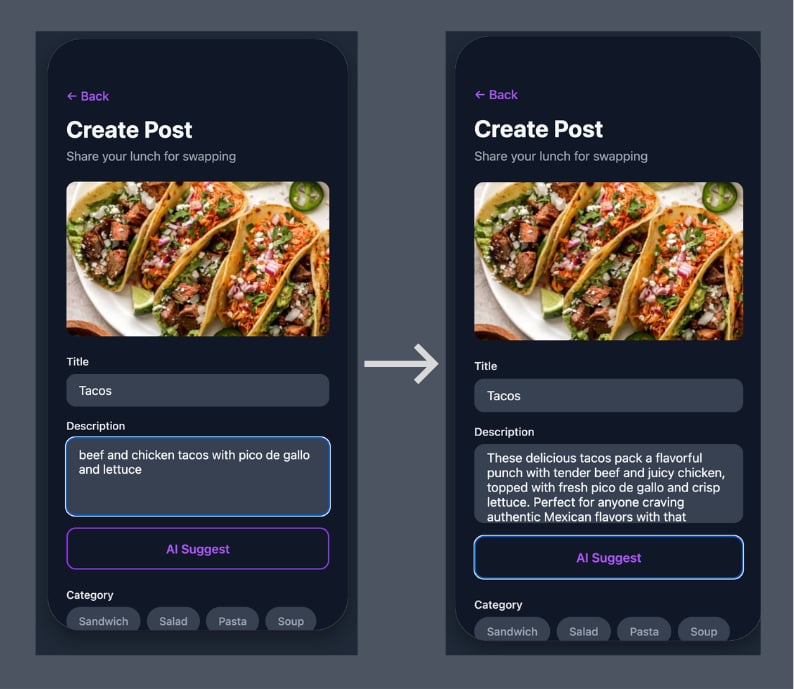 So in the initial description you may write, "Grilled cheese sandwich", then click the AI Suggest button. The app replaces it with, "Golden, buttery grilled cheese with perfectly melted cheese sandwiched between crispy white bread. This comfort food classic is grilled to perfection with a satisfying crunch on the outside and gooey, cheesy goodness on the inside. Simple, delicious, and guaranteed to hit the spot!"
Now which lunch post are you more than likely to click on?
This subtle addition takes the app from a fun, simple lunch swap experience to a viable LLM application that still requires the same visibility and observability of traditional systems. OpenTelemetry allows you to extract the necessary data like token count, model name, agent responses, etc in order to properly debug system failures.
## Multi-Agent Architecture
So in the initial description you may write, "Grilled cheese sandwich", then click the AI Suggest button. The app replaces it with, "Golden, buttery grilled cheese with perfectly melted cheese sandwiched between crispy white bread. This comfort food classic is grilled to perfection with a satisfying crunch on the outside and gooey, cheesy goodness on the inside. Simple, delicious, and guaranteed to hit the spot!"
Now which lunch post are you more than likely to click on?
This subtle addition takes the app from a fun, simple lunch swap experience to a viable LLM application that still requires the same visibility and observability of traditional systems. OpenTelemetry allows you to extract the necessary data like token count, model name, agent responses, etc in order to properly debug system failures.
## Multi-Agent Architecture
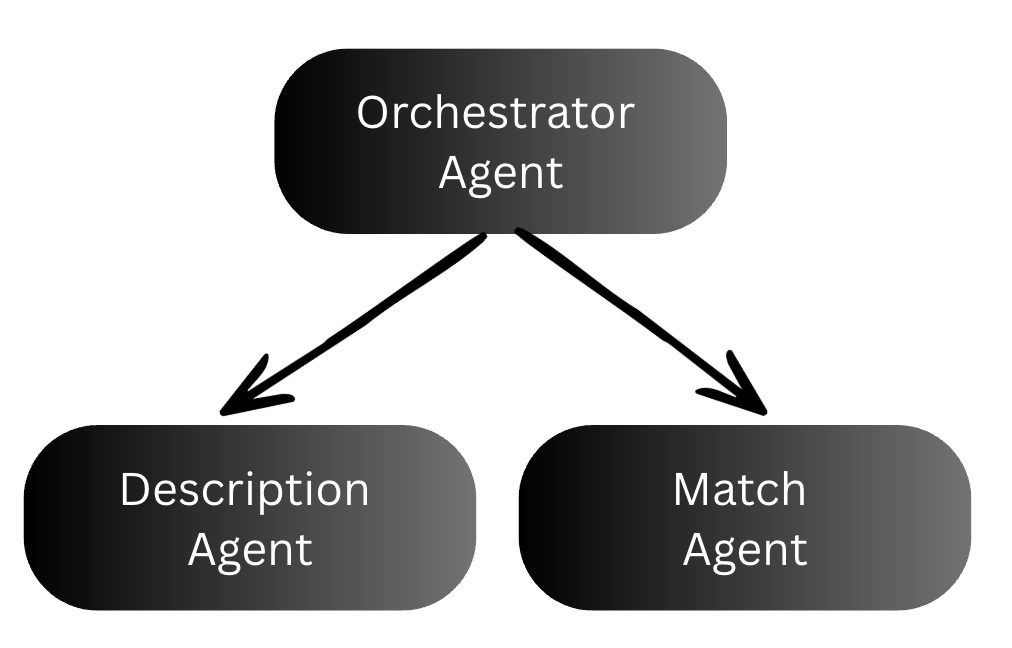 The WorkLunch backend uses 3 agents to rewrite the lunch post description and find good lunch swaps.
1. The orchestrator coordinates the other two agents. It receives the user's request and the model type, calls the description agent first, then passes the generated description into the match agent. It acts as the parent span that ties the whole chain together.
2. The description agent takes the user's sparse lunch post input and calls Claude to generate an appealing 2-3 sentence description.
3. The match agent takes the user's lunch post (including the description just generated) plus a list of other active posts in the community, and uses AI to suggest 2-3 posts that would make good swaps.
These features are controlled by two [feature flags](/docs/guides/flags), one for enabling the AI suggest feature and the other to control which model version the app uses. Every layer gets its own OTel span, creating a trace tree that shows the full request lifecycle.
## Prerequisites
Before you start, you'll need the following installed locally and accounts set up with the services below.
* [Docker Desktop](https://www.docker.com/products/docker-desktop/)
* [Node.js](https://nodejs.org/) / Npm
* An [Anthropic](https://console.anthropic.com/) account (or openai)
* A [LaunchDarkly](https://app.launchdarkly.com/) account (sdk key and access token)
* A [Langfuse](https://cloud.langfuse.com/) account (public and secret key)
* A [Supabase](https://supabase.com/) account (database configuration)
### Environment variables
Once you're all setup, clone the [WorkLunch repo](https://github.com/arober39/worklunch/tree/otel-launchdarkly-langfuse?tab=readme-ov-file). Copy the example `.env` file and fill in your values:
```shell lines wrap theme={null}
cp .env.example .env
```
Your `.env` should contain:
```shell expandable lines wrap theme={null}
# .env
# Supabase (required for the app)
EXPO_PUBLIC_SUPABASE_URL=https://your-project.supabase.co
EXPO_PUBLIC_SUPABASE_ANON_KEY=your-anon-key
# LaunchDarkly client-side (required for feature flags in the frontend)
EXPO_PUBLIC_LAUNCHDARKLY_SDK_KEY=mob-your-mobile-key
EXPO_PUBLIC_LAUNCHDARKLY_CLIENT_SIDE_ID=your-client-side-id
# AI Backend URL (where docker compose runs the Python backend)
EXPO_PUBLIC_AI_BACKEND_URL=http://localhost:8000
# --- Docker Compose vars (used by the backend + otel-collector) ---
# Anthropic API key for Claude
ANTHROPIC_API_KEY=sk-ant-your-key-here
# LaunchDarkly server-side SDK key (starts with sdk-, NOT mob-)
LD_SDK_KEY=sdk-your-key-here
# Langfuse auth — Base64 of "public_key:secret_key" (keep on one line)
LANGFUSE_AUTH_HEADER=your-base64-encoded-string
```
### Supabase setup
1. Create a new Supabase project and grab your **Project URL** and **Anon key** from **Dashboard → Settings → API**
2. Run the migration files in `supabase/migrations/` to create the database schema. Execute them in order in the **Supabase Dashboard → SQL Editor**:
```lines wrap theme={null}
supabase/migrations/
20240101000000_initial_schema.sql ← tables: profiles, spaces, posts, proposals, messages, trades
20240101000001_rls_policies.sql ← row-level security policies
20240101000002_storage_setup.sql ← storage bucket for post photos
20240101000003_disable_email_confirmation.sql ← simplifies local dev auth
20240205000000_fix_space_memberships_rls_recursion.sql
20240205000001_spaces_delete_policy.sql
20240206000000_space_creator_as_admin.sql
20240206100000_delete_space_rpc.sql
```
Be sure to run each file in order as later migrations depend on tables and policies from earlier ones.
### LaunchDarkly setup
Create two feature flags in your new LaunchDarkly `worklunch` project:
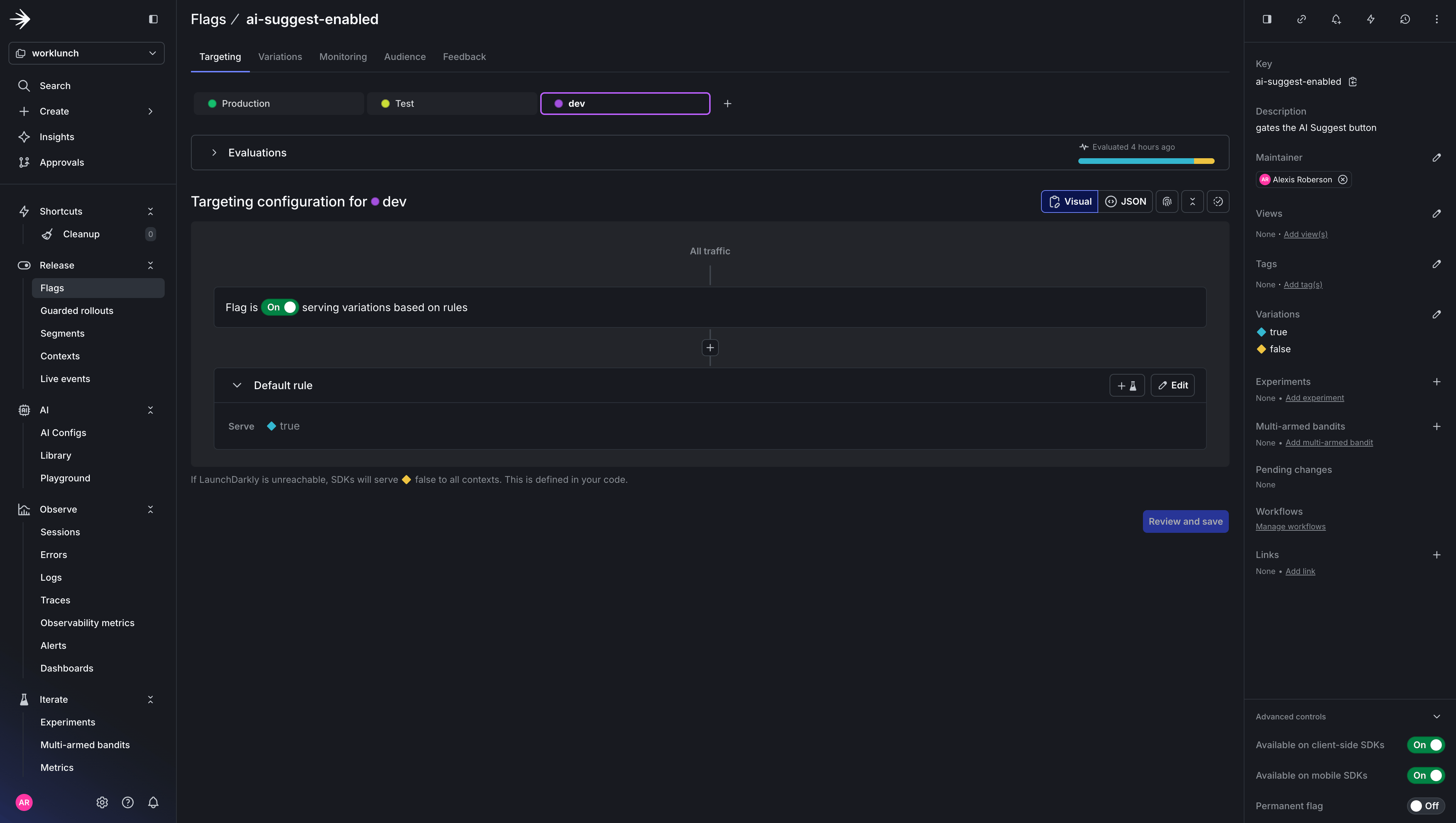
1. `ai-suggest-enabled`: Boolean flag, client-side. Gates visibility of the AI Suggest button in the frontend. Set it to `true` for users you want to test with.
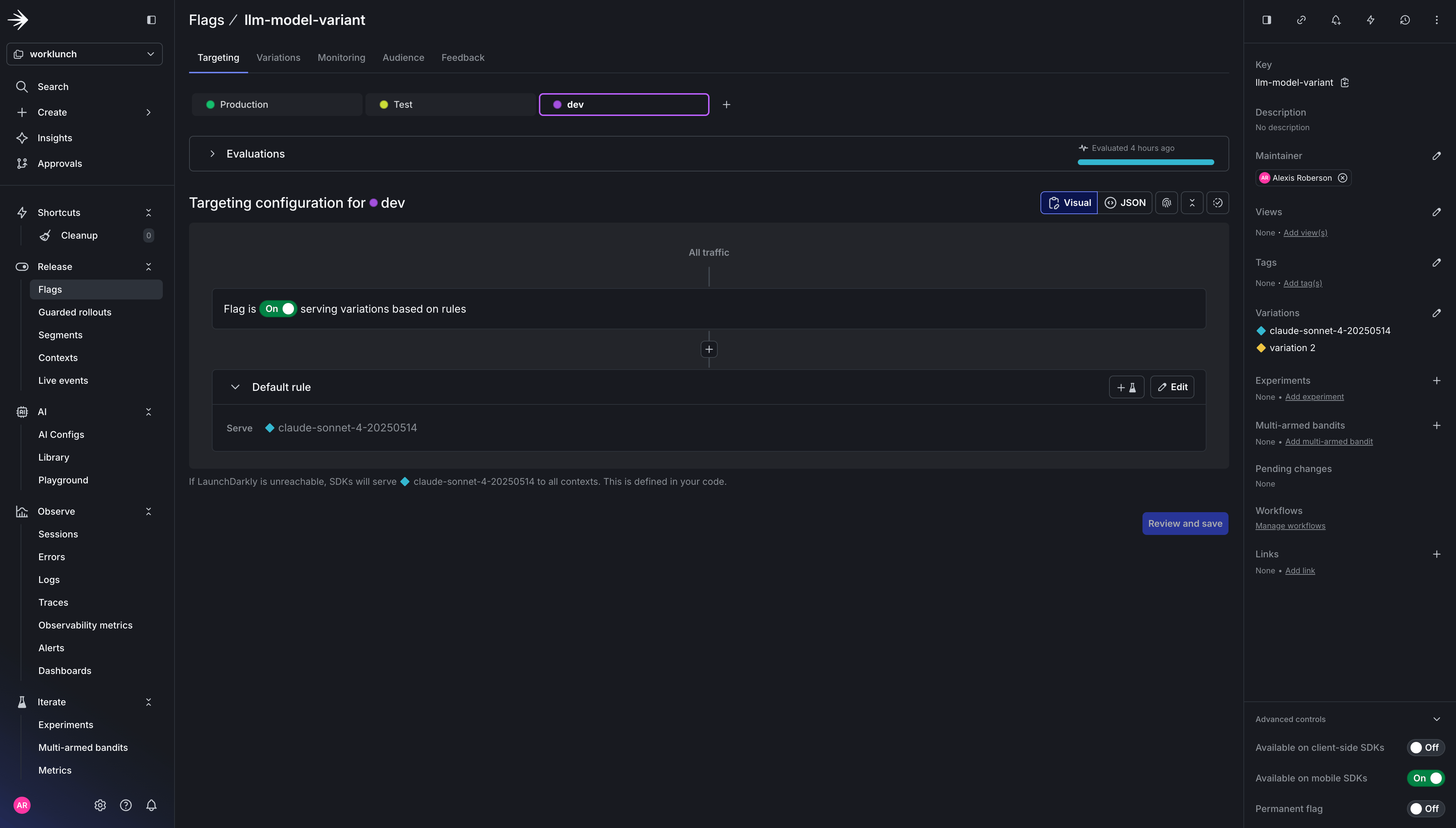
2. `llm-model-variant`: String flag, server-side. Controls which Claude model the backend uses. Set the default value to `claude-sonnet-4-20250514`. Add a variation for `claude-haiku-4-5-20251001` if you want to experiment with a faster/cheaper model.
The WorkLunch backend uses 3 agents to rewrite the lunch post description and find good lunch swaps.
1. The orchestrator coordinates the other two agents. It receives the user's request and the model type, calls the description agent first, then passes the generated description into the match agent. It acts as the parent span that ties the whole chain together.
2. The description agent takes the user's sparse lunch post input and calls Claude to generate an appealing 2-3 sentence description.
3. The match agent takes the user's lunch post (including the description just generated) plus a list of other active posts in the community, and uses AI to suggest 2-3 posts that would make good swaps.
These features are controlled by two [feature flags](/docs/guides/flags), one for enabling the AI suggest feature and the other to control which model version the app uses. Every layer gets its own OTel span, creating a trace tree that shows the full request lifecycle.
## Prerequisites
Before you start, you'll need the following installed locally and accounts set up with the services below.
* [Docker Desktop](https://www.docker.com/products/docker-desktop/)
* [Node.js](https://nodejs.org/) / Npm
* An [Anthropic](https://console.anthropic.com/) account (or openai)
* A [LaunchDarkly](https://app.launchdarkly.com/) account (sdk key and access token)
* A [Langfuse](https://cloud.langfuse.com/) account (public and secret key)
* A [Supabase](https://supabase.com/) account (database configuration)
### Environment variables
Once you're all setup, clone the [WorkLunch repo](https://github.com/arober39/worklunch/tree/otel-launchdarkly-langfuse?tab=readme-ov-file). Copy the example `.env` file and fill in your values:
```shell lines wrap theme={null}
cp .env.example .env
```
Your `.env` should contain:
```shell expandable lines wrap theme={null}
# .env
# Supabase (required for the app)
EXPO_PUBLIC_SUPABASE_URL=https://your-project.supabase.co
EXPO_PUBLIC_SUPABASE_ANON_KEY=your-anon-key
# LaunchDarkly client-side (required for feature flags in the frontend)
EXPO_PUBLIC_LAUNCHDARKLY_SDK_KEY=mob-your-mobile-key
EXPO_PUBLIC_LAUNCHDARKLY_CLIENT_SIDE_ID=your-client-side-id
# AI Backend URL (where docker compose runs the Python backend)
EXPO_PUBLIC_AI_BACKEND_URL=http://localhost:8000
# --- Docker Compose vars (used by the backend + otel-collector) ---
# Anthropic API key for Claude
ANTHROPIC_API_KEY=sk-ant-your-key-here
# LaunchDarkly server-side SDK key (starts with sdk-, NOT mob-)
LD_SDK_KEY=sdk-your-key-here
# Langfuse auth — Base64 of "public_key:secret_key" (keep on one line)
LANGFUSE_AUTH_HEADER=your-base64-encoded-string
```
### Supabase setup
1. Create a new Supabase project and grab your **Project URL** and **Anon key** from **Dashboard → Settings → API**
2. Run the migration files in `supabase/migrations/` to create the database schema. Execute them in order in the **Supabase Dashboard → SQL Editor**:
```lines wrap theme={null}
supabase/migrations/
20240101000000_initial_schema.sql ← tables: profiles, spaces, posts, proposals, messages, trades
20240101000001_rls_policies.sql ← row-level security policies
20240101000002_storage_setup.sql ← storage bucket for post photos
20240101000003_disable_email_confirmation.sql ← simplifies local dev auth
20240205000000_fix_space_memberships_rls_recursion.sql
20240205000001_spaces_delete_policy.sql
20240206000000_space_creator_as_admin.sql
20240206100000_delete_space_rpc.sql
```
Be sure to run each file in order as later migrations depend on tables and policies from earlier ones.
### LaunchDarkly setup
Create two feature flags in your new LaunchDarkly `worklunch` project:
1. `ai-suggest-enabled`: Boolean flag, client-side. Gates visibility of the AI Suggest button in the frontend. Set it to `true` for users you want to test with.
2. `llm-model-variant`: String flag, server-side. Controls which Claude model the backend uses. Set the default value to `claude-sonnet-4-20250514`. Add a variation for `claude-haiku-4-5-20251001` if you want to experiment with a faster/cheaper model.
 ### Langfuse setup
1. Create a new project in Langfuse (note whether your project URL starts with `us.cloud.langfuse.com` or `cloud.langfuse.com` — this determines your region)
2. Go to **Project Settings → API Keys** and create a new key pair
3. Generate your Base64 auth header and place it inside your .env file:
```shell lines wrap theme={null}
echo -n "pk-lf-your-public-key:sk-lf-your-secret-key" | base64
```
### Quick Start
Once your `.env` is configured:
```shell lines wrap theme={null}
# Install frontend dependencies
npm install
# Start the OTel Collector + Python backend
docker compose up --build
# In a separate terminal, start the Expo dev server
npm run web
```
Verify traces are flowing by checking the collector logs:
```shell lines wrap theme={null}
docker compose logs -f otel-collector
```
You should see spans with `gen_ai.*` attributes and `feature_flag` events printed by the debug exporter.
Now, let's take a look at how each agent is instrumented to send spans to LaunchDarkly.
## Step 1: Instrument your LLM application
### Initialize the Tracer and Application
The FastAPI app sets up OTel, LaunchDarkly, CORS, and auto-instrumentation in a single lifespan handler:
```py expandable lines wrap theme={null}
# backend/app/main.py
from contextlib import asynccontextmanager
import ldclient
from fastapi import FastAPI
from fastapi.middleware.cors import CORSMiddleware
from opentelemetry import trace
from opentelemetry.exporter.otlp.proto.grpc.trace_exporter import OTLPSpanExporter
from opentelemetry.instrumentation.fastapi import FastAPIInstrumentor
from opentelemetry.sdk.trace import TracerProvider
from opentelemetry.sdk.trace.export import BatchSpanProcessor
from app.config import settings
from app.routers.suggest import router as suggest_router
def setup_otel() -> None:
"""Configure OpenTelemetry with OTLP gRPC exporter."""
provider = TracerProvider()
provider.add_span_processor(
BatchSpanProcessor(
OTLPSpanExporter(endpoint=settings.OTEL_EXPORTER_ENDPOINT, insecure=True)
)
)
trace.set_tracer_provider(provider)
def setup_launchdarkly() -> None:
"""Initialize LaunchDarkly server SDK."""
config = ldclient.Config(settings.LD_SDK_KEY)
ldclient.set_config(config)
@asynccontextmanager
async def lifespan(app: FastAPI):
setup_otel()
setup_launchdarkly()
yield
ldclient.get().close()
provider = trace.get_tracer_provider()
if hasattr(provider, "shutdown"):
provider.shutdown()
app = FastAPI(title="WorkLunch AI Backend", lifespan=lifespan)
# CORS
app.add_middleware(
CORSMiddleware,
allow_origins=["*"],
allow_credentials=True,
allow_methods=["*"],
allow_headers=["*"],
)
# Instrument FastAPI with OTel
FastAPIInstrumentor.instrument_app(app)
# Routes
app.include_router(suggest_router, prefix="/api/v1")
@app.get("/health")
async def health():
return {"status": "ok"}
```
### The Route: Flag evaluation + feature flag span event
The FastAPI route is where the LaunchDarkly flag gets evaluated. The `feature_flag` span event on this span is what LaunchDarkly's observability layer looks for when correlating traces with flag evaluations.
```py expandable lines wrap theme={null}
# backend/app/routers/suggest.py
import ldclient
from fastapi import APIRouter
from opentelemetry import trace
from app.agents import orchestrator
from app.models import SuggestRequest, SuggestResponse
router = APIRouter()
tracer = trace.get_tracer("worklunch.routers.suggest")
DEFAULT_MODEL = "claude-sonnet-4-20250514"
@router.post("/suggest", response_model=SuggestResponse)
async def suggest(request: SuggestRequest) -> SuggestResponse:
with tracer.start_as_current_span("suggest.endpoint") as span:
# Evaluate the model variant flag
ld_client = ldclient.get()
context = ldclient.Context.builder("worklunch-backend").kind("service").build()
model = ld_client.variation("llm-model-variant", context, DEFAULT_MODEL)
# Emit the feature_flag span event — this is what LaunchDarkly correlates with
span.add_event(
"feature_flag",
{
"feature_flag.key": "llm-model-variant",
"feature_flag.provider.name": "LaunchDarkly",
"feature_flag.variant": str(model),
},
)
span.set_attribute("gen_ai.request.model", model)
# The flag-controlled model flows into the orchestrator
description, matched_posts = await orchestrator.run(request, model)
return SuggestResponse(
suggested_description=description,
matched_posts=matched_posts,
)
```
### The Orchestrator: Parent span for the agent chain
The orchestrator creates a parent span and calls each sub-agent sequentially. Because the sub-agent spans are created while the orchestrator span is active, OTel automatically nests them as children.
```py expandable lines wrap theme={null}
# backend/app/agents/orchestrator.py
from opentelemetry import trace
from app.agents.description_agent import generate_description
from app.agents.match_agent import find_matches
from app.models import MatchedPost, SuggestRequest
tracer = trace.get_tracer("worklunch.orchestrator")
async def run(
request: SuggestRequest, model: str
) -> tuple[str, list[MatchedPost]]:
with tracer.start_as_current_span("orchestrator.run") as span:
span.set_attribute("orchestrator.model", model)
span.set_attribute("orchestrator.title", request.title)
span.set_attribute("orchestrator.active_posts_count", len(request.active_posts))
# Step 1: Generate description
description = await generate_description(request, model)
# Step 2: Find matches using the generated description
matched_posts = await find_matches(
title=request.title,
description=description,
category=request.category,
dietary_preferences=request.dietary_preferences,
active_posts=request.active_posts,
model=model,
)
span.set_attribute("orchestrator.matches_found", len(matched_posts))
return description, matched_posts
```
### The Description Agent: LLM Call with genAI semantic conventions
This is where the [OTel GenAI Semantic Conventions](https://opentelemetry.io/docs/specs/semconv/gen-ai/) come in. The conventions define a standard schema for LLM spans — `gen_ai.system`, `gen_ai.request.model`, `gen_ai.usage.*`, and prompt/completion content as span events.
```py expandable lines wrap theme={null}
# backend/app/agents/description_agent.py
import json
import anthropic
from opentelemetry import trace
from app.config import settings
from app.models import SuggestRequest
tracer = trace.get_tracer("worklunch.agents.description")
async def generate_description(request: SuggestRequest, model: str) -> str:
client = anthropic.Anthropic(api_key=settings.ANTHROPIC_API_KEY)
system_prompt = (
"You are a helpful assistant that writes appealing, concise lunch descriptions "
"for a lunch-swapping app. Given a title and optional details, write a 2-3 sentence "
"description that makes the lunch sound appetizing and highlights what makes it special. "
"Mention any dietary info naturally if provided. Keep it friendly and casual."
)
user_content_parts = [f"Lunch title: {request.title}"]
if request.description:
user_content_parts.append(f"Current description: {request.description}")
if request.category:
user_content_parts.append(f"Category: {request.category}")
if request.dietary_preferences:
user_content_parts.append(f"Dietary preferences: {request.dietary_preferences}")
if request.allergies:
user_content_parts.append(f"Allergies to note: {request.allergies}")
user_content = "\n".join(user_content_parts)
messages = [{"role": "user", "content": user_content}]
with tracer.start_as_current_span("description_agent.generate") as span:
# GenAI semantic conventions — provider and request attributes
span.set_attribute("gen_ai.system", "anthropic")
span.set_attribute("gen_ai.request.model", model)
span.set_attribute("gen_ai.request.max_tokens", 256)
span.set_attribute("gen_ai.request.temperature", 0.7)
# Log prompt as a span event (keeps large payloads out of the attribute index)
span.add_event(
"gen_ai.content.prompt",
{"gen_ai.prompt": json.dumps(messages)},
)
response = client.messages.create(
model=model,
max_tokens=256,
temperature=0.7,
system=system_prompt,
messages=messages,
)
result = response.content[0].text
# Response attributes — model identity, finish reason, token usage
span.set_attribute("gen_ai.response.model", response.model)
span.set_attribute(
"gen_ai.response.finish_reasons", [response.stop_reason or "end_turn"]
)
span.set_attribute("gen_ai.usage.input_tokens", response.usage.input_tokens)
span.set_attribute("gen_ai.usage.output_tokens", response.usage.output_tokens)
# Log completion as a span event
span.add_event(
"gen_ai.content.completion",
{"gen_ai.completion": result},
)
return result
```
### The Match Agent: Structured JSON output from an LLM
The match agent follows the same GenAI span pattern but with different parameters (lower temperature for more deterministic output, higher token budget for JSON) and post-processing to parse structured JSON from the LLM response.
````py expandable lines wrap theme={null}
# backend/app/agents/match_agent.py
import json
import anthropic
from opentelemetry import trace
from app.config import settings
from app.models import ActivePost, MatchedPost
tracer = trace.get_tracer("worklunch.agents.match")
async def find_matches(
title: str,
description: str,
category: str | None,
dietary_preferences: str | None,
active_posts: list[ActivePost],
model: str,
) -> list[MatchedPost]:
if not active_posts:
return []
client = anthropic.Anthropic(api_key=settings.ANTHROPIC_API_KEY)
system_prompt = (
"You are a lunch-matching assistant. Given a user's lunch post and a list of "
"active posts from other users, suggest 2-3 posts that would make good swaps. "
"Consider complementary flavors, dietary compatibility, and variety. "
"Respond with valid JSON only — an array of objects with keys: "
'"post_id", "title", "reason". Keep reasons to one short sentence.'
)
posts_text = "\n".join(
f"- ID: {p.id}, Title: {p.title}, Description: {p.description}, "
f"Category: {p.category}, By: {p.user_name}"
for p in active_posts
)
user_parts = [
f"My lunch: {title}",
f"Description: {description}",
]
if category:
user_parts.append(f"Category: {category}")
if dietary_preferences:
user_parts.append(f"My dietary preferences: {dietary_preferences}")
user_parts.append(f"\nAvailable posts to match with:\n{posts_text}")
user_content = "\n".join(user_parts)
messages = [{"role": "user", "content": user_content}]
with tracer.start_as_current_span("match_agent.find") as span:
span.set_attribute("gen_ai.system", "anthropic")
span.set_attribute("gen_ai.request.model", model)
span.set_attribute("gen_ai.request.max_tokens", 512)
span.set_attribute("gen_ai.request.temperature", 0.3)
span.add_event(
"gen_ai.content.prompt",
{"gen_ai.prompt": json.dumps(messages)},
)
response = client.messages.create(
model=model,
max_tokens=512,
temperature=0.3,
system=system_prompt,
messages=messages,
)
raw = response.content[0].text
span.set_attribute("gen_ai.response.model", response.model)
span.set_attribute(
"gen_ai.response.finish_reasons", [response.stop_reason or "end_turn"]
)
span.set_attribute("gen_ai.usage.input_tokens", response.usage.input_tokens)
span.set_attribute("gen_ai.usage.output_tokens", response.usage.output_tokens)
span.add_event(
"gen_ai.content.completion",
{"gen_ai.completion": raw},
)
# Parse the JSON response
try:
cleaned = raw.strip()
if cleaned.startswith("```"):
cleaned = cleaned.split("\n", 1)[1]
cleaned = cleaned.rsplit("```", 1)[0]
matches_data = json.loads(cleaned)
return [MatchedPost(**m) for m in matches_data[:3]]
except (json.JSONDecodeError, KeyError, TypeError):
return []
````
For each of these agents, Langfuse receives the full trace including prompt/completion content for debugging. LaunchDarkly receives the same trace and correlates the `feature_flag` event with the HTTP span for experimentation metrics.
## Step 2: Configure the OTel collector
This is where the fan-out happens. The collector receives traces over OpenTelemetry Protocol (OTLP) and exports them to both backends simultaneously. Two pipelines from the same receiver is the key: you configure one `receivers` block and reference it in multiple `pipelines` — no duplication of ingestion, no changes needed in application code.
### `otel-collector-config.yaml`
```yaml expandable lines wrap theme={null}
# otel-collector-config.yaml
receivers:
otlp:
protocols:
grpc:
endpoint: 0.0.0.0:4317
http:
endpoint: 0.0.0.0:4318
processors:
batch:
timeout: 5s
send_batch_size: 512
# Stamp traces with the LaunchDarkly project identifier so the endpoint
# knows which project they belong to
resource/launchdarkly:
attributes:
- key: launchdarkly.project_id
value: "${env:LD_SDK_KEY}"
action: upsert
exporters:
# Langfuse — LLM-specific traces with full prompt content
otlphttp/langfuse:
endpoint: https://us.cloud.langfuse.com/api/public/otel
headers:
Authorization: "Basic ${env:LANGFUSE_AUTH_HEADER}"
# LaunchDarkly — flag-correlated observability
# No auth header needed; identification is via the
# launchdarkly.project_id resource attribute
otlphttp/launchdarkly:
endpoint: https://otel.observability.app.launchdarkly.com
# Debug exporter for local development
debug:
verbosity: detailed
service:
pipelines:
# Pipeline 1: Full LLM traces to Langfuse (includes prompt content)
traces/llm-observability:
receivers: [otlp]
processors: [batch]
exporters: [otlphttp/langfuse]
# Pipeline 2: Flag-correlated traces to LaunchDarkly
traces/feature-flags:
receivers: [otlp]
processors: [resource/launchdarkly, batch]
exporters: [otlphttp/launchdarkly]
# Pipeline 3: Debug output for development
traces/debug:
receivers: [otlp]
processors: [batch]
exporters: [debug]
```
Now if we rerun our application, we should see LaunchDarkly Traces capturing the OTel spans.
```shell lines wrap theme={null}
docker compose up --build
npm run web # in a separate terminal
```
### Langfuse setup
1. Create a new project in Langfuse (note whether your project URL starts with `us.cloud.langfuse.com` or `cloud.langfuse.com` — this determines your region)
2. Go to **Project Settings → API Keys** and create a new key pair
3. Generate your Base64 auth header and place it inside your .env file:
```shell lines wrap theme={null}
echo -n "pk-lf-your-public-key:sk-lf-your-secret-key" | base64
```
### Quick Start
Once your `.env` is configured:
```shell lines wrap theme={null}
# Install frontend dependencies
npm install
# Start the OTel Collector + Python backend
docker compose up --build
# In a separate terminal, start the Expo dev server
npm run web
```
Verify traces are flowing by checking the collector logs:
```shell lines wrap theme={null}
docker compose logs -f otel-collector
```
You should see spans with `gen_ai.*` attributes and `feature_flag` events printed by the debug exporter.
Now, let's take a look at how each agent is instrumented to send spans to LaunchDarkly.
## Step 1: Instrument your LLM application
### Initialize the Tracer and Application
The FastAPI app sets up OTel, LaunchDarkly, CORS, and auto-instrumentation in a single lifespan handler:
```py expandable lines wrap theme={null}
# backend/app/main.py
from contextlib import asynccontextmanager
import ldclient
from fastapi import FastAPI
from fastapi.middleware.cors import CORSMiddleware
from opentelemetry import trace
from opentelemetry.exporter.otlp.proto.grpc.trace_exporter import OTLPSpanExporter
from opentelemetry.instrumentation.fastapi import FastAPIInstrumentor
from opentelemetry.sdk.trace import TracerProvider
from opentelemetry.sdk.trace.export import BatchSpanProcessor
from app.config import settings
from app.routers.suggest import router as suggest_router
def setup_otel() -> None:
"""Configure OpenTelemetry with OTLP gRPC exporter."""
provider = TracerProvider()
provider.add_span_processor(
BatchSpanProcessor(
OTLPSpanExporter(endpoint=settings.OTEL_EXPORTER_ENDPOINT, insecure=True)
)
)
trace.set_tracer_provider(provider)
def setup_launchdarkly() -> None:
"""Initialize LaunchDarkly server SDK."""
config = ldclient.Config(settings.LD_SDK_KEY)
ldclient.set_config(config)
@asynccontextmanager
async def lifespan(app: FastAPI):
setup_otel()
setup_launchdarkly()
yield
ldclient.get().close()
provider = trace.get_tracer_provider()
if hasattr(provider, "shutdown"):
provider.shutdown()
app = FastAPI(title="WorkLunch AI Backend", lifespan=lifespan)
# CORS
app.add_middleware(
CORSMiddleware,
allow_origins=["*"],
allow_credentials=True,
allow_methods=["*"],
allow_headers=["*"],
)
# Instrument FastAPI with OTel
FastAPIInstrumentor.instrument_app(app)
# Routes
app.include_router(suggest_router, prefix="/api/v1")
@app.get("/health")
async def health():
return {"status": "ok"}
```
### The Route: Flag evaluation + feature flag span event
The FastAPI route is where the LaunchDarkly flag gets evaluated. The `feature_flag` span event on this span is what LaunchDarkly's observability layer looks for when correlating traces with flag evaluations.
```py expandable lines wrap theme={null}
# backend/app/routers/suggest.py
import ldclient
from fastapi import APIRouter
from opentelemetry import trace
from app.agents import orchestrator
from app.models import SuggestRequest, SuggestResponse
router = APIRouter()
tracer = trace.get_tracer("worklunch.routers.suggest")
DEFAULT_MODEL = "claude-sonnet-4-20250514"
@router.post("/suggest", response_model=SuggestResponse)
async def suggest(request: SuggestRequest) -> SuggestResponse:
with tracer.start_as_current_span("suggest.endpoint") as span:
# Evaluate the model variant flag
ld_client = ldclient.get()
context = ldclient.Context.builder("worklunch-backend").kind("service").build()
model = ld_client.variation("llm-model-variant", context, DEFAULT_MODEL)
# Emit the feature_flag span event — this is what LaunchDarkly correlates with
span.add_event(
"feature_flag",
{
"feature_flag.key": "llm-model-variant",
"feature_flag.provider.name": "LaunchDarkly",
"feature_flag.variant": str(model),
},
)
span.set_attribute("gen_ai.request.model", model)
# The flag-controlled model flows into the orchestrator
description, matched_posts = await orchestrator.run(request, model)
return SuggestResponse(
suggested_description=description,
matched_posts=matched_posts,
)
```
### The Orchestrator: Parent span for the agent chain
The orchestrator creates a parent span and calls each sub-agent sequentially. Because the sub-agent spans are created while the orchestrator span is active, OTel automatically nests them as children.
```py expandable lines wrap theme={null}
# backend/app/agents/orchestrator.py
from opentelemetry import trace
from app.agents.description_agent import generate_description
from app.agents.match_agent import find_matches
from app.models import MatchedPost, SuggestRequest
tracer = trace.get_tracer("worklunch.orchestrator")
async def run(
request: SuggestRequest, model: str
) -> tuple[str, list[MatchedPost]]:
with tracer.start_as_current_span("orchestrator.run") as span:
span.set_attribute("orchestrator.model", model)
span.set_attribute("orchestrator.title", request.title)
span.set_attribute("orchestrator.active_posts_count", len(request.active_posts))
# Step 1: Generate description
description = await generate_description(request, model)
# Step 2: Find matches using the generated description
matched_posts = await find_matches(
title=request.title,
description=description,
category=request.category,
dietary_preferences=request.dietary_preferences,
active_posts=request.active_posts,
model=model,
)
span.set_attribute("orchestrator.matches_found", len(matched_posts))
return description, matched_posts
```
### The Description Agent: LLM Call with genAI semantic conventions
This is where the [OTel GenAI Semantic Conventions](https://opentelemetry.io/docs/specs/semconv/gen-ai/) come in. The conventions define a standard schema for LLM spans — `gen_ai.system`, `gen_ai.request.model`, `gen_ai.usage.*`, and prompt/completion content as span events.
```py expandable lines wrap theme={null}
# backend/app/agents/description_agent.py
import json
import anthropic
from opentelemetry import trace
from app.config import settings
from app.models import SuggestRequest
tracer = trace.get_tracer("worklunch.agents.description")
async def generate_description(request: SuggestRequest, model: str) -> str:
client = anthropic.Anthropic(api_key=settings.ANTHROPIC_API_KEY)
system_prompt = (
"You are a helpful assistant that writes appealing, concise lunch descriptions "
"for a lunch-swapping app. Given a title and optional details, write a 2-3 sentence "
"description that makes the lunch sound appetizing and highlights what makes it special. "
"Mention any dietary info naturally if provided. Keep it friendly and casual."
)
user_content_parts = [f"Lunch title: {request.title}"]
if request.description:
user_content_parts.append(f"Current description: {request.description}")
if request.category:
user_content_parts.append(f"Category: {request.category}")
if request.dietary_preferences:
user_content_parts.append(f"Dietary preferences: {request.dietary_preferences}")
if request.allergies:
user_content_parts.append(f"Allergies to note: {request.allergies}")
user_content = "\n".join(user_content_parts)
messages = [{"role": "user", "content": user_content}]
with tracer.start_as_current_span("description_agent.generate") as span:
# GenAI semantic conventions — provider and request attributes
span.set_attribute("gen_ai.system", "anthropic")
span.set_attribute("gen_ai.request.model", model)
span.set_attribute("gen_ai.request.max_tokens", 256)
span.set_attribute("gen_ai.request.temperature", 0.7)
# Log prompt as a span event (keeps large payloads out of the attribute index)
span.add_event(
"gen_ai.content.prompt",
{"gen_ai.prompt": json.dumps(messages)},
)
response = client.messages.create(
model=model,
max_tokens=256,
temperature=0.7,
system=system_prompt,
messages=messages,
)
result = response.content[0].text
# Response attributes — model identity, finish reason, token usage
span.set_attribute("gen_ai.response.model", response.model)
span.set_attribute(
"gen_ai.response.finish_reasons", [response.stop_reason or "end_turn"]
)
span.set_attribute("gen_ai.usage.input_tokens", response.usage.input_tokens)
span.set_attribute("gen_ai.usage.output_tokens", response.usage.output_tokens)
# Log completion as a span event
span.add_event(
"gen_ai.content.completion",
{"gen_ai.completion": result},
)
return result
```
### The Match Agent: Structured JSON output from an LLM
The match agent follows the same GenAI span pattern but with different parameters (lower temperature for more deterministic output, higher token budget for JSON) and post-processing to parse structured JSON from the LLM response.
````py expandable lines wrap theme={null}
# backend/app/agents/match_agent.py
import json
import anthropic
from opentelemetry import trace
from app.config import settings
from app.models import ActivePost, MatchedPost
tracer = trace.get_tracer("worklunch.agents.match")
async def find_matches(
title: str,
description: str,
category: str | None,
dietary_preferences: str | None,
active_posts: list[ActivePost],
model: str,
) -> list[MatchedPost]:
if not active_posts:
return []
client = anthropic.Anthropic(api_key=settings.ANTHROPIC_API_KEY)
system_prompt = (
"You are a lunch-matching assistant. Given a user's lunch post and a list of "
"active posts from other users, suggest 2-3 posts that would make good swaps. "
"Consider complementary flavors, dietary compatibility, and variety. "
"Respond with valid JSON only — an array of objects with keys: "
'"post_id", "title", "reason". Keep reasons to one short sentence.'
)
posts_text = "\n".join(
f"- ID: {p.id}, Title: {p.title}, Description: {p.description}, "
f"Category: {p.category}, By: {p.user_name}"
for p in active_posts
)
user_parts = [
f"My lunch: {title}",
f"Description: {description}",
]
if category:
user_parts.append(f"Category: {category}")
if dietary_preferences:
user_parts.append(f"My dietary preferences: {dietary_preferences}")
user_parts.append(f"\nAvailable posts to match with:\n{posts_text}")
user_content = "\n".join(user_parts)
messages = [{"role": "user", "content": user_content}]
with tracer.start_as_current_span("match_agent.find") as span:
span.set_attribute("gen_ai.system", "anthropic")
span.set_attribute("gen_ai.request.model", model)
span.set_attribute("gen_ai.request.max_tokens", 512)
span.set_attribute("gen_ai.request.temperature", 0.3)
span.add_event(
"gen_ai.content.prompt",
{"gen_ai.prompt": json.dumps(messages)},
)
response = client.messages.create(
model=model,
max_tokens=512,
temperature=0.3,
system=system_prompt,
messages=messages,
)
raw = response.content[0].text
span.set_attribute("gen_ai.response.model", response.model)
span.set_attribute(
"gen_ai.response.finish_reasons", [response.stop_reason or "end_turn"]
)
span.set_attribute("gen_ai.usage.input_tokens", response.usage.input_tokens)
span.set_attribute("gen_ai.usage.output_tokens", response.usage.output_tokens)
span.add_event(
"gen_ai.content.completion",
{"gen_ai.completion": raw},
)
# Parse the JSON response
try:
cleaned = raw.strip()
if cleaned.startswith("```"):
cleaned = cleaned.split("\n", 1)[1]
cleaned = cleaned.rsplit("```", 1)[0]
matches_data = json.loads(cleaned)
return [MatchedPost(**m) for m in matches_data[:3]]
except (json.JSONDecodeError, KeyError, TypeError):
return []
````
For each of these agents, Langfuse receives the full trace including prompt/completion content for debugging. LaunchDarkly receives the same trace and correlates the `feature_flag` event with the HTTP span for experimentation metrics.
## Step 2: Configure the OTel collector
This is where the fan-out happens. The collector receives traces over OpenTelemetry Protocol (OTLP) and exports them to both backends simultaneously. Two pipelines from the same receiver is the key: you configure one `receivers` block and reference it in multiple `pipelines` — no duplication of ingestion, no changes needed in application code.
### `otel-collector-config.yaml`
```yaml expandable lines wrap theme={null}
# otel-collector-config.yaml
receivers:
otlp:
protocols:
grpc:
endpoint: 0.0.0.0:4317
http:
endpoint: 0.0.0.0:4318
processors:
batch:
timeout: 5s
send_batch_size: 512
# Stamp traces with the LaunchDarkly project identifier so the endpoint
# knows which project they belong to
resource/launchdarkly:
attributes:
- key: launchdarkly.project_id
value: "${env:LD_SDK_KEY}"
action: upsert
exporters:
# Langfuse — LLM-specific traces with full prompt content
otlphttp/langfuse:
endpoint: https://us.cloud.langfuse.com/api/public/otel
headers:
Authorization: "Basic ${env:LANGFUSE_AUTH_HEADER}"
# LaunchDarkly — flag-correlated observability
# No auth header needed; identification is via the
# launchdarkly.project_id resource attribute
otlphttp/launchdarkly:
endpoint: https://otel.observability.app.launchdarkly.com
# Debug exporter for local development
debug:
verbosity: detailed
service:
pipelines:
# Pipeline 1: Full LLM traces to Langfuse (includes prompt content)
traces/llm-observability:
receivers: [otlp]
processors: [batch]
exporters: [otlphttp/langfuse]
# Pipeline 2: Flag-correlated traces to LaunchDarkly
traces/feature-flags:
receivers: [otlp]
processors: [resource/launchdarkly, batch]
exporters: [otlphttp/launchdarkly]
# Pipeline 3: Debug output for development
traces/debug:
receivers: [otlp]
processors: [batch]
exporters: [debug]
```
Now if we rerun our application, we should see LaunchDarkly Traces capturing the OTel spans.
```shell lines wrap theme={null}
docker compose up --build
npm run web # in a separate terminal
```
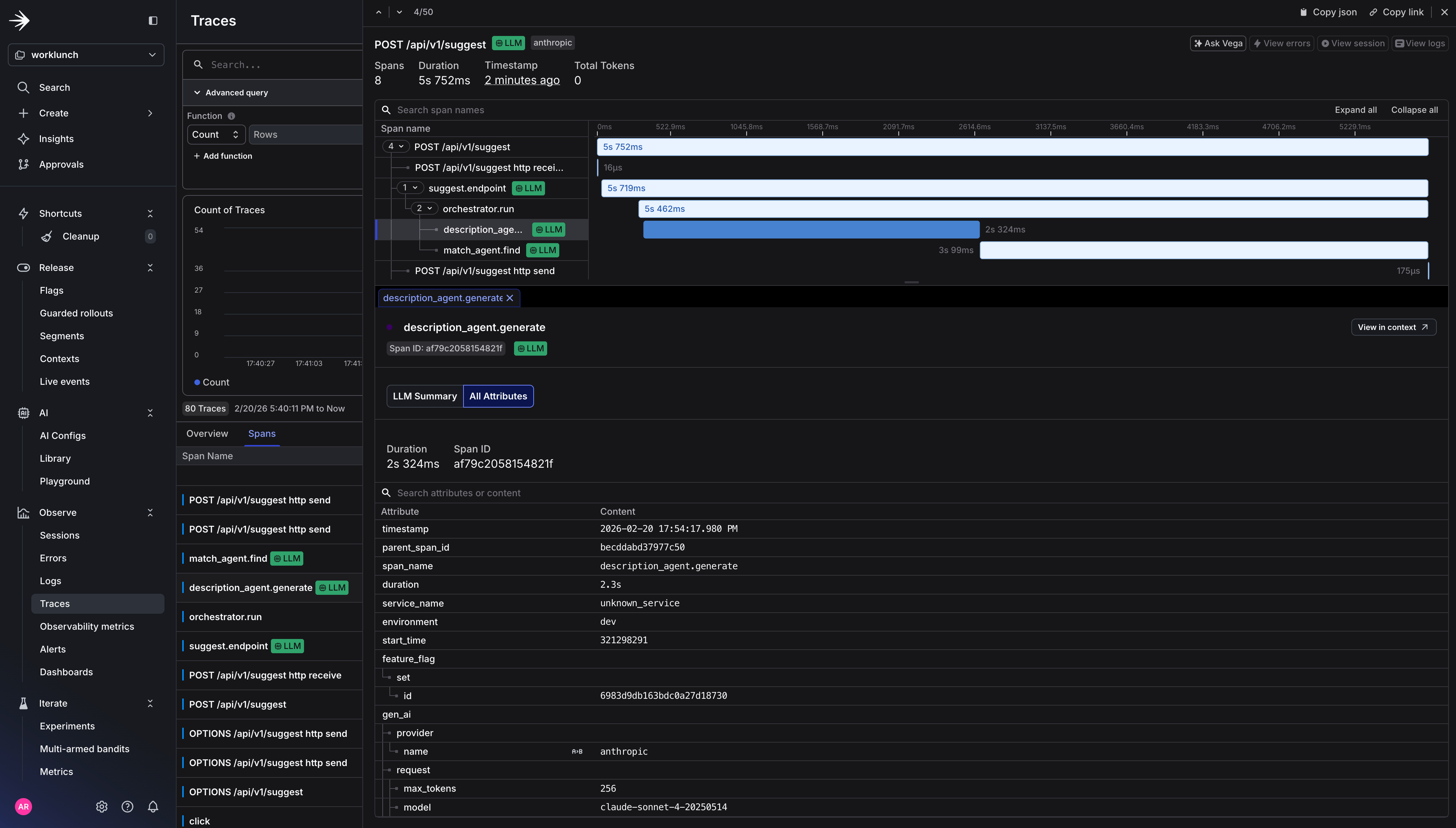 ### How LaunchDarkly processes OTel traces
LaunchDarkly receives traces for logging and converts OTel span data into **events** for use with Experimentation and Guarded Rollouts. The process works like this:
1. Your application emits a span that covers an HTTP request (or LLM call). This span carries standard HTTP attributes: `http.response.status_code`, `http.route`, latency derived from span duration.
2. On that same span (or a parent span in the same trace), you've emitted a `feature_flag` span event with `feature_flag.key` and `feature_flag.variant`.
3. LaunchDarkly's collector ingests the trace and looks for HTTP spans that **overlap** with spans containing at least one `feature_flag` event. When it finds a match, it produces a metric event associating the flag variant with the observed latency and error rate (5xx status codes).
4. Those metric events flow into Experimentation, where they become the outcome metrics for your flag-controlled A/B test — for example, comparing `claude-sonnet-4-20250514` vs `claude-haiku-4-5-20251001` on p95 latency and error rate without writing a single line of custom metric instrumentation.
Every span in the agent chain is nested under a single trace. The collector fans out that trace to both backends simultaneously. Langfuse gets the full LLM details for prompt debugging and cost analysis. LaunchDarkly gets the flag-correlated signal it needs for automated rollout decisions.
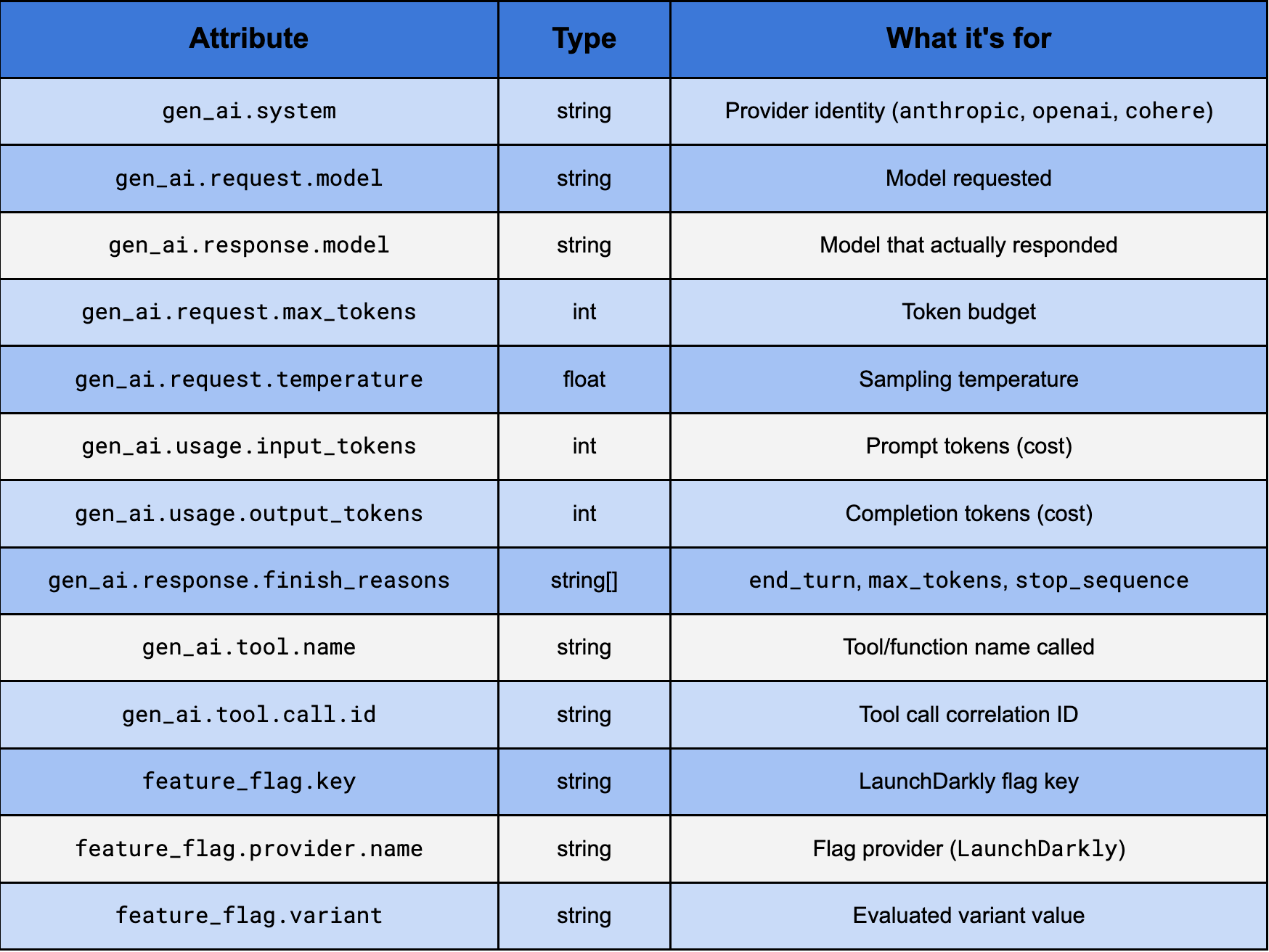
### Key attributes from gen\_ai trace spans
### How LaunchDarkly processes OTel traces
LaunchDarkly receives traces for logging and converts OTel span data into **events** for use with Experimentation and Guarded Rollouts. The process works like this:
1. Your application emits a span that covers an HTTP request (or LLM call). This span carries standard HTTP attributes: `http.response.status_code`, `http.route`, latency derived from span duration.
2. On that same span (or a parent span in the same trace), you've emitted a `feature_flag` span event with `feature_flag.key` and `feature_flag.variant`.
3. LaunchDarkly's collector ingests the trace and looks for HTTP spans that **overlap** with spans containing at least one `feature_flag` event. When it finds a match, it produces a metric event associating the flag variant with the observed latency and error rate (5xx status codes).
4. Those metric events flow into Experimentation, where they become the outcome metrics for your flag-controlled A/B test — for example, comparing `claude-sonnet-4-20250514` vs `claude-haiku-4-5-20251001` on p95 latency and error rate without writing a single line of custom metric instrumentation.
Every span in the agent chain is nested under a single trace. The collector fans out that trace to both backends simultaneously. Langfuse gets the full LLM details for prompt debugging and cost analysis. LaunchDarkly gets the flag-correlated signal it needs for automated rollout decisions.
### Key attributes from gen\_ai trace spans
 ## Step 3: Trigger a guarded rollout
With traces flowing into LaunchDarkly and span events carrying your flag evaluations, you can now configure a Guarded Rollout that automatically rolls back the AI Suggest feature if token costs spike or response truncation increases as you increase the percentage of users who see it.
In the LaunchDarkly UI, navigate to your flag (`ai-suggest-enabled`), under Default rule click Edit and select Guarded Rollout.
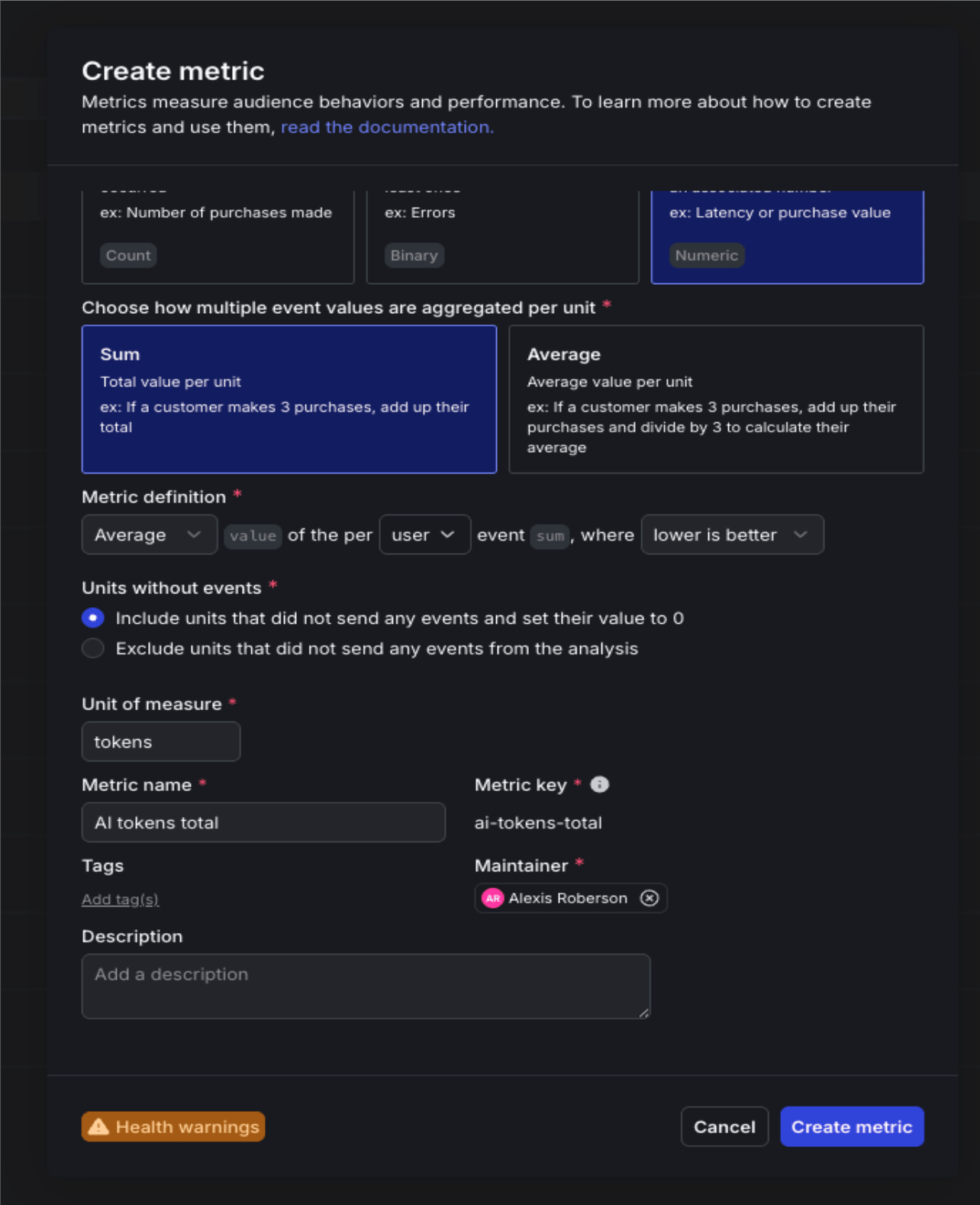
You'll need to create two new custom metrics to attach to the guarded rollout. The first will is the AI tokens total rollout metric. This will measure cost-per-request as a gate for releasing the feature to a wider audience and alert if average tokens per request exceeds your baseline by more than 25%. And the second is AI completion truncated error metric, which will catch prompt truncation before users notice degraded output quality. This metric will halt the rollout if the rate climbs above your control baseline.
For `ai.tokens.total`:
* Event kind: Custom
* Event key: `ai.tokens.total`
* What do you want to measure?: Sum (Numeric) — you're passing the actual token count as the magnitude
* Metric name: AI tokens total
## Step 3: Trigger a guarded rollout
With traces flowing into LaunchDarkly and span events carrying your flag evaluations, you can now configure a Guarded Rollout that automatically rolls back the AI Suggest feature if token costs spike or response truncation increases as you increase the percentage of users who see it.
In the LaunchDarkly UI, navigate to your flag (`ai-suggest-enabled`), under Default rule click Edit and select Guarded Rollout.
You'll need to create two new custom metrics to attach to the guarded rollout. The first will is the AI tokens total rollout metric. This will measure cost-per-request as a gate for releasing the feature to a wider audience and alert if average tokens per request exceeds your baseline by more than 25%. And the second is AI completion truncated error metric, which will catch prompt truncation before users notice degraded output quality. This metric will halt the rollout if the rate climbs above your control baseline.
For `ai.tokens.total`:
* Event kind: Custom
* Event key: `ai.tokens.total`
* What do you want to measure?: Sum (Numeric) — you're passing the actual token count as the magnitude
* Metric name: AI tokens total
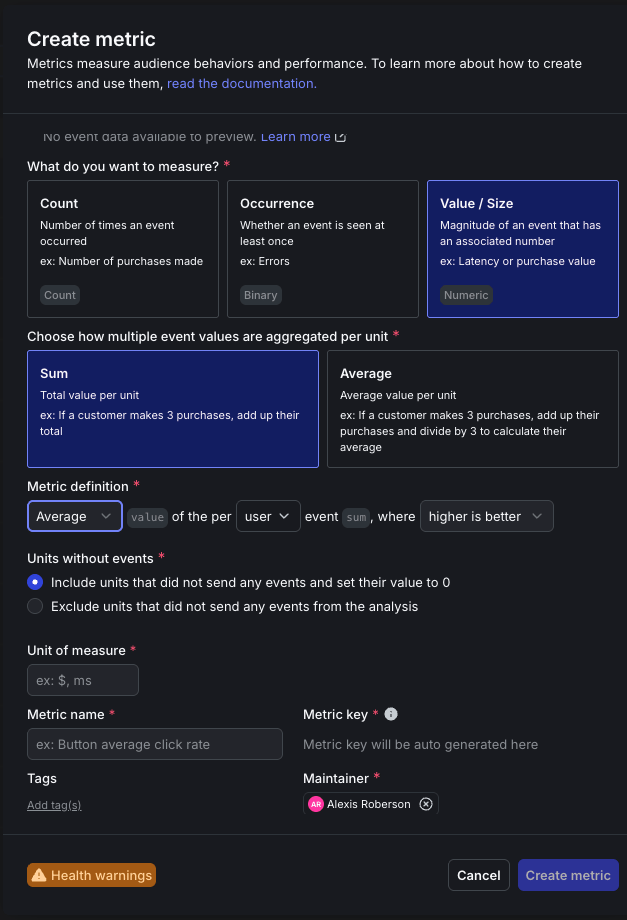
 For `ai.completion.truncated`:
* Event kind: Custom
* Event key: `ai.completion.truncated`
* What do you want to measure?: Occurrence (Percent) — you're tracking whether truncation happened at least once, not how many times
* Metric name: AI completion truncated
For `ai.completion.truncated`:
* Event kind: Custom
* Event key: `ai.completion.truncated`
* What do you want to measure?: Occurrence (Percent) — you're tracking whether truncation happened at least once, not how many times
* Metric name: AI completion truncated
 Select the two newly created metrics.
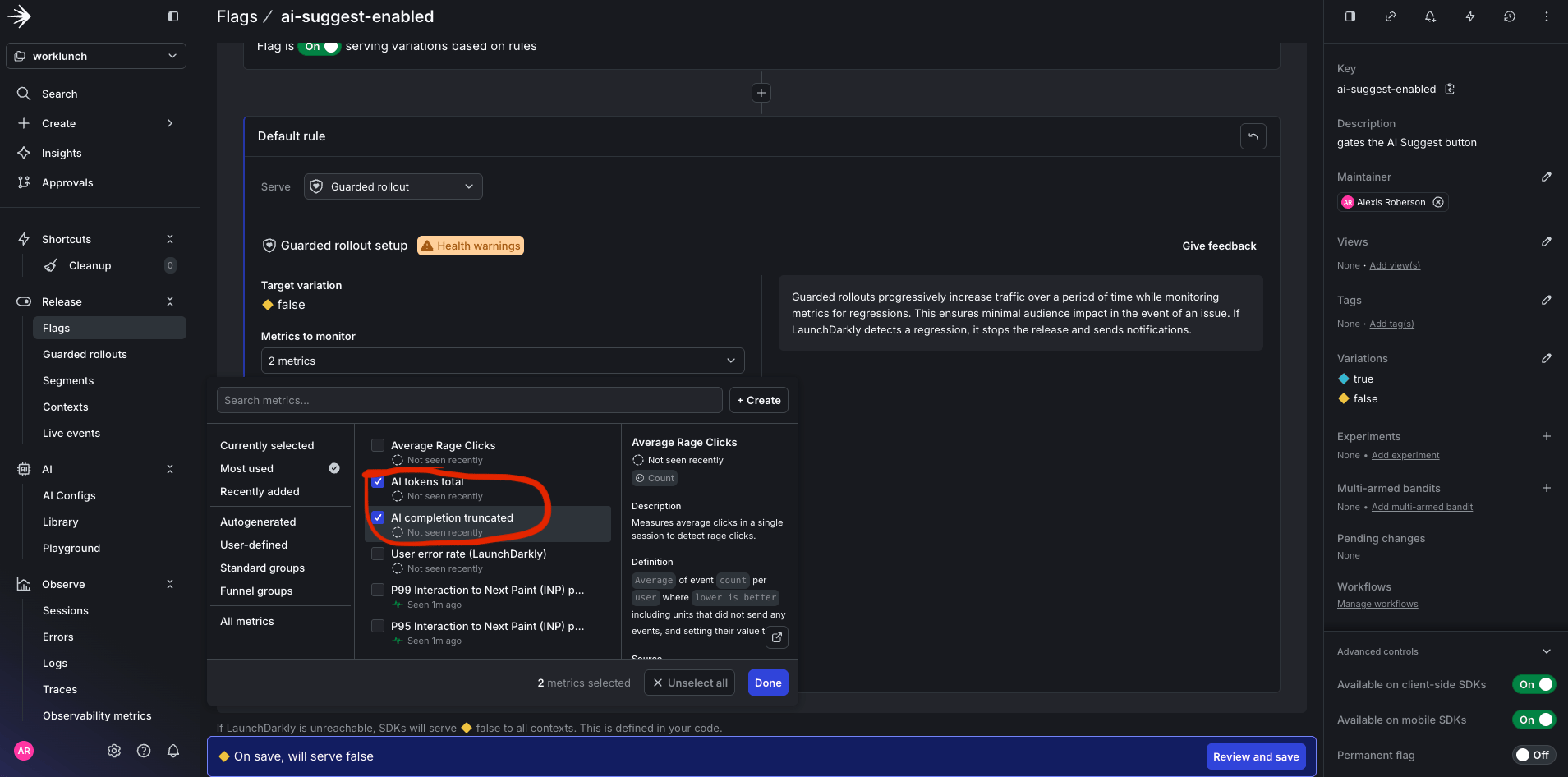 Set the threshold to 25 percent for 1 week.
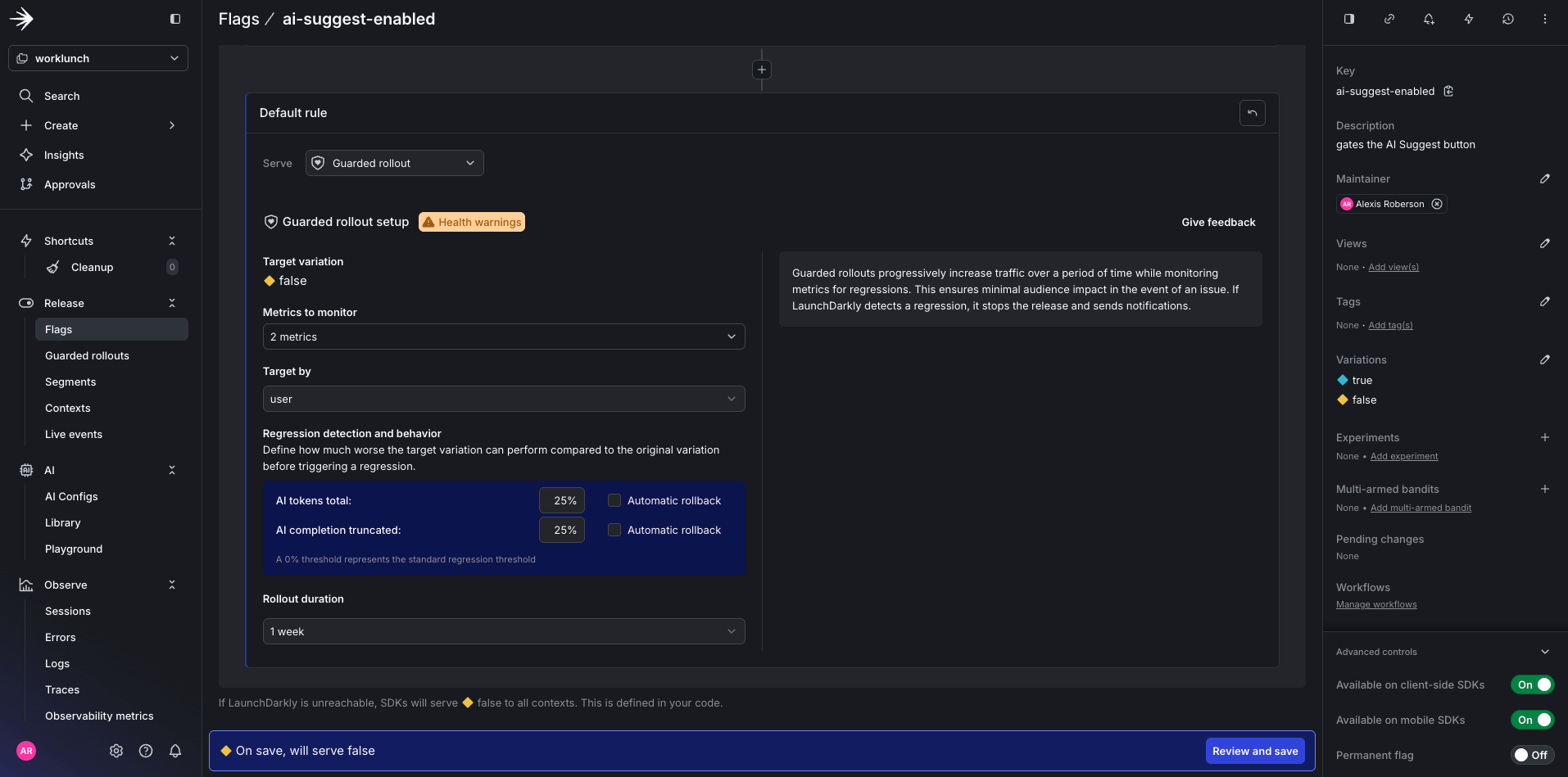 Click Save.
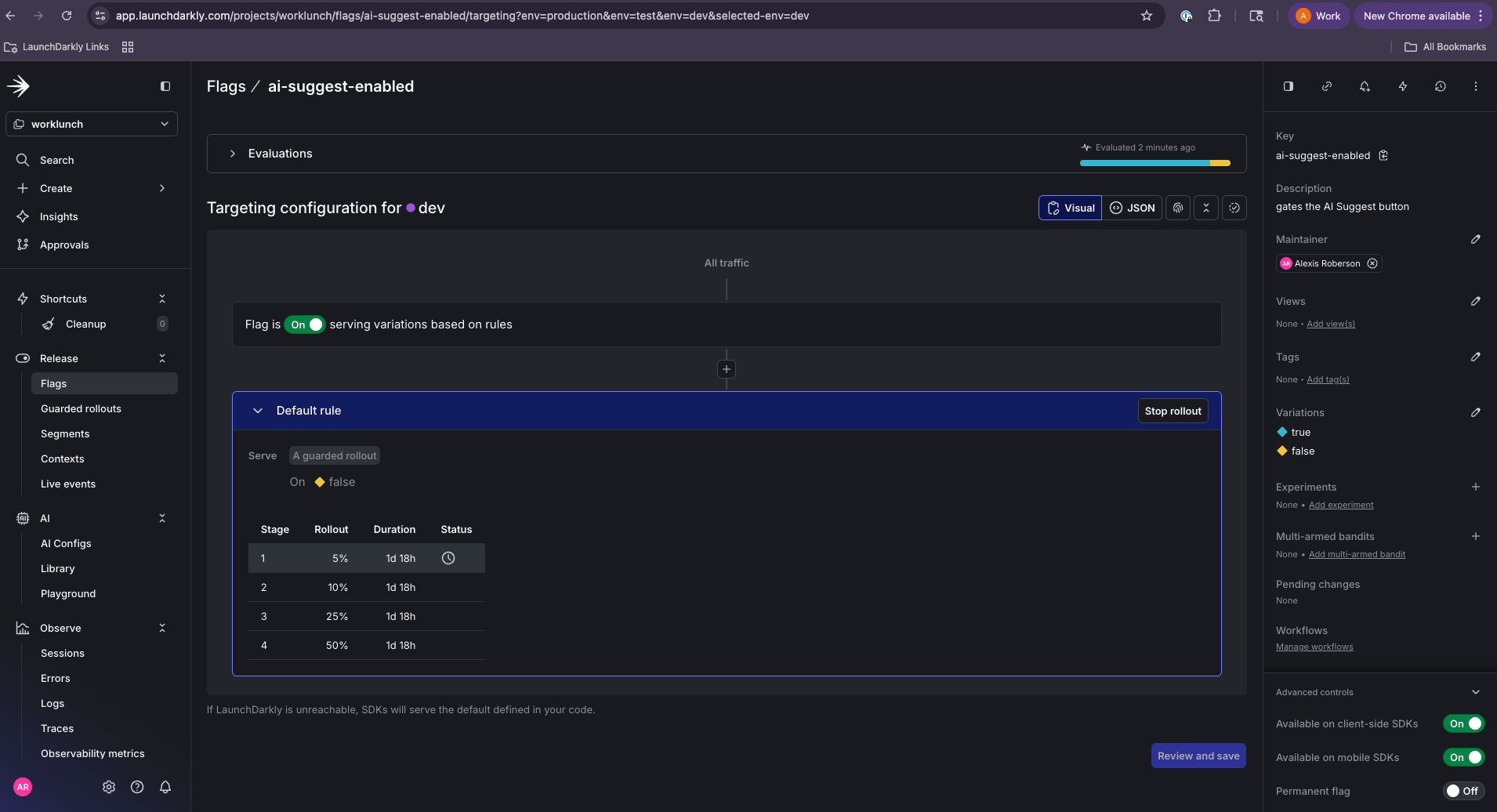 LaunchDarkly will now monitor both metrics against the `ai-suggest-enabled` flag and trigger an automatic rollback if either threshold is breached.
## What You've Built
At this point you have a fully instrumented LLM application where every layer of the stack tells a story. The FastAPI route evaluates a LaunchDarkly flag and stamps the result onto the trace. The orchestrator creates a parent span that ties the entire agent chain together. Each agent makes a Claude API call and records exactly what was sent, what came back, and how many tokens it cost. The OTel Collector fans all of that out to two backends simultaneously without a single line of application code changing between them.
Langfuse gives you the LLM-specific view: prompt content, completions, token usage, and latency per agent so you can debug why a description came out wrong or whether the match agent is consistently burning more tokens than expected. LaunchDarkly gives you the experimentation view: which model variant was active during a given request, how latency and error rates compare between claude-sonnet-4-20250514 and claude-haiku, and the automated safety net to roll back if a new variant starts degrading your users' experience. Both tools are consuming the same trace. Neither required a custom integration.
## Conclusion
LLM applications fail in ways that traditional monitoring wasn't designed to catch. OpenTelemetry gives you the standard schema to do that, and the collector architecture gives you the flexibility to route that signal wherever it's most useful.
If you're building anything with LLMs in production, start here. Instrument at the agent level, follow the GenAI semantic conventions, and build your observability pipeline before you need it.
The full source code for the WorkLunch app is available [in this GitHub repository](https://github.com/arober39/worklunch/tree/otel-launchdarkly-langfuse?tab=readme-ov-file). Clone it, swap in your API keys, and you'll have a working multi-agent trace pipeline running locally in under ten minutes.
## Additional resources
* [Guarded Releases](/docs/home/releases/guarded-rollouts)
* [LaunchDarkly 14 Day Free Trial](https://app.launchdarkly.com/signup)
LaunchDarkly will now monitor both metrics against the `ai-suggest-enabled` flag and trigger an automatic rollback if either threshold is breached.
## What You've Built
At this point you have a fully instrumented LLM application where every layer of the stack tells a story. The FastAPI route evaluates a LaunchDarkly flag and stamps the result onto the trace. The orchestrator creates a parent span that ties the entire agent chain together. Each agent makes a Claude API call and records exactly what was sent, what came back, and how many tokens it cost. The OTel Collector fans all of that out to two backends simultaneously without a single line of application code changing between them.
Langfuse gives you the LLM-specific view: prompt content, completions, token usage, and latency per agent so you can debug why a description came out wrong or whether the match agent is consistently burning more tokens than expected. LaunchDarkly gives you the experimentation view: which model variant was active during a given request, how latency and error rates compare between claude-sonnet-4-20250514 and claude-haiku, and the automated safety net to roll back if a new variant starts degrading your users' experience. Both tools are consuming the same trace. Neither required a custom integration.
## Conclusion
LLM applications fail in ways that traditional monitoring wasn't designed to catch. OpenTelemetry gives you the standard schema to do that, and the collector architecture gives you the flexibility to route that signal wherever it's most useful.
If you're building anything with LLMs in production, start here. Instrument at the agent level, follow the GenAI semantic conventions, and build your observability pipeline before you need it.
The full source code for the WorkLunch app is available [in this GitHub repository](https://github.com/arober39/worklunch/tree/otel-launchdarkly-langfuse?tab=readme-ov-file). Clone it, swap in your API keys, and you'll have a working multi-agent trace pipeline running locally in under ten minutes.
## Additional resources
* [Guarded Releases](/docs/home/releases/guarded-rollouts)
* [LaunchDarkly 14 Day Free Trial](https://app.launchdarkly.com/signup)