The daily life of a developer involves spending a large amount of time in a text editor. Sometimes, switching context out of your editor to do things such as checking a feature flag's configuration can be distracting and result in wasted time.
To help alleviate this pain, we've released an update to our extension that brings some new convenient features to Visual Studio Code, such as:
- flag key autocomplete
- displaying flag details on cursor hover, which registers both exact flag keys and camelCased flag keys
- and an “Open in LaunchDarkly” command to instantly open a feature flag in a new browser tab
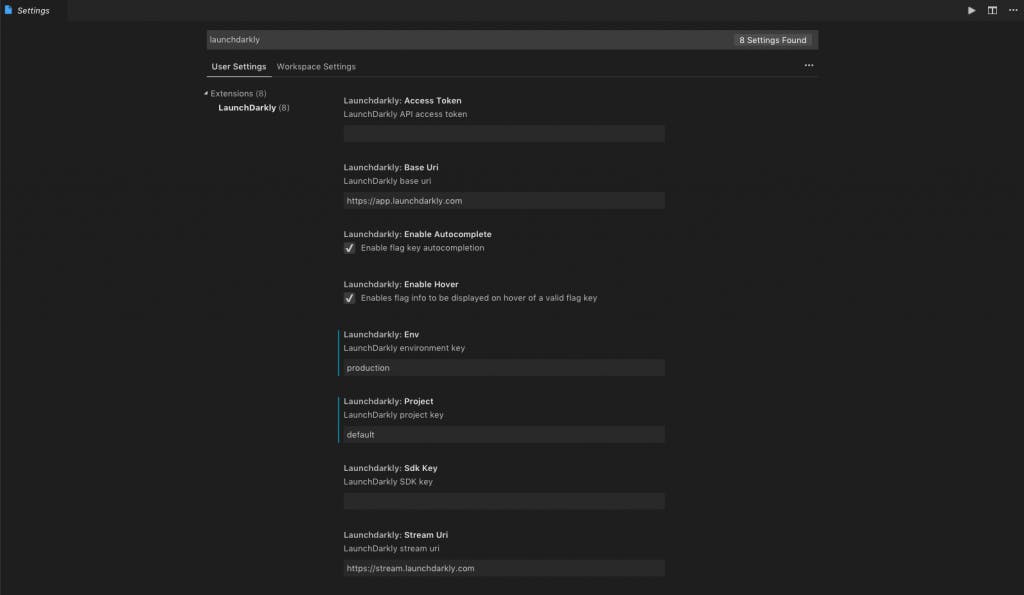
To get started, either install the extension by searching for “LaunchDarkly” in the extensions menu within vscode, or download it on the Visual Studio marketplace. Once you've got it installed, configure vscode with the required settings as defined in the extension's README.