For AI agents: a documentation index is available at the root level at /llms.txt and /llms-full.txt. Append /llms.txt to any URL for a page-level index, or .md for the markdown version of any page.
Sign inTry it free
DocsGuidesSDKsIntegrationsAPI docsTutorialsFlagship blog
  • Integrations
    • Collaboration tools
    • Data Export
    • Edge tools
    • Environments as a service
    • Experimentation and metric integrations
    • Internal developer platforms
    • Monitoring tools
    • Segments integrations
    • Workflow management tools
    • More integrations
    • Managing integrations
    • Using the LaunchDarkly integration framework
    • Building partner integrations
      • Getting started
      • Defining an integration manifest
      • Registering a LaunchDarkly OAuth client
      • Using form variables
      • Using integration framework capabilities
      • Validating an integration
Sign inTry it free
LogoLogo
On this page
  • Build form variables
IntegrationsBuilding partner integrations

Using form variables

Was this page helpful?
Previous

Using integration framework capabilities

Next
Built with

This topic explains how to use form variables to collect configuration data from members when they begin using your integration. Most integrations need to collect one or more pieces of configuration data that support the integration, such as API tokens or webhook endpoints.

Build form variables

To support your configuration, you must describe a set of formVariables that define your configuration properties. The formVariables populate a form in the LaunchDarkly user interface (UI) that members complete to add your integration.

Here’s an example:

Example manifest
1"formVariables": [
2 {
3 "key": "name",
4 "name": "Name",
5 "type": "string"
6 },
7 {
8 "key": "webhookUrl",
9 "name": "Incoming webhook URL",
10 "description": "Enter your Microsoft Teams [incoming webhook URL](https://example-documentation.com).",
11 "defaultValue": "https://example.com/inbound_webhook",
12 "type": "url",
13 "isSecret": true
14 }
15]

Here’s how the formVariables entry above displays on the LaunchDarkly Integrations page:
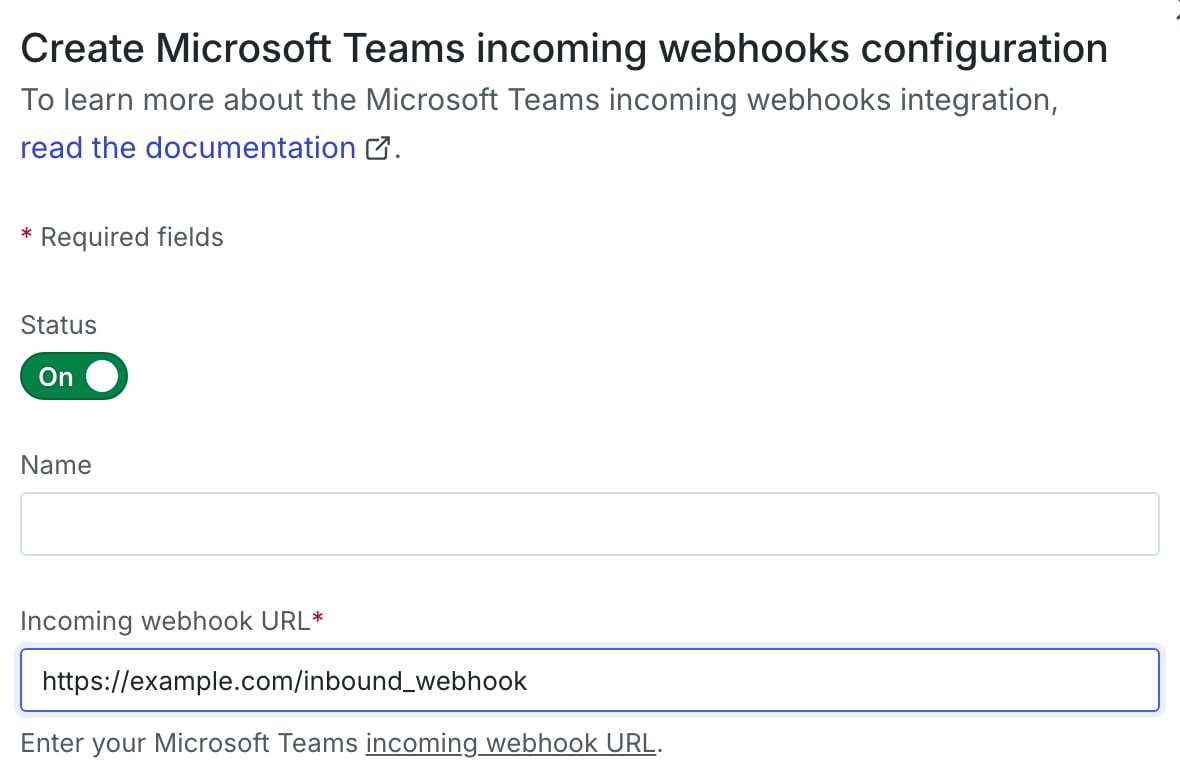
Example integration configuration panel in the LaunchDarkly UI

Example integration configuration panel in the LaunchDarkly UI

Form variables apply to the entire integration configuration. There are no capability-specific form variables.

Here are the form variables you need to supply:

  • key, name, description, and type are required.
  • formVariables[].description is used as a field label on the UI. You can use simple Markdown to link a word or phrase to an external URL.
  • Optionally, you can set isSecret or isOptional if necessary, or provide guidance with placeholder and defaultValue. If you provide a defaultValue, you must also set isOptional to true and vice versa.

Accepted form variable types are string, boolean, uri, enum, and dynamicEnum.

To learn more, read the manifest schema.