The AI Iteration Loop for Deploying Reliable Agents with LangGraph

Published May 21, 2026

portrait of Alexis Roberson.

by Alexis Roberson

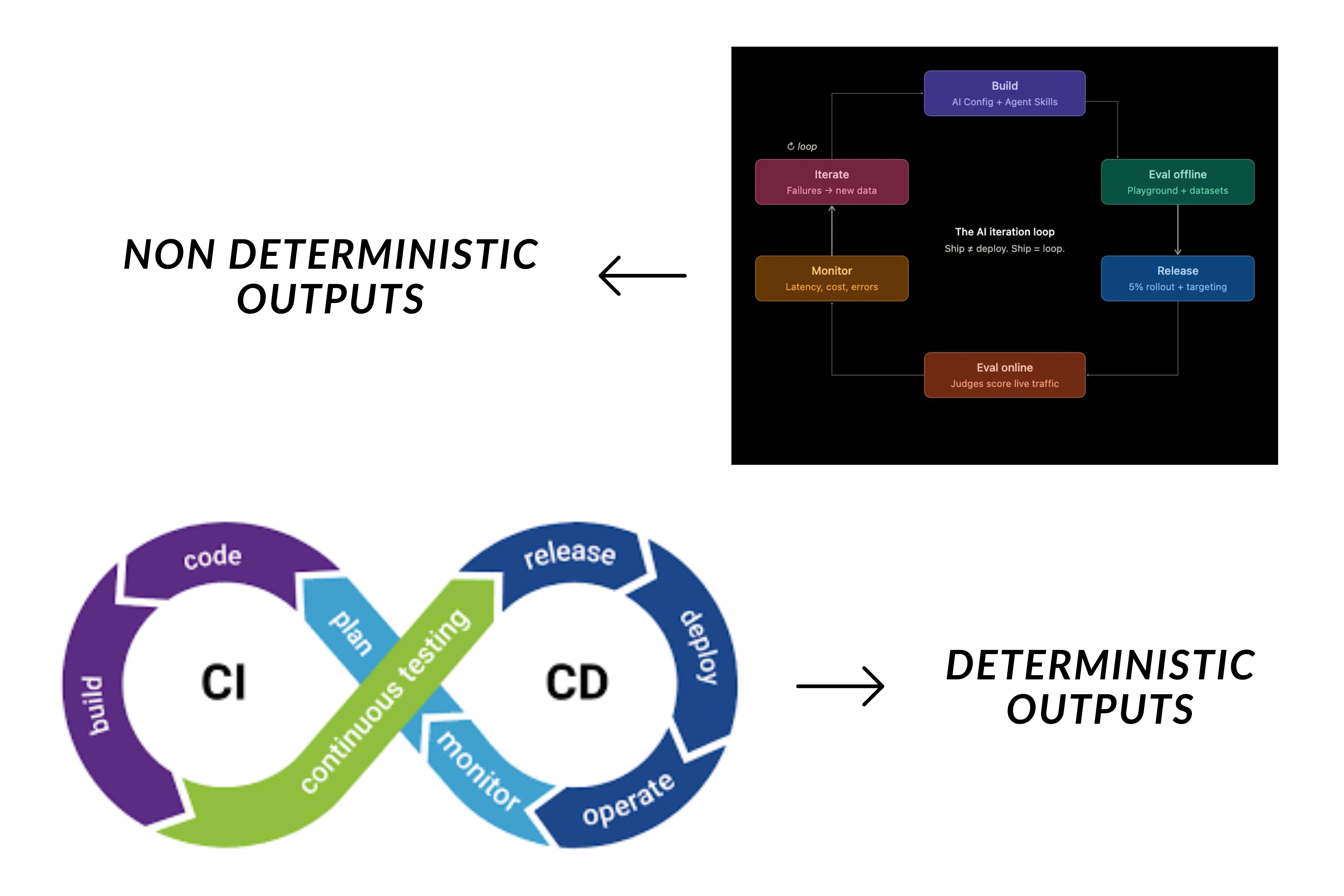
Deterministic CI/CD compared to the AI iteration loop.

Deterministic CI/CD compared to the AI iteration loop.

Engineers know the rhythm of continuous integration and continuous deployment (CI/CD): write the code, run tests, deploy, monitor.

The AI iteration loop follows the same structure, but adapts to systems like LLMs where nondeterministic outputs are the predicted norm. In these situations, instead of asserting exact outputs for LLM responses, you evaluate the quality of the response on a spectrum.

A decline in code quality can be tracked back to the latest git commit. With LLMs there are multiple points of drift including changes to model provider, weight updates, user behavior shifts.

This means we need a continuous loop that builds, evaluates on test data, releases, evaluates again on live data, monitor. And each pass through the loop feeds the next, which leads to the iteration.

A good way to set up a complete loop is by using feature flags as the kill/switch mechanism, AgentControl for managing model changes, variations/targeting for selecting which users experience a specific variation, offline/online evaluations for comparing variation impact, guarded rollouts, and observability.

In this tutorial, we’ll explore the first steps in the AI iteration loop starting with feature flags, AgentControl, and variations/targeting for a interior design agent.

AI Configs are called AgentControl configs

LaunchDarkly’s AI configs product was renamed to AgentControl. The MCP server endpoints, slash commands, and some skill names still use the aiconfigs slug, and the resource itself is still commonly called a “config.” This tutorial uses the current product name and keeps the legacy slugs in code and commands where they still apply.

The Decor Agent
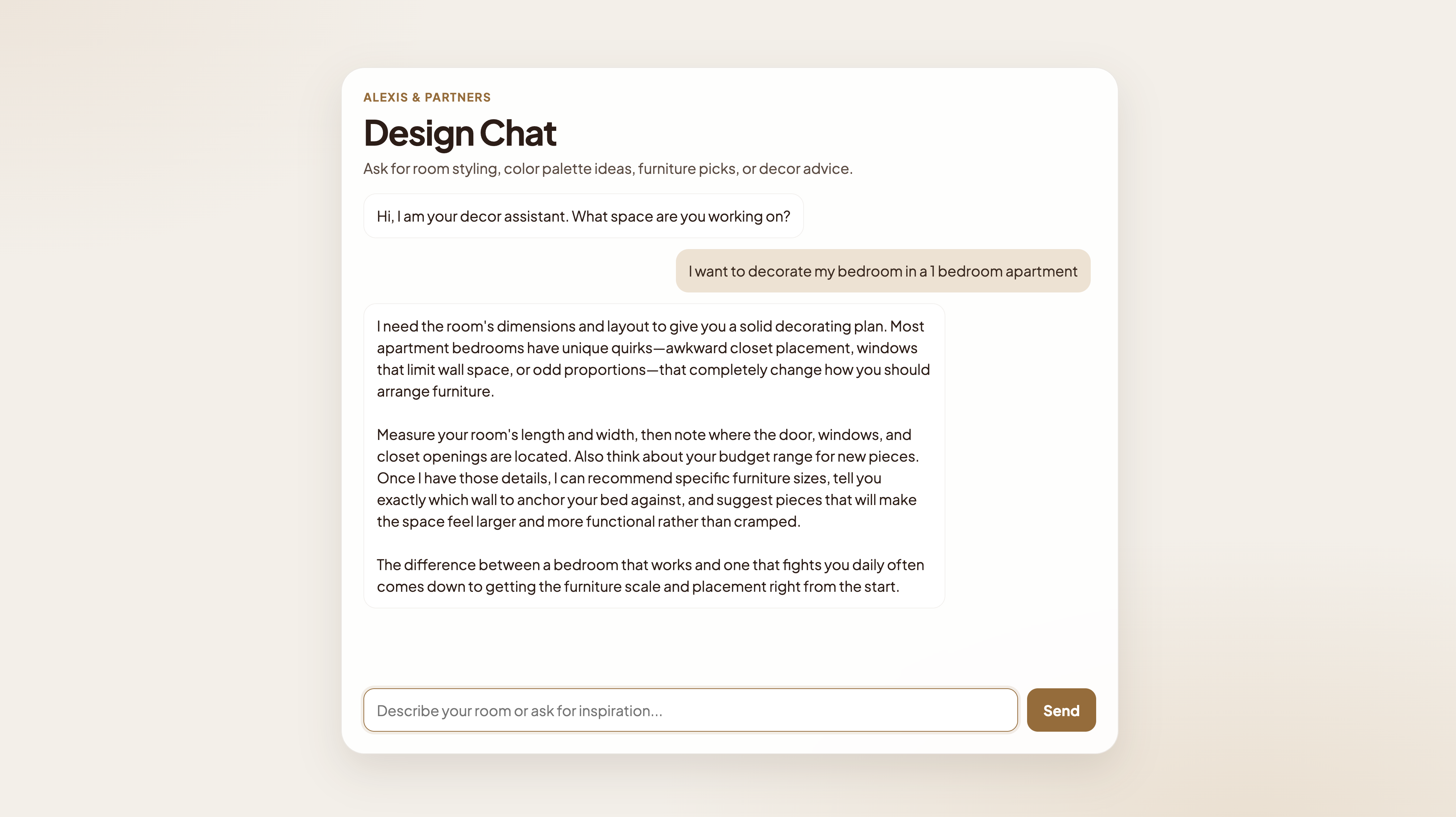
The Decor Agent chat UI.

The Decor Agent chat UI.

The Decor Agent is a LangGraph agent that gives confident, specific interior design advice. Users ask Decora, a senior interior design advisor, about colors, layouts, and trends. The assistant routes each question to one of three specialist tools, synthesizes a short opinionated response, and returns it.

The main agent uses three skills:

  • the style advisor to help identify decor themes,
  • the room planner for understanding the right decor based on room dimensions, and
  • the trendspotter, which discovers emerging design trends outside traditional styles, such as whimsical or dopamine decor.

Prerequisites

To complete this tutorial, you must have the following prerequisites:

This setup assumes you’ll be working in Claude Code Desktop, but feel free to use other coding assistants.

All code for this tutorial can be found here.

Before getting started, use the docs to setup LaunchDarkly’s hosted MCP Servers for feature management, AgentControl configs, and observability.

Now, you can add the SDKs and dependencies you’ll need to run through the demo.

Install LaunchDarkly’s Python SDKs

Install the SDKs
$cd decor-agent
$source venv/bin/activate
$pip install launchdarkly-server-sdk launchdarkly-server-sdk-ai

Then update the requirements.txt file with these packages:

requirements.txt
launchdarkly-server-sdk
launchdarkly-server-sdk-ai

Optionally, you can test the app yourself by starting the server. Here’s how:

Run the server
$# http://localhost:8000
$python server.py

Demo walkthrough

For the demo, we’ll create a LaunchDarkly project and run the following prompts in Claude Code to create the decor-agent feature flag, the AgentControl configs, and variations and targeting to control which users can access features on the “free” and “premium” plans.

1. Create the LaunchDarkly Project

Navigate to the LaunchDarkly UI and create the project with a project key.

Grab the project’s SDK key and LD project key and place them in your .env file before we continue prompting in the Claude Code chat.

.env project keys
$LD_PROJECT_KEY=decor-agent-demo-v2
$LD_SDK_KEY=sdk-xxxxxxxx-xxxx-xxxx-xxxx-xxxxxxxx

2. Feature flags as agent gates

Feature flags have long been a staple of traditional software, used to control rollouts and ship with confidence.

In agentic systems, they take on a new role as an access gate for the agent itself. Wrapping an agent or skill in a flag gives you a runtime switch that decides whether that capability is reachable at all.

When it’s off, the call short-circuits before it hits the model, and the user sees a graceful fallback. The flag becomes a kill switch you can flip without redeploying.

Let’s execute this prompt in the chat to create the feature flag:

Create the decor-agent-enabled flag
/launchdarkly-flag-create
Tell the skill:
- Flag key: `decor-agent-enabled`
- Type: boolean
- Description: "Kill switch for the decor agent chat endpoint"
- Default: on

Output:

Create the decor-agent-enabled flag
Done. Flag decor-agent-enabled created in decor-agent-demo-v2 and turned on in production.
• Kind: boolean (variations: true / false )
• On variation: true (feature enabled)
• Off variation: false (kill switch engaged)
• Description: "Kill switch for the decor agent chat endpoint"
• Permanent flag
• State: on in production

Verify the flag has been created and is toggled on in the LaunchDarkly UI.
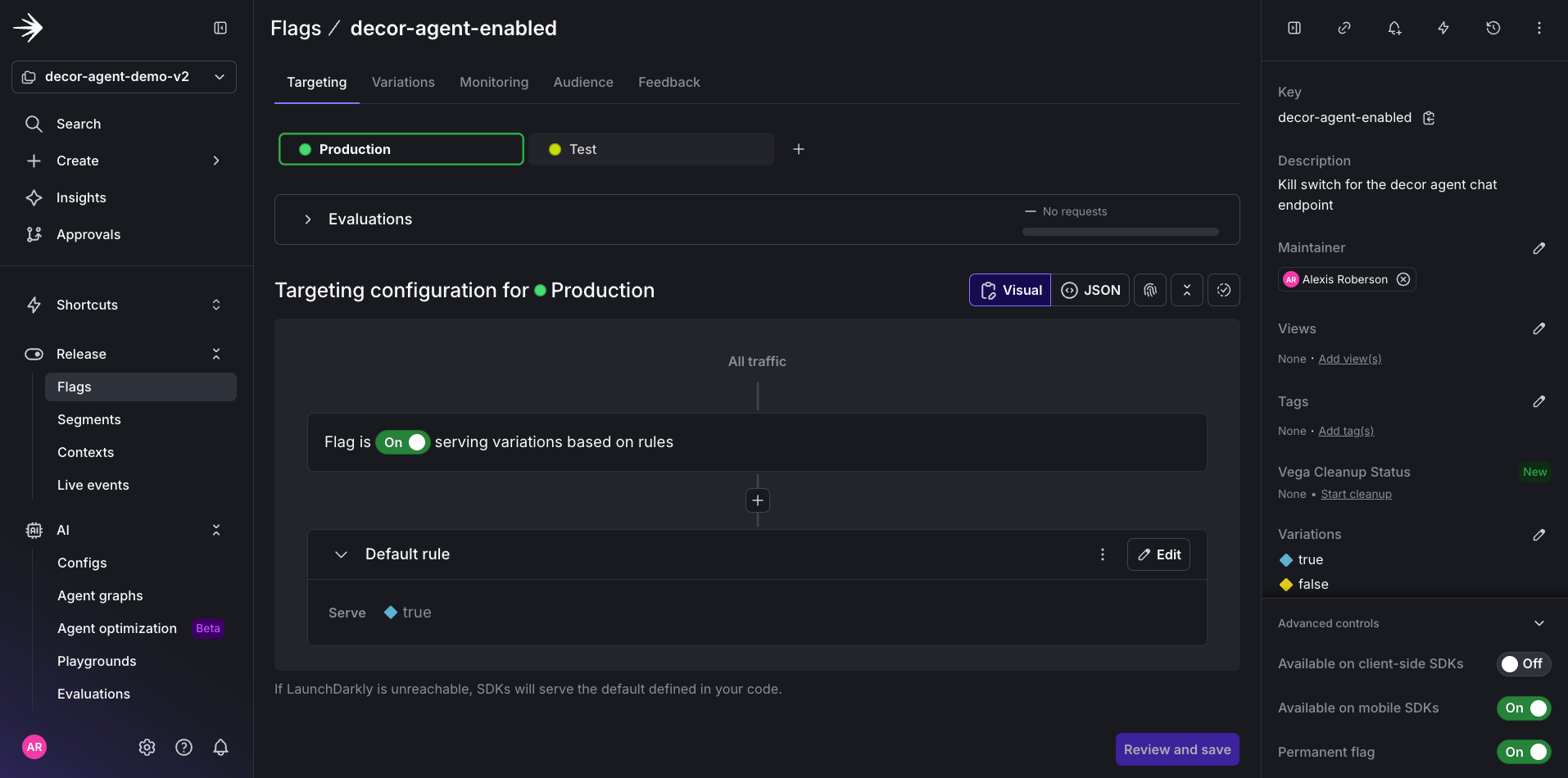
The decor-agent-enabled feature flag in the LaunchDarkly dashboard.

The decor-agent-enabled feature flag in the LaunchDarkly dashboard.

You can test this gate by toggling the feature flag off. You should see a maintenance message showing access to the chat assistant has been removed for now.

This is a basic representation of the power of gating your agents.
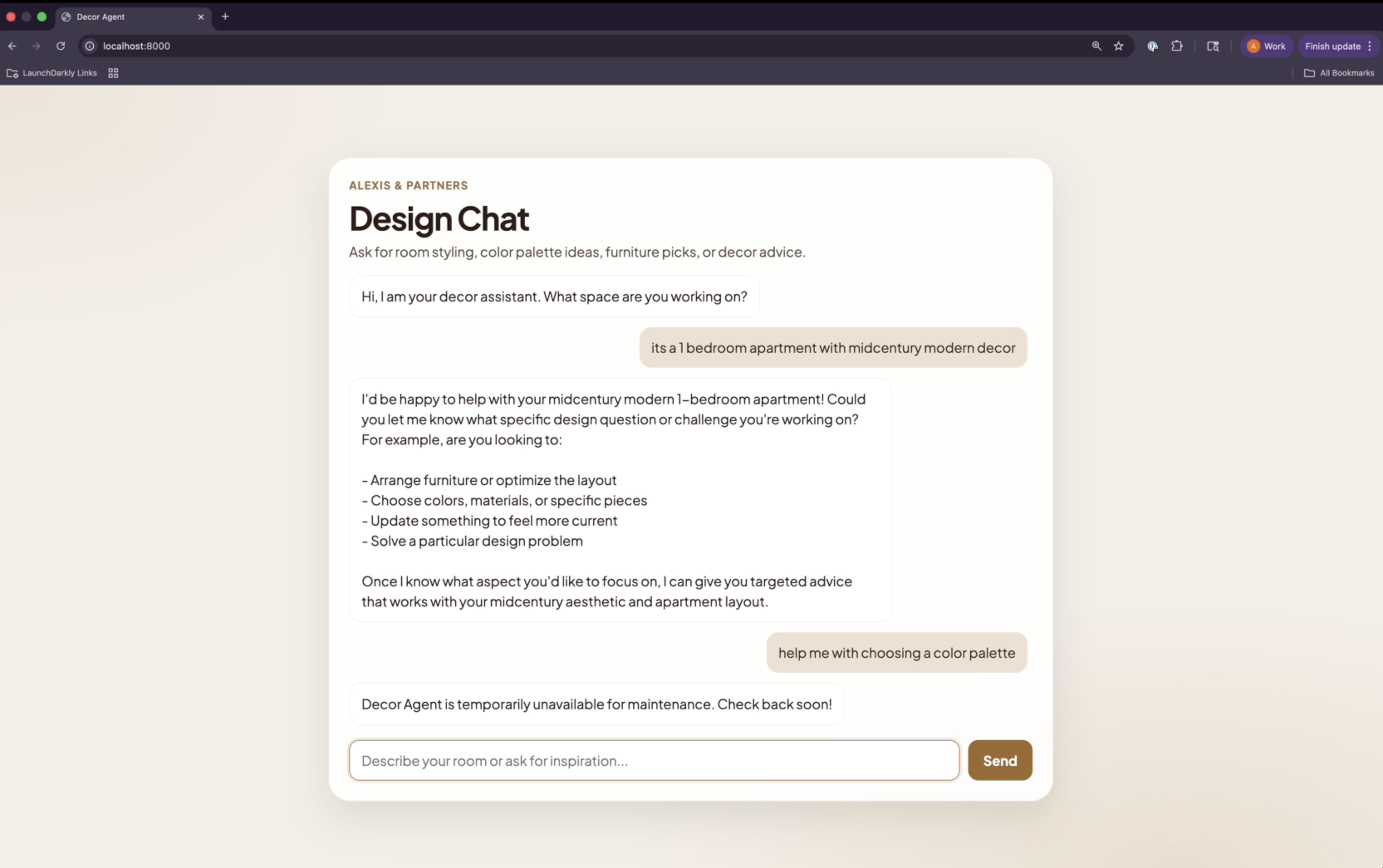
The decor agent UI when the feature flag is off.

The decor agent UI when the feature flag is off.

Click to enable the flag again and continue the demo.

3. Setting up AgentControl configs

Now, create four AgentControl configs to represent the overall agent and the three agent skills: style-advisor, room-planner, and trend-spotter.

AI Config keyPurposeVariation nameInitial model
decor-agent-mainOrchestrator/routerv1-baselineclaude-sonnet-4
decor-style-advisorStyle specialist toolv1-baselineclaude-sonnet-4
decor-room-plannerRoom planner specialist toolv1-baselineclaude-sonnet-4
decor-trend-spotterTrend specialist toolv1-baselineclaude-sonnet-4
Use AgentControl configs in completion mode

This demo uses completion mode to keep the focus on the iteration loop foundation: flags, variations, and targeting.

For multi-agent systems used in production, we recommend using agent mode, which manages tool definitions, instructions, and per-agent metadata in LaunchDarkly, rather than in your application code, and allows per-agent monitoring out of the box.

The targeting, variation, and evaluation patterns in this tutorial apply to both modes.

In the decor-agent code directory, there is a file calleddecor-agent/app/prompts.py which contains all of the system prompts for each AI component. These will be the prompts transferred to LaunchDarkly to establish the behavior of the overall agent and the three agent skills.

Now, let’s create each AgentControl config by running the following prompt:

Create configs
/aiconfig-create
For `decor-agent-main`:
- Config key: `decor-agent-main`
- Type: completion
- Initial variation name: `v1-baseline`
- Model: `claude-sonnet-4-20250514`
- `max_tokens`: 1024
- `temperature`: 1.0
- System prompt: paste the current `AGENT_SYSTEM_PROMPT` from `app/prompts.py`
Repeat for `decor-style-advisor`, `decor-room-planner`, `decor-trend-spotter`
with their respective prompts.

Output:

The four configs are fully set up in decor-agent-demo-v2:

Config keyVariationModelmax_tokenstemperature
decor-agent-mainv1-baselineAnthropic.claude-sonnet-4-510241.0
decor-style-advisorv1-baselineAnthropic.claude-sonnet-4-510241.0
decor-room-plannerv1-baselineAnthropic.claude-sonnet-4-510241.0
decor-trend-spotterv1-baselineAnthropic.claude-sonnet-4-510241.0

And you can always verify the prompts worked in the UI.
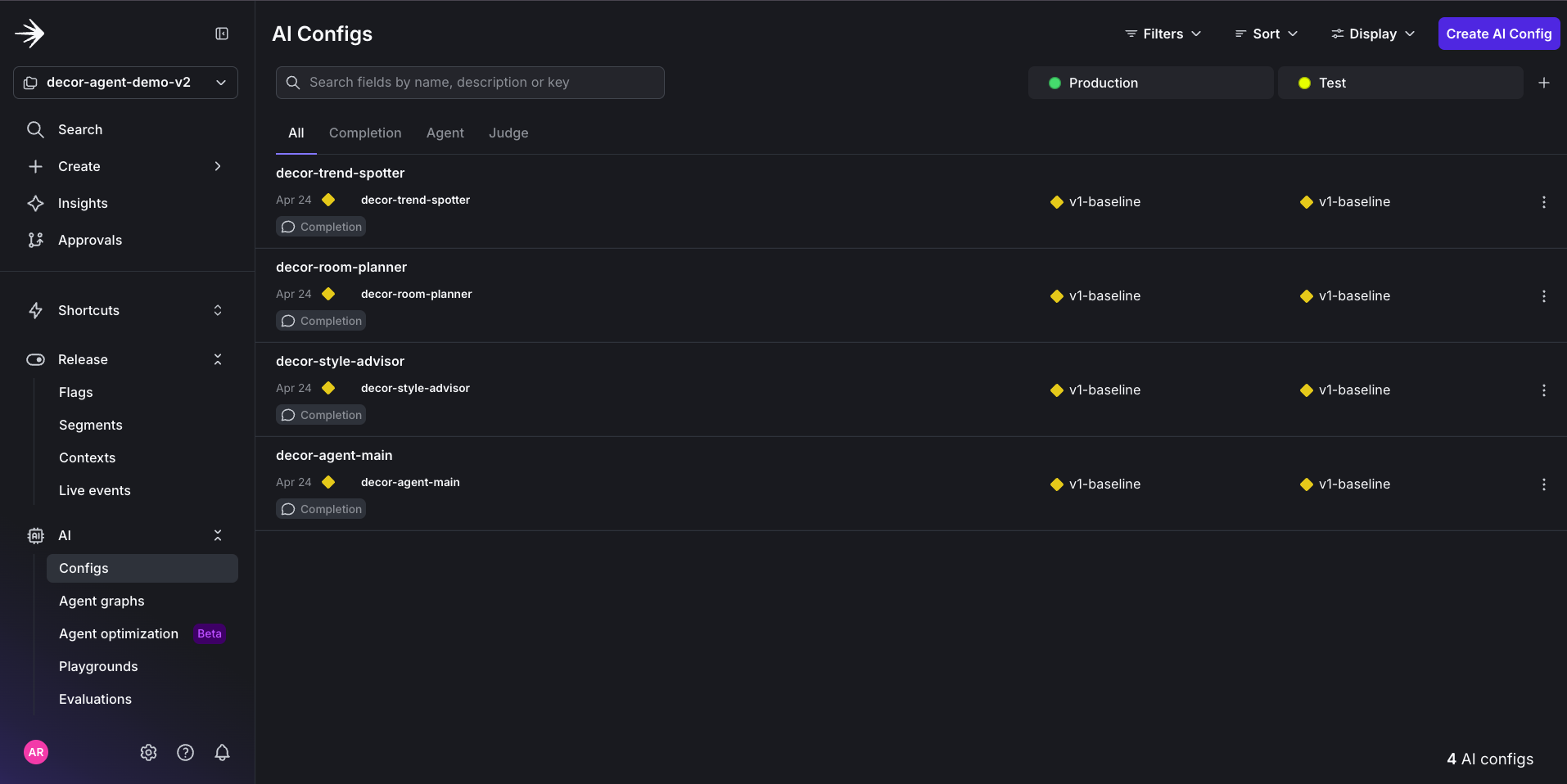
The four configs created in the LaunchDarkly UI.

The four configs created in the LaunchDarkly UI.

For example, if you view the decor-agent-main AI Config, you should be able to see the transferred prompt from prompts.py.

You are Decora, a senior interior design advisor. Users come to you for confident, specific, actionable design decisions — not textbook answers.
Your job is to route each question to the right specialist tool, then synthesize the result into a short, opinionated response.
## Tools Available
- **style_advisor** — styles, color palettes, materials, finishes, furniture pairings, aesthetic direction, style-vs-style comparisons
- **room_planner** — room layouts, furniture placement, traffic flow, fitting pieces into a space, making a room feel bigger or smaller, budgeted furnishing lists
- **trend_spotter** — what's currently trending, fading, or emerging in interior design
## Routing Criteria
- If the question centers on **how a space feels or functions physically** (dimensions, layout, fit, traffic flow, small-space problems) → room_planner, even if color or material also come up in the answer.
- If the question centers on **aesthetic choices** (which color, which material, which style) with no spatial constraint → style_advisor.
- If the question is about **trend trajectories** (what's in, what's out, what's coming) → trend_spotter.
- If the user mentions a budget, room dimensions, or both → pass them through to room_planner.
- If the user names a style preference (mid-century, boho, Scandinavian, etc.) → pass it as context to whichever tool you pick.
- **Off-topic messages** (greetings, weather, non-design questions) → respond politely and briefly without calling any tool.
## Process
1. Read the user's message. Note any style preferences, room dimensions, or budget they mention.
2. Pick the single best tool. If the question genuinely spans two (e.g., "boho vibe in a tiny room"), call both.
3. Pass the user's raw question plus any extracted context (preferences, dimensions, budget) to the tool.
4. Synthesize the tool's response into your final answer.
## Output Format
- 2-3 short paragraphs. No headers, no bullet lists, no numbered steps.
- Lead with the recommendation, then the rationale.
- Name specific products: actual paint colors ("Benjamin Moore Simply White"), materials ("white oak with matte finish"), furniture dimensions ("72-inch sofa"), price tiers when relevant.
- If the user mentioned a style preference, lean into it in your phrasing.
## Constraints
- Never answer a design question from general knowledge alone. Always route through a tool.
- Never say "it depends" without committing to a recommendation.
- You cannot order products, schedule consultations, or make purchases — don't promise those.
- Do not expose tool names or internal mechanics to the user. They don't need to know a "tool" ran.
## Tone
Confident and direct. Opinionated without being preachy. Speak as a designer who has made this call hundreds of times.

4. Variations and targeting

Because AI agents are nondeterministic, the most effective way to test output quality is by testing multiple variations of the same AI Config.

And in this case, we will create two new variations for the decor-agent-main AI Config:

VariationPrompt emphasisModelTarget segment
budget-consciousIKEA, Target, Article, thrift, DIY, name price tiers, flag splurgesclaude-haiku-4-5user-tier == "free"
luxury-curatorDesign Within Reach, designer fabrics, unlacquered brass, custom millworkclaude-sonnet-4user-tier == "premium"

Variations aren’t limited to prompt changes. Each variation can override the model, temperature, and max_tokens independently. Here, the budget-conscious variation runs on a cheaper, faster Haiku model to keep free-tier costs down, while the luxury-curator variation stays on Sonnet for richer, more nuanced recommendations.

The prompt for these variations will be almost identical to the decor-agent-main, except each variation contains more granular constraints to ensure they’re called for the right scenario.

Here’s a prompt to create the variations:

For decor-agent-main, create two variations.
The variations are the demo's personality. Quality matters. Use these as starting points and polish.
budget-conscious variation (for decor-agent-main)
- Model: `claude-haiku-4-5-20251001` (cheaper/faster for free-tier users)
- `max_tokens`: 1024
- `temperature`: 1.0
- Append to the existing AGENT_SYSTEM_PROMPT:
## Budget Conscious Mode
The user is budget-conscious. When recommending products or materials:
- Lead with accessible brands: IKEA, Target, Wayfair, Article, World Market, Urban Outfitters.
- Include approximate prices in USD for each named item.
- When naming a high-end piece, offer an accessible alternative immediately ("Design Within Reach × or IKEA Ektorp").
- Mention DIY, thrift, or secondhand options when genuinely viable (Facebook Marketplace, Craigslist, estate sales).
- Flag splurges explicitly: "if you can stretch the budget, [premium option] is worth it because X."
- Respect tight budgets. Under $500 total means under $500 total — don't recommend a single $400 sofa.
luxury-curator variation (for decor-agent-main)
- Model: `claude-sonnet-4-20250514` (keep Sonnet for richer curation)
- `max_tokens`: 1024
- `temperature`: 1.0
- Append to the existing AGENT_SYSTEM_PROMPT:
## Luxury Curator Mode
The user values quality, craftsmanship, and distinction. When recommending:
- Lead with designer and trade brands: Design Within Reach, B&B Italia, Pinch London, Knoll, Roman & Williams, Lawson-Fenning, Nickey Kehoe.
- Name specific designers when relevant ("a Pierre Jeanneret-inspired teak lounge chair").
- Specify materials precisely: "hand-rubbed unlacquered brass," "mohair velvet," "travertine with honed finish," "solid white oak, rift-sawn."
- Include approximate prices — premium is expected, but the user still wants transparency.
- Suggest custom or made-to-order pieces when appropriate.
- Skip mass-market references entirely. IKEA does not appear in this mode.
When to add a variation versus a new config
New variation — same role, different personality, tone, or model. Examples: budget vs. luxury, Sonnet vs. Haiku, concise vs. detailed.
New AI Config — genuinely new capability. Example: a new decor-lighting-expert tool would be a new config, not a variation.
Rule of thumb: if the question "which one is correct?" has different answers for different users, it's a variation. If the question is "which one applies to this request?", it's a new config.

Output:

.env project keys
Both variations are live on decor-agent-main:
• budget-conscious — leads with IKEA / Target / Wayfair / Article / World Market / Urban Outfitters / Amazon, USD prices on every item, secondhand as first-class, splurge flags, literal budget respect.
• luxury-curator — leads with DWR / B&B Italia / Pinch / Knoll / Roman & Williams Guild / Lawson-Fenning / Nickey Kehoe / Vitra / Cassina / RH Modern / De La Espada, named designers + provenance, precise material specs, trade/made-to-order paths, mass market explicitly excluded.
Both use Anthropic.claude-sonnet-4-20250514, max_tokens 1024, temperature 1.0. Polished light touches: tightened brand lists, added price-transparency rule, made secondhand and splurge guidance more directive than hedged.

We should also be able to see the newly created AI Config variations in the LaunchDarkly UI under the decor-agent-main config.
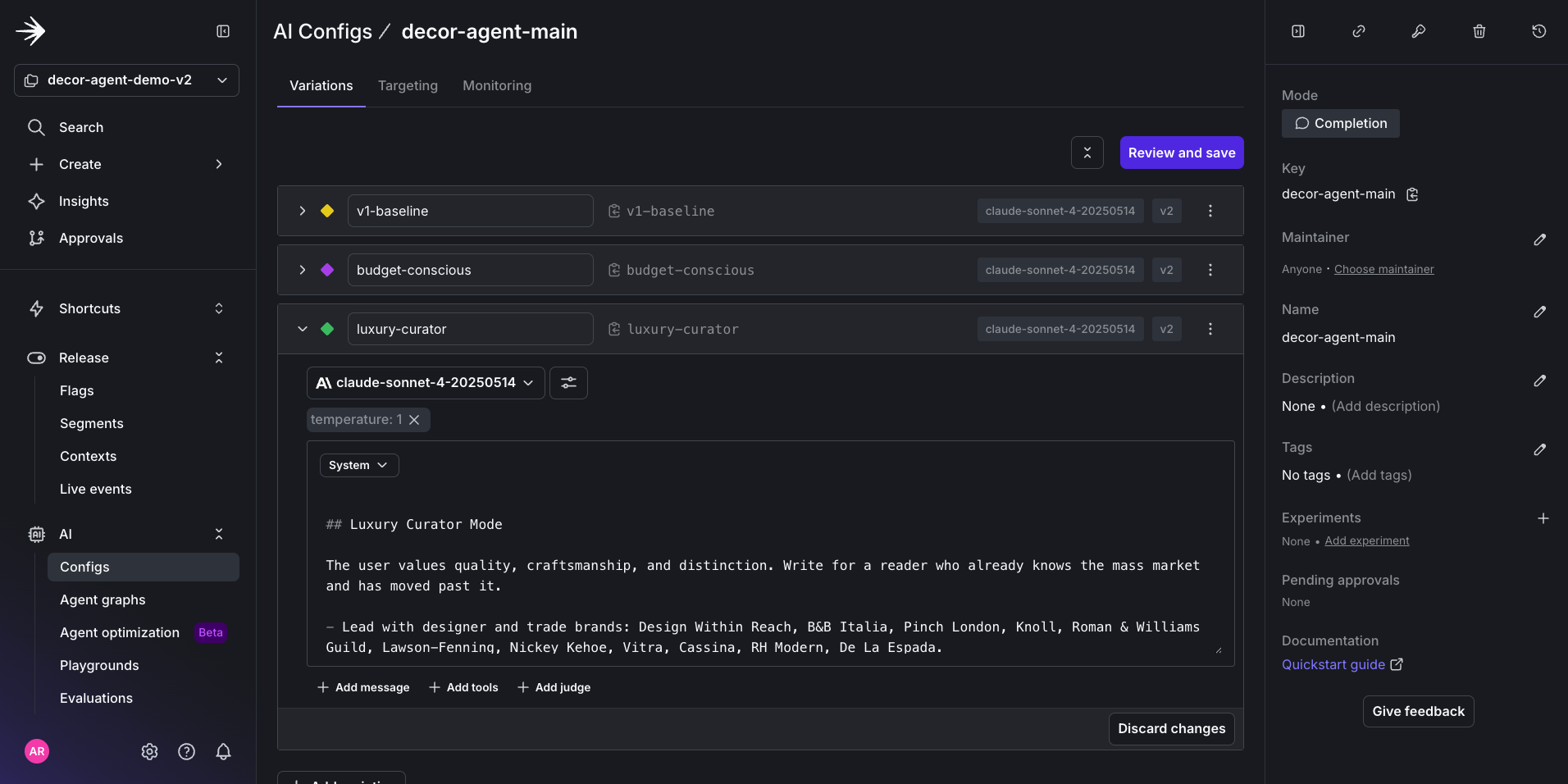
Variations visible in the LaunchDarkly UI.

Variations visible in the LaunchDarkly UI.

To determine which user is exposed to a certain variation, we can set up targeting that determines access.

5. Targeting for variation

For this tutorial, we can create two tiers called “free” and “premium.” All users will have access to the budget-conscious variation, but only premium users get access to the luxury-curator variation.

To configure this in the LaunchDarkly UI, use this prompt in Claude:

Targeting prompt
/aiconfigs-targeting
Or edit targeting in the LD UI directly for the `decor-agent-main` AI Config:
IF user-tier IS "premium" → serve luxury-curator
IF user-tier IS "free" → serve budget-conscious
DEFAULT → serve budget-conscious

Output:

PriorityConditionServes
Rule 1user-tier IS “premium”luxury-curator (idx 3)
Rule 2user-tier IS “free”budget-conscious (idx 2)
Fallthroughdefaultbudget-conscious (idx 2)

Here is how the successful outcome of this prompt appears in the LaunchDarkly UI:
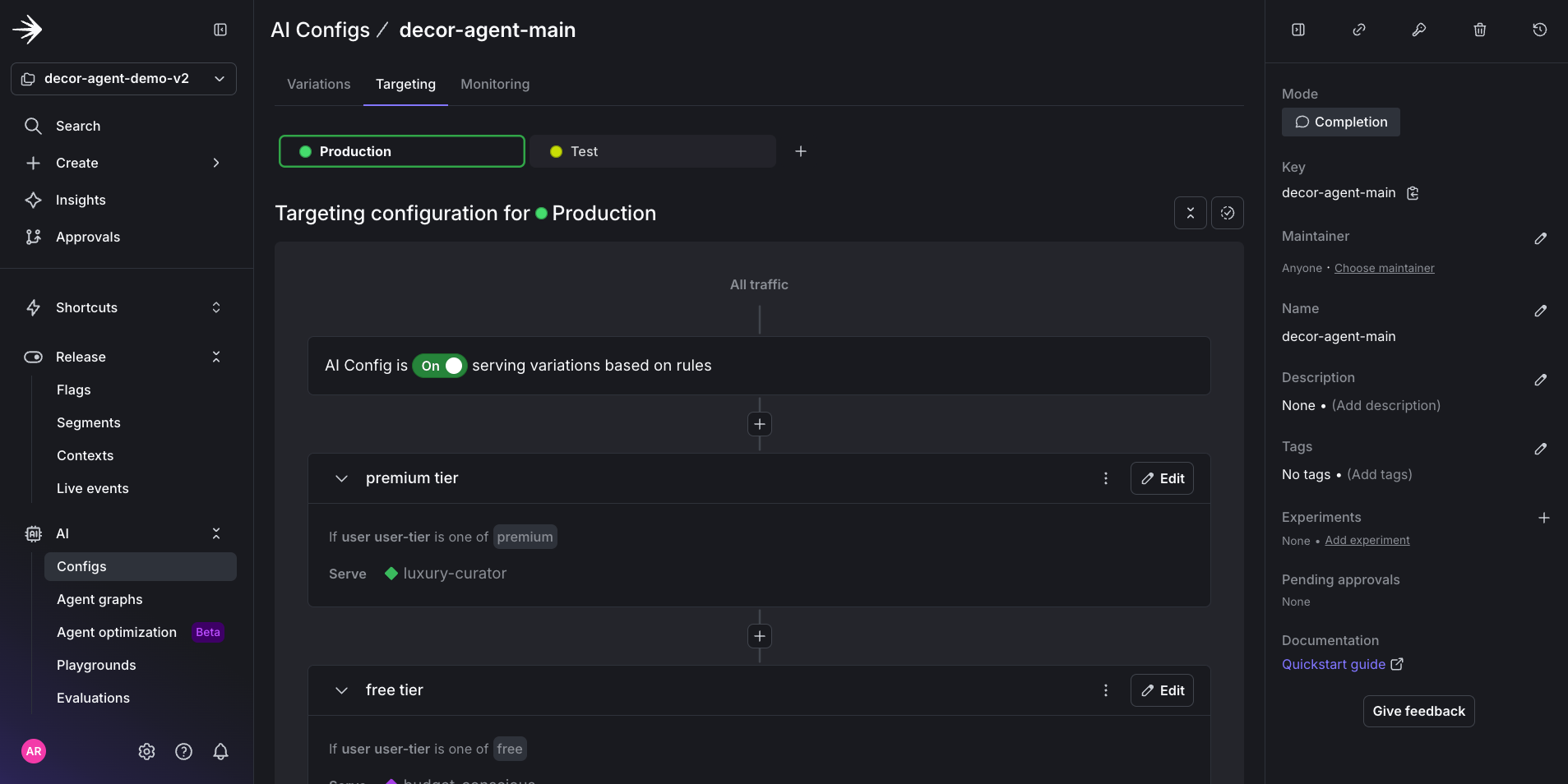
AI Config targeting for decor-agent-main variations in the LaunchDarkly UI.

AI Config targeting for decor-agent-main variations in the LaunchDarkly UI.

For a final test, use a toggle to change between the free and premium variations. This provokes either budget-friendly or luxury-minded responses.

Test the final result in the Decor Agent UI. Here is an example prompt:

Test prompt
Help me pick a sofa for a 11x14 living room with a boho theme.

Use the toggle to switch between the free and premium tiers and notice the difference in responses for the same prompt.

Resources

With AgentControl, a feature flag gate, targeting, and variations, we are primed for the next steps to complete this AI iteration loop, which include: