

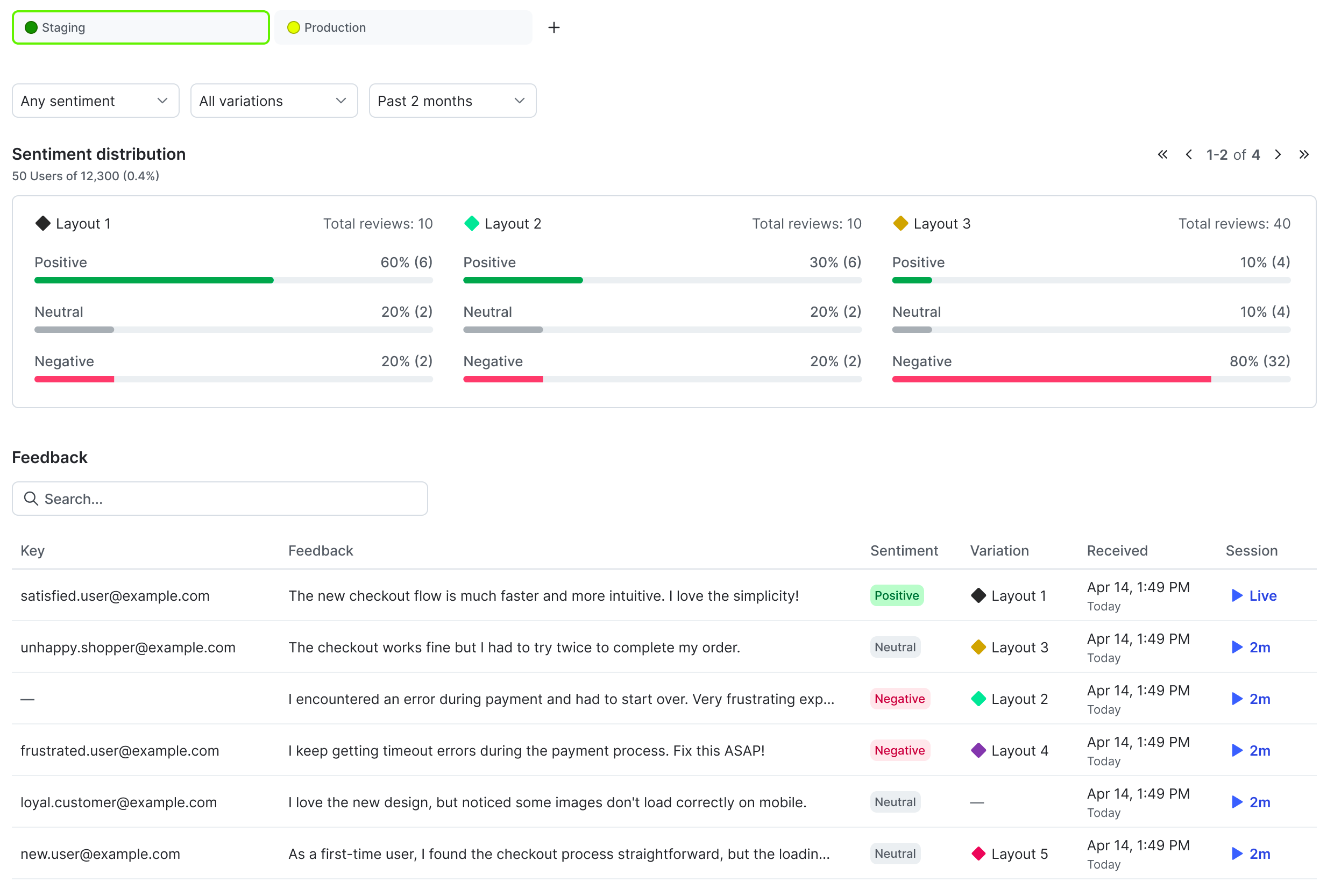
The user feedback tab for a flag.
- Configuring the JavaScript SDK
- Creating a feedback widget
Configure the JavaScript SDK
Expand JavaScript code sample
Expand JavaScript code sample
If you use LaunchDarkly observability features, you can optionally tie the feedback to an observability session ID. This lets you use session replay to view what the user was doing in your app before they left their feedback. To use session replay, you must install the LaunchDarkly observability SDK.To configure the JavaScript SDK to send feedback to LaunchDarkly, including session replay:If you do not use LaunchDarkly observability features, you can collect user feedback without session replay. Here’s how:
import { LDRecord } from '@launchdarkly/session-replay';

function sendFeedback(client, flagKey, feedback, sentiment, prompt, slackChannelId) {
    // Create an object
    const feedbackData = {
        feedback_answer: feedback,
        flag_key: flagKey,
        sentiment: sentiment,
    }
    // Ensure the provided sentiment value is valid
    const sentiments = ["positive", "neutral", "negative"]
    if (!sentiments.includes(feedbackData.sentiment)) {
      feedbackData.sentiment = "neutral";
    }
    // Tie the feedback to an observability session ID
    const sessionID = LDRecord.getSession()?.sessionSecureID;
    if (sessionID) {
        feedbackData.o11y_session_id = sessionID;
    }
    // The wording of the question or form prompt that generated the feedback
    if (prompt) {
        feedbackData.feedback_prompt = prompt;
    }

    // Send the event back to LaunchDarkly
    client.track('$ld:feedback', feedbackData);
    client.flush();
}
import type { LDClient } from "launchdarkly-js-client-sdk";
import { LDRecord } from '@launchdarkly/session-replay';

// Create an object
type LDFeedbackData = {
    feedback_answer: string;
    flag_key: string;
    sentiment?: LDFeedbackSentiment;
    feedback_prompt?: string;
    o11y_session_id?: string;
}

// Ensure the provided sentiment value is valid
type LDFeedbackSentiment = "positive" | "neutral" | "negative";

function sendFeedback(
    client: LDClient,
    flagKey: string,
    feedback: string,
    sentiment?: LDFeedbackSentiment,
    prompt?: string,
    slackChannelId?: string,
) {
    const feedbackData: LDFeedbackData = {
        feedback_answer: feedback,
        flag_key: flagKey,
        sentiment: sentiment ?? "neutral",
    }
    // Tie the feedback to an observability session ID
    const sessionID = LDRecord.getSession()?.sessionSecureID;
    if (sessionID) {
        feedbackData.o11y_session_id = sessionID;
    }
    // The wording of the question or form prompt that generated the feedback
    if (prompt) {
        feedbackData.feedback_prompt = prompt;
    }

    // Send the event back to LaunchDarkly
    client.track('$ld:feedback', feedbackData);
    client.flush();
}
function sendFeedback(client, flagKey, feedback, sentiment, prompt, slackChannelId) {
    // Create an object
    const feedbackData = {
        feedback_answer: feedback,
        flag_key: flagKey,
        sentiment: sentiment,
    }
    // Ensure the provided sentiment value is valid
    const sentiments = ["positive", "neutral", "negative"]
    if (!sentiments.includes(feedbackData.sentiment)) {
      feedbackData.sentiment = "neutral";
    }
    // The wording of the question or form prompt that generated the feedback
    if (prompt) {
        feedbackData.feedback_prompt = prompt;
    }

    // Send the event back to LaunchDarkly
    client.track('$ld:feedback', feedbackData);
    client.flush();
}
import type { LDClient } from "launchdarkly-js-client-sdk";

// Create an object
type LDFeedbackData = {
    feedback_answer: string;
    flag_key: string;
    sentiment?: LDFeedbackSentiment;
    feedback_prompt?: string;
    o11y_session_id?: string;
}

// Ensure the provided sentiment value is valid
type LDFeedbackSentiment = "positive" | "neutral" | "negative";

function sendFeedback(
    client: LDClient,
    flagKey: string,
    feedback: string,
    sentiment?: LDFeedbackSentiment,
    prompt?: string,
    slackChannelId?: string,
) {
    const feedbackData: LDFeedbackData = {
        feedback_answer: feedback,
        flag_key: flagKey,
        sentiment: sentiment ?? "neutral",
    }
    // The wording of the question or form prompt that generated the feedback
    if (prompt) {
        feedbackData.feedback_prompt = prompt;
    }

    // Send the event back to LaunchDarkly
    client.track('$ld:feedback', feedbackData);
    client.flush();
}
Create a feedback widget
Next, you need to create a feedback widget for your application to collect user feedback. We provide a basic React sample here, but your component can be customized and styled as needed. Here is an example React component:import { useState } from 'react';
import { sendFeedback } from './sendFeedback';
const ThumbsUpIcon = () => (
<svg width="20" height="20" viewBox="0 0 20 20" fill="none" xmlns="http://www.w3.org/2000/svg">
<path fillRule="evenodd" clipRule="evenodd" d="M10.8333 4.0835C10.5902 4.0835 10.3571 4.18007 10.1852 4.35198C10.0132 4.52389 9.91667 4.75705 9.91667 5.00016V5.8335C9.91667 6.91646 9.48646 7.95508 8.72069 8.72085C8.1341 9.30744 7.38741 9.69713 6.58333 9.84738V14.1668C6.58333 14.631 6.76771 15.0761 7.0959 15.4043C7.42409 15.7325 7.8692 15.9168 8.33333 15.9168H14.1667C14.1879 15.9168 14.2091 15.9177 14.2302 15.9195C14.3314 15.9281 14.4807 15.8951 14.6552 15.7206C14.8345 15.5414 15.0045 15.2418 15.1005 14.8403L15.9145 10.7702C15.8993 10.5502 15.8051 10.3422 15.6482 10.1853C15.4763 10.0134 15.2431 9.91683 15 9.91683H12.5C12.0858 9.91683 11.75 9.58104 11.75 9.16683V5.00016C11.75 4.75705 11.6534 4.52389 11.4815 4.35198C11.3096 4.18007 11.0764 4.0835 10.8333 4.0835ZM6.31554 16.7146C6.25856 16.7997 6.19305 16.8796 6.11959 16.9531C5.82265 17.25 5.41992 17.4168 5 17.4168H3.33333C2.91341 17.4168 2.51068 17.25 2.21375 16.9531C1.91681 16.6561 1.75 16.2534 1.75 15.8335V10.0002C1.75 9.58024 1.91682 9.17751 2.21375 8.88058C2.51068 8.58365 2.91341 8.41683 3.33333 8.41683H5.83333C6.51848 8.41683 7.17556 8.14466 7.66003 7.66019C8.1445 7.17572 8.41667 6.51864 8.41667 5.8335V5.00016C8.41667 4.35922 8.67128 3.74453 9.12449 3.29132C9.57771 2.83811 10.1924 2.5835 10.8333 2.5835C11.4743 2.5835 12.089 2.83811 12.5422 3.29132C12.9954 3.74453 13.25 4.35922 13.25 5.00016V8.41683H15C15.6409 8.41683 16.2556 8.67144 16.7088 9.12466C17.1621 9.57787 17.4167 10.1926 17.4167 10.8335C17.4167 10.8829 17.4118 10.9322 17.4021 10.9806L16.5688 15.1473C16.5672 15.1553 16.5654 15.1633 16.5635 15.1713C16.4193 15.7866 16.1361 16.3611 15.7159 16.7813C15.2974 17.1998 14.7451 17.4569 14.1388 17.4168H8.33333C7.59724 17.4168 6.88688 17.1671 6.31554 16.7146ZM5.08333 9.91683H3.33333C3.31123 9.91683 3.29004 9.92561 3.27441 9.94124C3.25878 9.95687 3.25 9.97806 3.25 10.0002V15.8335C3.25 15.8556 3.25878 15.8768 3.27441 15.8924C3.29003 15.908 3.31123 15.9168 3.33333 15.9168H5C5.0221 15.9168 5.0433 15.908 5.05893 15.8924C5.07455 15.8768 5.08333 15.8556 5.08333 15.8335V9.91683Z" fill="#3F454C"/>
</svg>
);
const ThumbsDownIcon = () => (
<svg width="20" height="20" viewBox="0 0 20 20" fill="none" xmlns="http://www.w3.org/2000/svg">
<path fillRule="evenodd" clipRule="evenodd" d="M14.1388 2.58319C14.7451 2.54314 15.2974 2.80022 15.7159 3.21873C16.1361 3.63897 16.4193 4.21339 16.5635 4.82868C16.5654 4.83668 16.5672 4.84471 16.5688 4.85277L17.4021 9.01944C17.4118 9.06787 17.4167 9.11714 17.4167 9.16653C17.4167 9.80747 17.1621 10.4222 16.7088 10.8754C16.2556 11.3286 15.6409 11.5832 15 11.5832H13.25V14.9999C13.25 15.6408 12.9954 16.2555 12.5422 16.7087C12.089 17.1619 11.4743 17.4165 10.8333 17.4165C10.1924 17.4165 9.5777 17.1619 9.12449 16.7087C8.67128 16.2555 8.41667 15.6408 8.41667 14.9999V14.1665C8.41667 13.4814 8.1445 12.8243 7.66003 12.3398C7.17556 11.8554 6.51848 11.5832 5.83333 11.5832H3.33333C2.91341 11.5832 2.51068 11.4164 2.21375 11.1194C1.91682 10.8225 1.75 10.4198 1.75 9.99986V4.16653C1.75 3.7466 1.91681 3.34387 2.21375 3.04694C2.51068 2.75001 2.91341 2.58319 3.33333 2.58319H5C5.41993 2.58319 5.82265 2.75001 6.11959 3.04694C6.19305 3.12041 6.25856 3.20035 6.31554 3.28543C6.88688 2.83291 7.59723 2.58319 8.33333 2.58319H14.1388ZM5.08333 4.16653C5.08333 4.14443 5.07455 4.12323 5.05893 4.1076C5.0433 4.09197 5.0221 4.08319 5 4.08319H3.33333C3.31123 4.08319 3.29004 4.09197 3.27441 4.1076C3.25878 4.12323 3.25 4.14442 3.25 4.16653V9.99986C3.25 10.022 3.25878 10.0432 3.27441 10.0588C3.29004 10.0744 3.31123 10.0832 3.33333 10.0832H5.08333V4.16653ZM6.58333 10.1526V5.83319C6.58333 5.36906 6.76771 4.92394 7.0959 4.59576C7.42409 4.26757 7.8692 4.08319 8.33333 4.08319H14.1667C14.1879 4.08319 14.2091 4.08229 14.2302 4.08049C14.3314 4.07189 14.4807 4.10489 14.6552 4.27939C14.8345 4.45867 15.0045 4.75827 15.1005 5.15978L15.9145 9.22985C15.8993 9.44983 15.8051 9.65779 15.6482 9.81471C15.4763 9.98662 15.2431 10.0832 15 10.0832H12.5C12.0858 10.0832 11.75 10.419 11.75 10.8332V14.9999C11.75 15.243 11.6534 15.4761 11.4815 15.648C11.3096 15.82 11.0764 15.9165 10.8333 15.9165C10.5902 15.9165 10.3571 15.82 10.1852 15.648C10.0132 15.4761 9.91667 15.243 9.91667 14.9999V14.1665C9.91667 13.0836 9.48646 12.0449 8.72069 11.2792C8.1341 10.6926 7.38741 10.3029 6.58333 10.1526Z" fill="#3F454C"/>
</svg>
);
export function FeedbackPopover({ flagKey, ldClient }) {
const [isOpen, setIsOpen] = useState(false);
const [feedback, setFeedback] = useState("");
const [sentiment, setSentiment] = useState(undefined);
const handleSubmit = () => {
sendFeedback(
ldClient,
flagKey,
feedback,
sentiment,
"Tell us what you think..."
);
setIsOpen(false);
setFeedback("");
setSentiment(undefined);
};
return (
<div style={{ position: "relative", display: "inline-block" }}>
<button
onClick={() => setIsOpen(!isOpen)}
style={{
backgroundColor: "black",
color: "white",
border: "none",
borderRadius: "0.25rem",
padding: "0.5rem 1rem",
cursor: "pointer",
}}
>
Give feedback
</button>
{isOpen && (
<div
style={{
position: "absolute",
top: "100%",
left: 0,
marginTop: "0.5rem",
backgroundColor: "white",
border: "1px solid #ccc",
borderRadius: "0.25rem",
padding: "16px",
boxSizing: "border-box",
width: "300px",
zIndex: 1000,
}}
>
<textarea
name="feedback"
value={feedback}
onChange={(e) => setFeedback(e.target.value)}
placeholder="Tell us what you think..."
rows={3}
style={{
width: "100%",
padding: "0.5rem",
marginBottom: "0.5rem",
boxSizing: "border-box",
border: "1px solid #ccc",
borderRadius: "0.25rem",
fontFamily: "sans-serif",
}}
/>
<div
style={{
display: "flex",
justifyContent: "space-between",
alignItems: "center",
}}
>
<div style={{ display: "flex", gap: "0.25rem" }}>
<button
onClick={() =>
setSentiment(
sentiment === "positive" ? undefined : "positive"
)
}
aria-label="Thumbs up"
style={{
cursor: "pointer",
background: sentiment === "positive" ? "#eee" : "none",
border: "none",
borderRadius: "0.25rem",
padding: "0.25rem 0.5rem",
}}
>
<ThumbsUpIcon />
</button>
<button
onClick={() =>
setSentiment(
sentiment === "negative" ? undefined : "negative"
)
}
aria-label="Thumbs down"
style={{
cursor: "pointer",
background: sentiment === "negative" ? "#eee" : "none",
border: "none",
borderRadius: "0.25rem",
padding: "0.25rem 0.5rem",
}}
>
<ThumbsDownIcon />
</button>
</div>
<button
onClick={handleSubmit}
style={{
backgroundColor: "black",
color: "white",
border: "none",
borderRadius: "0.25rem",
padding: "0.5rem 1rem",
cursor: "pointer",
}}
>
Send
</button>
</div>
</div>
)}
</div>
);
}
// Usage example:
// <FeedbackPopover ldClient={ldClient} />
import { useState } from 'react';
import type { LDClient } from "launchdarkly-js-client-sdk";
import { sendFeedback, type LDFeedbackSentiment } from './sendFeedback';

const ThumbsUpIcon = () => (
  <svg width="20" height="20" viewBox="0 0 20 20" fill="none" xmlns="http://www.w3.org/2000/svg">
    <path fillRule="evenodd" clipRule="evenodd" d="M10.8333 4.0835C10.5902 4.0835 10.3571 4.18007 10.1852 4.35198C10.0132 4.52389 9.91667 4.75705 9.91667 5.00016V5.8335C9.91667 6.91646 9.48646 7.95508 8.72069 8.72085C8.1341 9.30744 7.38741 9.69713 6.58333 9.84738V14.1668C6.58333 14.631 6.76771 15.0761 7.0959 15.4043C7.42409 15.7325 7.8692 15.9168 8.33333 15.9168H14.1667C14.1879 15.9168 14.2091 15.9177 14.2302 15.9195C14.3314 15.9281 14.4807 15.8951 14.6552 15.7206C14.8345 15.5414 15.0045 15.2418 15.1005 14.8403L15.9145 10.7702C15.8993 10.5502 15.8051 10.3422 15.6482 10.1853C15.4763 10.0134 15.2431 9.91683 15 9.91683H12.5C12.0858 9.91683 11.75 9.58104 11.75 9.16683V5.00016C11.75 4.75705 11.6534 4.52389 11.4815 4.35198C11.3096 4.18007 11.0764 4.0835 10.8333 4.0835ZM6.31554 16.7146C6.25856 16.7997 6.19305 16.8796 6.11959 16.9531C5.82265 17.25 5.41992 17.4168 5 17.4168H3.33333C2.91341 17.4168 2.51068 17.25 2.21375 16.9531C1.91681 16.6561 1.75 16.2534 1.75 15.8335V10.0002C1.75 9.58024 1.91682 9.17751 2.21375 8.88058C2.51068 8.58365 2.91341 8.41683 3.33333 8.41683H5.83333C6.51848 8.41683 7.17556 8.14466 7.66003 7.66019C8.1445 7.17572 8.41667 6.51864 8.41667 5.8335V5.00016C8.41667 4.35922 8.67128 3.74453 9.12449 3.29132C9.57771 2.83811 10.1924 2.5835 10.8333 2.5835C11.4743 2.5835 12.089 2.83811 12.5422 3.29132C12.9954 3.74453 13.25 4.35922 13.25 5.00016V8.41683H15C15.6409 8.41683 16.2556 8.67144 16.7088 9.12466C17.1621 9.57787 17.4167 10.1926 17.4167 10.8335C17.4167 10.8829 17.4118 10.9322 17.4021 10.9806L16.5688 15.1473C16.5672 15.1553 16.5654 15.1633 16.5635 15.1713C16.4193 15.7866 16.1361 16.3611 15.7159 16.7813C15.2974 17.1998 14.7451 17.4569 14.1388 17.4168H8.33333C7.59724 17.4168 6.88688 17.1671 6.31554 16.7146ZM5.08333 9.91683H3.33333C3.31123 9.91683 3.29004 9.92561 3.27441 9.94124C3.25878 9.95687 3.25 9.97806 3.25 10.0002V15.8335C3.25 15.8556 3.25878 15.8768 3.27441 15.8924C3.29003 15.908 3.31123 15.9168 3.33333 15.9168H5C5.0221 15.9168 5.0433 15.908 5.05893 15.8924C5.07455 15.8768 5.08333 15.8556 5.08333 15.8335V9.91683Z" fill="#3F454C"/>
  </svg>
);

const ThumbsDownIcon = () => (
  <svg width="20" height="20" viewBox="0 0 20 20" fill="none" xmlns="http://www.w3.org/2000/svg">
    <path fillRule="evenodd" clipRule="evenodd" d="M14.1388 2.58319C14.7451 2.54314 15.2974 2.80022 15.7159 3.21873C16.1361 3.63897 16.4193 4.21339 16.5635 4.82868C16.5654 4.83668 16.5672 4.84471 16.5688 4.85277L17.4021 9.01944C17.4118 9.06787 17.4167 9.11714 17.4167 9.16653C17.4167 9.80747 17.1621 10.4222 16.7088 10.8754C16.2556 11.3286 15.6409 11.5832 15 11.5832H13.25V14.9999C13.25 15.6408 12.9954 16.2555 12.5422 16.7087C12.089 17.1619 11.4743 17.4165 10.8333 17.4165C10.1924 17.4165 9.5777 17.1619 9.12449 16.7087C8.67128 16.2555 8.41667 15.6408 8.41667 14.9999V14.1665C8.41667 13.4814 8.1445 12.8243 7.66003 12.3398C7.17556 11.8554 6.51848 11.5832 5.83333 11.5832H3.33333C2.91341 11.5832 2.51068 11.4164 2.21375 11.1194C1.91682 10.8225 1.75 10.4198 1.75 9.99986V4.16653C1.75 3.7466 1.91681 3.34387 2.21375 3.04694C2.51068 2.75001 2.91341 2.58319 3.33333 2.58319H5C5.41993 2.58319 5.82265 2.75001 6.11959 3.04694C6.19305 3.12041 6.25856 3.20035 6.31554 3.28543C6.88688 2.83291 7.59723 2.58319 8.33333 2.58319H14.1388ZM5.08333 4.16653C5.08333 4.14443 5.07455 4.12323 5.05893 4.1076C5.0433 4.09197 5.0221 4.08319 5 4.08319H3.33333C3.31123 4.08319 3.29004 4.09197 3.27441 4.1076C3.25878 4.12323 3.25 4.14442 3.25 4.16653V9.99986C3.25 10.022 3.25878 10.0432 3.27441 10.0588C3.29004 10.0744 3.31123 10.0832 3.33333 10.0832H5.08333V4.16653ZM6.58333 10.1526V5.83319C6.58333 5.36906 6.76771 4.92394 7.0959 4.59576C7.42409 4.26757 7.8692 4.08319 8.33333 4.08319H14.1667C14.1879 4.08319 14.2091 4.08229 14.2302 4.08049C14.3314 4.07189 14.4807 4.10489 14.6552 4.27939C14.8345 4.45867 15.0045 4.75827 15.1005 5.15978L15.9145 9.22985C15.8993 9.44983 15.8051 9.65779 15.6482 9.81471C15.4763 9.98662 15.2431 10.0832 15 10.0832H12.5C12.0858 10.0832 11.75 10.419 11.75 10.8332V14.9999C11.75 15.243 11.6534 15.4761 11.4815 15.648C11.3096 15.82 11.0764 15.9165 10.8333 15.9165C10.5902 15.9165 10.3571 15.82 10.1852 15.648C10.0132 15.4761 9.91667 15.243 9.91667 14.9999V14.1665C9.91667 13.0836 9.48646 12.0449 8.72069 11.2792C8.1341 10.6926 7.38741 10.3029 6.58333 10.1526Z" fill="#3F454C"/>
  </svg>
);

export function FeedbackPopover({
  flagKey,
  ldClient,
}: {
  flagKey: string;
  ldClient: LDClient;
}) {
  const [isOpen, setIsOpen] = useState(false);
  const [feedback, setFeedback] = useState("");
  const [sentiment, setSentiment] = useState<LDFeedbackSentiment | undefined>(
    undefined
  );

  const handleSubmit = () => {
    sendFeedback(
      ldClient,
      flagKey,
      feedback,
      sentiment,
      "Tell us what you think..."
    );
    setIsOpen(false);
    setFeedback("");
    setSentiment(undefined);
  };

  return (
    <div style={{ position: "relative", display: "inline-block" }}>
      <button
        onClick={() => setIsOpen(!isOpen)}
        style={{
          backgroundColor: "black",
          color: "white",
          border: "none",
          borderRadius: "0.25rem",
          padding: "0.5rem 1rem",
          cursor: "pointer",
        }}
      >
        Give feedback
      </button>
      {isOpen && (
        <div
          style={{
            position: "absolute",
            top: "100%",
            left: 0,
            marginTop: "0.5rem",
            backgroundColor: "white",
            border: "1px solid #ccc",
            borderRadius: "0.25rem",
            padding: "16px",
            boxSizing: "border-box",
            width: "300px",
            zIndex: 1000,
          }}
        >
          <textarea
            name="feedback"
            value={feedback}
            onChange={(e) => setFeedback(e.target.value)}
            placeholder="Tell us what you think..."
            rows={3}
            style={{
              width: "100%",
              padding: "0.5rem",
              marginBottom: "0.5rem",
              boxSizing: "border-box",
              border: "1px solid #ccc",
              borderRadius: "0.25rem",
              fontFamily: "sans-serif",
            }}
          />
          <div
            style={{
              display: "flex",
              justifyContent: "space-between",
              alignItems: "center",
            }}
          >
            <div style={{ display: "flex", gap: "0.25rem" }}>
              <button
                onClick={() =>
                  setSentiment(
                    sentiment === "positive" ? undefined : "positive"
                  )
                }
                aria-label="Thumbs up"
                style={{
                  cursor: "pointer",
                  background: sentiment === "positive" ? "#eee" : "none",
                  border: "none",
                  borderRadius: "0.25rem",
                  padding: "0.25rem 0.5rem",
                }}
              >
                <ThumbsUpIcon />
              </button>
              <button
                onClick={() =>
                  setSentiment(
                    sentiment === "negative" ? undefined : "negative"
                  )
                }
                aria-label="Thumbs down"
                style={{
                  cursor: "pointer",
                  background: sentiment === "negative" ? "#eee" : "none",
                  border: "none",
                  borderRadius: "0.25rem",
                  padding: "0.25rem 0.5rem",
                }}
              >
                <ThumbsDownIcon />
              </button>
            </div>
            <button
              onClick={handleSubmit}
              style={{
                backgroundColor: "black",
                color: "white",
                border: "none",
                borderRadius: "0.25rem",
                padding: "0.5rem 1rem",
                cursor: "pointer",
              }}
            >
              Send
            </button>
          </div>
        </div>
      )}
    </div>
  );
}

// Usage example:
// <FeedbackPopover ldClient={ldClient} />