

What Makes a Clean ReactJS App
A clean ReactJS app is well organized and easy to follow. Mainly it should:-
Fail less
- If it fails, it provides clear feedback to our users
- Be easy to find the root cause of the problem.
- Be simple to get it back up and running
#1 Sanitize Your Data
One of the major reasons an application crashes on runtime is bad data. In ReactJS, data is passed down from parent to child components through props. If the data is not sanitized properly, it can lead to unexpected bugs and crashes. To avoid this, always sanitize your data before passing it down as props. Let’s take a look at an example. Maybe you are expecting a remote API to return a piece of data that looks like this:Error: Can't read name of undefined
One easy way to avoid a crash like this is by creating the following code:
<div> {user?.basicInfo?.name} </div>
The biggest downside of this approach is that you have to input “?” signs into every piece of code, which results in an unclean react code.
How to Write Clean React Code?
Start by taking advantage of Typescript and define your User model like the following:initUser method can be used to create an instance of User, and the options parameter makes it easy to pass parameters if we want.
If we don’t pass anything, we will get back the object with default values.
So before you push the data into the component, you will pass it via the initUser method and stay chilled.
Or you can use a hook to avoid having to worry whether the API data is clean.
#2 Test As Much As Possible
Testing is important for any application. But it’s especially important for ReactJS applications. That’s because a ReactJS application is composed of small, reusable components. If one of these components breaks, the entire application can break. So, you must test the most critical paths for your users to make sure it works as expected. There two best approaches to test your application is:- Unit testing with React Testing Library
- End-to-end testing with Cypress
Focus on Covering The Critical Paths
No matter how thoroughly you test your code, there is always the potential for bugs to slip through the cracks. However, when it comes to testing React applications, there is no need to worry about achieving 100% test coverage. Instead, focus on testing the most important functionality of the application. This will help ensure that the application is stable and bug-free.Write More Integration Tests
The Test Pyramid concept prescribes that the majority of tests at the bottom of the pyramid should be low-level unit tests, with progressively fewer higher-level integration tests as you move up the pyramid. However, when testing a ReactJS application, it is important to write more integration tests than unit tests.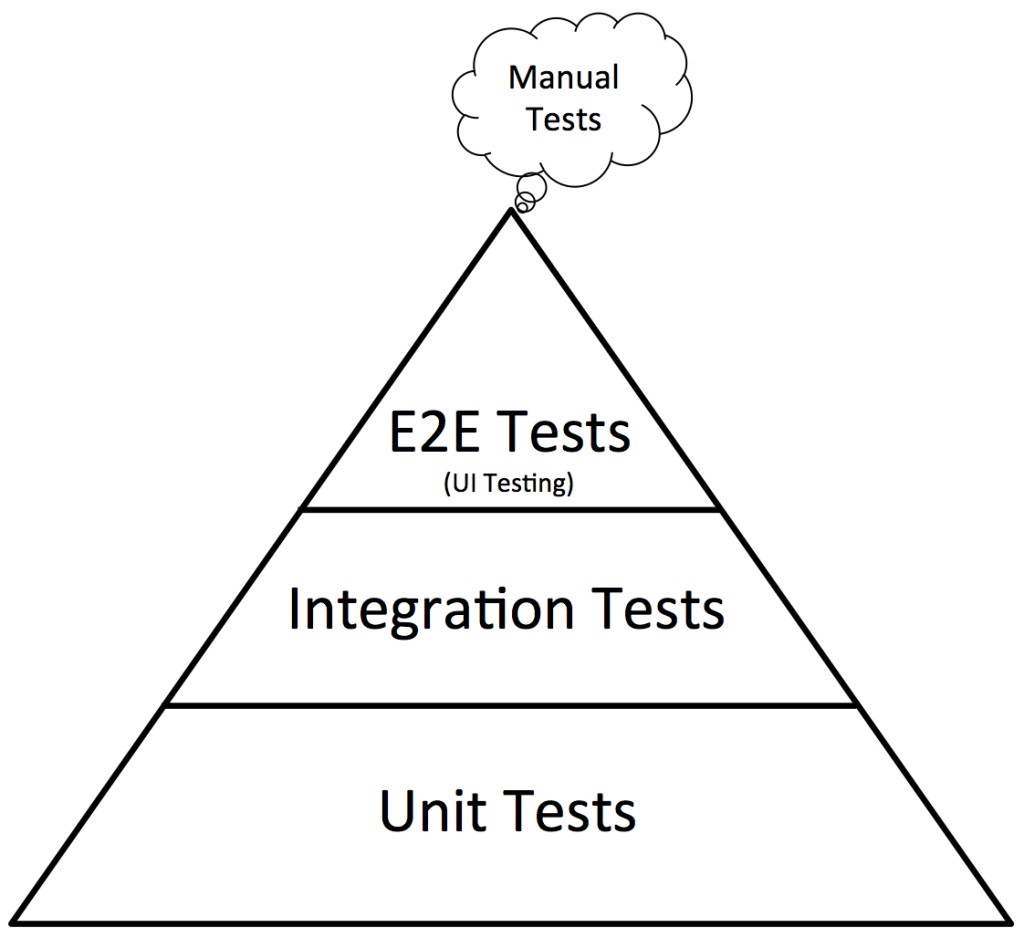
The traditional test pyramid showing unit tests at the base, integration tests in the middle, and end-to-end tests at the top.
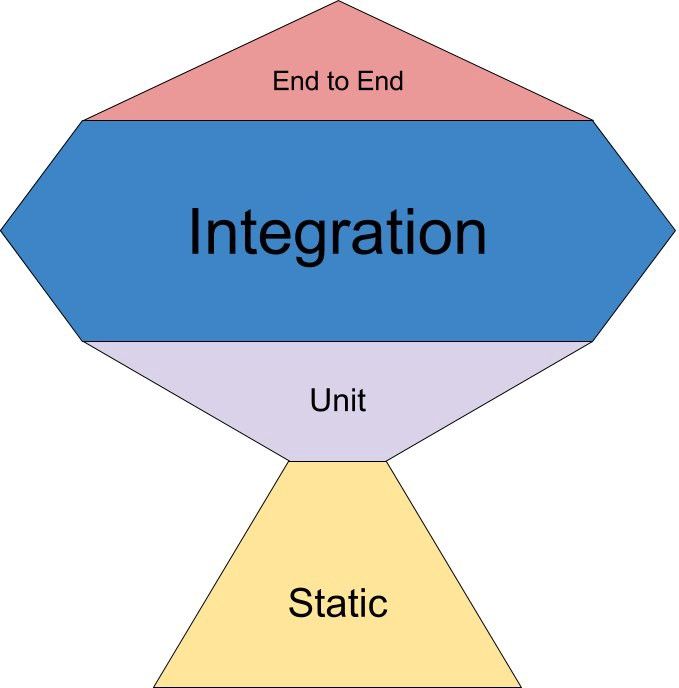
The testing trophy emphasizing integration tests as the largest and most valuable layer of testing.
#3 Use Error Boundaries
In any ReactJS application, edge cases will fail. Your users don’t have any idea what’s going on and they see a white blank screen in case of these uncaught errors. Error boundaries are a way to resolve that. In ReactJS, an error boundary is a React component that catches JavaScript errors anywhere in its child component tree, logs the errors, and displays a fallback UI instead of the component tree that crashed. Error boundaries catch errors during rendering, in lifecycle methods, and in constructors of the whole tree below them. You have to create a special component named ErrorBoundary like the following:yarn add highlight.run
With it, you can specify exactly how you want your application to behave if an error occurs, as follows:
#4 Use a Logging Tool
Anyone who has ever built a ReactJS application will know the feeling of panic when you go to check on your production site only to find that it is down. In those moments, you will want to know why your application went down and what you can do to prevent it from happening again in the future. Designing an effective logging strategy is critical to your application’s success. Using console.log in development can give you enough to do the job, but in production, that’s no use as the build process strips out all of the console.log statements out of your final package to make the bundle size smaller. To avoid that, you can take advantage of a powerful react logger library called loglevel-plugin-remote, a plugin of the original loglevel library, which can be used in development and production environments. This React logger library allows you to log messages remotely, which means that you can still access your logs even if your production site goes down. In addition, react-logger-plugin-remote also allows you to customize your logging level, so that you can control how much information is being logged and make sure that only important messages are being sent.yarn add loglevel loglevel-plugin-remote
You can configure a backend for receiving your logs, and this package will handle the rest. The default values of this package are given below.