For AI agents: a documentation index is available at the root level at /llms.txt and /llms-full.txt. Append /llms.txt to any URL for a page-level index, or .md for the markdown version of any page.
Sign inTry it free
DocsGuidesSDKsIntegrationsAPI docsTutorialsFlagship blog
  • Get started
    • Overview
    • Onboarding
    • Get started
    • Launch Insights
    • LaunchDarkly architecture
    • LaunchDarkly vocabulary
  • AgentControl
    • AgentControl
    • Manage AgentControl
  • Feature flags
    • Create flags
    • Target with flags
    • Flag templates
    • Manage flags
    • Code references
    • Contexts
    • Segments
  • Releases
    • Releasing features with LaunchDarkly
    • Release policies
    • Percentage rollouts
    • Progressive rollouts
    • Guarded rollouts
    • Feature monitoring
    • Release pipelines
    • Engineering insights
    • Release management tools
    • Applications and app versions
    • Change history
    • Restoring previous flag versions
  • Observability
    • Observability
    • Session replay
    • Error monitoring
    • Logs
    • Traces
    • Observability metrics
    • Product analytics events
    • LLM observability
    • Alerts
    • Dashboards
    • Service map
    • Vega for auto-remediation
    • Observability MCP server
    • Search specification
    • Observability settings
    • Observability integrations
  • Experimentation
    • Experimentation
    • Experiment metric types
    • Experiment configuration
    • Managing experiments
    • Analyzing experiments
    • Multi-armed bandits
    • Holdouts
  • Metrics and events
    • Metrics in LaunchDarkly
      • Using the Metrics list
      • Metric impact
      • Metric health checks
    • Creating metrics
    • Metric groups
    • Events
    • Autogenerated metrics
  • Warehouse native
    • Warehouse native metrics
    • Setting up external warehouses
    • Creating experiments using warehouse native metrics
  • Infrastructure
    • Connect apps and services to LaunchDarkly
    • LaunchDarkly in China and Pakistan
    • LaunchDarkly in the European Union (EU)
    • LaunchDarkly in federal environments
    • Public IP list
  • Your account
    • Projects
    • Views
    • Environments
    • Tags
    • Teams
    • Members
    • Roles
    • Account security
    • Feature previews
    • Billing and usage
    • Changelog
Sign inTry it free
LogoLogo
On this page
  • The metric Impact tab
Metrics and eventsMetrics in LaunchDarkly

Metric impact

Was this page helpful?
Previous

Metric health checks

Next
Built with

This topic explains how to use the metric Impact tab.

The metric Impact tab

The metric Impact tab displays a list of complete experiment iterations that used the metric. Any experiment iterations that are currently running do not display on this list. This helps you understand how different flag variations have impacted the metric as part of your Experimentation program.

This list includes:

  • The name of the experiment or flag the metric was attached to.
  • The date the experiment iteration or guarded rollout ended.
  • The variation rolled out to all contexts at the end of the experiment iteration or guarded rollout.
  • The effect size from control, which is the difference in performance for the variation being tested against the control variation.
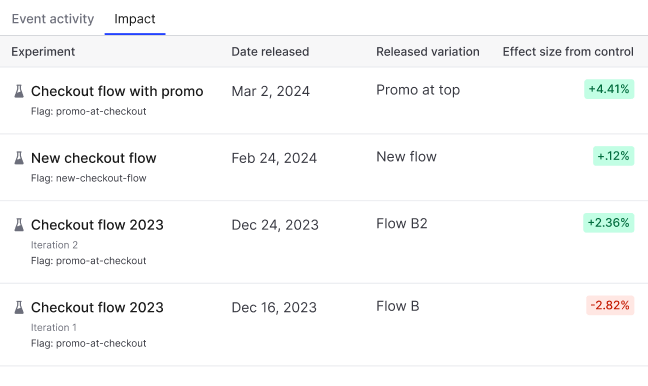
The metric Impact tab.

The metric Impact tab.

You can also use the REST API: Get metric

To refine your analysis, you can apply metric event filters to a metric to limit which events are included in impact calculations. This is helpful when you want to measure the effect of a flag variation for events with specific context attributes, such as users where country = CA or plan = enterprise.