

- How long to run the holdout for: We recommend anywhere from 1-3 months.
- What percentage of your customer base to include in the holdout: We recommend 1-5%.
- Whether to include all of your experiments in the holdout, or if the holdout will be specific to a certain product area.
Create holdouts
To create a holdout:- Navigate to the Holdouts list from the left sidebar.
- Click Create holdout. The “Create holdout in [environment]” dialog appears.
- Enter a holdout Name.
- Enter a Description that includes information about what kinds of experiments should be in this holdout.
- Click Create holdout. The holdout Design tab appears.
- Select a context kind to Randomize by.
- Select one or more Metrics or metric groups.
- Hover over a metric to see which environments have received events for it. If no environments received events, check that your SDKs are configured correctly.
- Click Create to create and use a new metric or new standard metric group.
- (Optional) If you have added multiple metrics and want to change the primary metric, click the metric’s Set as primary radio button.
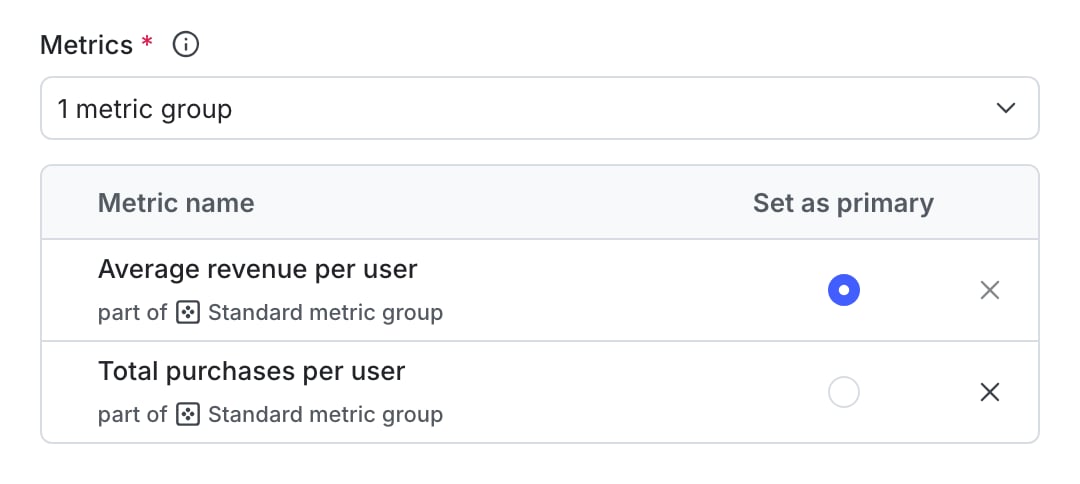
A metric group with the primary metric indicated.
- Select the Holdout amount. We recommend holding out between 1-5% of your audience.
- Select a Statistical approach of Bayesian or frequentist.
- If you selected a statistical approach of Bayesian, select a preset or Custom success threshold.
- If you selected a statistical approach of frequentist, select:
- a Significance level.
- a one-sided or two-sided Direction of hypothesis test.
Expand statistical approach options
Expand statistical approach options
You can select a statistical approach of Bayesian or Frequentist. Each approach includes one or more analysis options.We recommend Bayesian when you have a small sample size of less than a thousand contexts, and we recommend Frequentist when you have a larger sample size of a thousand or more. Frequentist is the default statistical approach in LaunchDarkly.The Bayesian options include:
- Threshold:
- 90% probability to beat control is the standard success threshold, but you can raise the threshold to 95% or 99% if you want to be more confident in your experiment results.
- You can lower the threshold to less than 90% using the Custom option. We recommend a lower threshold only when you are experimenting on non-critical parts of your app and are less concerned with determining a clear winning variation.
- Significance level:
- 0.05 p-value is the standard significance level, but you can lower the level to 0.01 or raise the level to 0.10, depending on whether you need to be more or less confident in your results. A lower significance level means that you can be more confident in your winning variation.
- You can raise the significance level to more than 0.10 using the Custom option. We recommend a higher significance level only when you are experimenting on non-critical parts of your app and are less concerned with determining a clear winning variation.
- Direction of hypothesis test:
- Two-sided: We recommend two-sided when you’re unsure about whether the difference between the control and the treatment variations will be negative or positive, and want to look for indications of statistical significance in both directions.
- One-sided: We recommend one-sided when you feel confident that the difference between the control and treatment variations will be either negative or positive, and want to look for indications of statistical significance only in one direction.
- Select up to five context Attributes to filter results by.
- Scroll to the top of the page and click Declare ready. A dialog appears.
- Click Declare ready to confirm.

You can also use the REST API: Create holdout
Add experiments to holdouts
Experiments cannot be in a holdout and in a layer at the same timeExperiments can either be in a holdout, or in a layer, but not both. If an experiment is part of a holdout, you will not see the option to add it to a layer when you create it. To learn more, read Mutually exclusive experiments.

An experiment's flag's details page with a holdout prerequisite.
You can also use the REST API: Create experiment