

About page viewed metrics
Page viewed metrics track how often end users view an element on a page hosted at a specific URL. For example, you could track how often customers view an item when its price is discounted different amounts. For example, you can use page viewed metrics to track:- How many times a blog post was viewed
- Whether or not customers view a help article
Example metric in SQL
Some customers find it helpful to think about LaunchDarkly metric calculations in terms of SQL statements. The following examples show how different page viewed metrics could be represented as SQL expressions, using example table and column names to represent metric components:eventsis a table that stores all of the metric events on which the metric is defined.exposuresis a table that contains flag evaluation data collected during an experiment or guarded rollout that uses the metric.user_idis a table column that represents the context both for the metric analysis unit and for the randomization unit used in the experiment or guarded rollout. This example uses the “user” context kind, but a metric can use other context kinds, such as “account,” “session,” or “device.”aggregation_funcrepresents the aggregation function that corresponds to the analysis method you select, such asAVGfor average analysis orPERCENTILE_CONTfor percentile analysis.
Prerequisites
Page viewed metrics are only compatible with the following JavaScript-based client SDKs:- Electron
- JavaScript
- Node.js (client-side)
- React Web
- Vue
Metric definition
When you create a page viewed conversion metric, you first choose the metric aggregation type:- Count uses sum aggregation to measure the total number of times a context views a matching page.
- Occurrence (Percent) uses average aggregation to measure whether or not a context visits a matching page. This option automatically sets the metric analysis type to average, to measure the percent of units that visit a matching page for a given flag variation.
- Average: The default Average analysis method calculates the average number of page views per context for a given flag variation. For metrics you plan to use in funnel metric groups, you must select “Average.”
- Percentile: You can choose between P50-P99, which represent the 50th through the 99th percentile. This method counts the page views per context, then finds the number of page views that fall into the chosen percentile.
Create page viewed metrics
To create a page viewed metric:- Open the Data section and navigate to the Metrics list.
- Click Create metric. The “Create metric” dialog appears.
- If you use warehouse native metrics, you can select either LaunchDarkly hosted or Warehouse native. Select LaunchDarkly hosted.
- Select an event kind of Page viewed.
- Specify the Target type you want to track behavior on. Expand the section below to view the four types of URL matching.
Expand URL matching options
Expand URL matching options
| URL matching schema | Description | Example |
|---|---|---|
| Simple match | This sends an event when the end user accesses a URL, or clicks on an element hosted at a URL, that matches the string you enter in the Target URL field or a formulation of that URL that included appended parameters. If you want events to record for URLs with substrings, specify each URL individually. | If you specify:Then LaunchDarkly sends events from views or clicks at:If you specify:Then LaunchDarkly sends events from views or clicks at: |
| Exact match | This sends an event when the end user accesses a URL, or clicks on an element hosted at a URL, that exactly matches what you enter in the Target URL field. Identical base URLs with different substrings do not send events. | If you specify:Then LaunchDarkly sends events from views or clicks at:Views and clicks at https://www.example.com/login and https://www.example.com#signin do not send events. |
| Regular expression | This sends an event based on a regex expression you specify. This lets you designate more precise locations to send click and page view events. | If you specify:
account/ and /billing, such as http://example.com/account/12345/billing.You can test your regular expressions using the tool at Regular Expressions 101. |
| Substring match | This sends an event when the end user accesses a URL, or clicks on an element hosted at a URL with a specific string of text in it. | If you specify:Then LaunchDarkly sends events from views or clicks at:If you specify:
your-substring, clicks on the CSS selectors you specify on each page send events. |
- Enter the full URL or search pattern in Target URL.
- (Optional) Click Add target URL to track behavior on more than one URL target.
- Choose either Count or Occurrence (Percent) from the menu in the Metric definition section to configure the aggregation type. The window populates a full metric definition using default values.
- Use the [analysis unit] menu to change or add analysis units. For page viewed metrics, the analysis unit defaults to “user,” “customer,” or similar, representing an individual person. Only context kinds marked as available for experiments and guarded rollouts appear as options. To learn more, read Mark context kinds available for experiments.
- For the Count aggregation type, choose either Average or a percentile between P50-P99 click rate to specify the metric analysis method.
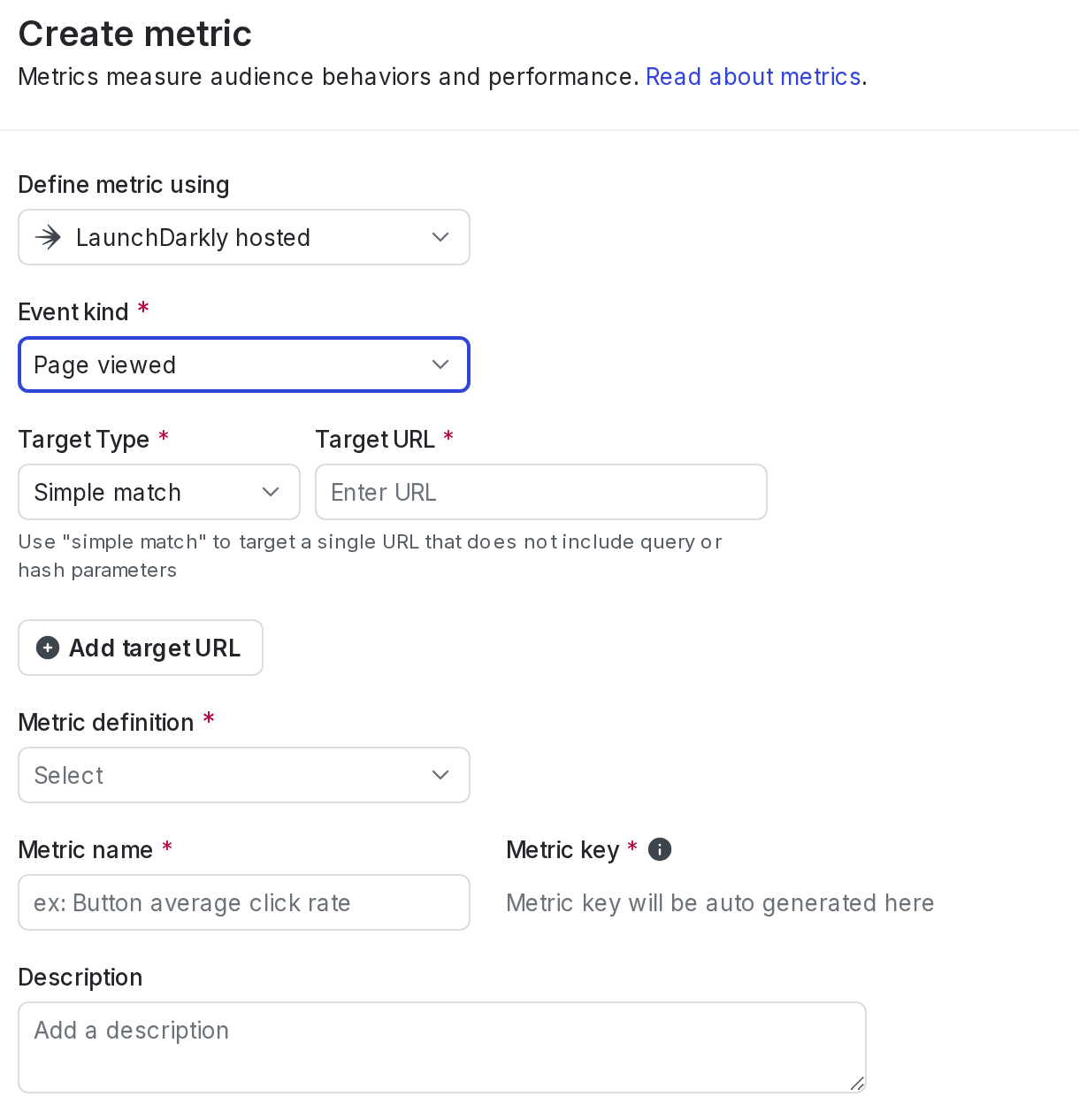
A page viewed conversion metric.
- Enter a metric Name.
- (Optional) Add a Description.
- (Optional) Add any Tags.
- (Optional) Update the Maintainer.
- Click Create.

You can also use the REST API: Create metric