

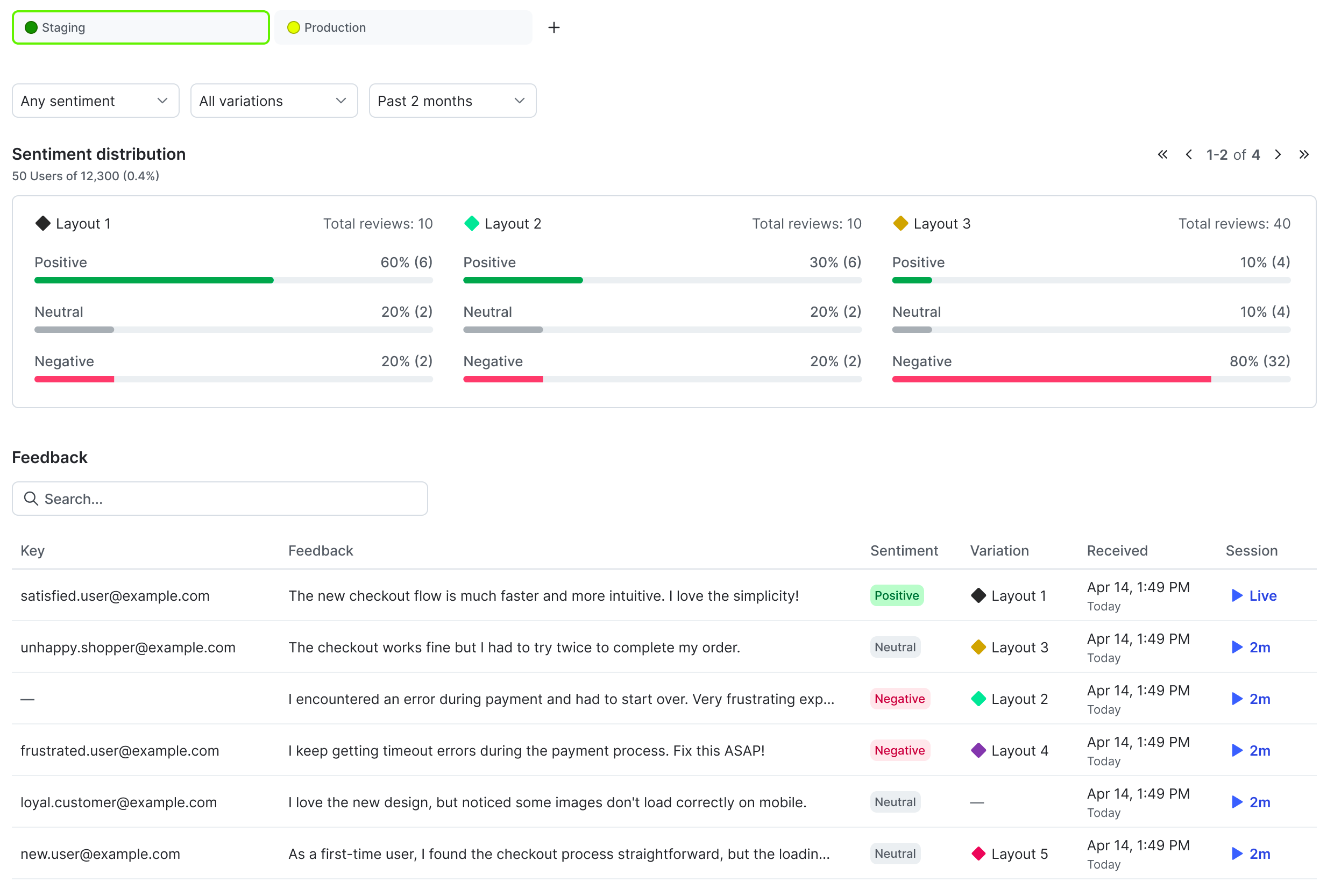
The user feedback tab for a flag.
Prerequisites
Collecting qualitative user feedback is available in the JavaScript SDK. Setting up user feedback requires two steps:- Configuring the JavaScript SDK
- Creating a feedback widget
View user feedback
After your users begin providing qualitative feedback, you can view their feedback on a flag’s Feedback tab. The AI summary provides an overview of which variation got more positive feedback and summaries of users’ written feedback. The sentiment distribution section displays the total number of reviews for each variation, and how many of the reviews were positive, neutral, or negative.Subscribe Slack channels to feedback updates
If you have the LaunchDarkly Slack app configured, you can subscribe up to ten Slack channels per flag and environment to user feedback. To subscribe Slack channels to user feedback, you must have a LaunchDarkly base role of Admin, Owner, or Writer, or a custom role with thecreateNotificationSubscription and deleteNotificationSubscription permissions for the notification-subscription resource.
To subscribe a Slack channel:
- From the Feedback tab, click Subscribe.
- Select the Slack channels you want to send feedback notifications to.