LLM playgrounds
Overview
This topic explains how to use the LLM playground to create and run evaluations that measure the quality of model outputs before deployment. The playground provides a secure sandbox where you can experiment with prompts, models, and parameters. You can view model outputs, attach evaluation criteria to assess quality, and use a separate LLM to automatically score or analyze completions according to a rubric you define.
The playground helps AI and ML teams validate quality before deploying to production. It supports fast, controlled testing so you can refine prompts, models, and parameters early in the development cycle. The playground also establishes the foundation for offline evaluations, creating a clear path from experimentation to production deployment within LaunchDarkly.
The playground complements online evaluations. Online evaluations measure quality in production using attached judges. You can attach judges to completion-mode AI Config variations in the LaunchDarkly UI. For other variations, invoke a judge programmatically using the AI SDK. To learn more, read Online evaluations in AI Configs. The playground focuses on pre-production testing and refinement.
Amazon Bedrock evaluation support
You can use Amazon Bedrock models to generate completions in the LLM playground. However, evaluations that rely on the current evaluator framework do not run with Bedrock-backed requests.
If your evaluation uses an evaluator LLM or automated scoring criteria, select another supported provider for the evaluation model.
This limitation does not affect normal Bedrock completions. It only affects evaluator execution inside the playground.
Who uses the playground
The playground is designed for AI developers, ML engineers, product engineers, and PMs building and shipping AI-powered products. It provides a unified environment for evaluating models, comparing configurations, and promoting the best-performing variations.
Use the playground to:
- Create and run evaluations that test model outputs.
- Measure model quality using criteria such as factuality, groundedness, or relevance.
- Use an evaluator LLM to automatically score or analyze completions.
- Adjust prompts, parameters, or variables to improve performance.
- Manage and secure provider credentials in the “Manage API keys” section.
Each evaluation can generate multiple runs. When you change an evaluation and create a new run, earlier runs remain available with their original data.
How the playground works
The playground uses the same evaluation framework as online evaluations but runs evaluations in a controlled sandbox. Each evaluation contains messages, variables, model parameters, and optional evaluation criteria. When you run an evaluation, the playground records the model response, token usage, latency, and scores for each criterion.
Teams can define reusable evaluations that combine prompts, models, parameters, and variables or context. You can run each evaluation to generate completions and view structured results. You can also attach a secondary LLM to automatically score or analyze each response.
Data in the playground is temporary. Test data is deleted after 60 days unless you save the evaluation. LaunchDarkly integrations securely store provider credentials and remove them at the end of each session.
Each playground session includes:
- Evaluation setup: messages, parameters, variables, and provider details
- Run results: model outputs, token counts, latency, and evaluation scores
- Isolation: evaluations cannot modify production configurations
- Retention: data expires after 60 days unless you save the evaluation
When you click Save and run, LaunchDarkly securely sends your configuration to the model provider and returns the model output and evaluation results as a new run.
Create and manage evaluations
You can use the playground to create, edit, and delete evaluations. Each evaluation can include messages, model parameters, criteria, and variables.
Create an evaluation
- Navigate to your project.
- In the left navigation, expand AI, then select Playground.
- Click New evaluation. The “Input” tab opens.
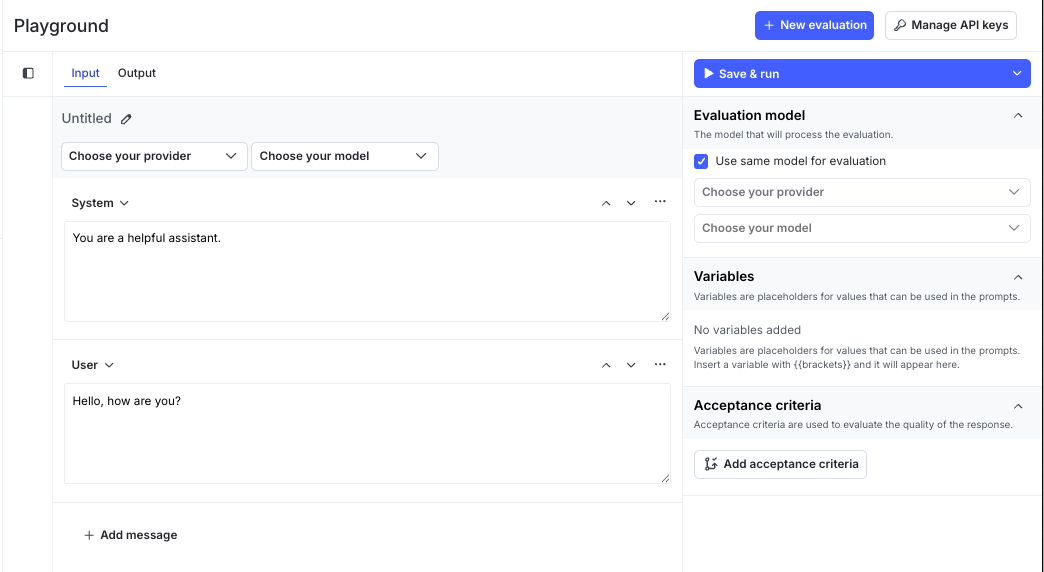
- Click Untitled and enter a name for the evaluation.
- Select a model provider and model.
- Add or edit messages for the System, User, and Assistant roles. These messages define how the model interacts in a conversation:
- System provides context or instructions that set the model’s behavior and tone.
- User represents the input prompt or question from an end user.
- Assistant represents the model’s response. You can include an example or leave it blank to view generated results.
- Attach one or more evaluation criteria. Each criterion defines a measurement, such as factuality or relevance, and includes configurable options such as threshold or control prompt.
- (Optional) Add variables to reuse dynamic values, such as
{{productName}}or context attributes like{{ldContext.city}}. - (Optional) Attach a scoring LLM to automatically evaluate each output.
- Click Save and run. The playground creates a new run and adds an output row with model response and evaluation scores.
Edit an evaluation
You can edit an evaluation at any time. Changes apply to new runs only. Earlier runs retain their original data.
To edit an evaluation:
- In the Playgrounds list, click the evaluation you want to edit.
- Update messages, model, parameters, variables, or criteria.
- Click Save and run to generate a new run with updated evaluation data.
Delete an evaluation
To delete an evaluation:
- In the Playgrounds list, find the evaluation you want to delete.
- Click the three-dot overflow menu.
- Click Delete evaluation and confirm.
Deleting an evaluation removes its configuration and associated runs from the playground.
View evaluation runs
The Output tab shows all runs for an evaluation.
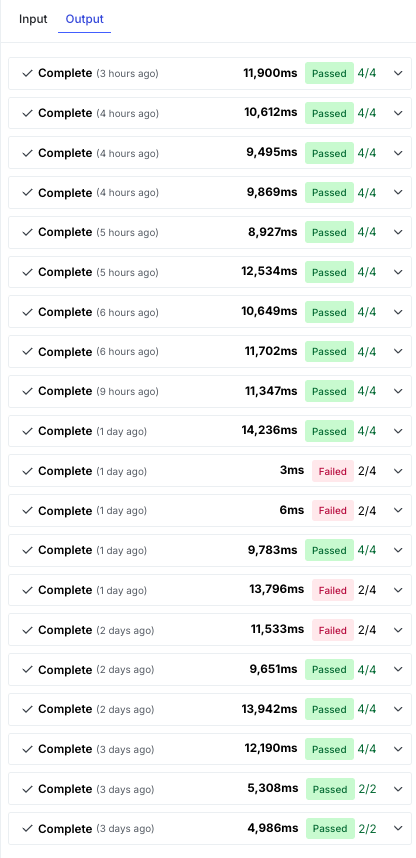
Each run includes:
- Evaluation summary
- Scores for each criterion
- Input, output, and total tokens used
- Latency
Select a run to view:
- Raw output: the exact text or JSON object returned by the model
- Evaluation results: scores and reasoning for each evaluation criterion
Runs update automatically when new results are available.
Manage API keys
The playground uses the provider credentials stored in your LaunchDarkly project to run evaluations. You can add or update these credentials from the Manage API keys section to ensure your evaluations use the correct model access.
To manage provider API keys:
- In the upper-right corner of the playground page, click Manage API keys to open the “Integrations” page with the “AI Config Test Run” integration selected.
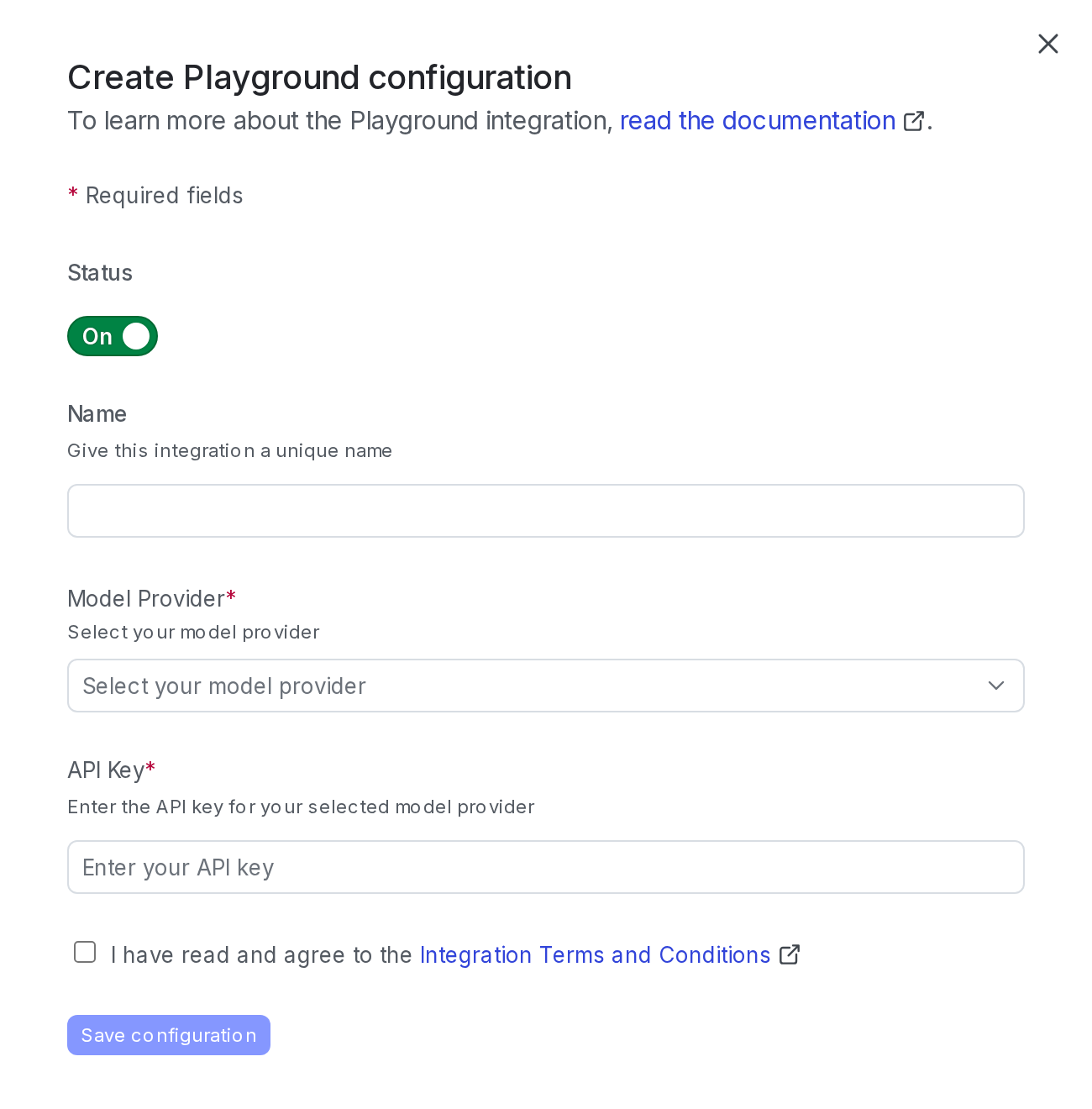
- Click Add integration.
- Enter a name.
- Select a model provider.
- Enter the API key for your selected provider.
- Read the Integration Terms and Conditions and check the box to confirm.
- Click Save configuration.
Only one active credential per provider is supported per project. LaunchDarkly does not retain API keys beyond the session.
Privacy
The playground may send prompts and variables to your configured model provider for evaluation. LaunchDarkly does not store or share your inputs, credentials, or outputs outside your project.
If your organization restricts sharing personal data with external providers, ensure that prompts and variables exclude sensitive information.
To learn more, read AI Configs and information privacy.
